How AI Improves E-commerce Product Recommendations
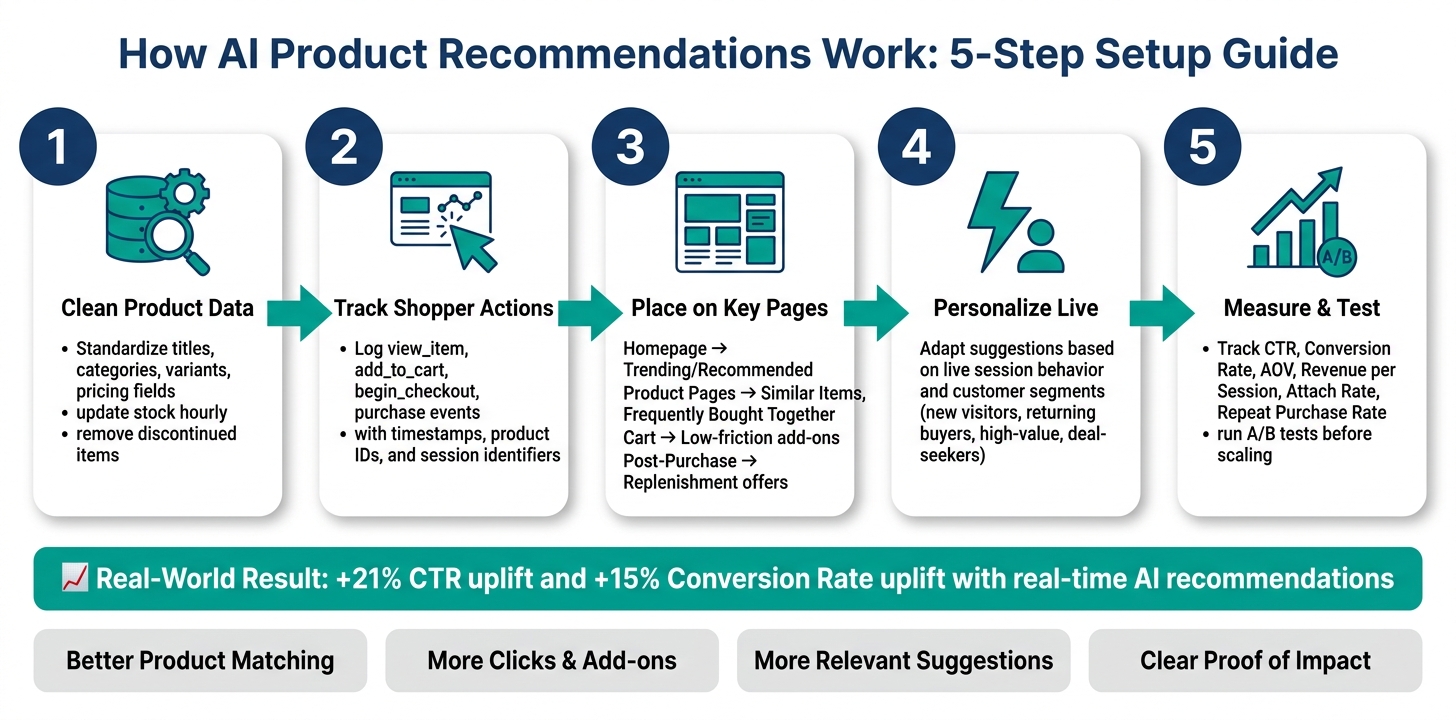
July 22, 2026AI recommendations can help you sell more by showing the right products at the right time. In this article, I’d boil it down to five things: clean up your catalog, track shopper actions, place recommendation blocks on key pages, update suggestions during the session, and measure results with tests.
Here’s the short version:
- I need clean product data so the system can match items the right way.
- I need behavior data like
view_item,add_to_cart,begin_checkout, andpurchaseto spot buying intent. - I should place recommendations on the homepage, product pages, cart, and post-purchase page.
- I should use live session behavior and customer segments to change what shoppers see.
- I should track CTR, conversion rate, AOV, revenue per session, attach rate, and repeat purchase rate.
- I should test changes before rolling them out across the site.
A few numbers stand out. Some tests in the source article point to higher click-through and conversion rates, including one case with +21% CTR and +15% conversion rate. That kind of lift usually depends on one thing: data quality. If the feed is messy or stock data is old, recommendations can miss the mark.
| Area | What I’d focus on | Main outcome |
|---|---|---|
| Data | Catalog fields, stock updates, event tracking | Better product matching |
| Placement | Homepage, PDPs, cart, thank-you page | More clicks and add-ons |
| Personalization | Live behavior and segments | More relevant suggestions |
| Measurement | A/B tests and revenue KPIs | Clear proof of impact |
If I were setting this up, I’d start small, watch the numbers, and expand only after the first placements show lift.
How AI Product Recommendations Work: 5-Step Setup Guide
How to Create AI Product Recommendations For Shopify?

sbb-itb-cef5bf6
Prepare the Data AI Needs to Make Better Recommendations
AI recommendations work best when your catalog and behavior data are clean. If the data is messy, the output gets messy too: irrelevant suggestions, out-of-stock products, and missed cross-sell chances. Once the data is in good shape, the next move is simple: put recommendations where they can shape buying decisions.
Clean Up Product Catalog Fields and Category Structure
Start by standardizing product titles, brand names, category paths, and variant fields like size, color, and material. Price should live in a numeric field, such as price_usd: 89.99, and appear on the site as $89.99.
Stock status matters just as much. Availability feeds should update every hour so the AI doesn't push an item that's already sold out. Remove discontinued products from recommendation feeds too. If category labels don't match - for example, "Women's Tops" in one place and "Ladies' Tops" in another - the model has a harder time grouping related items. That weakens both substitute suggestions and complementary product picks.
Track Behavior Signals That Show Purchase Intent
Catalog data tells the system what the products are. Behavior data shows what the shopper wants.
Track signals like:
- Page views
- Search queries
- Time on page
- Add-to-cart events
- Checkout starts
- Purchases
- Repeat visits
Log each event with a timestamp in U.S. format, such as 07/23/2026, 3:15 PM. Include a steady product ID, price, category, and a user or session identifier. Google Analytics 4 ecommerce guidance uses event names like view_item, add_to_cart, begin_checkout, and purchase, with item-level parameters passed in an items array.
Use one event format across your setup so the recommendation engine can read the data cleanly. If timestamps or session IDs are off, the AI can't tell the difference between what a shopper cared about five minutes ago and what they looked at last month. And that timing matters a lot. Recency is one of the strongest signals in recommendation systems, which is why suggestions can shift as shopper intent shifts.
Get Implementation Support When Internal Resources Are Limited
Catalog cleanup and analytics instrumentation can take a lot of time, especially when product data sits in several systems or the internal team is stretched thin. If you don't have enough hands on deck, a full-service partner like SEO Werkz can help line up catalog structure, analytics setup, and reporting.
With the data in place, the next step is choosing the highest-impact placement points.
Place AI Recommendations on Key Store Pages
Put recommendation modules where they line up with what the shopper is trying to do. Every page serves a different job: discovery, consideration, checkout, or expansion. The placements that tend to matter most are the homepage, product detail pages (PDPs), cart page, and post-purchase page.
Add Recommendation Modules to Homepage, Product Pages, Cart, and Post-Purchase Pages
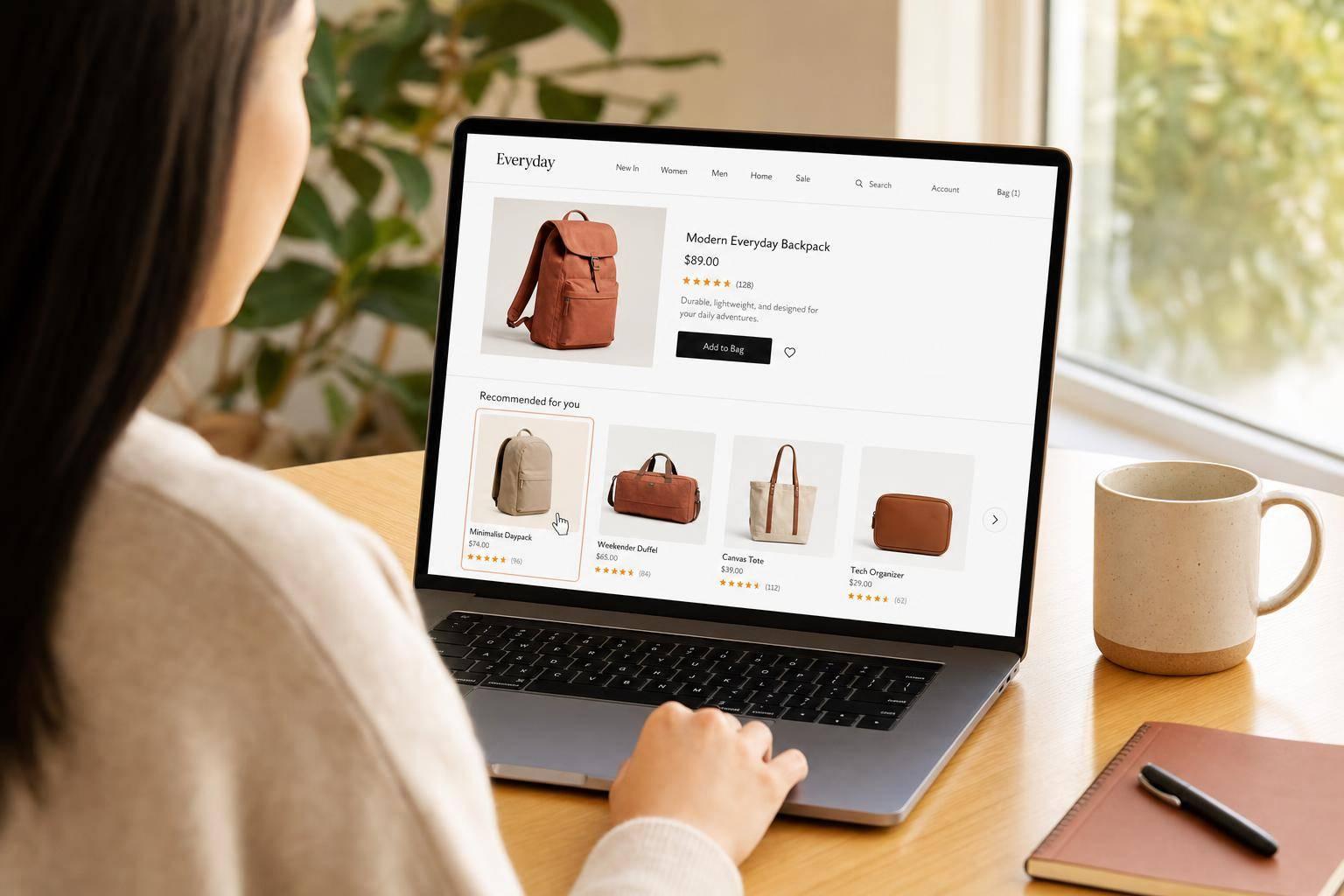
On the homepage, a "Recommended for You" block helps returning visitors get back into the funnel fast. For new visitors, use trending products or bestsellers instead.
Product pages are one of the best places to drive cross-sells and lift AOV. Place "Similar Items" and "Frequently Bought Together" modules below the buy box, where shoppers are already comparing options and deciding what to add.
On the cart page, keep things light. Small add-on modules like accessories, warranties, or refills work well when they sit below the cart line items and above the checkout button. The goal here isn't to distract people. It's to support checkout with relevant extras.
The post-purchase confirmation page is a natural spot for post-purchase offers. Use the thank-you page to show complementary products, replenishment offers, or accessories while the order is still top of mind.
Start with Simple Use Cases Before Expanding to Advanced Models
Once the core modules are live, roll out more placements in stages so performance stays steady and results are easier to track. Start with one high-traffic category and one or two placements, such as product-page recommendations or cart add-ons. Then expand only after CTR, conversion rate, or AOV goes up.
Comparison Table: Best Recommendation Placements by Business Goal
Use the table below to connect each placement with its main business goal.
| Placement | Primary Goal | Recommended Module Type | Key KPIs |
|---|---|---|---|
| Homepage | Product discovery & re-engagement | "Recommended for You", Trending, Recently Viewed | CTR, Engagement |
| Product Page | Cross-sell & increase cart size | "Similar Items", "Frequently Bought Together", "Customers Also Bought" | AOV, Conversion Rate |
| Cart | Increase basket size | Low-friction add-ons, accessories, warranties, refills | AOV, Checkout Completion Rate |
| Post-Purchase | Repeat purchases and CLV | Complementary items, replenishment offers | Repeat Purchase Rate, CLV |
Use Real-Time Personalization and Customer Behavior Analysis
Once your placements are live, the next move is simple: let in-session behavior shape what each shopper sees. Real-time personalization updates product suggestions as intent shifts from one click to the next.
Adjust Recommendations Based on Live Browsing and Cart Behavior
AI recommendation engines read session signals like product views, search queries, filter choices, and cart changes to infer intent for each visitor. Then they update product rankings as that behavior changes.
Here’s what that looks like in practice: if a shopper views three Bluetooth speakers in a tight price band and then sorts from low to high, the recommendation set should lean toward budget-friendly options, clearance products, or bundles in that same range. If that shopper pauses in the cart or comes back later without buying, you can surface free-shipping thresholds, lower-priced substitutes, or add-on prompts to help recover the sale without shrinking basket size.
Build Customer Segments for More Relevant Product Suggestions
Not every shopper should see the same logic. Someone visiting for the first time doesn’t need the same recommendations as a repeat buyer who already knows your catalog.
A few segment types are worth setting up early:
- New visitors - no purchase history; show bestsellers and high-converting bundles based on live session signals.
- Returning buyers - show cross-sells tied to past purchases, recently viewed items, or replenishment reminders.
- High-value customers - respond to premium products, exclusive offers, and loyalty rewards.
- Deal-seekers, identified by buying mostly during sales - serve outlet deals, value bundles, and time-limited promotions.
AI platforms can also update segment membership on the fly as behavior changes. So if a customer used to buy only during sales but starts purchasing full-price items, that person can move into a new segment automatically and start seeing a different recommendation strategy without any manual work.
Comparison Table: Static Rules vs. Real-Time AI Personalization
The table below shows why live logic tends to beat fixed rules.
| Factor | Static Rules | Real-Time AI Personalization |
|---|---|---|
| Relevance | Broad; misses nuanced intent | High; adapts to individual behavior and session context |
| Speed of Updates | Refreshes daily or weekly | Updates in real time as new session events occur |
| Revenue Impact | Baseline lift from broad recommendations | Can improve conversion rate and AOV, especially on product and cart pages |
Measure Results and Improve Recommendation Performance
Track Metrics Tied to Revenue and Customer Value
Once recommendations go live, the numbers tell you which placements are pulling their weight. Track CTR, conversion rate, revenue per session, AOV, attach rate, repeat purchase rate, and returning customer rate to see the effect on revenue and customer loyalty.
Break those metrics down by placement, device, and segment. A recommendation block on a product page can behave very differently from one in the cart or on a post-purchase page.
Recommendation clicks can drive an outsized share of revenue, and refined models can improve both revenue per session and AOV.
Run A/B Tests and Pilot Rollouts Before Scaling Site-Wide
Once you know which metrics matter, test every change against your current baseline before rolling it out across the site. A clean A/B test looks at one variable at a time - like recommendation type, copy, item count, or placement - against what you're using now.
Let the test run long enough to gather enough purchases. Then slice the results by device, category, and new vs. returning visitors so you can spot where lift shows up and where it doesn't.
Set a clear success threshold for each KPI before the test starts. Keep a rollback plan ready too. And before you scale, check for missing attributes and broken category mapping. Those small issues can throw off the whole setup.
One real-time recommendation system case study reported a +21% uplift in CTR and +15% uplift in conversion rate over an older model.
Conclusion: Core Steps for Making AI Recommendations Work
The path from setup to measurable results tends to follow the same pattern: prepare clean data, launch recommendations on high-impact pages, personalize in real time based on live behavior and customer segments, measure revenue-focused KPIs, and keep refining based on what the data shows.
In plain English, don't stop at launch. Measure what moves revenue, improve what works, and scale from there. Then use those results to tighten your data, placement, and segmentation before expanding further.
FAQs
How much data do I need to start AI recommendations?
You don’t need a huge dataset to get started with AI-powered product recommendations. What matters more is that you track user behavior consistently.
That includes signals like:
- Clicks
- Scrolling
- Cart additions
- Browsing history
- Purchases
The main goal is to build clean, well-structured first-party data. When you bring together data from your CRM, website analytics, and transaction systems, your AI can make more relevant, context-aware suggestions.
Can AI recommendations work for first-time visitors?
Yes. AI recommendation engines can help first-time visitors, even when there’s little or no past user data to work with.
Instead of leaning only on old profiles, they look at real-time session data. That includes signals like clicks, searches, page views, and time spent on certain items. So the system can start showing relevant suggestions almost right away.
When data is still thin, these engines often fall back on safer picks, such as trending products or bestsellers.
How long should I run an A/B test before scaling?
There’s no set timeline for running an A/B test before you scale. What matters more is steady testing and close tracking of key performance metrics, not picking an arbitrary number of days and hoping that’s enough.
In practice, some teams review results after 14 to 30 days, while new initiatives may run for as long as 90 days. The goal is simple: keep the test live until you’ve isolated the effect of personalization and found a clear winner. Then scale what’s working.