
How to Future-Proof CRM for Long-Term Growth
July 26, 2026A CRM that works today can become a bottleneck later. I’d future-proof it by doing four things early: building a clean structure, setting firm data and access rules, connecting tools the right way, and reviewing the system on a set schedule.
Here’s the short version:
- A bad CRM setup can get expensive fast. A forced migration can cost up to 6x the original software price.
- Slow follow-up hurts sales. A 10-minute delay after an inquiry can cut conversion odds by nearly 80%.
- Poor setup is a common failure point. 43% of CRM breakdowns come from setup and configuration problems.
- CRM data goes stale fast. About 40% of it becomes outdated each year.
If I wanted a CRM to support long-term growth, I’d focus on these four areas:
- Structure: Clean data model, standard fields, simple configuration, and archiving rules
- Governance: Validation rules, field ownership, role-based access, retention, and audit trails
- Integrations: APIs, middleware, and automation tied to revenue and response time
- Review cycle: Monthly checks, quarterly reviews, and system audits every 6 to 12 months
Bottom line: if your CRM isn’t built for more users, more records, and more process changes, growth will expose the weak spots. The fix is simple in theory: plan for scale early, keep data clean, control change, and review the system before problems pile up.
Below, I’ll break down what that looks like in plain English.
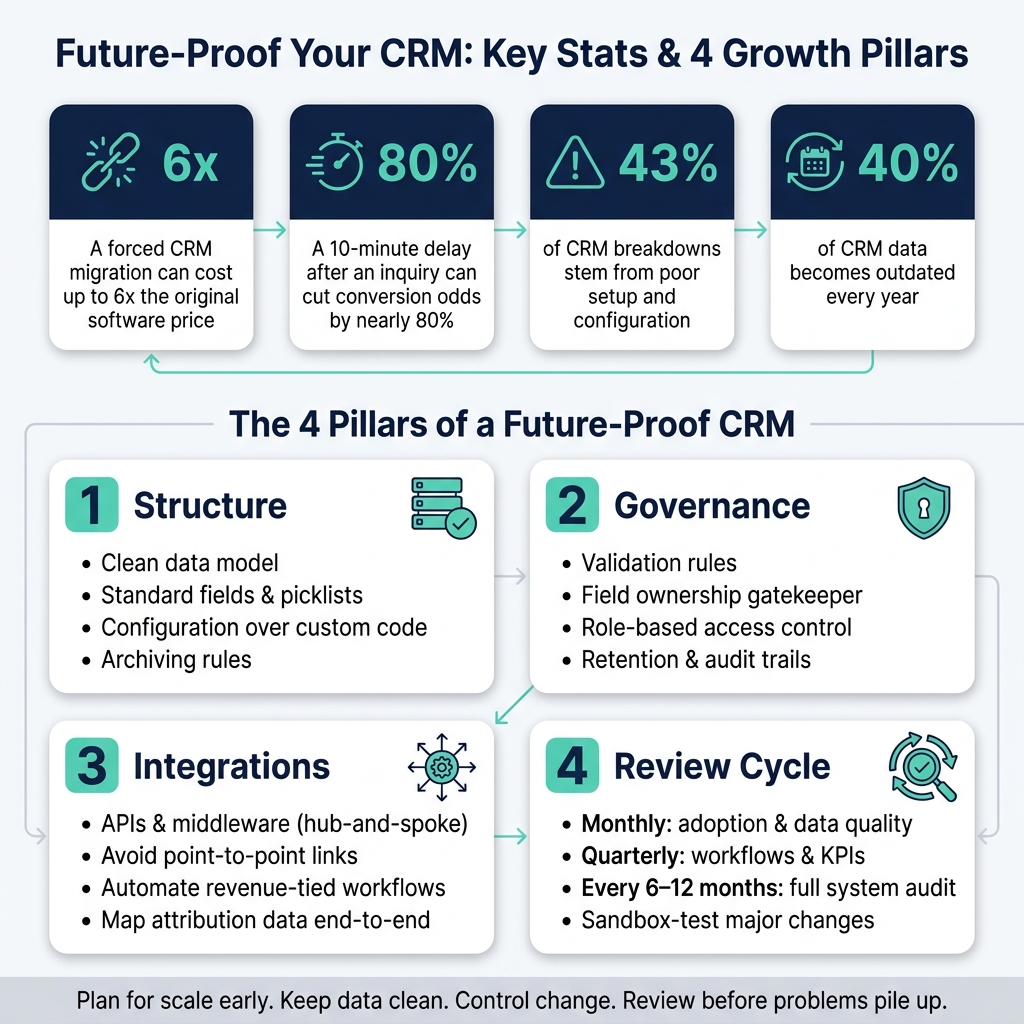
Future-Proof CRM: Key Stats & 4 Pillars for Long-Term Growth
Future-Proof CRM: The 5 Top Trends & Strategy for 2026
sbb-itb-cef5bf6
1. Build a CRM Structure That Can Scale
A CRM that works for a small team can turn into a choke point once more users, more records, and more workflows pile in. Gartner found that 43% of CRM system breakdowns come from poor setup and configuration failures.
Design a Clean Data Model Before Adding Complexity
If you want a CRM to scale, start with the way records connect. Your CRM should match how the business sells, supports customers, and tracks results. That means setting up clear links between companies, contacts, and transactions instead of using the CRM like one big spreadsheet.
That structure matters more than it may seem at first. A clean data model makes it much easier to add fields and objects later without throwing workflows off balance.
Reporting also gets messy fast when teams name things in different ways or move records through random stages. Use standardized lifecycle stages and naming rules so the data stays consistent as volume grows. For key fields like Lead Source or Industry, use picklists and dropdowns instead of free-text entries. That cuts down on messy inputs like “FinServ,” “Finance,” and “financial services” all meaning the same thing.
Role-based visibility helps too. Show people the fields tied to their job and hide the rest. That can cut unused fields and make the system easier to work in day to day.
Choose Configuration Over Custom Code When Possible
Start with native configuration before you reach for custom code. Custom work brings more upkeep, more upgrade risk, and more long-term cost.
A good rule of thumb: configure for what 80% of users need most often. That keeps the CRM focused on the work people do every day instead of stuffing it with edge-case features.
Too much customization can clutter the UI, slow the system, and make onboarding harder as the team gets bigger. On the flip side, smart CRM configuration can lead to a 34% increase in productivity.
Plan for Performance, Archiving, and More Records
As record counts grow, speed starts to matter a lot. Archive inactive records and activity logs so searches, reports, and automations keep moving without drag.
Data quality needs attention at the front door too. Duplicate prevention and validation rules at the point of entry help stop bad data before it spreads. It also helps to lock down formats for fields like:
- Phone numbers
- Emails
- Currency
Standardized inputs and strict formatting rules keep the data clean from the start.
Once the structure can scale, the next step is setting rules for data, access, and retention.
2. Strengthen Data Governance, Security, and System Rules
Once your CRM structure is clean, the next step is to lock down how data is managed, who can change it, and how long it stays in the system. A CRM only stays useful when the data is clean, access is controlled, and retention rules are clear. If those pieces are loose, even a well-built CRM gets messy as the company grows.
Set Rules for Data Quality and Field Management
Use standard field values and validation rules to keep records consistent as volume grows. That means setting rules that stop records from being saved when phone numbers are missing or email addresses are in the wrong format.
You also need a clear rule for who can create new fields or automations. One person should act as the gatekeeper - usually a CRM manager or operations lead - and review any new addition before it goes live. That helps prevent the system from filling up with extra fields and automations that no one owns or maintains.
It also helps to run a field utilization report every quarter. If a custom field is blank on 90% of records, it’s often a sign that the field should be removed. At the same time, run a quarterly cleanup to remove duplicates and stale records.
After these data rules are in place, access needs to be tightened so broad editing rights don’t chip away at them.
Use Scalable Permissions and Access Controls
As teams grow, open access starts to create risk for both security and data quality. Use role-based access control so sales, marketing, and support can only view the data they need. Name roles and permission groups in a way that leaves room for later changes, so you can refine them over time instead of rebuilding everything from scratch as the business expands.
That same access model should also extend to retention, deletion, and audit preparation.
Prepare for Compliance, Retention, and Audit Needs
As record volume increases, more people touch the system and regulatory risk grows with it. Put a written retention policy in place, define deletion triggers, and keep audit trails that show who accessed, edited, exported, or changed CRM settings.
If your business expands globally, you may also need to account for GDPR requirements. Review the policy every quarter so compliance stays built into the system instead of turning into a last-minute scramble.
3. Build a Flexible Integration and Automation Strategy
With clean data and tight access controls in place, connect the CRM to the rest of your stack in a way that can handle new tools without falling apart.
Use APIs and Middleware Instead of One-Off Connections
When two tools need to share data, the first instinct is often to connect them directly. That can work early on. But as the stack grows, those one-off connections add up fast.
Here’s the problem: point-to-point links are brittle. Change one system, and several direct connections can break with it.
A better setup is to route connections through a central middleware layer, such as Zapier, Make, or a dedicated iPaaS (Integration Platform as a Service) tool. Instead of every app talking to every other app, each one connects to the hub. That makes it much easier to add new tools without disrupting what’s already in place.
| Feature | Point-to-Point | Middleware / Hub-and-Spoke |
|---|---|---|
| Resilience | Low; one change can break multiple links | High; centralized management isolates changes |
| Maintenance | High; manual updates for every connection | Low; updates are managed through the middleware layer |
| Future Expansion | Difficult; creates fragile point-to-point integrations | Easy; new tools plug into the existing hub |
| Data Consistency | Poor; often leads to data silos | Strong; ensures a single version of truth |
When you evaluate tools, check the vendor’s API rate limits. Low call limits can turn into bottlenecks as volume grows.
Automate High-Value Processes With Clear Ownership
Once your integrations are stable, automate the work that affects speed, revenue, or retention first. Start with repetitive tasks tied to money, like lead routing, follow-up reminders, renewal alerts 90 days before a contract expires, and status change notices on high-value deals.
These are the workflows where delays cost actual dollars.
Lead response should usually come first. It helps protect conversion rates and cuts down on manual follow-up. But there’s a catch: automation without ownership can create a mess of its own. Every automated workflow needs a named owner. That person should monitor it, update it when the process changes, and flag it for review during scheduled audits.
| Metric | Manual Workflows | Automated Workflows |
|---|---|---|
| Error Rate | High (human entry errors, duplicates) | Low (standardized rules and logic) |
| Response Time | Slow (dependent on staff availability) | Instant (triggered by system events) |
| Scalability | Linear (requires more headcount to scale) | High (handles volume spikes effortlessly) |
| Maintenance Cost | High (operational drag, wasted hours) | Low (initial setup + periodic audits) |
Connect CRM Data to Marketing and Revenue Reporting
After automation is in place, keep attribution data intact across every customer touchpoint. If lead source, campaign, and journey data are missing, marketing can’t connect revenue to the right channel.
Each contact record should show where the lead came from. That’s how you figure out which channels drive revenue instead of just traffic. And every integration that sends leads into the CRM needs to pass that source data through the right way.
Keep source, campaign, and lifecycle data mapped from end to end so revenue reporting stays accurate as channels expand.
4. Manage Change and Improve the CRM on a Set Schedule
Once structure, governance, and integrations are in place, CRM maintenance turns into a steady operating habit. The system doesn't keep its value on autopilot. After go-live, someone has to manage change on purpose.
Assign Ownership and a Change Approval Process
At this stage, the job is to control change, not just react to it. Every CRM update - whether it's a new field, report, or automation - should pass through a clear approval process. If that process doesn't exist, teams start adding things on the fly, and the CRM fills up with clutter that slows people down.
A simple way to handle this is with a cross-functional steering committee that includes Sales, Marketing, Service, IT, and senior leadership. That group should meet quarterly. Ownership also needs to be split in a clear way: Sales Ops manages pipeline logic and KPIs, Marketing owns campaign and lead scoring logic, Service runs SLA workflows, and IT handles uptime and integrations. Each request should be reviewed based on business value and urgency.
It also helps to appoint departmental CRM champions. These are trained power users who can answer teammate questions and spot friction points before they turn into bigger issues.
Track Adoption, Performance, and Business Impact
Metrics show when the CRM needs attention before users start voicing frustration. Watch logins, logged activities, workflow completion, record completeness, and forecast accuracy. If adoption drops, that's usually a sign the CRM no longer fits how teams work day to day.
Companies that tune their CRM systems on a regular basis report 20% to 40% higher user adoption rates and better forecasting accuracy.
Run CRM Audits and Improvement Cycles Every 6 to 12 Months
A tiered review cadence helps keep the CRM in step with the business as it changes. A practical rhythm looks like this:
- Monthly checks for adoption and data quality
- Quarterly reviews for workflows and KPIs
- Technical audits every 6 to 12 months for the data model, integrations, and archived records
Focus on structural fixes before small feature requests. Work like data model cleanup, API optimization, and security and permission updates can feel slower and less visible. But that's the work that keeps the system from hitting a ceiling. About 40% of CRM data becomes obsolete every year, so data health reviews can't be skipped.
When making major changes, test them in a sandbox environment first. Then pilot them with a small team before rolling them out across the company.
Conclusion: Key Steps to Keep Your CRM Ready for Growth
The four pillars in this guide work together to keep your CRM ready for growth. A future-proof CRM doesn’t happen by accident. You build it on purpose through structure, governance, integrations, and scheduled reviews. It also needs to stay tied to business goals as those goals shift over time.
Align your CRM with your 3-to-5-year business goals. Build a data model that can handle fast record growth. Put governance rules in place so your data stays trustworthy. Connect systems through APIs and middleware instead of fragile one-off links. And only automate workflows that are clearly defined. Those four pillars help create a CRM that scales with the business instead of getting in the way.
If you skip those basics, growth gets expensive fast. A forced CRM migration caused by poor scalability can cost up to six times the original software investment, including lost productivity. Shortcuts have a way of coming back with a much bigger bill.
Treat your CRM like a system that needs regular maintenance, clear ownership, and periodic improvement. When it stays aligned with long-term goals and gets reviewed on a set schedule, it keeps supporting growth instead of slowing it down.
FAQs
When should I upgrade my CRM setup?
Consider upgrading your CRM when it stops helping your business grow and starts getting in the way.
The signs are usually hard to miss: clunky workflows, slow reports, costly or complex integrations, poor team connectivity, weak performance, or a system that no longer matches your business goals.
How much customization is too much in a CRM?
Customization goes too far when it turns your CRM into something bloated, clunky, or too rigid to use well. At that point, performance can slow down, and users start getting confused instead of helped.
A few red flags tend to show up fast:
- Features that almost no one uses
- Workflows that are overly complex and don’t tie back to a clear plan
- Attempts to track every single business detail, even when it hurts usability
There’s also a bigger cost behind all of this. Over-customization can make upgrades harder, push maintenance costs up, and create data silos.
What should I review in my CRM quarterly?
Review the essentials that keep your CRM in step with business needs:
- Key metrics such as user adoption, data quality, and sales cycle length
- Team feedback on friction points and feature requests
- Data health, including duplicates and missing required fields
- Field usage, workflows, dashboards, and integrations
Then compare the results with the previous quarter. That makes it easier to spot changes, see what’s slipping, and decide which updates should come first.