
CRM Implementation Roadmap: 7 Key Steps
July 26, 2026Most CRM rollouts fail for two simple reasons: weak planning and low user adoption. If I were summarizing this roadmap in plain English, I’d say this: set 3 to 5 clear goals, keep phase one small, clean your data before import, test with a small user group, and track adoption hard in the first 90 days.
Here’s the full roadmap at a glance:
- Step 1: Set business goals, scope, and success metrics
- Step 2: Get leaders and team owners aligned, then map current workflows
- Step 3: Pick the CRM and confirm tool connections like email, calendar, forms, and chat
- Step 4: Clean, map, back up, and test-migrate customer data
- Step 5: Set up pipelines, permissions, automations, testing, and user training
- Step 6: Launch with a small pilot, support users, and keep a rollback plan
- Step 7: Review adoption, data quality, and business results against your baseline
A few numbers stand out. CRM projects often take 3 to 6 months. Data can decay by about 2% per month. And strong early targets may include 80%+ user adoption, 90%+ data completeness, and much faster lead response times after launch.
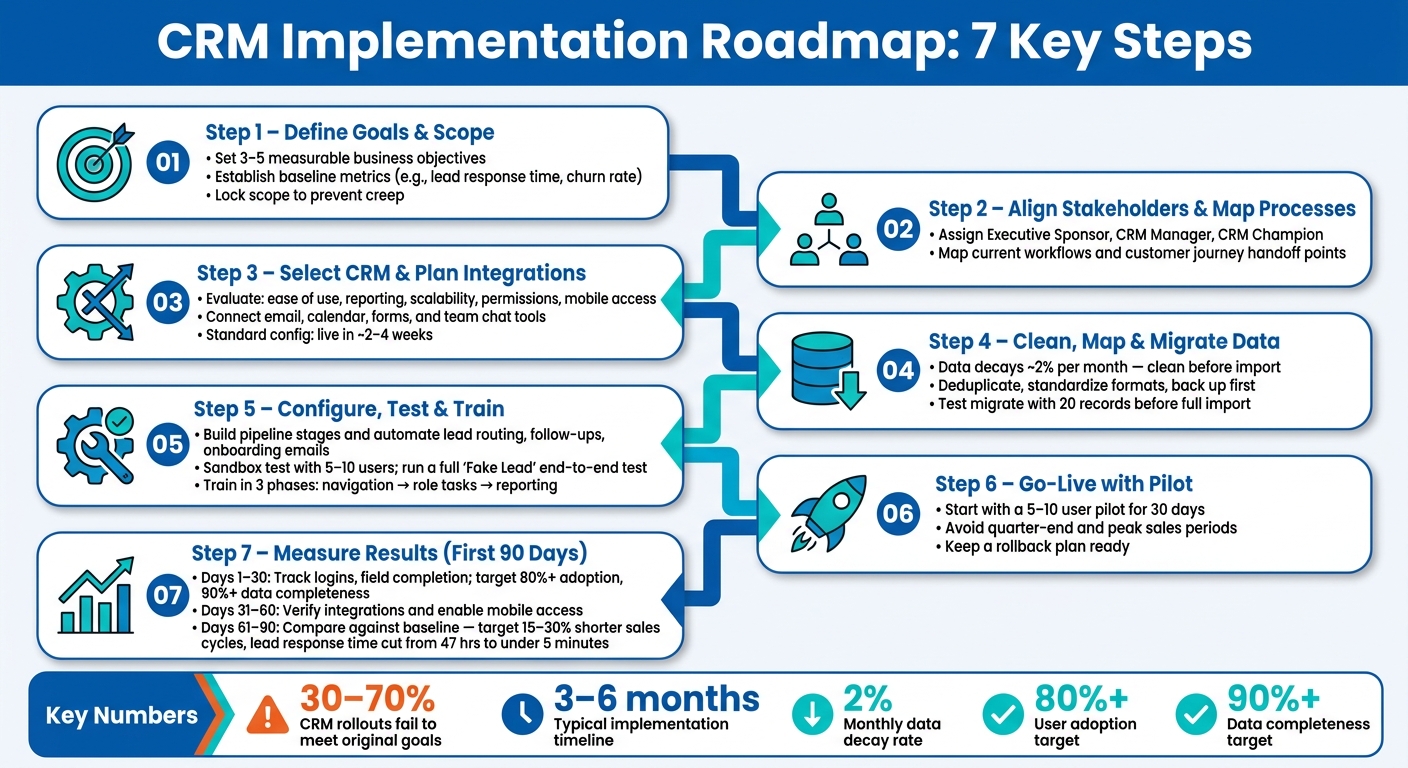
CRM Implementation Roadmap: 7 Steps to a Successful Rollout
How To Do CRM Implementation Right
sbb-itb-cef5bf6
Quick Comparison
| Step | Main Job | What to Watch |
|---|---|---|
| 1 | Define goals and scope | Vague targets, scope creep |
| 2 | Align people and map process | Missing owners, unclear handoffs |
| 3 | Select CRM and integrations | Poor fit, missing tool connections |
| 4 | Prepare data | Duplicates, bad formatting, stale records |
| 5 | Configure and test | Broken workflows, weak training |
| 6 | Go live | Poor timing, weak support, no fallback plan |
| 7 | Measure results | Low adoption, bad data habits, missed KPIs |
If I were using this roadmap, I’d treat the CRM as a company process change first and a software setup second. That’s the main idea behind the full article.
Steps 1 and 2: Set Goals, Scope, and Internal Alignment
Step 1: Define Business Goals, Scope, and Success Metrics
Step 1 sets the goals and metrics that will shape every decision that comes next. Think of the rollout as a business move, not just an IT task. It should stay tied to revenue, service, and efficiency.
Before you look at any software, define 3 to 5 measurable objectives. Make them specific enough to track in plain numbers. For example, you might want to reduce average lead response time from 48 hours to under 4 hours, increase pipeline accuracy to 90%, or cut customer churn by 15%. Put your current baseline next to each target so you can see the before-and-after change without guessing.
| Objective Type | Example Goal | Key Metrics |
|---|---|---|
| Sales Growth | Increase conversion rates | Win rate, deal velocity |
| Efficiency | Reduce manual data entry | Time per task, automation rate |
| Customer Experience | Improve satisfaction scores | NPS, CSAT, response time |
| Retention | Increase customer lifetime value | Churn rate, CLV |
You also need to set scope boundaries early. Be clear about which workflows, systems, and approvals the CRM will support in phase one. That keeps the first rollout usable and helps stop scope creep before it starts. Once the goals and scope are locked in, the next job is getting the right people lined up around them.
Step 2: Align Stakeholders and Map Current Processes
With goals in place, assign the people who will turn those goals into process and system rules. Set these three roles early:
- Executive sponsor: Owns the budget, connects CRM goals to company KPIs, and pushes adoption.
- CRM manager/administrator: Turns business needs into CRM settings and data rules.
- CRM champion: Acts as the team’s go-to person, helps users, and passes feedback to leadership.
After ownership is clear, map how work moves today. Talk with sales, marketing, and service teams to find the current workflow, not the polished version people wish they had.
Map the customer journey from first contact through renewal, and note every handoff point between teams. Spell out what moves a lead from one stage to the next. Then write each handoff in simple terms so the CRM can support it later. Those workflows become the baseline for CRM selection and configuration.
Steps 3 Through 5: Choose the CRM, Prepare Data, and Build the System
Step 3: Select the CRM and Plan Integrations
Once you've mapped your workflows, you can pick a CRM that fits them - instead of twisting your process to fit the software. That one choice saves a lot of pain later.
When you compare platforms, look at five practical criteria: ease of use, reporting depth, scalability, permission controls, and mobile access.
Fit also depends on how your team works. B2B teams usually need to track company structures and several decision-makers on one deal. B2C teams, on the other hand, often get more value from direct customer data collection. The right platform should line up with your team size, how complex your workflow is, and how easy it will be for people to start using it day to day.
Integrations matter just as much as the CRM itself. At a minimum, the system should sync with email, calendars, web forms, and team communication tools like Slack or Microsoft Teams. When your marketing campaigns and landing pages connect to the CRM, you can see which lead sources drive revenue - not just clicks.
Deployment and setup choices will also affect timeline, cost, and support needs:
| Option | Key Characteristics | Best For |
|---|---|---|
| Cloud Deployment | Provider-hosted, automatic updates, accessible via web or app | Most modern businesses, remote teams |
| On-Premises | Hosted on company servers, requires internal IT maintenance | Regulated industries with strict data residency rules |
| Standard Configuration | Out-of-the-box features, faster setup, lower cost | SMBs with standard sales processes |
| Heavy Customization | Custom fields, objects, and complex logic; longer implementation | Enterprises with non-standard operations |
Standard configuration usually gets you live the fastest, often in about 2 to 4 weeks. After you've chosen the CRM, lock the field map and clean the data before you import anything.
Step 4: Clean, Map, and Migrate Customer Data
Customer data decays at about 2% per month, which means a database that looked fine last year may already be full of gaps and errors now.
Start by pulling every source into one place: spreadsheets, old systems, email contacts, and any other contact list your team uses. Then sort records by email address so duplicates float to the surface. From there, delete or merge them.
Before import, clean up the basics. Standardize U.S. phone numbers, normalize addresses, and use one date format across the board. The point isn't to move every old field into the new CRM. It's to move the fields you still need. If you carry bad or unused data into the new system, you're just bringing old mess into a new house.
| Data Quality Issue | Likely Cause | Corrective Action |
|---|---|---|
| Duplicate Records | Multiple lead sources, manual entry errors | Sort by email/phone; run deduplication scripts; merge records |
| Incomplete Records | Fields not marked as mandatory | Reduce mandatory fields to 5–10 essential items |
| Inconsistent Formatting | Lack of data entry standards | Implement validation rules and standardized templates |
| Outdated Data | Natural data "rot" over time | Schedule monthly or quarterly data hygiene audits |
Always back up your old data before migration starts. Then test with 20 records first - not the whole database. That small batch helps you confirm the field mapping is right and that record relationships stay intact during import.
Step 5: Configure Workflows, Test Functions, and Train Users
Once the clean data is loaded, set up the core workflows first. Define your pipeline stages in plain terms - Lead, Qualified, Proposal, Negotiation, Closed - and spell out the exact criteria that move a deal from one stage to the next.
Early automation should focus on the tasks that save the most time. That usually means lead auto-routing by territory, follow-up task creation, and onboarding email sequences. Set role-based permissions early as well, so the system stays under control as the team grows. It's also smart to limit export access for general users, so no one pulls the full database by mistake or without approval.
Before any company-wide launch, test everything. Use a sandbox with 5 to 10 users and log every bug, confusion point, and workflow snag. Then run a "Fake Lead" through the entire process: each pipeline stage, every automated workflow, and the mobile interface. That's how you catch the problems that only show up from start to finish.
Once testing is clean, train users in three phases:
- Core navigation first
- Then role-specific tasks
- Then reporting and dashboards
Use real company data in training sessions, not made-up sample records. People learn faster when they work with their own accounts and actual deals.
Steps 6 and 7: Launch the CRM and Measure Results
Step 6: Plan Go-Live, Support Users, and Limit Disruption
Once testing is clean and users know how to use the system, move into a controlled go-live. Timing matters more than people think. Skip quarter-end, peak sales weeks, and holidays. A safer move is to start with a 5- to 10-user pilot for 30 days.
Run that 30-day pilot with a small group of 5 to 10 users, and assign CRM Champions in each department to gather feedback and help answer questions. This gives you a practical feedback loop before the full rollout. You get to see where people get stuck, what slows them down, and what breaks under day-to-day use. Then you can fix those issues before the rest of the company comes onboard.
For distributed U.S. teams, live training can be a headache across time zones. Recorded walkthrough videos, role-based cheat sheets, and a dedicated Slack channel for async questions can fill the gap well. People can get unstuck on their own schedule instead of waiting around for the next live session.
Champion support also works best when everyone follows one clear standard for CRM use and data entry. If each team logs data a different way, the system gets messy fast.
Before full launch, keep a rollback plan ready. Document the current data and process state so you can revert if the cutover goes sideways. Then use the first 90 days to watch adoption closely and fix issues fast.
Step 7: Review Adoption, Performance, and Next Actions
Review the first 90 days in three phases, and measure each phase against the baseline you set before rollout.
During Days 1-30, track logins, required-field completion, and stage compliance. Aim for user adoption above 80% and data completeness above 90%. If the numbers are off, deal with it early. Bad habits tend to stick once a team settles into them.
During Days 31-60, check that email, calendar, and communication sync are working as expected. This is also the time to enable mobile access for field teams.
During Days 61-90, compare results against your pre-launch baseline. Here's what a solid implementation often looks like:
| Metric | Pre-Implementation | Post-Implementation Target |
|---|---|---|
| Lead Response Time | 47 hours | Under 5 minutes |
| Sales Cycle Length | Baseline | 15%–30% reduction |
| Conversion Rate | Baseline | 10%–25% improvement |
| Admin Time per Rep | High manual entry | 5 to 10 hours saved/week |
| Customer Retention | Baseline | Up to 15% increase |
It also helps to keep support visible after launch. Schedule weekly Q&A sessions during the first month, then switch to monthly check-ins as the team gets more comfortable. If adoption starts to lag, tie CRM usage to performance reviews and have leaders use CRM dashboards in team meetings. That sends a pretty clear message: this isn't side work, it's part of how the team operates.
Conclusion: The 7 Steps That Keep CRM Implementation on Track
A CRM rollout works when you treat it as an operational shift, not just a software purchase. Clear goals, stakeholder support, clean data, and user adoption matter more than the platform itself. Each step points to the same outcome: a CRM your team actually uses, and uses well.
This seven-step roadmap goes straight at the main failure points. Between 30% and 70% of CRM implementations still fail to meet their original objectives, and most of those misses come from poor adoption and weak process discipline. Follow the steps in order, then spend the first 12 to 18 months tightening adoption, data quality, and reporting. Launch isn’t the finish line. It’s the point where the work starts to pay off.
FAQs
What should phase one include?
Phase one is all about building the foundation. Before anything gets set up, the team needs a clear picture of where things stand and what needs work.
This phase usually starts with an assessment of current customer engagement, data collection practices, and the main pain points. From there, the focus shifts to defining objectives and business goals so everyone is working toward the same target.
It also includes stakeholder interviews to spot gaps and opportunities early. That step often brings useful issues to the surface - the kind that don’t show up in a spreadsheet.
At the same time, the team gets ready for setup and data migration by cleaning and unifying data, then confirming the technical groundwork is in place. If this part is rushed, everything that comes after can get messy fast.
How much data should we migrate?
Move only the data that matters - not every single record.
Start with a data audit. Remove duplicate, old, or incomplete entries, and keep the records that support your buyer journey and business goals. If a contact, deal, or company record won’t help your team sell, support, or market better, it probably doesn’t need to come along for the ride.
Before the full move, run a test migration with a small sample. That gives you a simple way to check field mapping and confirm your data stays intact. It’s a small step, but it can save a lot of cleanup later and helps keep your CRM clean and dependable.
What if user adoption is low?
If user adoption is low, don’t just push harder. Step back and look at why people aren’t using the system in the first place.
Start by reviewing your implementation plan and giving users more support. Talk to employees directly to find the sticking points. Are there pain points in the process? Is the system adding extra steps? Do people even understand how it helps with their day-to-day work?
A few fixes can help:
- Offer role-specific training so each team learns what matters to them
- Assign point people who can answer questions and help over time
- Use incentives, if needed, to encourage steady use
SEO Werkz emphasizes monitoring adoption and adjusting workflows based on user needs.