How Navigation Impacts SEO and UX
April 20, 2026Website navigation is a critical factor for improving both SEO and user experience. Here's why:
- User Experience (UX): Clear, simple navigation helps users find what they need quickly, reducing frustration and bounce rates. Features like breadcrumbs and mobile-friendly menus make browsing intuitive and keep visitors engaged.
- SEO Benefits: Search engines rely on structured navigation to crawl and index your site efficiently. Using keyword-rich labels and limiting navigation depth ensures better visibility and rankings.
- Mobile Traffic: With over 60% of traffic coming from mobile devices, responsive navigation designs like hamburger menus are essential to retain visitors and signal usability to search engines.
7 Ways UX Can Improve Your Site's SEO
sbb-itb-cef5bf6
How Website Navigation Improves User Experience
Good navigation acts like a mental map, helping visitors understand where they are and what options they have to explore. When users arrive on your homepage, they often rely on the menu to quickly identify their choices, allowing them to focus on the content instead of figuring out how to navigate the site.
The Role of Clear Menus and Layouts
Menus that are thoughtfully designed make it easier for users to find what they need. By limiting the number of links to 5–7, you reduce the mental effort required to process options, which helps users stay engaged with your content. For example, when JEMSU simplified their menu in 2025, their bounce rates dropped by 30% because visitors could locate information more efficiently.
Descriptive labels also play a big role. Instead of using vague terms like "Solutions" or "What We Do", opt for straightforward labels like "Pricing", "Services", or "Support." This way, users know exactly what to expect when they click a link. Consistency is equally crucial - keeping navigation in the same position and using the same labels across all pages creates a predictable and seamless experience for visitors.
Impact on User Engagement and Retention
Clear navigation does more than guide users - it keeps them interested. When visitors can easily find what they’re looking for, they’re more likely to explore additional pages instead of leaving the site. Features like breadcrumbs enhance this experience by showing users where they are and providing a simple way to retrace their steps.
The benefits of strong navigation are evident in metrics. Websites with well-organized navigation often see higher pages-per-session and lower bounce rates. As Vezert explains:
"Navigation is not just a design element - it is a business tool. Websites with clear, well-structured navigation see up to 50% lower drop-off rates".
With mobile devices accounting for over 60% of web traffic, mobile-friendly navigation is a must. Features like hamburger menus save screen space and ensure users can easily navigate your site, no matter the device they’re using. Up next, we’ll explore how these user experience improvements also enhance SEO performance.
How Navigation Affects SEO Performance
Navigation plays a dual role in keeping users engaged and guiding search engine crawlers. A well-organized navigation system helps search engines understand your site's structure, prioritize content, and crawl efficiently. By categorizing your content into broad topics with specific subcategories, you make it easier for both visitors and search engines to grasp your site's focus and relevance.
Navigation also directly influences search engine rankings through link equity distribution. This refers to how ranking power flows from high-authority pages - like your homepage - to deeper pages. Proper menu linking ensures valuable pages aren’t buried. For instance, pages that are more than three or four clicks away from the homepage often struggle to get indexed, sometimes becoming "ghost pages" that search engines overlook. Let’s dive into how crawlability and keyword-rich navigation labels can further improve your SEO.
Better Crawlability and Indexing
Search engines rely on clear, structured navigation to scan your site effectively. Using text-based navigation built with HTML and CSS makes this process smoother, as opposed to JavaScript-heavy menus that could hide links if not rendered correctly. Keeping your navigation depth to three levels or fewer ensures that important pages remain accessible. Think of it like searching through a filing cabinet - the fewer layers to sift through, the quicker you’ll find what you need.
Breadcrumbs are another helpful tool. They provide search engines with a clear understanding of your site's hierarchy and can even enhance search result snippets, boosting your visibility and click-through rates. Additionally, maintaining consistency between your main menu and footer links creates a predictable path for crawlers, which helps with indexing.
Using Keywords in Navigation Labels
Navigation labels with descriptive, keyword-focused terms improve your site’s search relevance. Instead of generic labels like "Services" or "Products", using specific phrases such as "Men's Running Shoes" or "DevOps Backup" connects your pages to targeted search queries. This signals relevance to both users and search engines.
How to Optimize Website Navigation
Improving website navigation isn't just about making things look neat - it's about creating a smoother experience for users while boosting search engine performance. Start by auditing your menu and footer to ensure they reflect your site's structure and priorities. Tools like Google Analytics can help you track metrics like bounce rate and time on page to identify where users might be getting stuck or leaving your site. Additionally, heatmaps and session recordings from platforms like Hotjar can reveal which menu items users are clicking on and which ones they’re ignoring. This data can help you decide which pages deserve a spot in your primary navigation. Aim to keep your main navigation simple, with no more than seven to eight links, and limit submenus to three levels deep. Also, check for broken links or slow-loading pages, as these technical issues can frustrate users and hurt your search rankings. Use these insights to refine your breadcrumb structure and mobile navigation.
Conducting a Navigation Audit
A thorough navigation audit can do wonders for improving both your internal linking and the overall user experience on mobile. By analyzing user behavior and fixing weak spots, you can create a more seamless and intuitive site.
Using Breadcrumbs and Internal Links
Breadcrumbs are a small but powerful tool. They help users understand where they are on your site and guide search engines through your content structure. Plus, they distribute link equity from high-traffic pages back to parent categories. To make breadcrumbs even more effective, implement structured data like the BreadcrumbList schema in JSON-LD. This helps search engines better interpret your site's hierarchy.
Here’s a real-world example: One case study showed that removing breadcrumb schema caused a site’s organic click-through rate (CTR) to drop from 6.6% to 4.1% - a nearly 40% decrease. Once the schema was restored, the CTR bounced back within three weeks. Always position breadcrumbs near the top of your page, just below the main navigation, and ensure they align with your URL structure. On mobile devices, where menus are often hidden behind hamburger icons, breadcrumbs provide an additional layer of guidance.
"The primary users of these breadcrumbs are Google spiders, which is useful because we can also add schema markup to these crumbs. So, even if our URL structure isn't ideal, we can always specify exactly how Google should think about our content."
– Kirill Sajaev, Founder, AUQ
Implementing Mobile-Friendly Navigation
Since 67% of mobile sites struggle with poor navigation, making your mobile navigation user-friendly is a must. Focus on the "thumb zone" - the lower third of the screen where nearly half of users interact. For simpler sites with three to five main sections, tab bars work well by keeping key options always visible. On more content-heavy sites, hamburger menus save space but may reduce visibility of certain links. Whichever layout you choose, ensure touch targets are at least 44×44 pixels with enough spacing to avoid accidental clicks.
If your categories have more than 10 items, break them into smaller, more manageable groups. For slide-in menus, make parent headers clickable and use clear labels like “Back to Electronics” to guide users. Finally, steer clear of pop-ups or oversized banners that block navigation elements - these can drive up bounce rates, especially on mobile.
Measuring Navigation Effectiveness
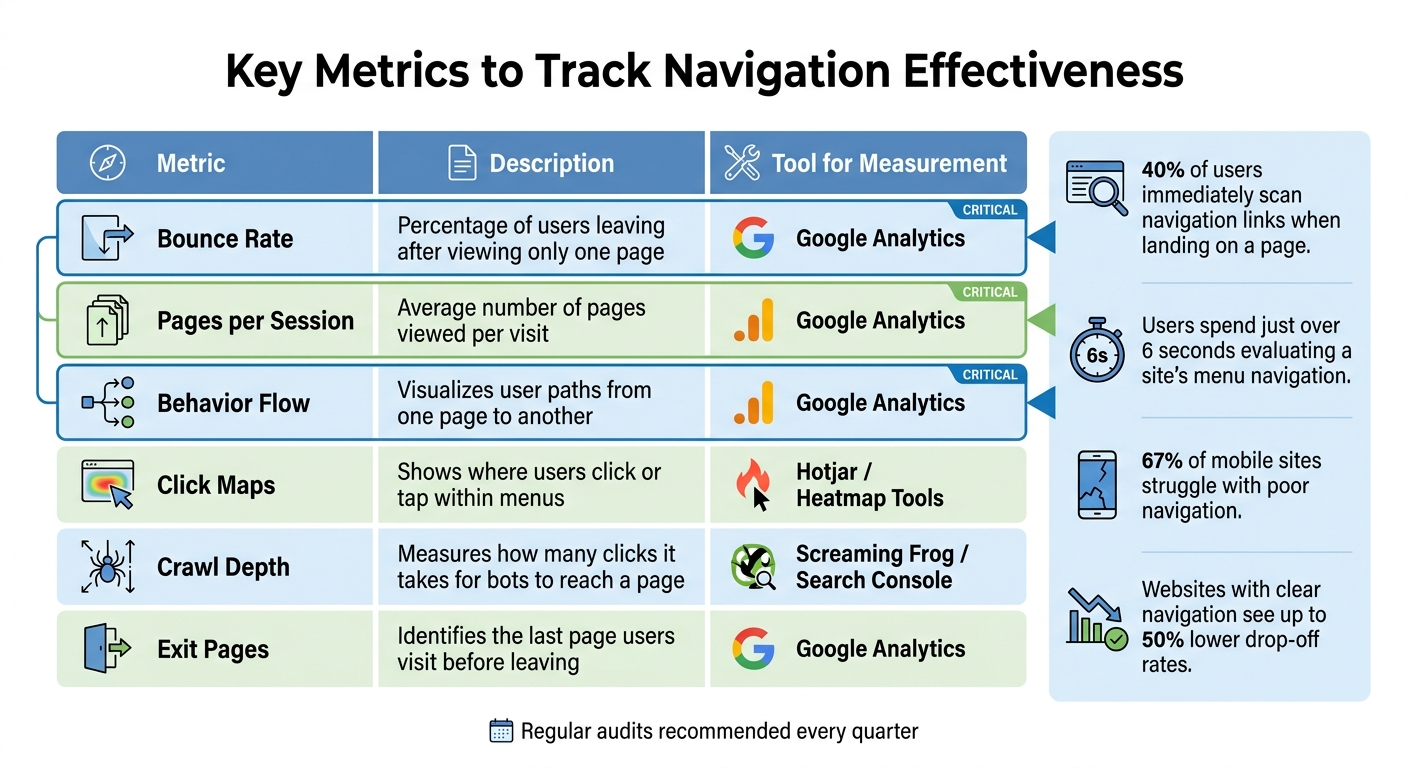
Website Navigation Effectiveness: Key Metrics and Performance Indicators
After refining your website's navigation, it’s crucial to evaluate how well it performs. Around 40% of users immediately scan navigation links and layout when they land on a page. This means your navigation must guide them effectively. Start by analyzing bounce rate and pages per session in Google Analytics. These metrics reveal whether visitors are exploring your site or leaving after a single click. A high bounce rate on specific pages often signals that users aren’t finding clear paths forward through your navigation.
Behavior flow reports in Google Analytics are another powerful tool. These reports show the paths users take as they move from one page to another. If you notice users frequently exiting from category pages, it may be time to reevaluate your subcategory links. Pair this analysis with exit page data to pinpoint pages that fail to guide users further. Together, these insights help you connect user behavior with site performance and refine your navigation strategy.
Heatmaps from tools like Hotjar or Microsoft Clarity provide additional clarity by visually showing where users click, tap, and scroll. These tools highlight "dead zones" in your navigation - areas where users interact less or not at all. By addressing these dead zones, you can reposition or remove underperforming menu items. Considering that users spend just over 6 seconds evaluating a site’s menu navigation, every link must serve a purpose. Compare heatmaps for desktop and mobile separately to ensure tap targets are user-friendly and that important links aren’t buried in hamburger menus.
Key Metrics to Track Navigation Effectiveness
| Metric | Description | Tool for Measurement |
|---|---|---|
| Bounce Rate | Percentage of users leaving after viewing only one page. | Google Analytics |
| Pages per Session | Average number of pages viewed per visit. | Google Analytics |
| Behavior Flow | Visualizes user paths from one page to another. | Google Analytics |
| Click Maps | Shows where users click or tap within menus. | Hotjar / Heatmap Tools |
| Crawl Depth | Measures how many clicks it takes for bots to reach a page. | Screaming Frog / Search Console |
| Exit Pages | Identifies the last page users visit before leaving. | Google Analytics |
Don’t overlook technical metrics. Use Google Search Console to ensure search engine bots can easily access all key pages through your navigation. Tools like Screaming Frog can help you measure crawl depth, which impacts how search engines index your site. Regular audits - ideally every quarter - can catch issues like broken links, slow load times, or structural flaws before they affect your rankings.
As Ardene Stoneman, Technical SEO at SEOJet, explains:
"Website navigation is one of the most overlooked elements in SEO, but it plays a major role in how users and search engines understand your site".
Conclusion
The strategies outlined above emphasize just how crucial effective navigation is for both SEO and user experience. Your website's navigation acts as a bridge, connecting search engines and users to the content they need. By simplifying menus, using keyword-focused labels, and ensuring all key pages are no more than three clicks from the homepage, you make it easier for search engines to crawl your site while creating a smoother journey for visitors.
Clear and logical menus not only help distribute link equity to important pages for better rankings but also lead users directly to the information they’re looking for - without unnecessary frustration. As SEO Consultant Dani Leitner explains:
"A website's navigation is very important. The navigation provides every website visitor with a quick first impression of what the site offers".
With mobile traffic accounting for over 60% of all web visits and users dedicating just six seconds to evaluating a site's menu, it's more important than ever to ensure your navigation is seamless across all devices. These numbers highlight the importance of prioritizing navigation as part of your website optimization efforts.
Regularly auditing your navigation, fixing broken links, and maintaining a mobile-friendly design are essential steps to boost both rankings and user satisfaction. Tracking metrics like bounce rates, pages per session, and behavior flow can provide valuable insights into where your navigation may need adjustments.
At its core, navigation is far more than a design feature - it's a powerful business tool. Investing in navigation improvements means better search rankings, happier users, and more conversions. The question isn’t whether navigation optimization is worth it - it’s whether you can afford to ignore it.
FAQs
How do I know if my site’s navigation is hurting SEO?
Navigation problems can hurt both user experience and your SEO efforts. If visitors seem lost, bounce rates climb, or search engines have trouble crawling and indexing your pages, it’s time to investigate your site’s navigation.
Some common red flags include:
- Unclear menus: If users can’t easily figure out where to go next, they’re likely to leave.
- Broken links: Dead ends frustrate visitors and send negative signals to search engines.
- Overly complex structures: A tangled web of pages can confuse users and make it harder for search engines to understand your site.
Addressing these issues can improve usability, keep visitors engaged, and boost your search rankings.
What’s the best way to restructure navigation without losing rankings?
To adjust your site’s navigation without harming rankings, it’s essential to approach the process thoughtfully. Start by ensuring the new structure maintains a clear hierarchy that search engines can easily follow. Preserve critical internal links to avoid disrupting the flow of link equity across your site. For any URLs you modify, set up proper redirects to guide users and search engines to the correct pages.
Once changes are live, keep a close eye on your site’s performance. This allows you to identify and fix any unexpected issues early on. By planning ahead and rolling out updates gradually, you can safeguard your rankings while improving the overall user experience.
Do hamburger menus make important pages harder for Google to crawl?
Yes, hamburger menus can create challenges for Google when it comes to crawling important pages - if they’re not set up correctly. These menus often tuck links away in expandable sections, which can make it harder for search engines to access and index those links.
To prevent SEO issues, it’s crucial to implement hamburger menus in a way that ensures search engines can easily find and crawl all the links. This helps maintain both accessibility and visibility for your content.