
Keyword Research Checklist for Content Writers
April 9, 202696.55% of web pages get zero Google traffic. Why? Most skip keyword research - the cornerstone of effective content strategy. Organic search drives 53% of all website traffic, but only if you focus on the right keywords. With 94.74% of keywords receiving 10 or fewer searches per month, targeting the right terms is critical.
Here’s a streamlined approach to keyword research:
- Start with Seed Keywords: Identify broad, 1–2 word terms that reflect your audience’s needs.
- Expand Your List: Use tools like Google Keyword Planner or Semrush to find variations and long-tail keywords.
- Analyze Metrics: Check search volume and competition to prioritize keywords with low difficulty and meaningful traffic potential.
- Study Competitors: Discover content gaps and opportunities by analyzing competitor rankings.
- Match Search Intent: Align keywords with user intent - informational, transactional, or commercial.
- Organize by Topic Clusters: Group related keywords to create focused, authoritative content.
- Refine and Prioritize: Choose primary keywords with clear intent and enhance content with related terms.
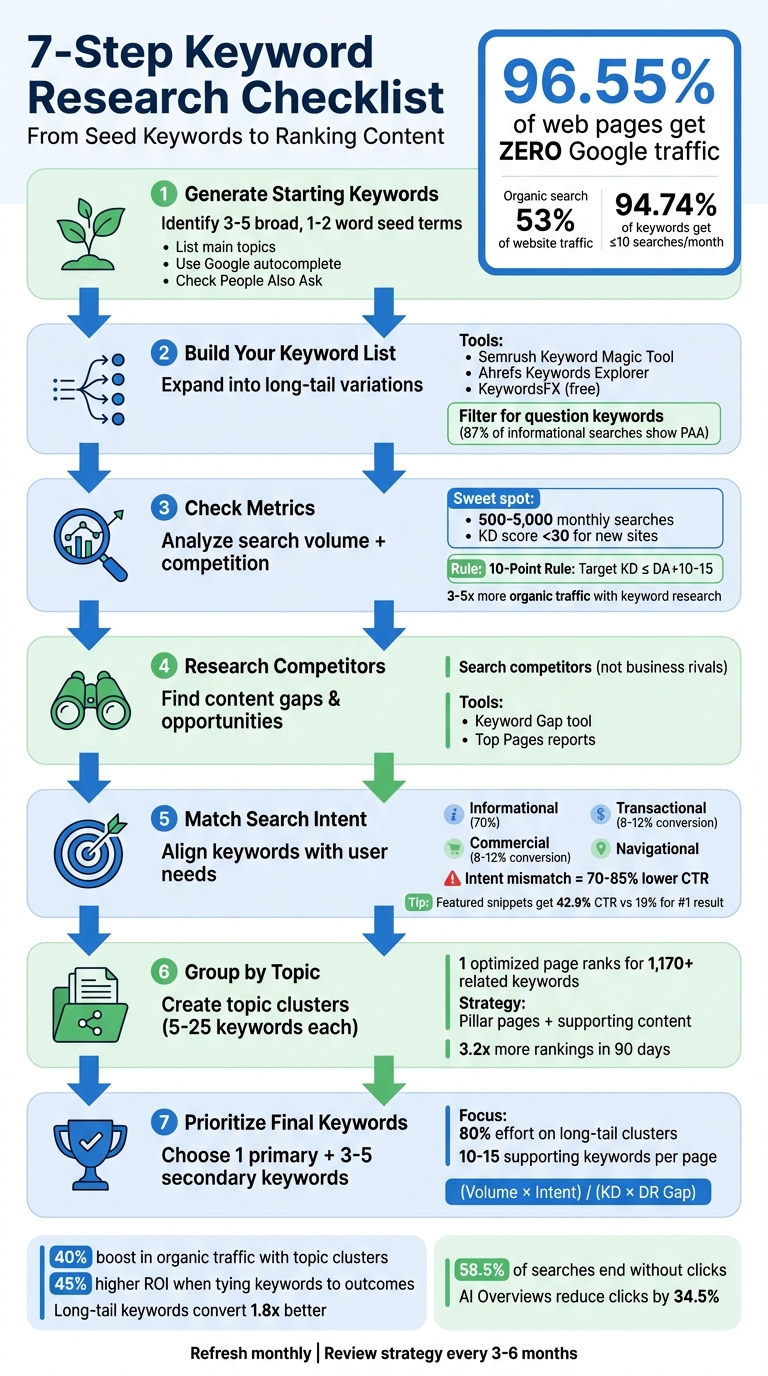
7-Step Keyword Research Process for Content Writers
Keyword Research Tutorial: From Start to Finish
sbb-itb-cef5bf6
Step 1: Generate Your Starting Keywords
This first step lays the groundwork for your research by pinpointing seed keywords. These are broad, 1–2 word terms that act as the cornerstone of your keyword strategy. Think of them as the starting point for how potential customers search. For instance, instead of targeting something specific like "Burton Custom X 2026 model", you’d use "snowboard." Similarly, "keyword research" works better as a seed keyword than a branded tool name.
"Seed keywords are the trunk of your keyword tree - every long-tail variation and cluster spoke traces back to one of these foundational terms." - NextGrowth.ai
List Your Main Topics
Start by jotting down 3–5 core topics that your business revolves around. Skip the industry buzzwords and focus on how your audience would naturally describe their needs. For example, if you run a digital marketing agency, your seed keywords might include "SEO", "content marketing", or "social media ads." The goal is to think like your customer. What problems are they trying to solve? What words do they use to describe them? To get even more precise, ask your sales and support teams about the phrases customers use in conversations.
Once you’ve nailed down your main topics, broaden them using free tools to uncover more keyword opportunities.
Use Free Search Tools
With your seed keywords ready, it’s time to expand them. A simple way to start is by typing your broad topic into Google. Pay attention to the autocomplete suggestions - usually, you’ll see 8–12 related searches. Look for patterns or modifiers like "how", "best", "vs", or "for beginners." These can help you identify the specific angles your audience is interested in. Don’t skip the People Also Ask (PAA) section either - it’s a goldmine of questions people are actively asking about your topic. After exploring these, check out the "search refinements" at the bottom of the page for even more ideas.
Another excellent resource is Google Keyword Planner, which is free if you have a Google Ads account. You can even enter a competitor's URL to see what terms Google links to their business. For instance, searching for "leather purses" on this tool brought back around 2,800 keyword suggestions.
Step 2: Build Out Your Keyword List
Now that you’ve got your seed keywords, it’s time to expand them into variations and long-tail phrases. This step is where the magic happens - long-tail keywords often bring in highly targeted traffic by addressing specific, niche queries from users.
Try Keyword Research Platforms
If you’ve already tried free tools, consider diving into dedicated keyword research platforms. These tools can generate thousands of related terms from just one seed keyword. For example, Semrush's Keyword Magic Tool not only provides extensive keyword lists but also includes a "Questions" filter to help you find question-based searches. Similarly, Ahrefs Keywords Explorer offers insights into search volume and ranking difficulty, helping you identify long-tail variations with solid potential. For those on a budget, KeywordsFX is a free option that organizes results into categories like regular keywords, questions, and modifiers - no subscription required.
You can also use Google Keyword Planner’s "Start with a website" feature. By entering a competitor’s URL, you’ll discover keywords Google associates with their content. This approach can expose gaps in your own keyword strategy and inspire new ideas. Just keep in mind, the "Competition" metric in Google Keyword Planner reflects paid advertising competition, not organic ranking difficulty. For SEO-specific difficulty scores, tools like Semrush and Ahrefs are more reliable.
Beyond platforms, it’s essential to focus on the specific questions your audience is asking. Answering these directly can make your content stand out.
Find Question Keywords
Once you’ve gathered a broad list of keywords, narrow it down by honing in on question-based phrases. These keywords are incredibly valuable because they directly address the problems your audience wants solved. Did you know that the "People Also Ask" (PAA) feature shows up in 87% of informational searches? This feature is a goldmine for discovering related questions. When you search for your seed keyword, click on the PAA questions to expand them, and you’ll see Google generate even more related queries.
Most keyword research tools make it easy to filter specifically for questions. In Semrush, for example, you can apply the "Questions" filter to find phrases that start with "how", "what", "why", or "can". These question-based keywords are perfect for FAQ sections, blog posts, or tutorials that directly address user needs. As Lily Ray, SEO Director at Path Interactive, explains:
"Question keywords are crucial, especially given how many different Google search features pull in questions directly into the search results. Top-performing informational pages are often structured using a question and answer format containing the most frequently asked questions about a given topic".
Don’t forget to check Google Search Console’s "Performance" tab. It can show you which question keywords are already driving clicks to your site. Use this data to create more in-depth content around those topics and maximize your results.
Step 3: Check Search Volume and Competition
Once you've built your keyword list, the next step is figuring out which terms are worth pursuing. This boils down to two key metrics: search volume (how often people search for a keyword) and competition (how hard it is to rank for that keyword). The sweet spot lies in finding keywords that balance achievable rankings with meaningful traffic potential.
Review Monthly Search Volume
Search volume gives you an idea of how many people are searching for a specific term. Tools like Semrush Keyword Overview and Google Keyword Planner can help you find this data by entering your keyword and checking the "Volume" field. Keep in mind, search volume reflects overall demand, not the actual traffic your site might receive. That depends on your ranking position and click-through rates.
Pay attention to trends. A keyword with 1,000 monthly searches might look great on paper, but if the trend graph shows a decline, it may not be worth the effort. On the flip side, a keyword with just 500 searches but a steady 50% growth trend might be a better bet. Also, consider regional variations - if most searches come from areas outside your target audience, the keyword might not deliver the results you want.
For quicker wins, aim for keywords with medium search volume (500–5,000 searches per month) and lower competition. Robin Monnier from Lovarank highlights the importance of this approach:
"Websites that base their content strategy on keyword research see 3-5x more organic traffic than those that don't".
Once you’ve evaluated search volume, it’s time to tackle keyword difficulty.
Check Keyword Difficulty
Keyword Difficulty (KD) measures how challenging it is to rank for a keyword, typically on a 0–100 scale. Keywords with a difficulty score under 30% are considered "Easy" and are ideal for newer or smaller websites. If your site is just starting out, focus on keywords in the 0–29% range to increase your chances of ranking quickly without needing a ton of backlinks.
Follow the 10-Point Rule: choose keywords with a difficulty score no more than 10–15 points higher than your site's Domain Authority (DA) or Domain Rating (DR). For instance, if your DA is 25, avoid targeting keywords with a difficulty above 35–40. Andy Crestodina, Cofounder of Orbit Media, explains why this matters:
"If you're not checking key phrase difficulty, you're not doing key phrase research. You simply don't have a chance of ranking for phrases that are way outside your website's authority".
Before committing to a keyword, do a quick Google search and analyze the top 10 results. If the first page is dominated by heavyweight sites like Wikipedia, Forbes, or government websites, the keyword might be too competitive. Instead, look for opportunities where the top results feature weaker content, outdated information, or gaps you can fill with more thorough and engaging material.
Step 4: Research Competitors and Find Content Opportunities
Once you've analyzed search metrics, it's time to dive into competitor research. Why? Because your competitors have already laid much of the groundwork. By studying the keywords they rank for, you can discover content gaps in your strategy and pinpoint areas where their content falls short. Remember, focus on search competitors - those ranking for your target keywords - rather than just your direct business rivals. For instance, a blog might dominate the search rankings in your niche, even if it doesn’t sell the same products or services.
Find Competitor Keywords
Tools like Semrush and Ahrefs make competitor keyword analysis straightforward. Features like Semrush's Keyword Gap tool or Ahrefs' Content Gap tool allow you to filter for "Missing" keywords - terms all your competitors rank for, but you don’t. These tools help you identify areas where your content strategy is falling short. As Joshua Hardwick explains:
"If your competitors have done keyword research and found topics that you missed, they've done the hard work for you".
But don't stop at keywords. Use competitor Top Pages reports to uncover which types of content - whether it's in-depth guides, listicles, or interactive tools - are driving the most traffic. You can also examine paid keyword data to gauge which terms are likely to convert well. Again, focus on search competitors, as their strategies often differ from those of direct business rivals.
Once you've gathered this data, the next step is to analyze how these keywords perform in search results to refine your content strategy.
Review Search Results for Ideas
After identifying the right competitor keywords, take them for a test drive - search them on Google. Carefully review the top 10 results. Pay attention to the content's format, depth, and structure. Are there headings, FAQs, visuals, or other elements that make the content stand out? This will help you understand what Google deems most relevant. If a competitor owns a featured snippet but you're already ranking in the top 10, you may be able to overtake them by reformatting your content into concise lists or clear answers.
For deeper insights, use Ahrefs Site Explorer to analyze your competitor's site structure. Look at which subfolders - like /blog or /tools - generate the most traffic. This can reveal high-performing content formats you might want to prioritize.
Yevheniia Khromova, an SEO expert at SE Ranking, sums it up well:
"Your goal shouldn't be to copy their strategy. Instead, your aim should be to understand what works (and why it works), and adapt it to your unique context to gain a competitive edge".
Step 5: Match Keywords to Search Intent
Once you've identified competitor opportunities, the next step is connecting your keywords to the right search intent. Why? Because even the highest search volume keywords won't deliver results if your content doesn't align with what users are looking for. Search intent generally falls into four categories: informational, navigational, commercial, and transactional.
Ian Lurie highlights a common pitfall: "First, folks still choose phrases without considering intent or context. So many marketers pick sexy phrases with high volumes... but ignore the real value of the phrase to the business". Misjudging intent can have serious consequences, like reducing click-through rates by 70–85% and increasing bounce rates by 50–60%.
Study Top-Ranking Pages
Once you understand the types of search intent, confirm them by analyzing the top-ranking content for your target keyword. Start by Googling the keyword and reviewing the first 10 results. For example:
- How-to guides or blog posts suggest informational intent.
- Product pages point to transactional intent.
- "Best of" lists or comparison articles indicate commercial intent.
- Brand homepages or login screens signal navigational intent.
Don't stop at the content type - pay attention to the SERP (Search Engine Results Page) features. For instance, "People Also Ask" boxes often accompany informational searches, while Google Shopping carousels confirm transactional intent. Featured snippets are particularly powerful, boasting a 42.9% click-through rate compared to 19% for the top organic result.
As NextGrowth.ai puts it:
"The SERP is the answer key".
Robin Monnier from Lovarank offers this advice:
"Match your content type to what's already ranking. If you create a product page for an informational keyword, you're fighting against Google's understanding of what users want".
In short, if the top results for a keyword are listicles, don’t try to rank with a long-form guide - Google has already determined the format users prefer.
Align Keywords with User Needs
After verifying search intent through SERP analysis, refine your keyword list by focusing on what users are trying to accomplish. Use an "Intent-First Filter" by asking questions like: Does the user want to learn something? Find a specific website? Compare options? Or make a purchase right now?.
Pay attention to intent clues within the keywords themselves. Phrases like "how to" or "what is" indicate informational intent, while words like "best", "vs", or "review" suggest commercial investigation.
Transactional keywords are especially valuable, converting at rates of 8–12%, compared to just 2–3% for informational keywords. However, informational searches dominate, making up about 70% of all queries. This makes them a great choice for building awareness and establishing authority.
Step 6: Group Keywords by Topic
Once you've nailed down search intent, it's time to organize your keywords into meaningful groups. Proper grouping not only avoids internal competition but also strengthens your site's authority by consolidating related content.
Did you know a single well-optimized page can rank for an average of 1,170 related keywords? Yet, many writers still stick to the outdated "one keyword, one article" approach. Jason Roy from SEO Site Checkup sums it up perfectly:
"If you're still writing one article per keyword, you're stuck in old-school SEO".
How to Group Your Keywords
Start by analyzing keyword overlap in Google search results. If two keywords share three or more of the same top-10 URLs, they likely serve the same search intent and should be clustered together. This process aligns with how Google interprets search intent. And here's the kicker: SERP-based clustering can help your pages rank for 3.2x more keywords within the first 90 days.
The sweet spot for keyword clusters is typically 5 to 25 keywords. For example, a raw list of 500 keywords often condenses into 25 to 40 distinct clusters. Within each group, prioritize the highest-volume keyword for your H1 and URL, while weaving secondary keywords into subheadings and the body content. These clusters form the backbone of your content plan.
Create a Content Strategy Around Clusters
Now that you've grouped your keywords, the next step is building a content strategy using a pillar-and-cluster model. Pillar pages cover broad topics, while supporting articles dive into subtopics and link back to the pillar. This structure not only showcases your expertise but also helps search engines and readers navigate your site more effectively. As The Seo Engine explains:
"A site with 500 pages targeting 500 individual keywords will almost always lose to a competitor with 80 pages, each targeting a well-researched keyword cluster of 15–20 related terms".
Before adding new content, review your site to ensure you're not targeting overlapping keywords. And don't stop there - search intent evolves. Revisit your keyword clusters every 6–12 months to keep your strategy aligned with current trends. This ongoing refinement is key to staying ahead in the SEO game.
Step 7: Choose and Prioritize Your Final Keywords
Now that you’ve organized your clustered keywords, it’s time to narrow them down to the ones that best align with your strategy. The goal is to focus on keywords that will deliver results. At this stage, relevance matters most - remove any keyword that doesn’t match your audience’s needs or your business offerings.
Within each topic cluster, your primary keyword is usually the most popular variation - this is the term with the highest search volume that aligns with your content's intent. However, keep in mind that high-volume keywords often come with stiff competition and might not always lead to high conversion rates. Ian Lurie, a Digital Marketing Consultant, puts it this way:
"First, folks still choose phrases without considering intent or context. So many marketers pick sexy phrases with high volumes... but ignore the real value of the phrase to the business."
When deciding which keywords to prioritize, consider your site’s authority. For instance, if your domain authority is under 20, focus on keywords with a difficulty score below 15. It’s also worth noting that 58.5% of U.S. Google searches now end without a click to any website, and AI Overviews are reducing clicks by 34.5%. To maximize your efforts, tools like Google Search Console can help you identify "striking distance" keywords - those currently ranking in positions 6–20. These keywords often represent low-hanging fruit.
Pick One Primary Keyword
Your primary keyword should guide your H1, URL, and overall topic. Trying to use multiple primary keywords can dilute your focus and confuse search engines. Make sure this keyword matches the user’s intent. For example:
- Blog posts typically target informational intent.
- Product pages focus on transactional intent.
- Comparison guides cater to commercial intent.
Before you commit, check the top three search results for your chosen keyword. If they’re dominated by videos or interactive tools and your content is text-based, that keyword might not be the best fit.
To prioritize effectively, use a formula like this: (Monthly Volume × Intent Value) / (KD Score × DR Gap). This helps weigh opportunity against effort. Dedicate most of your focus (about 80%) to long-tail keyword clusters. These often have clear user intent and lower competition. Interestingly, 94.74% of all keywords get 10 or fewer monthly searches, but collectively, these long-tail terms can drive the majority of organic traffic.
Add Related Keywords
Once you’ve chosen your primary keyword, enhance your content by including 3–5 secondary keywords and 10–15 supporting keywords. A well-optimized page can rank for over 1,000 related keywords.
- Secondary keywords are variations or synonyms of your primary keyword.
- Supporting keywords include long-tail phrases, specific questions, and subtopics.
Incorporate these related terms naturally throughout your content - use them in subheadings, body copy, and FAQ sections. "People Also Ask" boxes are a goldmine for finding related questions that can serve as H2 headings. This approach can also help you capture featured snippets, which boast a 42.9% click-through rate.
To avoid keyword cannibalization, map out a clear keyword-to-URL plan. This ensures that related keywords are grouped on a single, authoritative page rather than scattered across multiple weaker pages.
Conclusion
Keyword research isn’t just a one-time task - it’s the foundation for creating content that ranks instead of vanishing into obscurity. By sticking to the structured steps outlined here, you can avoid the fate of the 96.55% of web pages that get zero Google traffic. Many of those pages fail because they skip the basics covered in this guide. A clear, methodical approach turns scattered ideas into a focused strategy, ensuring you target keywords with proven demand instead of relying on guesswork.
The payoff is clear. Websites that use topic cluster strategies can see up to a 40% boost in organic traffic. Meanwhile, businesses that tie keyword performance to measurable outcomes report 45% higher ROI on their SEO efforts. As NextGrowth.ai wisely says:
"Keyword research isn't dead. Bad keyword research is dead".
The key is aligning your content with search intent, building authority with topic clusters, and focusing on long-tail keywords, which convert at 1.8 times the rate of broader terms. These strategies help avoid common pitfalls while unlocking new opportunities.
This checklist also helps you sidestep issues like keyword cannibalization, mismatched content formats, or chasing high-volume keywords that don’t convert. Plus, it positions your content for modern search features like featured snippets. With 58.5% of U.S. Google searches now ending without a click and AI Overviews cutting clicks by 34.5%, choosing the right keywords is more critical than ever.
To keep your strategy effective, refresh priority keywords monthly and evaluate your overall approach every three to six months. A continually updated keyword strategy ensures your content not only ranks but also drives meaningful results. This is how research transforms into tangible success.
FAQs
How do I find seed keywords fast?
To jumpstart your keyword research, begin by brainstorming broad terms that connect to your website, products, or niche. Think about what your audience might type into a search engine. Consider questions like, "What topics does my website cover?" or "Which keywords align with the rankings I want to achieve?"
Once you have a list of broad terms, narrow them down into more specific keywords. This helps make your content more relevant and reduces competition, giving you a solid foundation for effective keyword research.
What keyword difficulty should I target for my site?
Focusing on low to moderate difficulty keywords is a smart way to improve your content's visibility. These terms strike a balance between being relevant to your audience and easier to rank for, compared to highly competitive keywords. By targeting these, you increase your chances of ranking well without overextending your site's current authority.
Make sure the keywords you choose align closely with your content goals. This ensures you're attracting the right audience while staying realistic about what your site can achieve within its current capabilities.
How can I prevent keyword cannibalization?
To keep keyword cannibalization at bay, it's important to regularly audit your content. This helps you spot pages that are competing for the same keywords or targeting similar search intent. Here's how you can tackle these overlaps:
- Consolidate similar content: If multiple pages cover the same topic, combine them into one comprehensive piece that serves your audience better.
- Use canonical tags: These tags signal to search engines which version of a page should be prioritized, avoiding confusion.
- Develop a clear content strategy: Plan your topics and keywords in a way that ensures each page has a distinct focus.
Other helpful actions include improving internal linking to guide users and search engines to the right pages and using 301 redirects to direct traffic from less relevant pages to the most valuable ones.
Finally, keep an eye on your search data and leverage SEO tools to detect and address cannibalization issues early. Staying proactive can save you from losing rankings and traffic.