
Ultimate Guide to Header Tag Optimization
March 8, 2026Header tags (H1 to H6) are essential for organizing web content and improving SEO. They create a clear structure that helps search engines understand your page and makes content easier to read. Here's what you need to know:
- H1: The main title of your page. Use only one per page, include your primary keyword, and keep it concise (40-60 characters).
- H2: Divides the content into sections. Ideal for secondary keywords or questions.
- H3: Breaks down H2 sections into more specific points. Use for long-tail keywords or related terms.
- H4-H6: Rarely needed unless dealing with highly detailed content.
Why it matters:
- SEO: Header tags improve indexing and increase chances of appearing in featured snippets.
- User Experience: They make content scannable, reduce bounce rates, and aid accessibility tools like screen readers.
- Best Practices: Follow a logical hierarchy (H1 → H2 → H3), avoid skipping levels, and don't use headers for styling.
Quick Tip: Use tools like Screaming Frog or Google Search Console to audit your header tags and fix issues like missing or duplicate H1s.
Header tags are a simple yet effective way to boost SEO and improve content readability. Let’s dive deeper into how to use them effectively.
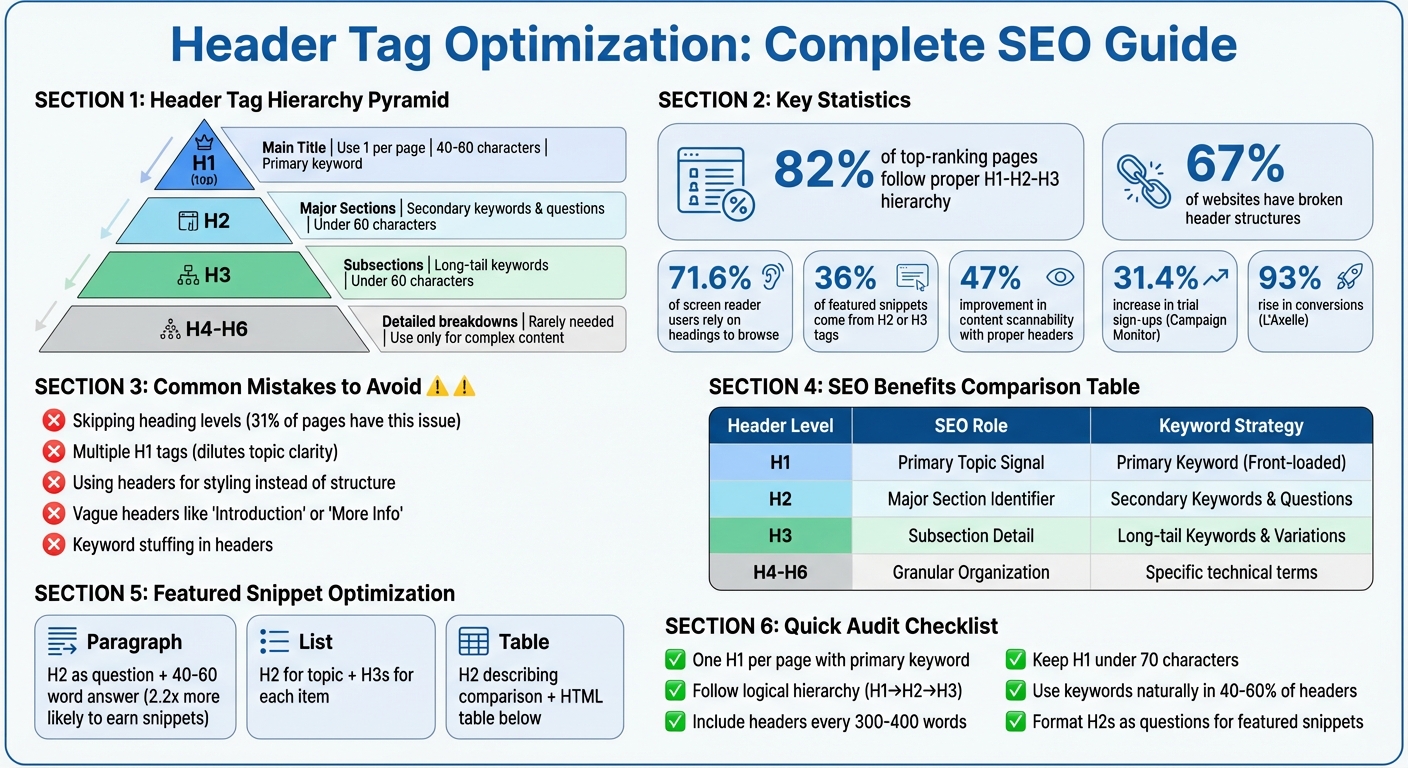
Complete Guide to Header Tag Hierarchy and SEO Best Practices
Header Tags for SEO: H1, H2, H3 Guide (Rank Higher in Google)
sbb-itb-cef5bf6
Understanding Header Tag Hierarchy
Header tags work like a pyramid of importance. The H1 sits at the top as the main topic, H2s divide the content into major sections, and H3–H6 tags provide additional layers of detail. This hierarchy helps search engines and screen readers interpret your content effectively.
The structure flows in descending order: H1 → H2 → H3 → H4, and so on. Skipping levels disrupts this flow. As John Mueller, Google's Search Advocate, puts it:
"We do use H tags to understand the structure of the text on a page better".
When organized properly, header tags create a clear structure that aids indexing, scanning, and navigation. For instance, 71.6% of screen reader users rely on headings to browse web pages. Now, let’s dive into the role of each header level, starting with the H1.
How to Use H1 Tags Correctly
Think of your H1 as the "book title" of your page. It defines the entire page's subject for both visitors and search engines. Best practice is to use it only once per page. While Google allows multiple H1s without penalties, sticking to one ensures clarity.
For optimal impact, keep your H1 between 40 and 60 characters. This length strikes a balance between being descriptive and concise. Also, include your primary keyword naturally - nearly all pages ranking on Google’s first page feature their main keyword in either the title or H1 tag.
It’s important to distinguish the H1 from the title tag. The <title> tag appears in browser tabs and search engine results, while the <h1> is the headline visible on your webpage. They can be similar but serve different purposes: the title tag drives clicks, while the H1 introduces the content to visitors already on your page.
How H2, H3, and Other Tags Work Together
H2 tags function like "chapter titles", breaking your content into primary sections. Each H2 should represent a distinct subtopic or theme, guiding readers through the article. Aim for concise H2s, keeping them between 3 and 7 words.
H3 tags add another layer of detail, dividing H2 sections into smaller, more specific points. For example, an H2 on "SEO Benefits of Header Tags" might include H3s such as "Improved Indexing" and "Better User Experience." This creates a nested structure where each layer supports the one above it.
Tags H4 through H6 are rarely needed unless you’re working with highly detailed content, like technical manuals or legal documents. For most web pages and blogs, sticking to H1 through H3 is sufficient. Regardless of the level, keep header lengths between 10 and 70 characters to ensure they’re easy to scan and understand.
Common Hierarchy Mistakes to Avoid
One of the most common errors is skipping heading levels, such as jumping from H1 to H3 or H2 to H4. This disrupts the semantic flow and can confuse both search engines and assistive technologies. As Pope Tech explains:
"When a heading is skipped, the user might think they missed a heading or aren't able to access it".
Another mistake is using header tags for their visual appearance rather than their structural role. If you want text to appear larger or bolder but it doesn’t fit the content hierarchy, use CSS styling on a regular paragraph tag instead. Header tags are for organizing content, not design.
Using multiple H1 tags can dilute your page’s main topic. While it won’t directly harm your rankings, it creates confusion about your page’s focus. Similarly, avoid vague headers like "Introduction" or "More Info." These add no value for search engines or readers. Lastly, steer clear of keyword stuffing in headers - it disrupts readability and could lead to penalties. Instead, use keywords naturally where they fit.
| Issue | Impact | Solution |
|---|---|---|
| Skipping levels | Confuses structure; hinders accessibility | Follow H1 → H2 → H3 order |
| Multiple H1s | Reduces topic clarity | Use one H1 as the main title |
| Styling misuse | Sends incorrect signals to search engines | Use CSS for design, not header tags |
| Vague text | Misses keyword opportunities | Write specific, descriptive headers |
| Keyword stuffing | Hurts user experience; risks penalties | Place keywords naturally and sparingly |
Avoiding these mistakes sets the stage for more advanced header strategies in SEO.
SEO Benefits of Optimized Header Tags
Optimized header tags do more than just structure your content - they actively contribute to better search rankings and user engagement. When used effectively, they signal relevance to search engines, improve indexing, and make your pages easier for users to navigate. Let’s break down the key SEO benefits of optimized header tags.
Where to Place Keywords in Header Tags
Search engines prioritize header tag text over regular body text, making headers prime real estate for keywords. Start with your H1 tag, which should feature your primary keyword prominently - ideally, at the very beginning. For instance, if your target keyword is "email marketing platform", place it right at the start of your H1 for maximum impact.
Use H2 tags for secondary keywords or question-based phrases. This approach helps capture a wider range of search queries while keeping your content focused. H3 tags are perfect for long-tail keywords and related terms. These add depth to your content without resorting to keyword stuffing.
Here’s a real-world example: In 2025, Campaign Monitor boosted trial sign-ups by 31.4% by aligning their H1 headlines with specific search queries, rather than sticking with a generic "Email Marketing Platform" header. Similarly, L'Axelle saw a 93% rise in conversions after switching their H1 from a passive description to a more engaging, benefit-driven headline. These examples highlight the direct link between keyword-focused headers and business growth.
| Header Level | SEO Role | Keyword Strategy |
|---|---|---|
| H1 | Primary Topic Signal | Primary Keyword (Front-loaded) |
| H2 | Major Section Identifier | Secondary Keywords & Questions |
| H3 | Subsection Detail | Long-tail Keywords & Semantic Variations |
| H4-H6 | Granular Organization | Specific technical terms or niche details |
How Header Tags Improve Content Indexing and Featured Snippets
A well-structured header hierarchy supports passage indexing, a Google feature that allows specific sections of your page to rank independently for niche queries. Even if your page doesn’t focus entirely on a single topic, clear H2 and H3 tags help search engines identify and rank individual sections.
Headers also play a critical role in featured snippets. Research indicates that 36% of featured snippets are sourced directly from H2 or H3 tags. To increase your chances of earning a featured snippet, frame your H2 tags as user questions (e.g., "How do header tags improve SEO?") and follow them up with a concise 40–60 word answer.
Google may also use H2 tags to create clickable "jump links" in search results, which increase the visibility of your listing. These links make your page more noticeable and clickable. As John Mueller, Google’s Search Advocate, explains:
"Header elements are a 'really strong signal' that informs Google's understanding of a page's topics".
Beyond helping with indexing, optimized headers improve the overall user experience.
Improving Readability and User Experience
Headers make your content scannable, which is crucial for user engagement. Most people skim through online content rather than reading it word-for-word. Headers act as clear signposts, guiding users to the information they’re looking for.
The impact of scannability is measurable: Content with a proper header hierarchy sees a 47% improvement in how easily users can navigate and understand the material. This improved navigation reduces cognitive load, keeps visitors on your page longer, and lowers bounce rates - all factors that positively affect your rankings.
Headers also enhance accessibility. Screen readers rely on them to navigate content efficiently, and using a proper header hierarchy ensures compliance with WCAG 2.1 standards. This not only improves accessibility but also contributes to better SEO performance.
Best Practices for Header Tag Optimization
Crafting headers that work for both search engines and users is all about balance. Headers should guide search engine crawlers while making content easy and enjoyable for readers to follow. By following these strategies, you can structure headers in a way that boosts search performance and keeps visitors engaged.
Conducting Keyword Research for Headers
Before you dive into writing headers, take the time to figure out what your audience is searching for. This step builds on the SEO advantages of header tags and ensures your content aligns with user intent. Start by identifying whether users are looking for information or ready to take action. Your H1 and first H2 should directly reflect this intent, while other headers can explore related or secondary topics.
When adding keywords to headers, keep it natural. Place primary keywords in your H1 and H2 tags, and use secondary or related terms in H3s and H4s. For longer-tail keywords, reserve them for deeper subsections. This way, you can cast a wider net for search queries without losing focus.
Another effective approach is to rephrase H2 or H3 tags as questions like "How does header tag optimization work?" Follow each question with a brief, concise answer (around 40–60 words). This format not only improves readability but also increases your chances of being featured in search snippets.
Writing Clear and Natural Headers
Clarity and readability should always come first. Headers should be engaging, to-the-point, and ideally between 3 and 10 words. If adding a keyword makes a header feel clunky, prioritize making it sound natural over forcing the keyword.
Avoid filler phrases like "Introduction to", as they add unnecessary length without contributing value. Keep your H1 under 70 characters to ensure it displays properly in search results, and aim for H2 and H3 tags to stay below 60 characters.
Consistency is key when it comes to formatting. Decide whether you'll use Title Case or Sentence Case and apply it uniformly across your site. As Google's John Mueller advises:
"Headings are best when they 'accurately reflect the content that follows.'"
Maintaining a Logical and Consistent Structure
A clear and consistent header structure is essential for both user experience and SEO. Stick to a logical hierarchy: use one H1 for your main title, H2s for major sections, and H3s through H6s for subsections. Skipping levels - like jumping from an H1 to an H3 - can confuse both search engines and screen readers, disrupting the flow of your content.
Plan your headers before you start writing. Think of them as a roadmap: the H1 is your title, H2s are chapter headings, and H3s and H4s are the finer details. Breaking up text with headers every 3–5 paragraphs also makes your content easier to scan, helping users find what they need faster. In fact, pages with well-structured headers can see up to 36% longer average time spent on the page.
Remember, headers are for organizing content, not styling. Use them to define the structure, while CSS takes care of the visual design.
| Header Level | Purpose | Character Limit | Keyword Strategy |
|---|---|---|---|
| H1 | Main Title / Central Theme | Under 70 characters | Primary keyword (front-loaded) |
| H2 | Major Sections / Chapters | Under 60 characters | Secondary keywords & questions |
| H3 | Subsections | Under 60 characters | Long-tail & related variations |
| H4–H6 | Detailed Breakdowns | Flexible | Specific technical terms |
Advanced Strategies for Header Tag Optimization
Once you've nailed the basics of header tags, it's time to level up. Advanced techniques can help you target featured snippets, align headers with broader SEO strategies, and even optimize for voice search. Surprisingly, headers play a bigger role in these areas than you might think.
Optimizing Headers for Featured Snippets
Did you know that about 36% of featured snippets come from H2 or H3 tags? Think of each header as a mini answer block for search engines.
One effective strategy is to phrase your H2 tags as direct questions that match user searches. For example, in April 2024, Search Engine Journal snagged a featured snippet for "How to remove default search engine in Chrome?" simply by using that exact question as an H2 tag, followed by a short, clear paragraph. In fact, question-based H2s are 2.2 times more likely to earn featured snippets.
Formatting also matters. For paragraph snippets, place a 40-60 word answer right after your H2 in a <p> tag. For list snippets, use an H2 for the main topic and H3s for each step or item. A great example is WebMD, which earned a featured snippet for "how to relieve migraine fast" by structuring their H2s as distinct relief methods. Google pulled these into a bulleted list automatically.
Headers also help define content boundaries for search engines. According to Single Grain, large language models (LLMs) treat headers as clear markers for where one answer ends and another begins.
| Snippet Type | Header Strategy | Content Requirement |
|---|---|---|
| Paragraph | H2 phrased as "What is" or "Why" question | 40-60 word direct answer in <p> tag |
| List | H2 for topic; H3s for list items | Sequential steps formatted as subheadings |
| Table | H2 describing the comparison | Data in a standard HTML table below |
These strategies make your headers work harder, seamlessly tying into your overall SEO efforts.
Integrating Headers with On-Page SEO
Headers aren't standalone elements - they're part of what experts call the "SEO Content Trinity": header tags, title tags, and meta descriptions. When these three work together, they send strong signals to search engines and create a better user experience.
A popular approach is the H1/H2 Partnership Model. Your H1 grabs attention with a compelling, benefit-driven message, while your H2 provides context and incorporates primary keywords. For instance, L'Axelle increased conversions by 93% when they changed their H1 from "Feel fresh without sweat marks" to "Put an end to sweat marks!".
Clean header structures can also boost traffic and reduce bounce rates. One B2B SaaS blog saw a 156% traffic increase (from 12,000 to 31,000 monthly visitors) by fixing duplicate H1s and improving the flow from H1 to H2 to H3. They also reduced their bounce rate by 32%.
For best results, aim to include keywords naturally in 40-60% of your headers. Overdoing it can make your content look spammy. You can also enhance your headers with schema markup - like FAQPage schema for question-based H2s - to improve clarity and eligibility for rich results.
Using Headers to Improve Voice Search Results
Voice search is booming, with over 8.4 billion devices now in use globally. Headers play a pivotal role in capturing these conversational queries. Voice searches tend to be longer and more natural, so your headers should reflect that.
Instead of a simple header like "Header Tag Benefits", reframe it as a question: "What are the benefits of using header tags for SEO?" This mirrors how people actually speak their queries. Interestingly, 40% of voice search responses come from featured snippets, so the snippet strategies mentioned earlier are crucial here too.
For voice search, structure your headers as "answer-first" units. Each H2 or H3 should clearly state the topic at the start, making it easier for NLP systems and voice assistants to extract the information. Research shows that QA accuracy improves by 18-27 percentage points when content is well-structured with explicit headers.
Keep your header hierarchy simple - stick to H1 through H3. Deeply nested headers (like H4-H6) can confuse retrieval systems, especially for voice and AI search. Use straightforward, literal phrasing instead of clever or abstract headings. As Google's John Mueller puts it:
"Header elements are a 'really strong signal' that informs Google's understanding of a page's topics".
| Strategy | Traditional SEO Heading | Voice/LLM-First Heading |
|---|---|---|
| Goal | Keyword relevance & scannability | Self-contained "answer units" |
| Phrasing | Short, keyword-heavy fragments | Natural language questions |
| Context | Relies on surrounding text | Front-loads entities for standalone clarity |
| Structure | Can be deep (H1-H6) | Shallow and predictable (H1-H3) |
Common Mistakes to Avoid in Header Optimization
When working on header optimization, steering clear of common mistakes is just as important as following best practices. Even small errors can negatively impact your SEO and make your content harder to navigate. Thankfully, once you know what to watch out for, these mistakes are often easy to fix. Below are three frequent errors and advice on how to address them effectively.
Using Multiple H1 Tags
Having more than one H1 tag on a page can confuse both search engines and assistive technologies like screen readers. For users relying on screen readers, each H1 tag is treated as equally important, making it harder to distinguish the main content from supporting sections. A study found that 71.6% of screen reader users depend on headings to navigate content.
From an SEO perspective, multiple H1 tags dilute your page’s main topic. This can lead to search engines misinterpreting your content and even rewriting your search snippet using an unintended heading. Additionally, SEO audit tools are likely to flag this as an error.
To avoid this, stick to a single H1 tag per page. Place it at the top of your main content and ensure it includes your primary target keyword. Aligning your H1 with your title tag can also help prevent Google from altering your snippet.
Maintaining proper header sequencing is equally important, as explained below.
Skipping Header Levels
Skipping header levels disrupts the logical flow of your content and makes it harder for search engines and screen readers to interpret your page structure. Think of your headers as a roadmap: the H1 is your title, H2s are chapters, and H3s are sub-sections within those chapters. Ignoring this sequence can confuse both users and search engines.
Interestingly, 31% of web pages have skipped header levels. If you’re tempted to skip a level because an H3 looks too small, adjust its style using CSS instead of jumping to an H4. Proper sequencing is crucial because screen readers rely on this order to help users navigate content. Tools like Screaming Frog or HeadingsMap can assist in identifying any skipped levels during your audits.
While skipping levels is problematic, overloading your content with too many low-level headers can also cause issues.
Overloading Content with Low-Level Headers
Data shows that only 8% of top-ranking pages use H4 tags, and fewer than 2% use H5 or H6 tags. Overusing these low-level headers can clutter your page and dilute the importance of your primary H1 and H2 tags. When every few paragraphs have a subheading, search engines may struggle to identify your main topics, and readers might find it harder to locate key information.
Excessive subheadings can overwhelm users and complicate navigation for those relying on screen readers. Google’s John Mueller has emphasized:
"Headings on a page help us to better understand the content on the page... sometimes having a clear heading on a page gives us a little bit more information on what that section is about".
Save H4–H6 tags for content that genuinely requires detailed breakdowns, such as highly technical guides or documents exceeding 5,000 words. For most content, focus on a straightforward structure using H1, H2, and H3 tags. Aim to include a header every 300–400 words to keep your content scannable and easy to read.
Tools for Auditing and Optimizing Header Tags
To make the most of header tags, you need to consistently monitor their performance. While avoiding common pitfalls is a good start, using specialized tools is essential for spotting and fixing header issues across your site. Manual checks might work for a few pages, but larger websites require automation to handle the scale. Below are some of the top tools that can help you manage and optimize header tags effectively.
Top Header Tag Audit Tools
Audit tools are designed to pinpoint specific header tag issues. One standout option is Screaming Frog SEO Spider, a desktop application that performs in-depth website crawls. It’s great for identifying skipped heading levels, missing H1 tags, and duplicate headers on large sites. The free version supports up to 500 URLs, while the paid version ($279/year) offers unlimited crawling. Aleyda Solis, Owner of Orainti, highlights its value:
"The Screaming Frog SEO Spider is my 'go to' tool for initial SEO audits and quick validations: powerful, flexible and low-cost."
Another reliable choice is Semrush Site Audit, which organizes issues into categories like errors, warnings, and notices. This makes it easier to prioritize fixes. It can scan 100 pages and generate a comprehensive report in about three minutes.
For a quick look at individual pages, the SEO Pro Extension offers instant visibility into your H1–H6 structure right in your browser. Meanwhile, Google Search Console is indispensable for checking how Google renders your headers, especially on sites relying heavily on JavaScript.
| Tool | Best For | Starting Price | Key Header Feature |
|---|---|---|---|
| Google Search Console | Indexing verification | Free | Displays rendered header HTML |
| Screaming Frog | Technical bulk audits | Free (500 URLs) / $279/year | Detects skipped levels and duplicate H1s |
| Semrush Site Audit | Prioritized fixes | Free (100 pages) / $139.95/month | Issue severity categorization |
| Sitebulb | Guided fixes | $18/month | Explains error resolution |
| SEO Pro Extension | Quick page checks | Free | Instant outline view |
Armed with these tools, you can streamline header optimization by following a structured audit process.
How to Perform a Header Tag Audit
Begin by crawling your entire site with a tool like Screaming Frog or Semrush Site Audit to map out all your H1–H6 tags. Look for hierarchy issues, such as skipping from H2 to H4, which can confuse both search engines and screen readers. Ensure every page has a single H1 tag that incorporates your primary keyword.
Next, identify duplicate H1 tags across multiple pages. Duplicate headers can weaken your topical relevance, so it’s important to address these promptly. For widespread problems like missing H1 tags, start by fixing them at the CMS template level before tackling individual pages.
For sites that rely on JavaScript, use Google Search Console’s URL Inspection tool to make sure header tags are rendered properly. This step is critical to confirm that search engines see your headers as intended.
Finally, export your audit findings as a CSV file and share it with your team. Focus on resolving template-level issues first, then move on to high-priority pages. For manual checks, browser extensions like the SEO Pro Extension can help you verify that headers are being used for structural purposes, not just for visual styling.
Conclusion and Key Takeaways
Header tag optimization plays a crucial role in improving SEO performance by making content clearer for search engines and more navigable for users. Here's a compelling statistic: 82% of top-ranking pages follow a proper H1-H2-H3 hierarchy, while 67% of websites struggle with broken header structures, potentially harming their rankings. This gap highlights a major opportunity for businesses to refine their header strategies and gain a competitive edge.
Key Takeaways
To optimize headers effectively, start with a logical hierarchy. Use one H1 tag per page (ideally 20–70 characters) that includes your primary keyword. Follow it with H2 tags for main sections and H3 tags for subtopics, ensuring you don’t skip levels - jumping from H1 to H3 can confuse search engines and screen readers alike. Aim to naturally incorporate keywords into 40–60% of your headers, striking a balance between SEO and readability to avoid spam penalties.
Properly structured headers also open the door to featured snippet opportunities. For example, formatting H2 tags as questions can double your chances of earning a featured snippet, and 36% of featured snippets are sourced directly from H2 or H3 tags. Beyond SEO, well-organized headers make content 47% faster to scan, which can significantly boost user engagement. Armed with these strategies, businesses can make meaningful improvements to their content structure.
Next Steps for Businesses
To put these strategies into action, start with a comprehensive audit of your website's current content. Tools like Screaming Frog or SEMrush Site Audit can help identify missing H1 tags, duplicate headers, or broken hierarchies. Begin by fixing template-level issues in your CMS, then address high-traffic pages individually for maximum impact. Establish clear editorial guidelines that outline character limits, formatting rules, and keyword usage to ensure consistency moving forward.
If you’re ready to take your header optimization to the next level, SEO Werkz offers tailored SEO solutions. Their team can assist with detailed audits, scalable fixes, and the creation of long-term content strategies that align header optimization with broader on-page and technical SEO goals. A well-structured header strategy is a key piece of the puzzle for sustained SEO success.
FAQs
Should my H1 match my title tag?
No, your H1 doesn’t have to be an exact replica of your title tag. However, they should be closely aligned in topic. This approach helps both users and search engines understand the content better, boosting your page's relevance and SEO effectiveness.
How many H2 tags should a page have?
Each major section of a page should include a single H2 tag. The total number of H2 tags will depend on the length and structure of the content. Using multiple H2 tags is a best practice as it helps clearly organize subtopics, making the content easier to read and improving its SEO performance.
Do headers affect AI and voice search?
Absolutely, headers play a key role in AI and voice search optimization. Using well-structured header tags (H1 to H6) establishes a clear hierarchy for your content, making it easier for search engines and AI systems to interpret your webpage's main topics.
When you include keywords in your headers, you increase the likelihood of appearing in featured snippets or voice search results. Why? AI relies on these headers to pull out relevant information and match it to user queries, enhancing the content's relevance and visibility.