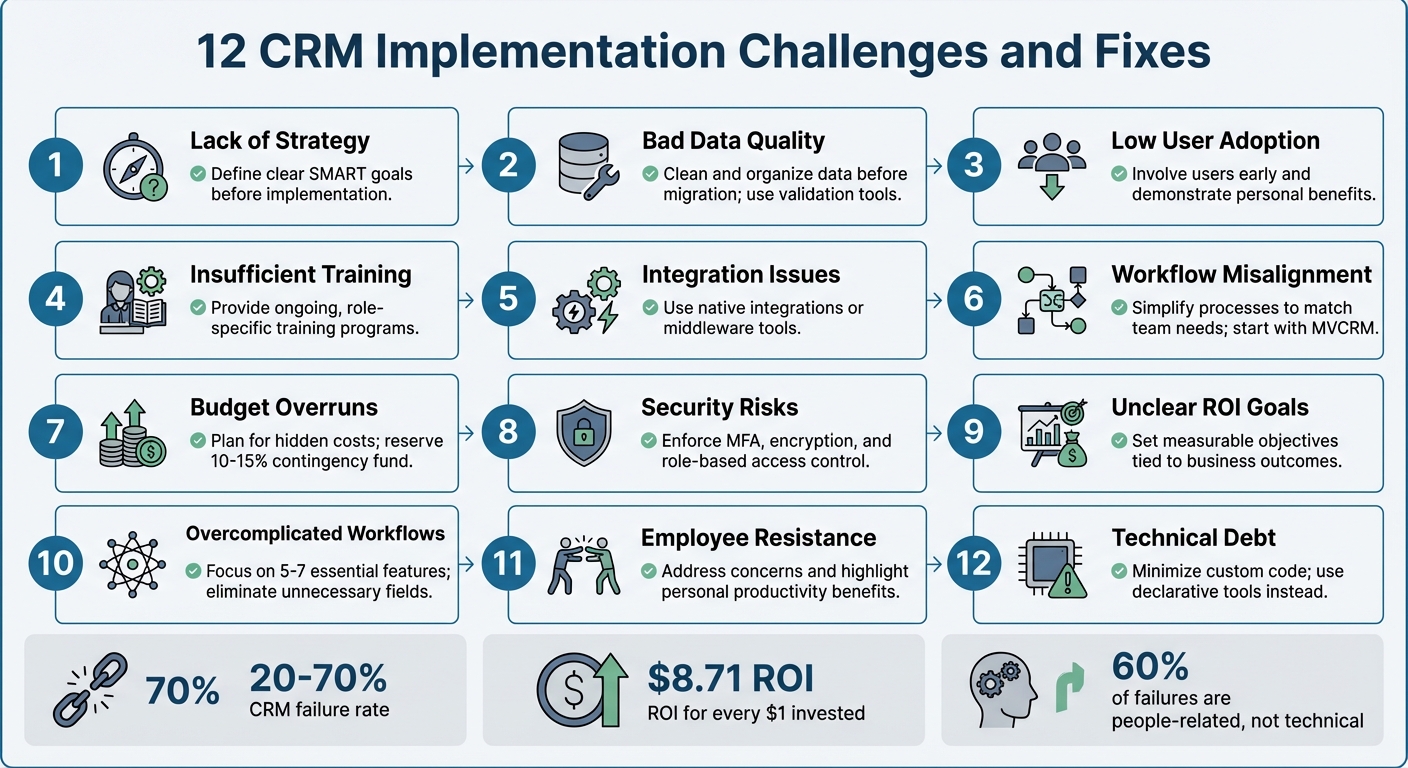
12 CRM Implementation Challenges and Fixes
March 14, 2026Implementing a CRM can transform how businesses manage customer relationships, but it often comes with challenges. From poor data quality to low user adoption, these hurdles can derail your project. The good news? Most issues are predictable and solvable. Here's a quick look at the 12 most common CRM implementation challenges and how to address them:
- Lack of Strategy: Define clear goals before implementation.
- Bad Data Quality: Clean and organize your data before migration.
- Low User Adoption: Involve users early and show how the CRM benefits them.
- Insufficient Training: Provide ongoing, role-specific training.
- Integration Issues: Use native integrations or middleware tools.
- Workflow Misalignment: Simplify processes to match team needs.
- Budget Overruns: Plan for hidden costs like training and data migration.
- Security Risks: Enforce strong security protocols like MFA and encryption.
- Unclear ROI Goals: Set measurable objectives tied to business outcomes.
- Overcomplicated Workflows: Focus on essential features and streamline processes.
- Employee Resistance: Address concerns and highlight personal benefits.
- Technical Debt: Minimize custom code to avoid costly maintenance.
12 Common CRM Implementation Challenges and Solutions
1. Missing CRM Strategy
Implementing CRM software without a clear roadmap is like trying to build a house without any blueprints. Many companies treat CRM as just another IT installation, rather than the transformative tool it can be for managing customer relationships. This mindset partly explains why nearly one in three CRM initiatives fail to deliver results, according to a 2023 Forrester report.
The issue often lies in focusing on the "what" before defining the "why." Without identifying specific problems the CRM should address - like reducing lead response time by 50% - the system risks becoming an underutilized database. A striking example is Vodafone's 2013 rollout of a new enterprise CRM and billing system. Due to poor planning, the initiative resulted in billing errors, incorrect pricing, and ultimately a £4.6 million fine from Ofcom.
A strong CRM strategy begins with setting SMART goals - objectives that are Specific, Measurable, Achievable, Relevant, and Time-bound. For instance, instead of vaguely aiming to "improve customer loyalty", set a concrete target like "increase customer retention by 10% within the next fiscal year". It's also critical to secure executive sponsorship, which signals that the CRM initiative is a business priority, not just another tech project. When leadership is disengaged, teams are left guessing at priorities, and departments often work toward conflicting goals.
"A CRM is more than software - it's a business philosophy. The most common failures of CRM projects stem from treating the implementation as a technology installation rather than a strategic change initiative."
- Twelverays Agency
The solution? Start small with a Minimum Viable CRM (MVCRM). Focus on essential processes, like lead management and pipeline tracking, before layering on additional features. TrekkSoft, a SaaS company, followed this approach in 2014 by adopting HubSpot CRM to streamline their marketing tools. Under Lucy Fuggle, their Head of Content Marketing, this targeted strategy led to a 376% increase in new leads, a 429% boost in organic traffic, and a 92% rise in marketing-qualified leads.
To avoid a "garbage in, garbage out" scenario, conduct a "why" audit, engage key stakeholders early, and establish clear data governance policies. With a solid strategy in place, the next step is ensuring high-quality data and a smooth migration process.
sbb-itb-cef5bf6
2. Bad Data Quality and Migration Problems
A CRM packed with duplicate, outdated, or incorrect data is like a ship with a leaky hull - it won’t get you very far. Here’s a startling fact: 91% of CRM data becomes unreliable within just one year, and almost half of all companies lose over 10% of their annual revenue because of poor data quality. When sales teams start doubting the accuracy of the data, trust in the system crumbles, and with it, the likelihood of successful CRM adoption.
Simple mistakes, like inconsistent formatting - think "USA" versus "United States" - can lead to typos and duplicate entries. On top of that, B2B data decays at an alarming rate of 30% to 70% annually due to factors like job changes and company rebranding. Migration introduces its own set of headaches: legacy data structures often don’t match up with the new CRM’s naming conventions, creating field-mapping issues that complicate the process.
So, how can these challenges be tackled? Careful migration planning is key. Take Tokara Solutions, for example. In June 2025, they successfully migrated a CRM for an aviation services company moving from a limited legacy system to a modern platform. Their approach included a detailed pre-migration audit, cleaning and consolidating data, creating customized field mappings, and running two full test migrations in a sandbox environment. The result? A seamless transition with 100% data migrated and zero downtime during the cutover.
"Your CRM must be the undisputed, single source of truth for all customer information. The moment your team starts questioning the data's accuracy, they'll stop trusting the system."
- AddToCRM
To address these issues, preparation must begin well before migration. Start with a pre-migration audit to identify duplicates and incomplete records. Use tools like Dedupe.io to eliminate duplicates and validate email and phone formats before importing. Replace free-text fields with dropdown menus to enforce uniformity, and set up automated validation rules to block duplicate entries at the point of capture. A phased migration strategy - testing smaller segments of data - can help catch and fix errors before they spread. Above all, ensure your data is clean before importing. Clean, reliable data is the backbone of a successful CRM, supporting the strategic goals discussed earlier.
3. Low User Adoption
After ensuring clean data and a smooth migration, the next big challenge is getting users to actually embrace the CRM. Even the most sophisticated system will fail if employees don’t use it. In fact, poor user adoption is the leading cause of CRM failures, responsible for 38% of cases. While 91% of companies with more than 10 employees have implemented CRM software, simply having the tool isn’t enough to guarantee success.
So, why do employees resist? Many see CRMs as tools for management to monitor performance rather than as resources to help them close deals faster. Add to this extra steps in their workflow and unreliable data, and it’s no surprise that some users revert to spreadsheets. Field teams, in particular, struggle with systems that lack mobile access, and inadequate training only deepens their frustration.
The fallout from low user adoption can be catastrophic. Take Avon, for example. In 2016, the beauty company abandoned a $125 million SAP-based CRM rollout after a Canadian pilot program. The system was so complicated that representatives quit, causing major disruptions and turning the investment into a complete loss. Similarly, Vodafone UK’s CRM migration in 2016 left 10,452 customers without proper credits. Complaints tripled, and the company faced a $6.2 million fine from Ofcom. Clearly, even with clean data and a strong strategy, user engagement is essential to avoid such costly failures.
How can companies tackle this? Start by involving end-users - sales reps, marketers, and support staff - early in the process. Including them in the selection phase fosters a sense of ownership and ensures the tool aligns with their day-to-day needs. Show employees how the CRM can make their lives easier, like reducing admin work or helping them hit commission goals. Appoint “CRM Champions” within each department to provide peer support and relay feedback to leadership. Simplify the system by hiding irrelevant modules and tailoring dashboards to specific roles.
"A CRM should be a secret weapon that saves time."
- Add to CRM Guide
When companies get user adoption right, the results can be game-changing: a 29% increase in sales, a 34% boost in productivity, and 42% more accurate forecasting. On average, every $1 invested in a well-adopted CRM delivers a return of $8.71. The secret lies in transforming the CRM from a data-entry chore into a productivity tool through automation, tailored training, and strong leadership support to establish it as the single source of truth.
4. Not Enough Training and Change Management
Weak training and poor change management can derail even the best CRM rollouts. According to Gartner, 50%–70% of CRM projects fail, and nearly 60% of these failures stem from people-related issues. A common mistake? Treating training as a one-time event instead of an ongoing, role-specific process.
The typical top-down approach often feels like a "compliance trap", where employees are told what to do without understanding how it benefits them. If users don’t see clear advantages - like closing deals faster, cutting down on admin work, or improving commission tracking - the CRM can come across as more of a monitoring tool than a helpful resource. This disconnect often leads teams back to their comfort zones: spreadsheets, personal email accounts, or other familiar tools, leaving the CRM underutilized.
Take Experian’s Salesforce rollout as an example. To address training gaps, Experian implemented Whatfix, a digital adoption platform that offers in-app, contextual guidance. The results were eye-opening: onboarding time shrank from six hours to just 40 minutes, support queries dropped by 55%, and first-year productivity soared by 72%. Lee Glenn, Global Digital Adoption and Training Specialist at Experian, shared, "Our traditional LMS courses couldn't keep pace with the scale and speed of change… Building Flows and in-app guidance with Whatfix is easy".
The right approach involves continuous, tailored training. For example, sales reps need hands-on practice with daily deal management, while managers benefit from training in reporting and analytics. Instead of marathon workshops, try bite-sized microlearning sessions - 5 to 10 minutes each - that focus on specific tasks. Pair this with peer support within teams to keep the momentum going. Don’t underestimate the power of executive sponsorship, either; projects with strong leadership backing are 73% more likely to succeed.
Investing in ongoing training and support can lead to a 40% higher ROI on CRM initiatives. Treat training as a strategic priority, not just a technical formality. Use real company data during practice sessions, create feedback loops to address user challenges, and link CRM usage to performance metrics and compensation plans. This ensures the CRM becomes a tool employees rely on, not avoid. Remember, up to 70% of CRM success hinges on effective training and implementation - not just the software itself.
With a solid training framework in place, the next step is ensuring your CRM integrates smoothly with existing systems.
5. Integration Problems with Current Systems
Adding a new CRM to your existing tech stack might seem simple in theory, but the reality often tells a different story. A striking 63% of organizations face challenges like data synchronization issues, system compatibility problems, or even staff resistance during the integration process. The root cause? Many businesses rely on a mix of tools - marketing automation platforms, accounting software, support systems, and outdated databases - that don’t naturally work together.
One of the most glaring issues is data silos. For example, your sales team might use one platform to track customer interactions, while your support team relies on another. This disconnect prevents a unified view of the customer. In fact, 52% of companies struggle to share customer data effectively across departments because of these isolated systems. The result? Confusion and inefficiency. A sales rep might label a lead as "Active", while the support team sees the same account marked as "Canceled", leading to duplicate or conflicting outreach efforts. These visible issues often hint at deeper technical hurdles.
Legacy systems add another layer of complexity. Many older platforms lack modern APIs or rely on outdated protocols, making it difficult to sync with cloud-based CRMs. Even when APIs are available, mismatched formats - like differences in phone number or date formatting - can disrupt automated workflows. It’s no surprise that 72% of CRM migrations experience failures in at least one critical integration, such as email sync or accounting software connections.
These technical obstacles come with a hefty price tag. Poor data quality, often exacerbated by integration issues, causes 44% of businesses to lose 10% of their annual revenue. But when integration is done right, the rewards are clear: a well-integrated CRM can increase business productivity by up to 30%. To achieve this, prioritize native integrations whenever possible. Native connectors, supported directly by vendors, are more reliable and easier to maintain. If native options aren’t available, middleware platforms like Workato or Make can help bridge the gaps.
Before diving into CRM integration, it’s crucial to map out your data flows visually. Determine which system will act as the "source of truth" for different types of data - your CRM might handle customer contact details, while your ERP system manages order history. Start with trial migrations using a sample of 1,000–5,000 records to catch any mapping errors early. For the final migration, schedule the cutover during off-hours, such as Friday evening through early Sunday morning, to minimize disruption. And always have a rollback plan ready in case something goes wrong. It’s worth noting that phased migrations boast a 98% success rate, compared to just 87% for "Big Bang" approaches.
Addressing these integration challenges is essential for creating a unified CRM system that aligns with your broader business goals. By taking the right steps, you’ll set the stage for smoother operations and better outcomes.
6. Workflow Misalignment and Customization Problems
A CRM, no matter how capable, can fall short if its workflows don’t align with how your team actually operates. Nearly half of CRM implementations fail, mostly because of poor user adoption caused by unclear processes and unnecessary complexity. This often stems from viewing CRM setup as a purely technical IT project instead of a strategic business transformation. When this happens, the real-world sales methods your team relies on every day are overlooked.
How can you tell if workflows are misaligned? One clear sign is when sales reps stick to using spreadsheets or notebooks instead of the CRM. These "shadow systems" highlight a disconnect between the CRM and your team’s actual needs. Another major indicator: 52% of sales leaders say their CRM ends up costing them opportunities instead of creating them. The culprit? Over-complicated processes that turn skilled salespeople into data-entry machines, bogging them down with unnecessary steps.
"The software doesn't create process clarity; it reflects whatever workflows are built into it." - Axis Consulting
Trying to make a CRM do everything for everyone often leads to scope creep, where businesses overload the system with features to address every possible scenario. This creates technical debt, making future updates difficult and frustrating. In fact, 33% of businesses report major issues with CRM customization alone. To avoid this, workflows need to reflect real-world practices, ensuring the CRM drives revenue instead of becoming a burden.
The solution? Start with a Minimum Viable CRM (MVCRM). Focus on the core processes that directly impact revenue, like lead management and pipeline tracking. Keep it simple by limiting your sales pipeline to 5–7 essential stages. Involve team members from different departments early in the planning process to ensure the CRM addresses their actual challenges. This approach not only simplifies workflows but also aligns the CRM with broader business goals.
Rather than rolling out the CRM all at once, take a phased approach. Start with one motivated team, refine workflows based on their real-world feedback, and then expand. Before configuring any software, map out your customer journey and internal processes on paper. Every new CRM field or feature should solve a widespread issue or improve efficiency - not add unnecessary complexity.
"Customization should only be used to remove friction from a core workflow, never to add complexity for an edge case." - Add to CRM
7. Budget Overruns and Cost Management Issues
Managing hidden CRM costs is critical to the success of any project, especially since CRM initiatives often exceed budgets by 25%-40% due to unforeseen expenses. It's not just about the monthly subscription fee - it's the additional costs that sneak in. For example, a medium-sized company with 300 users could end up spending $1.08 million annually on an enterprise CRM once all related expenses are included.
While software licenses grab most of the attention, the real budget-eaters are data migration, integrations, training, and downtime. Data migration alone can cost anywhere from $1,000 for simple transfers to $40,000 for more complex projects involving multiple sources. On top of that, custom integrations, staff training, productivity dips during the transition, and ongoing maintenance can significantly inflate costs. In fact, long-term expenses are often dominated by maintenance. A common rule of thumb? For every $1 spent on the CRM subscription, expect to spend another $1 on implementation.
DIY implementations can be particularly risky, often leading to delays and expensive rework caused by misconfigurations. Add in scope creep - where every "nice-to-have" feature and custom field adds complexity - and costs can spiral out of control. Staying disciplined with your budget is key to maintaining the strategic focus established early on.
"Limit add-ons to essentials that enhance productivity." - Adobe
To stay within budget, consider these strategies:
- Reserve 10%-15% of your budget as a contingency fund for unexpected issues.
- Clean your data before migration to avoid costly fixes later.
- Start with a Minimum Viable CRM that focuses on core functionalities like lead management and pipeline tracking. You can expand later based on actual user feedback.
- Limit initial implementation phases to 90 days to avoid scope creep and keep momentum.
- Opt for native integrations over custom development to save on both upfront and ongoing maintenance costs.
The table below highlights key cost categories and practical ways to manage them:
| Cost Category | Estimated Range (10 Users) | Cost-Saving Strategy |
|---|---|---|
| Annual Subscription | $1,500 – $36,000 | Choose plans with essential features; skip unnecessary add-ons. |
| Setup & Migration | $1,800 – $10,000 | Use vendors offering free migration or automated tools. |
| Training | Varies | Rely on in-app guidance and free vendor tutorials. |
| Reduced Productivity | $3,000 – $12,000 | Roll out in phases to minimize disruptions. |
| Additional Integrations | $0 – $18,000 | Focus on native integrations instead of custom APIs. |
8. Security and Compliance Problems
Security issues and compliance gaps can leave your CRM vulnerable to serious risks. Consider this: 83% of organizations have faced at least one data breach, with the global average cost of a breach now exceeding $4.4 million. Weak or stolen passwords contribute to over 80% of data breaches, while 60% are linked to unpatched software vulnerabilities. These numbers emphasize the critical need for strong security protocols in CRM systems.
On the compliance side, regulations such as GDPR, CCPA, and HIPAA come with steep penalties for violations. For instance, GDPR fines can reach up to 4% of global annual revenue, and FINRA has imposed more than $88 million in fines for recordkeeping violations in recent years. Upcoming changes to the CCPA in 2026 will require compliance with Global Privacy Control (GPC) signals and mandate pre-use notices for AI-driven decision-making. Healthcare organizations must ensure they have Business Associate Agreements (BAAs) in place, while financial services need thorough audit trails for client communications. With regulatory fines increasing, addressing security vulnerabilities is no longer optional - it’s essential.
From a technical standpoint, CRM systems face risks like insufficient encryption for data at rest and in transit, lack of Multi-Factor Authentication (MFA), excessive user permissions, and vulnerabilities in third-party integrations. Insider threats - where employees or contractors misuse their access - are another growing concern.
To strengthen defenses, enforcing MFA and using Role-Based Access Control (RBAC) can help limit data access. Look for CRM providers that offer AES-256 encryption for stored data and SSL/TLS protocols for data in transit. Automated security patches are also vital to address risks from unpatched software. Additionally, AI-driven threat detection can significantly lower breach costs, with a median reduction of $2.44 million.
Here’s a quick look at some common security risks and how to mitigate them:
| Security Risk | Cause | Mitigation Strategy |
|---|---|---|
| Unauthorized Access | Weak passwords / Lack of MFA | Enforce MFA and strong password policies |
| Data Interception | Inadequate encryption | Use AES-256 encryption and SSL/TLS protocols |
| Compliance Fines | Non-compliance with regulations | Conduct regular compliance audits and data mapping |
| Insider Misuse | Excessive user permissions | Implement Role-Based Access Control (RBAC) |
| System Exploitation | Unpatched software vulnerabilities | Enable automatic updates and security patches |
9. Unclear Goals and ROI Tracking
Without clear objectives, CRM projects often fall short. Nearly half of CRM implementations struggle due to undefined strategies and mismatched goals, with 48% of decision-makers stating their CRM fails to meet their needs. Geoffrey Hodgson, Marketing Manager at Tokara Solutions, highlights this issue:
"One of the biggest reasons CRM projects fail is the absence of well-defined goals. Many businesses rush into CRM adoption without a clear vision... assuming the technology alone will resolve inefficiencies."
Defining clear goals not only provides direction but also lays the groundwork for tracking ROI and driving ongoing improvements.
The financial stakes are hard to ignore. On average, every $1 invested in CRM delivers $8.71 in returns. Yet, 52% of sales leaders report that their CRM systems end up costing them opportunities instead. The key difference between success and failure often lies in setting specific, measurable targets. For example, instead of vague aspirations like "improve customer service", effective CRM strategies aim for tangible outcomes, such as reducing lead response time by 40% or boosting pipeline value by 25%. Clear ROI tracking turns CRM from a cost center into a powerful business tool.
"CRM ROI can be one of the highest-leverage investments a company makes - but only when it's measured with the same discipline applied to any other strategic investment." – Optrua
To get started, organize goal-setting workshops with leadership and department heads before selecting your CRM platform. Capture baseline metrics like current lead conversion rates, customer acquisition cost (CAC), sales cycle length, and churn rates to create a foundation for measuring progress. Monitor user adoption closely, as it serves as a critical indicator of success. Keep in mind, ROI isn’t instant - initial improvements often appear within 3–9 months, while full returns might take 12–24 months.
Incorporate CRM metrics into regular performance reviews and team meetings to emphasize its importance. For example, calculate productivity gains by tracking time saved on administrative tasks. If each sales rep saves three hours per week, multiplying that by their hourly rate provides a clear picture of annual financial benefits. Setting specific goals, such as cutting lead response times by 40%, not only provides measurable benchmarks but also integrates CRM usage into daily operations, turning it into a vital business asset. Clear, measurable targets are essential for unlocking the full potential of CRM solutions.
10. Too Many Complex Workflows
One common obstacle in CRM adoption is overly complicated workflows. If logging a call or creating a lead involves endless clicks, tabs, and mandatory fields, productivity takes a hit. Sales reps often find themselves bogged down in data entry instead of focusing on selling. In fact, 23% of users cite manual data entry as their biggest frustration with CRM systems.
"More fields, more steps, more approvals. It might seem like better tracking, but it's building friction into your system. Overengineering CRM workflows often backfires." – Axis Consulting
The repercussions of such complexity are clear. Teams may start avoiding the CRM altogether, updating it inconsistently or using only a fraction of its features. Many revert to simpler tools like spreadsheets and notebooks because the system feels more like a hurdle than a help. Nearly half of CRM implementations fail due to poor user adoption driven by unnecessary complexity. Even more telling, 90% of businesses don't utilize all the features their CRM offers, often because the system is over-engineered.
The solution? Adopt a Minimum Viable CRM (MVCRM) approach. Focus on the core processes that directly impact revenue, such as lead management and pipeline tracking. Cut out the "nice-to-haves" that clutter the system. Keep your sales pipeline simple with just 5–7 essential stages to maintain clarity and efficiency. Leverage intelligent conditional logic to streamline workflows, reduce manual inputs, and minimize clicks. Annual audits can help identify and remove unused modules, redundant fields, and other unnecessary features that add complexity.
Before introducing any custom field or workflow, ask yourself: does this change benefit the majority of users, or is it solving a rare issue? A CRM should save time, not waste it. Simplifying workflows not only boosts user adoption but also reinforces the CRM's value as a critical business tool. A streamlined system ensures your CRM works for your team - not the other way around.
11. Employee Resistance to Change
For a CRM system to succeed, your team has to embrace it. Resistance often comes from fear of the unknown, concerns about losing control, or the belief that a new system will add to their workload instead of reducing it. Many employees view CRMs as tools for monitoring rather than productivity, which can stall adoption. Interestingly, over 60% of CRM failures are tied to "people" issues like poor change management, while technical problems are rarely the main cause. This challenge ties closely to issues like low user adoption and inadequate training.
The reasons behind resistance are easy to understand. A CRM can reveal performance gaps, leaving some employees feeling exposed or less indispensable, especially if they previously controlled key customer data. Others may see the system as a time sink - CRM adoption can significantly increase data entry tasks, making it feel like busywork. If the CRM is presented as a tool for management oversight rather than something that helps employees meet their goals, the "What's In It For Me?" question remains unanswered, and resistance solidifies.
"Resistance isn't a technical flaw, it's a human one. It stems from fear of the unknown, perceived complexity, and a lack of clarity on personal benefit." – ArionERP
To tackle this resistance, you need to align the CRM's features with the specific needs of your team. For example, show sales reps how the CRM can help them close deals faster or reduce time spent on repetitive tasks. Involve key team members from different departments early in the planning process so they can shape workflows that solve their pain points. Designate internal champions - team members who can mentor their peers and provide frontline support. Leadership also plays a critical role; when management actively uses the CRM, it sets an example for the rest of the team.
Beyond addressing personal value, tailor training to individual roles. Show each user how the CRM can make their daily tasks easier. Use automation tools to simplify processes, like one-click data capture from emails or social platforms, turning the CRM into a productivity booster instead of a time-consuming task. Companies that actively manage change during CRM rollouts are six times more likely to see successful implementation and improved results. When employees view the CRM as a tool that supports their work rather than burdens it, resistance naturally fades away.
12. Technical Debt from Custom Code
Custom code can seem like a quick solution during CRM implementation, but it often comes with hidden costs. Technical debt is the term used to describe the accumulation of shortcuts and outdated code that bogs down your system and complicates future updates. Alarmingly, 60% to 75% of custom CRM code turns into technical debt within just two years. What starts as a tailored solution frequently morphs into "spaghetti code" - disorganized scripts that make debugging and updates a nightmare.
The upkeep required for custom code is no small task. On average, maintaining custom Salesforce setups demands 1,200 developer hours annually, which is 2.5 times more than standard configurations. Even then, only 25% of custom Apex code lasts three years without needing a significant rewrite. With platforms like Salesforce and HubSpot releasing three major updates each year, custom code must be rigorously tested and often rebuilt to keep functioning. This creates what’s known as "innovation drag", where IT teams spend the bulk of their time fixing outdated integrations instead of focusing on new AI tools or revenue-generating features. To keep costs and complications in check, reducing custom code is essential.
"Technical debt - the accumulated cost of shortcuts, outdated code, and deferred refactoring - is the single largest hidden cost of CRM customization." – Vantage Point
The financial toll is hard to ignore. Custom CRM setups come with a 40% to 60% higher total cost of ownership over three years compared to marketplace solutions. The risks are also greater - organizations with heavily customized systems experience a 28% upgrade failure rate, compared to just 4% for those using pre-built apps. For industries like healthcare and finance, the stakes are even higher. The "compliance tax" makes validation costs 2.4 times higher for custom code versus pre-certified solutions.
These numbers highlight the importance of limiting custom code. Just like integration and data quality problems, unchecked customization can derail your CRM’s effectiveness. To avoid this, adopt a "Buy First, Build Surgically" strategy. Use custom development sparingly, focusing on areas that offer a genuine competitive edge - ideally no more than 10% of your CRM’s functionality. Whenever possible, rely on declarative tools like Salesforce Flow or HubSpot Workflows instead of custom scripts.
To further minimize technical debt, follow best practices:
- Use sandboxes for testing changes.
- Conduct quarterly audits with tools like Salesforce Optimizer to find outdated code or unused fields.
- Establish clear naming conventions and centralize logic to avoid duplicate automations that lead to conflicts.
When custom code is unavoidable, ensure it’s well-structured and thoroughly documented. A shortcut today can easily turn into a costly headache down the line.
Comparison Table
Here’s a breakdown of some common CRM challenges, their ripple effects on businesses, and practical ways to tackle them. As emphasized earlier, issues like data quality, integration, and security play a major role in determining the success of any CRM implementation. These tables provide a quick reference to the problems and their resolutions.
Data Quality and Migration Challenges
| Challenge | Business Impact | Solution |
|---|---|---|
| Bad Data Quality | 10% annual revenue loss; 20-30% drop in productivity; inaccurate reports and failed sales forecasts. | Use automated data capture and enrichment tools; enforce strict data governance policies. |
| Migration Problems | Data silos, missing customer history, downtime, frustrated teams, and reliance on spreadsheets. | Perform a pre-migration audit; adopt a phased migration strategy; keep verified backups. |
| Duplicate Records | Fragmented customer views; wasted marketing budgets; sales teams contacting the same lead repeatedly. | Deploy real-time duplicate detection tools; create processes for merging duplicate records. |
Integration and System Connectivity Issues
| Challenge | Business Impact | Solution |
|---|---|---|
| Integration Problems | 52% of sales leaders believe CRM creates missed opportunities; leads to data silos and manual workarounds. | Focus on native connectors; utilize middleware (iPaaS) to bridge gaps; adopt an API-first approach. |
Security and Compliance Risks
| Security/Compliance Problem | Business Impact | Solution |
|---|---|---|
| Unauthorized Access | Data breaches, financial losses, and damage to reputation. | Use Multi-Factor Authentication (MFA) and Role-Based Access Control (RBAC). |
| Regulatory Non-compliance | Legal penalties (e.g., GDPR/CCPA fines) and operational disruptions. | Implement end-to-end encryption; schedule regular automated compliance audits. |
| AI-Driven Phishing | Stolen credentials and fraudulent communications. | Utilize AI-based monitoring systems; provide ongoing user security awareness training. |
| Shadow IT / Unvetted Plugins | Vulnerabilities from unapproved tools and integrations. | Enforce strict vetting for third-party plugins and API usage. |
| Insider Threats | Internal data leaks and unauthorized changes. | Apply Zero Trust principles; monitor user behavior continuously. |
The numbers are striking: poor data quality alone causes 44% of companies to lose 10% of their annual revenue, while over half of sales leaders feel CRM systems hinder opportunities. These statistics underline the importance of addressing these challenges head-on to protect both the bottom line and operational efficiency.
Conclusion
Looking back at the 12 challenges outlined, implementing a CRM system can be a game-changer if done right. Despite failure rates hovering between 20% and 70%, the key to success lies in viewing CRM as a strategic transformation for your business - not just another software installation.
To keep your project on track, start by addressing potential hurdles early. For example, clean your data before migration, involve end-users from the beginning, and set SMART goals directly tied to revenue outcomes. It's worth noting that about 60% of CRM failures stem from people-related issues rather than technical problems, highlighting the importance of change management and proper training. When done well, the rewards are impressive: companies can see a 29% boost in sales performance and an ROI of up to $8.71 for every $1 spent. Organizations that provide ongoing support even report a 40% higher ROI.
A phased deployment strategy can also make a big difference. Start with a Minimum Viable CRM, secure executive buy-in, and focus on delivering quick wins. This approach not only showcases value early but also sets the stage for long-term growth while avoiding the pitfalls of technical debt that can complicate future updates. Ultimately, your CRM should feel like a powerful ally - saving time and streamlining operations, not creating extra work.
FAQs
What should a CRM strategy include before implementation starts?
A successful CRM strategy hinges on a few key elements: clear goals, accurate data, team involvement, and a well-thought-out implementation plan. Begin by aligning your CRM goals with your overall business objectives - this ensures that the strategy directly supports your company's growth.
Next, prioritize clean, reliable data. Without accurate information, even the best CRM tools won't deliver meaningful results. Equally important is getting your team on board early. Involving them from the start not only fosters buy-in but also helps ensure smoother adoption when the system goes live.
Roll out the implementation in phases to make the transition manageable. Provide training that focuses on real-world, practical use so your team can see the immediate benefits. Lastly, track results from day one to measure progress and identify areas for improvement.
How do I know my data is ready to migrate into a new CRM?
Before migrating your data to a new CRM, it's crucial to make sure it’s in top shape. Start by checking for accuracy, consistency, and proper formatting. Eliminate duplicates, fix any inconsistencies, and validate the data thoroughly to sidestep potential migration problems. Also, ensure the data is structured to meet the new CRM's requirements. Taking these steps can help minimize errors and prevent data loss during the migration process.
How can I increase CRM adoption without adding extra work for my team?
To encourage CRM adoption without piling on extra tasks, make it a natural part of existing workflows. Adjust the system to fit smoothly into current processes, ensuring it feels like a tool that simplifies work rather than complicates it. Provide concise, focused training sessions that emphasize quick, practical benefits. Foster a mindset that values accurate data entry, and clearly show how the CRM improves both personal efficiency and team results. This approach can inspire users to embrace the system without feeling overwhelmed.