
Breadcrumb Schema Markup: Setup Guide
April 25, 2026Breadcrumb schema markup helps search engines understand your website's structure and improves user navigation. It displays clean, clickable navigation paths (e.g., "Home > Category > Product") in search results, replacing long URLs. This can boost click-through rates by 20-30%, improve internal linking, and help search engines crawl your site more efficiently.
Here’s what you need to know:
- What it is: Structured data defining your site’s hierarchy using the
BreadcrumbListschema. - Why it matters: Enhances search result appearance, improves SEO, and strengthens internal linking.
- How to implement: Add JSON-LD code to your site, specifying breadcrumb steps with
position,name, anditemproperties. - Testing: Use tools like Google Rich Results Test and Search Console to validate and monitor your schema.
Breadcrumb schema is easy to set up and delivers measurable SEO benefits, making it a must-have for your website.
Core Elements of Breadcrumb Schema Markup
Required Properties in JSON-LD Format
Breadcrumb schema relies on six key properties to function correctly. To start, set @context to https://schema.org - this defines the vocabulary for your markup. Use the @type property to specify BreadcrumbList for the container and ListItem for each breadcrumb step.
The itemListElement property is an array containing at least two ListItem objects, each representing a step in the navigation trail. Each ListItem requires three main fields:
position: An integer indicating the breadcrumb's order in the trail.name: The visible text label for the breadcrumb.item: The absolute URL of the page. This field is required for all steps except the final breadcrumb, which represents the current page.
| Property | Required | Description |
|---|---|---|
@context |
Yes | Must be https://schema.org. |
@type |
Yes | Use BreadcrumbList for the container and ListItem for breadcrumb steps. |
itemListElement |
Yes | An array of breadcrumb items. |
position |
Yes | An integer starting at 1, showing the breadcrumb's place in the hierarchy. |
name |
Yes | The text displayed to users for the breadcrumb. |
item |
Partial | The absolute URL of the page; optional for the final breadcrumb. |
Always use absolute URLs, like https://example.com/category, instead of relative paths. Ensure that the name property matches the visible breadcrumb text exactly - any mismatch could trigger validation warnings in Google Search Console.
Finally, confirm that the breadcrumb positions align with the visual navigation trail on your site.
Understanding Sequential Positioning
Accurate sequential positioning is essential for your breadcrumb schema to validate properly. The position property indicates the order of breadcrumbs, starting at 1 and incrementing by one for each subsequent step. Errors like starting at 0 or skipping numbers (e.g., 1, 3, 4) can cause parsing issues.
"Position 1 signifies the beginning of the trail." - Google Search Central
If the positions in your schema don't match the visual breadcrumb trail, search engines may struggle to interpret your site's structure. This mismatch could prevent your breadcrumbs from appearing as rich results, potentially impacting your site's visibility.
sbb-itb-cef5bf6
How to Implement Breadcrumb Schema Markup
Adding JSON-LD to Your Website
To add breadcrumb schema, you can insert a <script type="application/ld+json"> block directly into your HTML. Ideally, place this script in the <head> section of your page to ensure search engines can access it immediately. Alternatively, you could position it just after the opening <body> tag or before the closing </body> tag.
"For maximum reliability, add the JSON-LD as a static script block in the HTML <head> so it is available immediately without rendering." - SchemaValidator.org
It’s crucial to keep the markup identical across both desktop and mobile versions of your site. This consistency helps avoid validation errors.
Here’s an example of a complete JSON-LD breadcrumb schema for a three-level navigation trail.
JSON-LD Breadcrumb Code Example
This sample schema represents a navigation path: Home > Category > Product.
<script type="application/ld+json"> { "@context": "https://schema.org", "@type": "BreadcrumbList", "itemListElement": [ { "@type": "ListItem", "position": 1, "name": "Home", "item": "https://example.com" }, { "@type": "ListItem", "position": 2, "name": "Running Shoes", "item": "https://example.com/running-shoes" }, { "@type": "ListItem", "position": 3, "name": "Trail Runners" } ] } </script> Notice that the final ListItem omits the item URL because it represents the current page. Ensuring consistent URLs throughout your markup is essential for proper functionality.
Once the schema is in place, the next step is to test its accuracy.
Testing Your Implementation
After adding the JSON-LD markup, validate your code using tools like the Google Rich Results Test. This will help you catch any syntax issues and confirm whether your page is eligible for rich snippets. After publishing the changes, use the URL Inspection tool in Google Search Console to check how Google processes the markup. Make sure the schema isn’t blocked by robots.txt or noindex tags.
Additionally, monitor the Breadcrumbs report in Google Search Console for potential errors. If you encounter issues, fix them promptly and request a reindexing through Search Console. For example, one case study highlighted that restoring breadcrumb schema after accidental removal helped recover organic click-through rates from 4.1% to 7% in just three weeks.
How to Create Breadcrumbs in Google with JSON-LD Markup
Other Breadcrumb Schema Formats: Microdata and RDFa
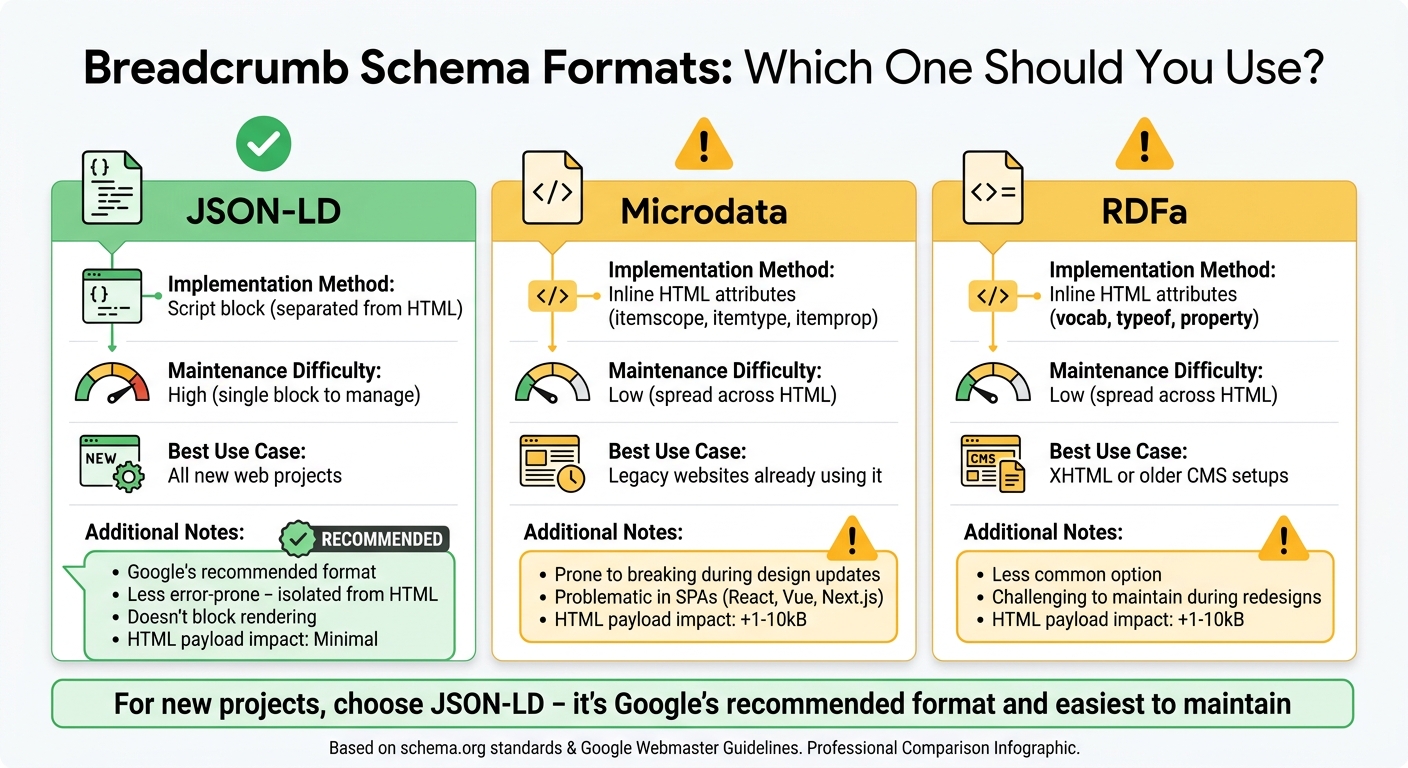
Breadcrumb Schema Formats Comparison: JSON-LD vs Microdata vs RDFa
While this guide primarily focuses on using JSON-LD for breadcrumb schema markup, there are other formats worth noting.
Using Microdata for Breadcrumbs
Microdata embeds structured data directly into HTML using attributes like itemscope, itemtype, and itemprop. Instead of relying on a separate script block, you annotate the breadcrumb navigation elements within your page's HTML. For instance, you would apply itemscope and itemtype="https://schema.org/BreadcrumbList" to your <ol> or <ul> tag. Each link would then be labeled with itemprop="item", and the text wrapped in a <span> with itemprop="name".
While Google supports this format, Microdata's integration into HTML makes it prone to issues during design updates. Any change to your site's navigation layout could break the structured data - especially in single-page applications (SPAs) like those built with React, Vue, or Next.js.
RDFa: A Less Common Option
RDFa (Resource Description Framework in Attributes) works in a similar way to Microdata but uses attributes like vocab, typeof, and property. It extends HTML5 and is often found in XHTML or older CMS environments. To implement, you would use typeof="BreadcrumbList" on the container and property="itemListElement" for each breadcrumb item.
However, like Microdata, RDFa's inline nature makes it challenging to maintain during site redesigns. In systems where RDFa is already hardcoded and functioning properly, the effort to migrate to another format might not be worth it.
Why JSON-LD is the Recommended Format
Compared to Microdata and RDFa, JSON-LD is much easier to work with. Google explicitly recommends it because it keeps structured data separate from your HTML, reducing the risk of errors during updates.
"JSON-LD is less error-prone because it is isolated from HTML." - SchemaValidator.org
For new projects, JSON-LD is the best option. It doesn’t block rendering, handles nested entities smoothly, and can be set up in just minutes using templates. Additionally, using Microdata or RDFa can unnecessarily inflate your HTML payload by 1–10kB on pages with dense attributes.
| Format | Implementation | Maintenance | Best Use Case |
|---|---|---|---|
| JSON-LD | Script block (separated) | High (single block) | All new web projects |
| Microdata | Inline HTML attributes | Low (spread across HTML) | Legacy websites |
| RDFa | Inline HTML attributes | Low (spread across HTML) | XHTML or older CMS setups |
Conclusion
Key Takeaways
Breadcrumb schema markup is one of the simplest ways to improve your website's performance. By replacing long, cluttered URLs with clean, easy-to-follow navigation paths in search results, you can make your listings 20–30% more appealing to users. This structured data not only helps search engines understand your site's structure but also distributes link equity to parent pages and ensures deeper content is crawled and indexed properly.
Real-world examples show that reinstating breadcrumb schema can significantly boost click-through rates (CTR), proving its direct impact on organic traffic.
"Think of it like plumbing - nobody sees it, but everything breaks when it's not there." - Search Engine Land
Even though Google removed breadcrumb trails from mobile search results in January 2025, the underlying structured data is still critical. It helps convey site hierarchy and supports advanced AI-driven search features. Large Language Models also rely on these "chains" to understand content relationships and provide better answers.
With all these benefits, it’s clear that implementing and maintaining breadcrumb schema is worth your time.
Next Steps for Schema Markup
To keep your structured data in top shape, start by monitoring your breadcrumb schema through Google Search Console under "Enhancements > Breadcrumbs." This will help you spot and fix errors early. Tools like the Rich Results Test and Schema Markup Validator are also handy for verifying compliance after site updates.
Once your breadcrumb schema is optimized, consider broadening your structured data efforts. For instance:
- Organization schema: Strengthen your brand presence.
- Product schema: Enhance e-commerce listings with rich details.
- Article schema: Improve visibility for blog posts.
"By using standard schema markup to structure your data today, you're making your content easier for these systems [AI and voice search] to interpret now and into the future." - Search Engine Land
FAQs
Do breadcrumbs still help SEO after Google removed them on mobile?
Absolutely, breadcrumbs still play a role in SEO, even though Google no longer displays them on mobile. When you use structured data like the BreadcrumbList schema, breadcrumbs continue to provide hierarchy information to search engines.
This helps improve how your content is displayed in search results and can even boost your click-through rates. Well-structured breadcrumbs are an effective way to organize your site’s content and support your overall SEO strategy.
How do I add breadcrumb schema on a JavaScript/SPA site?
To include breadcrumb schema on a JavaScript or SPA site, make sure the structured data is server-rendered and part of the initial HTML response. Avoid relying on JavaScript to inject it after the page loads, as this can cause issues with search engines like Google during the initial crawl.
A practical approach is to use a function, such as defineBreadcrumb(), to create the JSON-LD markup. Then, embed it directly into the HTML using a <script type="application/ld+json"> tag. Frameworks like Next.js simplify this process by supporting server-side rendering, ensuring Googlebot can access the data right away.
How long until Google shows my breadcrumbs after I add schema?
Google usually shows your breadcrumbs a few days after you add the schema markup. However, the timing can differ based on how frequently Google crawls your site and processes the updates.