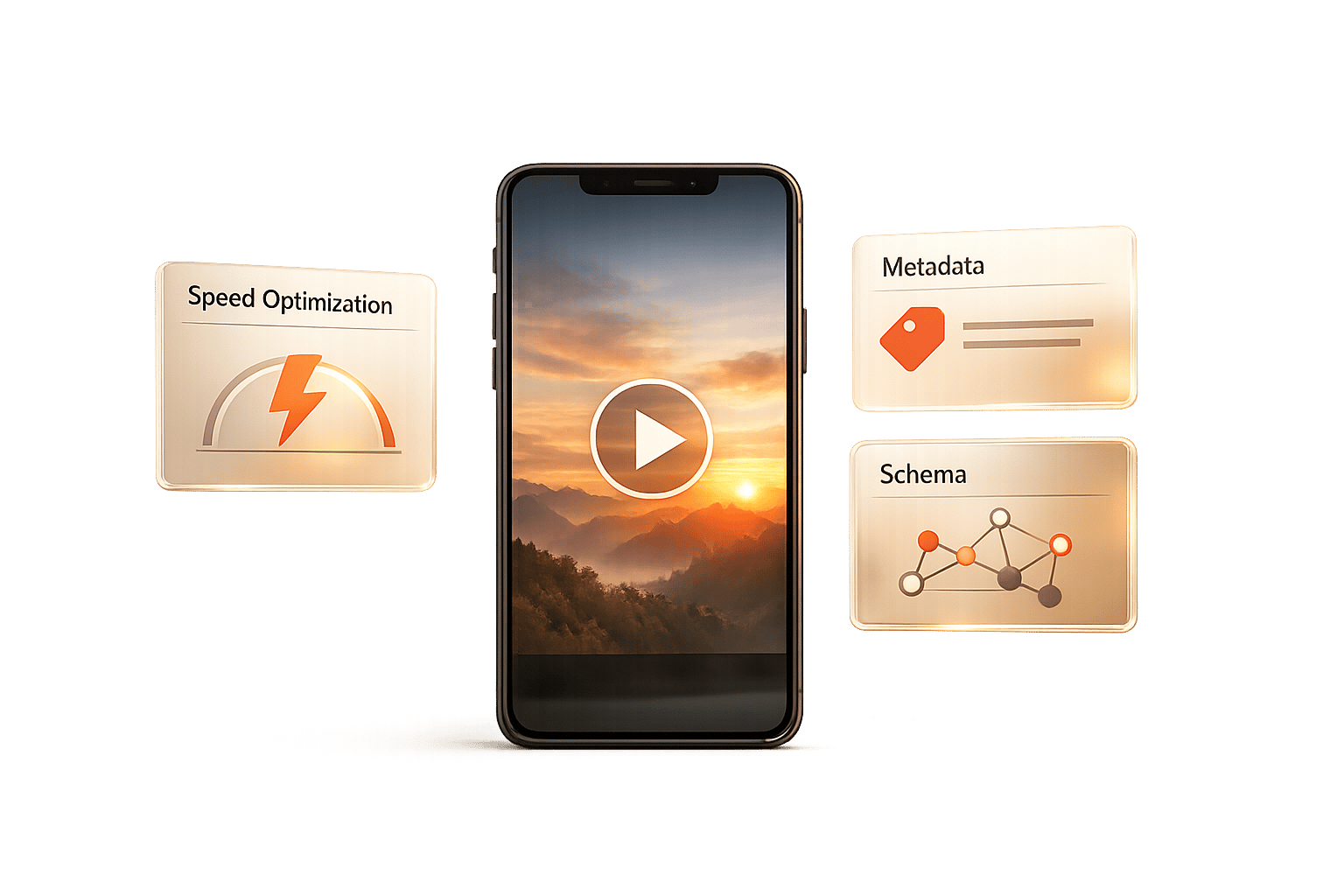
Ultimate Guide to Mobile Video SEO
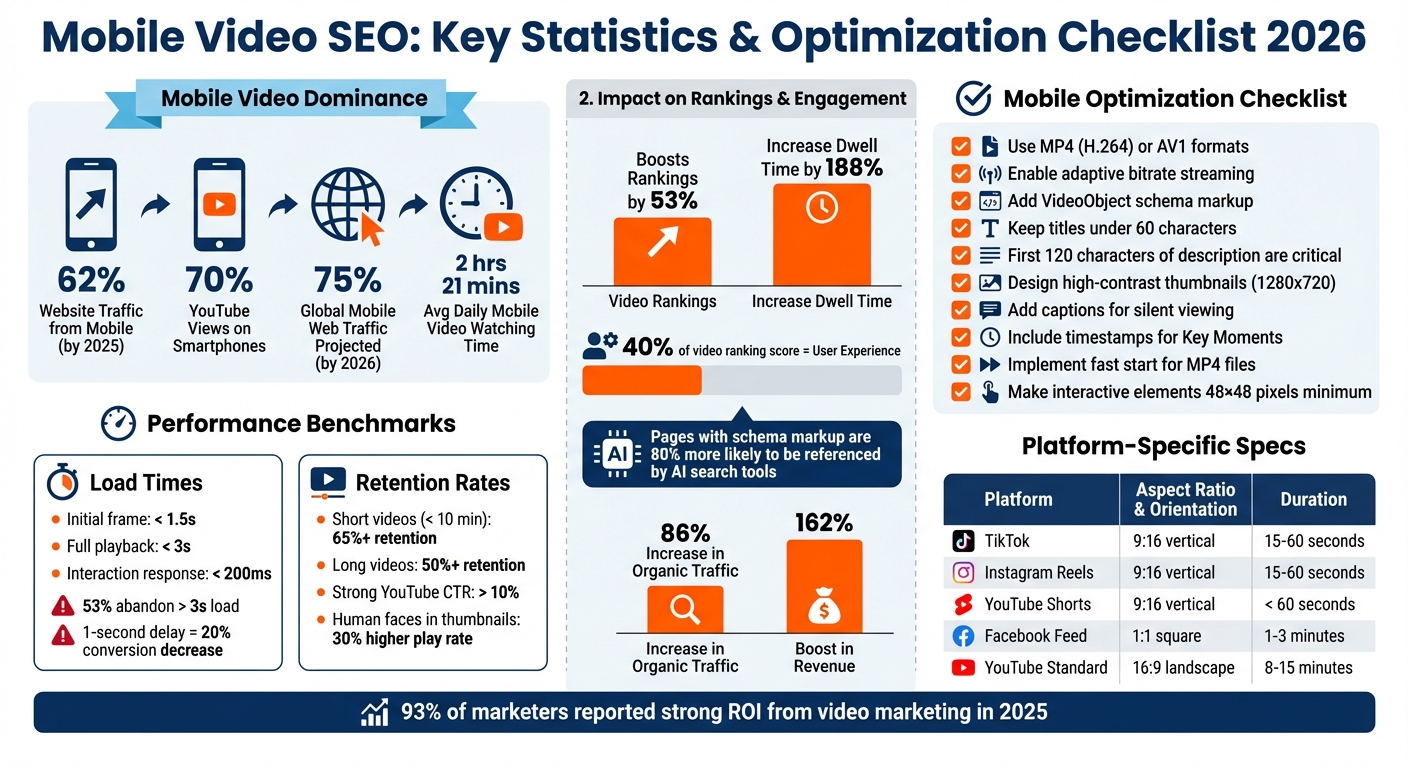
February 17, 2026If your videos aren’t optimized for mobile, you’re losing out on a massive audience. By 2025, 62% of website traffic will come from mobile devices, and over 70% of YouTube views already happen on smartphones. In 2026, mobile-first indexing and AI-driven search tools like ChatGPT and Perplexity are reshaping how videos are ranked and discovered. This means that optimizing your videos for mobile is no longer optional - it’s essential for visibility and growth.
Key Takeaways:
- Mobile-First Indexing: Google prioritizes your mobile content for rankings. Missing or broken mobile videos can harm your visibility.
- Video Engagement: Videos boost rankings by 53% and increase dwell time by 188%. Captions and vertical formats are key for mobile viewers.
- Technical Setup: Use fast-loading formats like MP4 (H.264) or AV1, enable adaptive bitrate streaming, and implement schema markup for better indexing.
- Metadata & Thumbnails: Keep titles under 60 characters, use bold thumbnails with human faces, and add timestamps for easy navigation.
- Performance Tracking: Monitor CTR, watch time, and retention rates with tools like YouTube Studio and Google Search Console.
Mobile video SEO isn’t just about keywords anymore - it’s about creating fast, engaging content that works seamlessly on small screens. If you’re ready to increase visibility, engagement, and conversions, this guide will show you how.
Mobile Video SEO Statistics and Best Practices 2026
Core Principles of Mobile Video SEO
How Mobile-First Indexing Works
Google now prioritizes the mobile version of your website for indexing and ranking. This process, called mobile-first indexing, uses the "Googlebot Smartphone" as the primary crawler for most websites. If your video is available on your desktop site but missing or broken on mobile, it risks losing visibility across all search results.
To avoid this, ensure your videos, titles, descriptions, and structured data are consistent across both mobile and desktop versions. Additionally, make sure the mobile crawler can access essential CSS and JavaScript files. Blocking these through your robots.txt file could prevent Google from indexing your video entirely.
By 2026, more than 75% of global web traffic is projected to come from mobile devices. Mobile-optimized videos are also crucial for AI-driven search tools like Google's AI Overviews. Pages with proper schema markup are nearly 80% more likely to be referenced by AI search tools, highlighting the importance of a mobile-friendly approach. This shift to mobile-first indexing introduces both challenges and opportunities, particularly as mobile consumption habits continue to evolve.
Mobile Video Consumption Patterns
Understanding how people consume videos on mobile devices is essential for effective video SEO. Mobile users interact with content differently than desktop users. For instance, over 70% of YouTube views come from smartphones, and the average person spends about 2 hours and 21 minutes daily watching videos on their phone. Mobile viewers tend to watch content in short bursts, a behavior often called "snacking."
Since videos are frequently watched without sound in public settings, adding captions and text overlays can significantly improve engagement and SEO performance. On the technical side, delays longer than 3 seconds in loading a video can drastically increase bounce rates and lower viewer retention.
The popularity of vertical video has also transformed mobile viewing habits. Platforms like TikTok, Instagram Reels, and YouTube Shorts have popularized the 9:16 aspect ratio, which aligns perfectly with the vertical orientation of smartphones. This format not only fills the screen better but also feels more natural for mobile users.
| Platform | Optimal Aspect Ratio | Ideal Mobile Duration |
|---|---|---|
| TikTok | 9:16 (Vertical) | 15–60 seconds |
| Instagram Reels | 9:16 (Vertical) | 15–60 seconds |
| YouTube Shorts | 9:16 (Vertical) | Under 60 seconds |
| Facebook Feed | 1:1 (Square) | 1–3 minutes |
| YouTube (Standard) | 16:9 (Landscape) | 8–15 minutes |
These trends in viewing behavior naturally lead to a focus on the technical and design elements that can optimize mobile video performance.
Mobile Optimization Factors That Matter
With mobile-first indexing and rapid consumption habits shaping user behavior, technical performance has become a major factor in video rankings. In fact, user experience now accounts for approximately 40% of a video's ranking score - a significant increase compared to previous years. This means that how well your video performs technically can directly impact its visibility in search results.
Core Web Vitals play a big role here. Videos should load quickly, with the initial frame appearing in under 1.5 seconds, full playback starting within 3 seconds, and responsive interactions occurring in less than 200 milliseconds. Even a one-second delay in page load time can decrease conversions by 20%.
Design also matters. Responsive video players that adjust to different screen sizes and orientations improve the user experience. Interactive elements like play buttons and calls-to-action should be at least 48×48 pixels to ensure easy tapping on mobile devices.
To optimize performance, use lightweight video formats like MP4 with H.264 encoding and implement lazy loading techniques. This ensures videos only load when they’re needed, reducing strain on mobile networks.
Lastly, as search engines increasingly rely on AI to interpret video content, adding proper VideoObject schema markup is essential. Use properties like contentUrl, thumbnailUrl, and transcript to provide detailed metadata. For longer videos, include timestamps and chapters in your descriptions to help users navigate directly to the sections they’re interested in. This not only enhances the user experience but can also make your content more prominent in mobile search results.
sbb-itb-cef5bf6
How to Optimize Videos on Mobile
Technical Setup for Mobile Video
Delivering video efficiently is essential in a mobile-first world where fast, user-friendly experiences are rewarded by search engines. Smooth playback and accurate metadata are key to achieving this.
Selecting Video Formats and Codecs
For mobile video, MP4 with H.264 (AVC) is the go-to format due to its widespread compatibility across devices. For better compression and quality, HEVC (H.265) can shrink file sizes by up to 50% without losing quality. Another option, AV1, offers even more efficiency, saving up to 50% in bitrate compared to H.264 and using around 12% less data than HEVC - all while being royalty-free. However, AV1's hardware support is limited; for example, Safari supports it only on newer devices like the iPhone 15 Pro or M3 MacBooks. To maximize compatibility, use multiple <source> tags in your HTML, listing formats in order of efficiency, starting with WebM/AV1 and ending with MP4/H.264.
Two technical adjustments can improve mobile playback significantly. First, enable "fast start" for MP4 files by moving the moov atom (metadata index) to the beginning of the file. You can do this with the following FFmpeg command:
ffmpeg -i input.mp4 -c copy -movflags +faststart output.mp4
Second, ensure your server supports HTTP 206 (byte range requests), allowing mobile devices to load specific video segments for faster seeking and smoother progressive playback. Additionally, stripping the audio track can reduce bandwidth usage by up to 20%.
Once formats are optimized, consider adaptive bitrate streaming to handle varying network conditions.
Setting Up Adaptive Bitrate Streaming
Adaptive bitrate streaming (ABR) ensures smooth playback by adjusting video quality based on the viewer's internet speed. This is especially useful when users switch between Wi-Fi and 5G or encounter weaker signals. Videos are divided into 2–4 second chunks, with a manifest file (.m3u8 for HLS or .mpd for DASH) listing available quality options. This approach is crucial, as buffering can reduce watch time by 39% and cause 73% of viewers to abandon the video.
"ABR is no longer optional - it's the foundation of modern video delivery, ensuring seamless playback across 5G, smart TVs, foldables, and IoT devices."
– Inkrypt Team
To implement ABR, create an encoding ladder with resolutions ranging from low (144p/480p) to high (1080p/4K). Use HLS (HTTP Live Streaming) for compatibility with Apple and iOS devices, or MPEG-DASH for Android and open-source platforms. If you're looking to support both protocols efficiently, CMAF (Common Media Application Format) can simplify file management and reduce storage needs.
While technical optimizations improve playback, schema markup ensures your videos are properly indexed by search engines.
Adding Schema Markup for Mobile Videos
VideoObject schema markup helps search engines understand and index your video content. Without it, your video might miss out on rich search features like video carousels, "Key Moments", or the "LIVE" badge - formats that stand out on mobile screens.
"Video SEO operates under a stricter set of rules than standard page indexing. Google doesn't just check whether a video exists on a page; it evaluates whether the page genuinely functions as a video experience."
– Pedro Dias, Technical SEO Expert, Visively
Google recommends using JSON-LD for schema markup. Start with essential properties like name, thumbnailUrl, and uploadDate. To increase eligibility for rich results, include recommended properties like duration (e.g., PT3M20S for a 3-minute, 20-second video), contentUrl (direct link to the video file), and embedUrl (URL of the video player). For longer videos, use the hasPart property to define chapters or key moments, enabling users to jump directly to specific sections from search results. Place the schema script in the <head> section or near the top of your HTML, and validate it using Google's Rich Results Test.
Optimizing Metadata and Thumbnails for Mobile
When it comes to mobile engagement, refining metadata and thumbnails is a game-changer. Mobile screens are smaller, meaning you’ve got less space to grab attention. Every word and visual element needs to work harder.
Writing Titles and Descriptions for Mobile
On mobile, titles should stay under 60 characters to avoid getting cut off in search results. Start with your most important keywords - mobile users tend to scan quickly and make decisions in seconds. Instead of overloading titles with keywords, focus on making them intriguing. For example, use numbers or curiosity-driven phrases like "5 Must-Have Tools".
Descriptions are just as crucial. Since mobile screens often truncate text after 120 characters, lead with a hook or the key benefit right upfront. Think of it like crafting a movie tagline - a short, punchy sentence designed to draw people in. Including full video transcripts on the page is another smart move. Search engines can index this text, helping your video rank for more specific, long-tail searches.
Once your video playback is optimized, fine-tuning your metadata and visuals ensures you’ll grab attention where it matters most.
Designing Thumbnails for Mobile Screens
Custom thumbnails significantly outperform auto-generated ones, especially when they include human faces and bold designs. Research shows that videos featuring human faces get a 30% higher play rate compared to those without. High-contrast colors and large, bold fonts are essential to make thumbnails pop on small screens. Close-up shots also work well - take a cue from Marques Brownlee (MKBHD), who uses detailed, close-up product images with unique angles to maintain high click-through rates on mobile.
"Your video thumbnail is more important than your title because it determines whether or not people will click."
– Phil Nottingham, Video SEO Expert, Wistia
To ensure your thumbnails look great across platforms, keep key text and visuals in the center third of the image. This prevents cropping by UI elements or platform-specific layouts. Also, test visibility in bright outdoor conditions - if it’s hard to see in sunlight, it probably won’t perform well.
Thumbnails are just the start. Addressing voice search queries can take your mobile SEO efforts even further.
Optimizing for Voice Search on Mobile
Voice searches are conversational and often phrased as questions. To align with this, target queries like "how-to" or "what is" by mirroring natural speech patterns. For instance, instead of optimizing for "video SEO tips", structure your content to answer questions like "how do I optimize videos for mobile search". Make sure the answer appears right at the beginning of your video description or on the corresponding page to cater to "instant answer" results.
Using the hasPart Clip schema can also help. By creating descriptive chapter names like "Configuring byte range requests" instead of vague titles like "Part 1", you provide clear, searchable anchors for voice assistants.
| Metadata Element | Mobile Best Practice | Character/Format Limit |
|---|---|---|
| Video Title | Keyword-frontloaded, catchy, editorial style | < 60 characters |
| Description | Lead with a hook/benefit; include keywords | First 120 characters are critical |
| Thumbnails | High contrast, human faces, minimal text | High-resolution (1280x720) |
| Timestamps | Use for "Key Moments" in SERPs | Format: MM:SS - Label |
| Captions | Essential for silent mobile scrolling | SRT or VTT files |
Tracking Mobile Video Performance
Once you've optimized formats, streaming, and metadata, the next step is to track performance. This is where data becomes your best friend, turning educated guesses into actionable insights.
Mobile Video Metrics to Track
Start with impressions and CTR (click-through rate) to measure your video's visibility and how well your thumbnail and title grab attention. On YouTube, a CTR above 10% is considered strong. However, mobile screens add a layer of difficulty - your visuals need to stand out instantly.
Metrics like watch time and Average View Duration (AVD) are even more important. YouTube's algorithm rewards videos that hold viewers' attention.
"Watch time is the currency of YouTube. The longer you keep people watching, the more YouTube will push your content." – Derral Eves, Founder of VidSummit
For shorter videos (under 10 minutes), aim for a retention rate of 65% or higher. For longer ones, aim for 50% retention.
Engagement metrics such as likes, shares, comments, and new subscribers show how well your content connects with viewers. When it comes to short-form content, like YouTube Shorts, completion rates and replays matter more than overall watch time. To track conversions - whether it's app downloads, sign-ups, or purchases - use UTM parameters. In 2025, 93% of marketers reported strong ROI from video marketing, and 81% of users said they purchased or downloaded an app after watching a video.
| Metric Category | Key Metrics | Purpose |
|---|---|---|
| Reach | Impressions, CTR, Unique Reach | Evaluates visibility and initial appeal |
| Retention | Watch Time, AVD, Completion Rate | Assesses content quality and viewer satisfaction |
| Engagement | Likes, Shares, Comments, Subscriptions | Measures resonance and viral potential |
| Conversion | Conversion Rate, Revenue, Lead Quality | Tracks direct business outcomes and ROI |
Tools for Mobile Video Analytics
The analytics tools you choose can make or break your strategy. Start with YouTube Studio, which provides native insights into watch time, retention graphs, and traffic sources, all broken down by device. Use Google Search Console to pinpoint the search queries driving traffic to your videos. By filtering for "Search Type: Video", you can zero in on mobile performance. For cross-platform analysis and competitor benchmarking, Socialinsider is a solid choice.
If you're testing thumbnails or researching keywords, tools like TubeBuddy and VidIQ are incredibly useful. For example, a high-contrast thumbnail can boost CTR by 30–50%. If you're reporting to stakeholders, export your data into Looker Studio to create detailed, custom dashboards.
| Tool | Best Use Case |
|---|---|
| YouTube Studio | Native analytics for watch time, retention, and reach |
| Google Search Console | Tracking organic search queries and video indexing |
| Socialinsider | Cross-platform analysis and competitor insights |
| TubeBuddy / VidIQ | A/B testing thumbnails and keyword research |
| Looker Studio | Custom dashboards for reporting |
These tools provide the data you need to refine your approach.
Using Data to Improve Results
Once you've gathered data, use it to sharpen your mobile video strategy. If you've already optimized metadata and technical elements, check whether these adjustments are improving CTR and retention.
Retention graphs can reveal where viewers drop off. If there's a sharp decline in the first 15 seconds, consider moving your most engaging content to the very start. Low CTR? Experiment with new thumbnails and tweak titles to better highlight key keywords or spark curiosity.
Analyze traffic sources to understand where your views are coming from. If most of your traffic is from your website rather than YouTube Search or Suggested Videos, your metadata might need a refresh. Use keyword insights from Google Search Console and YouTube Search reports to refine your titles, tags, and descriptions.
Before making changes, set baseline metrics using historical data and industry benchmarks. This helps you measure real progress instead of random fluctuations. For mobile-specific improvements, ensure your videos load quickly - 53% of mobile users abandon videos that take longer than 3 seconds to load. Adding timestamps to your descriptions can also improve the mobile experience by enabling "Key Moments" in search results, increasing your visibility.
Conclusion and Next Steps
Mobile video SEO has become the cornerstone of online visibility. With Google fully committed to mobile-first indexing, your mobile site isn’t just important - it’s the only version that determines your ranking. Combine that with the fact that mobile devices drive 63% of global traffic and video content makes up a staggering 82% of it, and the message is clear: if your mobile videos aren’t optimized, your business risks being invisible - not just in traditional search but also on AI-driven platforms like Perplexity and ChatGPT.
The numbers don’t lie. Companies adopting video-focused strategies have reported an 86% increase in organic traffic and a 162% boost in revenue, with their content frequently referenced by AI search tools.
So, where should you start? Focus on the essentials:
- Use responsive design to ensure videos display correctly on any device.
- Implement
VideoObjectschema markup for better search engine understanding. - Keep load times under three seconds - 53% of users will leave if your site is too slow.
- Optimize titles and descriptions with front-loaded keywords.
- Design thumbnails that stand out on small screens and include captions for viewers who watch without sound.
Tracking progress is just as important. Tools like YouTube Studio and Google Search Console can help you monitor retention rates and traffic sources, giving you insights to refine your approach. Consistent optimization, as outlined in this guide, is the key to staying ahead in the mobile video SEO game.
If tackling all these details feels like too much to handle, consider teaming up with experts. SEO Werkz (https://www.seowerkz.com) offers services like advanced schema markup, cross-platform video optimization, and performance tracking. They take on the heavy lifting - like video production and technical deployment - so you can focus on running your business while reaping the benefits of increased ROI from your video content.
FAQs
How can I check if Google indexes my videos on mobile?
The Video Indexing Report in Google Search Console helps you track how many of your videos are eligible for video features on Google Search. This tool not only provides a clear overview but also pinpoints any indexing issues that might prevent your videos from appearing in search results.
If you want to check a specific video page, the URL Inspection tool is your go-to. It allows you to test whether a particular page with a video is indexable by Google, giving you more control and insights into your video content's performance.
Do I need vertical video to rank better on mobile?
Vertical video is a smart choice if you're aiming to rank better on mobile platforms. Here's why: it matches how people naturally hold their phones, making it more user-friendly. Platforms also tend to favor vertical formats, which means your content is more likely to get noticed.
In fact, over 75% of videos watched on mobile devices are either vertical or square. This isn't just a trend - it's a clear signal that mobile audiences prefer these formats. By using vertical video, you're not just adapting to user habits; you're also increasing the chances of higher engagement and visibility.
What schema markup fields are most important for mobile video SEO?
To boost your mobile video SEO, focus on including key VideoObject properties in your schema markup. These properties include:
name: The title of your video.description: A brief summary of the video content.thumbnailUrl: The URL of the video's thumbnail image.uploadDate: The date the video was uploaded, formatted as YYYY-MM-DD.duration: The length of the video in ISO 8601 format (e.g., PT2M30S for 2 minutes and 30 seconds).
These fields play a crucial role in helping search engines understand your video content. By using them correctly, you can improve your video’s visibility in search results and increase click-through rates.