How to Optimize PPC Ads for Mobile Users
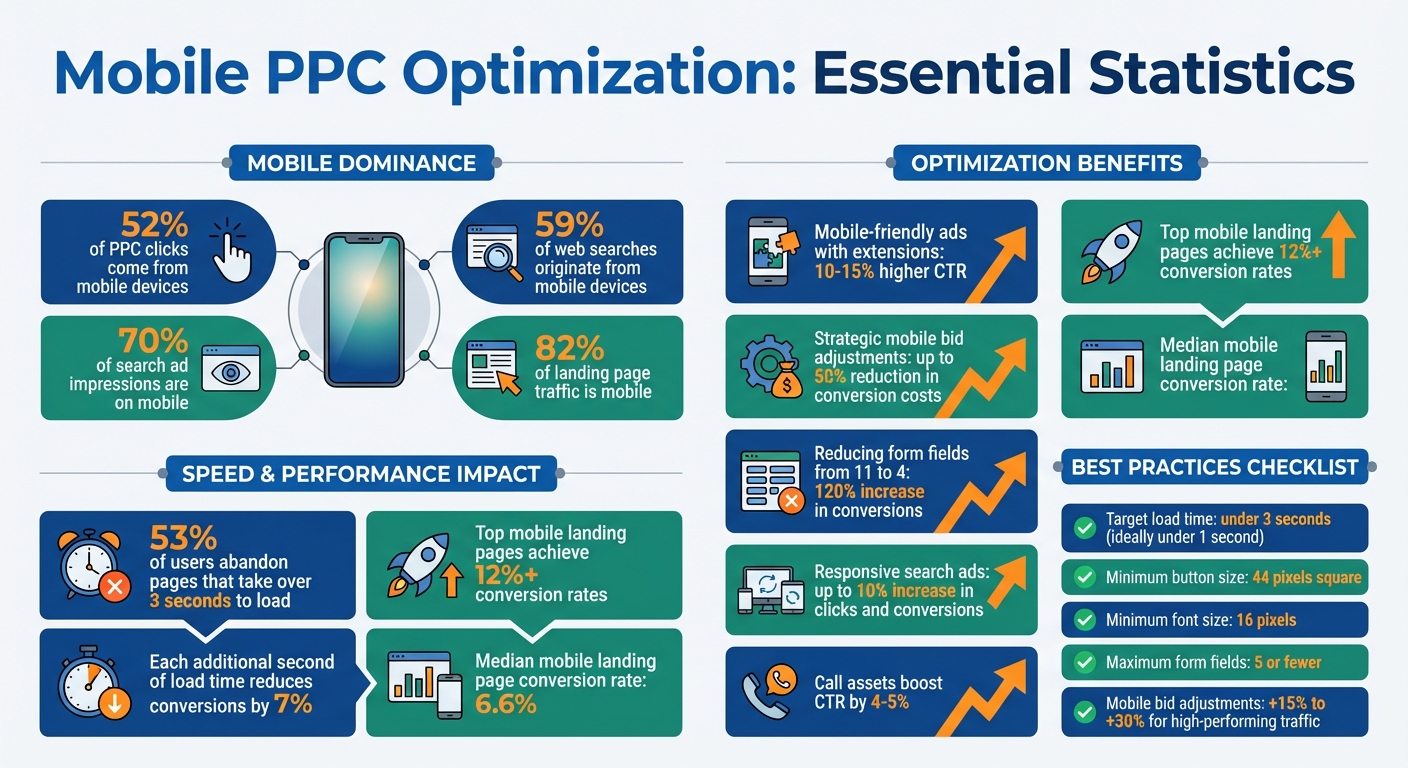
April 13, 2026Mobile PPC ads are now a necessity, not an option. With mobile devices driving over 52% of PPC clicks and accounting for 70% of search ad impressions, your campaigns must cater to mobile users to stay competitive. But here's the catch: mobile users behave differently than desktop users. They demand speed, simplicity, and quick answers.
Key takeaways:
- 53% of users leave if a page takes over 3 seconds to load.
- Mobile-friendly ads with extensions see 10-15% higher click-through rates.
- Strategic mobile bid adjustments can cut conversion costs by up to 50%.
- 59% of web searches come from mobile devices.
To succeed, focus on:
- Fast, touch-friendly landing pages – Optimize images, simplify navigation, and reduce form fields.
- Smart bid adjustments – Increase bids for high-performing mobile traffic and lower them for underperforming segments.
- Mobile-specific ad extensions – Use call, location, and message extensions to drive quick actions.
- Tailored keywords – Target "near me" and question-based searches for local and intent-driven results.
- Concise ad copy – Write short, impactful headlines and use responsive search ads for flexibility.
If your campaigns aren’t optimized for mobile, you're missing out on a fast-growing audience. Start implementing these strategies today to improve your results.
Mobile PPC Optimization Statistics and Key Performance Metrics
Build Mobile-Friendly Landing Pages
With mobile traffic accounting for over 82% of visits, creating landing pages that work seamlessly on mobile devices is no longer optional - it's essential. A page designed solely for desktops will fall short, as shrinking a desktop layout for mobile often leads to lower conversions, according to Sprouter.
The performance of your landing page hinges on effective mobile optimization. Top-tier mobile landing pages boast conversion rates above 12%, while the median hovers at just 6.6%. What sets the best apart? Three key elements: speed, navigation, and simplicity. Let’s break down how to tackle these areas for better results.
Improve Page Loading Speed
Page speed is everything. If your page takes more than three seconds to load, 53% of users will leave. Each additional second can slash conversion rates by over 7%.
Here’s how to speed things up:
- Optimize images: Convert images to WebP format and compress them using tools like TinyPNG.
- Implement lazy loading: Delay loading images that aren’t immediately visible to users.
- Minify code: Compress your CSS and JavaScript, and defer non-critical scripts to avoid slowing down the page load.
Use tools like Google PageSpeed Insights to track metrics like Largest Contentful Paint (LCP) and First Input Delay (FID). Aim for a load time under three seconds - ideally under one second.
Once speed is under control, it’s time to focus on user-friendly navigation.
Design for Easy Touch Navigation
Mobile users often navigate with one hand, so design with this in mind. Place buttons and links in the bottom center of the screen - top corners are harder to reach.
Other touch-friendly tips:
- Make tap targets large: Buttons and links should be at least 44 pixels square to avoid accidental taps.
- Use single-column layouts: Vertical stacking is easier to navigate than forcing horizontal scrolling.
- Prioritize key elements above the fold: Ensure users see your headline, value proposition, and primary call-to-action (CTA) without scrolling.
Typography also matters. Use a minimum font size of 16 pixels with a line height 1.5 times the font size for readability. Simplify navigation with collapsible hamburger menus to reduce clutter.
Simplify Forms and Content
Lengthy forms and dense content can be deal-breakers for mobile users. Reducing form fields from 11 to 4 can increase conversions by as much as 120%. Stick to five fields or fewer.
Here’s how to make forms effortless:
- Use smart input types (e.g., numeric keypads for phone numbers, email keyboards with "@" shortcuts).
- Enable autofill so browsers can populate common fields automatically.
For content, keep it concise. Use short sentences and focus on benefits rather than long-winded explanations. As Sprouter puts it:
Mobile sessions are typically shorter... Your page must quickly communicate value and prompt action.
Finally, design your CTA buttons to stand out. Use bold, contrasting colors and action-oriented text like "Get My Free Guide" instead of generic phrases like "Submit". A sticky CTA that remains visible as users scroll can further boost engagement.
sbb-itb-cef5bf6
Adjust Bids Based on Device Performance
Mobile users interact with content differently compared to desktop users. They often browse for quick information, look up local businesses, or make immediate calls. Adjusting your bids based on how each device performs can help you allocate your budget more effectively and boost your return on investment. Optimizing bids for mobile devices ensures you're tapping into the unique behavior patterns of mobile users.
The golden rule here? Don't bid the same amount for mobile traffic as you do for desktop traffic. Treating all devices equally can lead to wasted spend or missed opportunities.
Review Device Performance Metrics
Understanding how different devices perform is the first step in making smart bid adjustments. Break down your campaign data by device - mobile, desktop, and tablet - and analyze key metrics like click-through rate (CTR), conversion rate, and cost per acquisition (CPA). This will help you identify where your budget delivers the most value.
For instance, one case study showed a keyword converting at 10% on desktop but only 3% on mobile. To address this, a -50% mobile bid adjustment was applied, cutting mobile CPA by half. This data revealed that mobile users were largely in the research phase, not yet ready to buy.
Another metric to monitor is impression share. A low mobile impression share might indicate that your bids aren't competitive enough, causing you to miss out on valuable traffic.
Increase Bids for Mobile Devices
If mobile traffic is driving phone calls or local visits, increasing mobile bids by +15% to +30% can help you capture more of that high-value audience. But if mobile performance isn't meeting expectations, reducing your bids can prevent overspending.
Take the example of a kitchen appliance retailer: by applying a -50% mobile bid adjustment, they saved $23 over the next 100 clicks. This simple tweak ensured their budget was better aligned with actual results.
To determine the right bid modifiers, compare performance gaps between devices. If mobile CPA is significantly higher than desktop CPA, a reduction in mobile bids might be in order. On the other hand, if mobile is outperforming, it’s worth increasing your investment.
Use Automated Bidding Tools
When your campaign generates more than 30 conversions per month, automated bidding strategies like "Maximize Conversions" or "Target CPA" become valuable tools. These strategies leverage machine learning to adjust bids in real time, factoring in signals like device type, location, and time of day.
As Improvado highlights:
Smart Bidding uses machine learning to optimize bids in real time based on hundreds of signals including device, location, time of day, remarketing lists, and ad characteristics.
For campaigns still in the data-gathering phase, Enhanced CPC is a great place to start. This hybrid approach allows you to maintain manual control while Google's AI adjusts bids for clicks more likely to convert. Once your campaign has enough conversion data, transitioning to fully automated bidding can streamline your strategy even further. Automated tools are a great way to ensure your bids are responding to device-specific performance without constant manual adjustments.
Add Mobile-Optimized Ad Extensions
Once you've fine-tuned your bids for mobile devices, you can take things a step further by incorporating ad extensions - now known as "assets" in Google Ads. These extensions expand your ad's visibility and can increase click-through rates by 10–15%, all without adding to your costs.
On mobile, these extensions automatically adjust to fit varying screen sizes. However, since space is limited, they'll appear less frequently. Focus on extensions that encourage quick actions, like making a call, getting directions, or sending a text.
Call and Location Extensions
Call extensions are a standout feature for mobile ads. They include a click-to-call button, making it easy for users to call your business directly without needing to visit your website. This is especially useful for businesses that rely on inbound calls. Use a dedicated, trackable phone number to measure conversions effectively. And don't forget - your team needs to be ready to answer calls quickly to avoid losing potential customers.
Location extensions, on the other hand, display your business address, hours, and even a map pin showing the user's distance from your location. Clicking the address opens Google Maps, providing instant directions - perfect for "near me" searches. To set these up, link your Google Business Profile (formerly Google My Business) to your Google Ads account. This ensures your address and distance information are updated automatically.
Sitelink and Promotion Extensions: Adding Depth to Your Ads
Sitelink extensions act like mini ads beneath your main ad text. They direct users to specific pages, such as "Contact Us", "Testimonials", or product categories. Mobile ads can show up to eight sitelinks, compared to six on desktop. To optimize these, include at least two sitelinks that link to the same domain as your main ad. Use the two available 35-character description lines to make the most of your ad space.
Promotion extensions are great for showcasing limited-time offers or discounts, like "20% off." These can be scheduled to run during specific timeframes, and they'll automatically stop once the sale ends. This keeps your ads up-to-date without requiring constant manual updates.
Message Extensions
Message extensions add a "click-to-message" button, allowing users to text your business directly from the ad. This feature is perfect for people who prefer texting over calling or filling out forms. To keep users engaged and reduce drop-offs, limit the amount of information they need to provide. Integrating a CRM system can also help you manage incoming leads in real time, ensuring every inquiry gets a timely response.
Target Mobile-Specific Keywords
When optimizing mobile landing pages and adjusting bids, fine-tuning your keyword strategy is a must for connecting with on-the-go users. Mobile users often look for fast answers and local solutions. Using question-based phrases like "how much does," "where can I," or "what's the best" can help you reach users actively researching their options. These types of queries are especially common with voice search, which is a major part of mobile browsing.
Understanding where users are in their decision-making process is key. For example, someone searching for "lawn care businesses near me" is likely in the mid-funnel phase - they know they need a service and are actively looking for a local provider. These aren't casual browsers; they're ready to take action. To stay ahead, regularly review your search query reports for mobile-heavy terms and incorporate them into your campaigns. Additionally, focus on keywords with local intent, like "near me," to connect with users who are prepared to act.
Target 'Near Me' and Local Keywords
To further improve your mobile strategy, honing in on local intent is essential. Searches with "near me" are incredibly valuable for mobile campaigns. These queries indicate immediate intent and are becoming more common as mobile searches now surpass desktop activity. Adding local modifiers to your keywords can make a big difference.
Pair these keywords with location extensions by linking your Google Business Profile to your Google Ads account. This setup displays your business address, distance from the user, and a map icon directly in search results. If a user clicks your address, Google Maps opens instantly with directions. For businesses that rely on foot traffic or service calls, combining local keywords with location extensions can significantly boost conversions. To maximize results, adjust your mobile bid strategy to prioritize top-performing geographic areas.
Schedule Ads for Peak Mobile Hours
Timing matters. Mobile users have distinct activity patterns compared to desktop users, and your ad schedule should reflect when your audience is most engaged. In North America, mobile engagement tends to peak during evening hours, while in Europe, mornings are often busier.
Use Google Ads schedule reports to pinpoint when mobile conversions are highest. If you're targeting working professionals, early mornings or late evenings - when they're browsing outside work hours - are ideal. For restaurants, focus on lunch and dinner times, and for travel businesses, align with seasonal planning periods. Apply bid adjustments to increase spending during these high-converting windows, such as boosting bids by 20% during peak hours. If you're using call or message extensions, ensure they're scheduled to appear only during business hours so your team can respond promptly. Matching your ad schedule to high-intent keywords strengthens your mobile campaign's overall impact.
Write Ad Copy for Mobile Screens
Writing ad copy for mobile screens is all about keeping it short and impactful. Mobile ads often display fewer elements than desktop ads - typically just two headlines and one description instead of three headlines and two descriptions. This makes every word matter. Below are strategies to craft concise, effective headlines, actionable CTAs, and use responsive search ads to maximize performance on mobile.
Write Short, Clear Headlines
Headlines are capped at 30 characters, so clarity and brevity are key. Here's how to structure them effectively:
- Headline 1: Use your primary keyword to establish relevance and trigger bold text in search results.
- Headline 2: Highlight a key benefit or what makes you stand out.
- Headline 3: Add urgency, pricing, or a call-to-action.
Keep in mind that not every headline needs to hit the 30-character limit. According to Tanuja Mahdavi, a digital marketing consultant:
"Try adding headlines of different lengths. Do not max out the characters in every headline. Google's systems will test both long and short headlines."
To grab attention, include target keywords in at least two headlines for bold matching. Phrases like "Limited Offer," "Same-Day Service," or "Exclusive Products" can drive urgency and interest. For users searching with "what," "where," or "how" queries - or using terms like "near me" - focus on answering their questions quickly with mid-funnel messaging.
Use Mobile-Focused CTAs
Mobile users expect fast, easy actions. Your call-to-action (CTA) should reflect what they can do immediately on their devices. Use action-driven verbs like Buy, Order, Sign Up, Call Today, or Get A Quote. For on-the-go users, CTAs like "Visit your nearest location" or "Call today for immediate service" are particularly effective.
Consistency is crucial - make sure the CTA in your ad matches the experience on your landing page. This alignment simplifies the path to conversion. You can also incorporate ad extensions like:
- Call assets: Allow users to call directly, boosting click-through rates by 4–5%.
- Message extensions: Enable users to text with CTAs like "Text us for more information" - ideal for users who prefer texting.
- Location assets: Help users find nearby stores or services.
If you use message extensions, schedule them during business hours to ensure timely responses.
Use Responsive Search Ads
Responsive search ads (RSAs) are ideal for mobile because they adapt to different screen sizes. They automatically adjust the number of headlines and descriptions shown, ensuring a clean, uncluttered display. With RSAs, you can test up to 15 headlines and 4 descriptions, and Google's machine learning will determine the best combinations for specific queries and devices - no manual A/B testing required.
RSAs can increase clicks and conversions by up to 10% compared to standard text ads. Improving your ad strength from "Poor" to "Excellent" can further boost performance by 9%. To optimize RSAs for mobile:
- Provide 8–10 unique headlines for Google's system to work with.
- Avoid pinning headlines or descriptions unless absolutely necessary, as it limits the system's flexibility.
- Make sure the first description line stands alone, as the second line may not always appear.
Conclusion
Making PPC campaigns work effectively for mobile users is no longer optional. With mobile searches leading the way in digital traffic, most of your audience is browsing on their smartphones. If your campaigns don’t cater to this audience, you risk wasting ad spend and missing out on valuable conversions.
This guide has outlined practical steps to improve your mobile PPC results. From creating fast-loading, touch-friendly landing pages to adjusting bids for mobile performance, every strategy plays a role in delivering a seamless experience. Using mobile-optimized ad extensions, targeting "near me" keywords, and crafting concise ad copy can make a big difference. Mobile users often search with quick, specific questions like "where", "how", or "what", so your ads should focus on answering these questions rather than pushing hard sales.
Here’s why this matters: 53% of mobile users will leave a page if it takes more than 3 seconds to load, and ad extensions can boost click-through rates by 10–15%. Even a small improvement, like a 10% increase in landing page conversions, directly translates into 10% more results without increasing your ad spend.
To get the most out of your budget, use mobile bid modifiers to fine-tune bids for different devices. Schedule call and message extensions to appear during business hours, ensuring timely responses. And if your site isn’t fully responsive, make sure to use mobile-specific URLs so users land on pages designed for their devices.
For those seeking additional support, SEO Werkz offers PPC management services, including mobile optimization, bid adjustments, and landing page improvements, to help you get the best possible returns across all devices.
FAQs
How can I tell if mobile traffic is converting?
With more than 60% of paid search clicks coming from mobile devices, it’s crucial to focus on what happens after those clicks. Use tools like tracking pixels, UTM parameters, and event-based analytics to monitor user behavior on mobile landing pages. These tools help you see whether users are completing key actions, such as making a purchase or submitting a form. By understanding this data, you can make adjustments to improve performance and drive better results.
What should I fix first on my mobile landing page?
To get the best results from your PPC campaigns, your ad copy, headline, and call-to-action (CTA) need to work together seamlessly. This alignment, known as message match, not only improves your Quality Score but also increases conversion rates by reassuring users they've landed in the right place.
Don't forget about mobile users - over 60% of paid search clicks now come from mobile devices. That means your landing page must be optimized for mobile. A mobile-friendly design ensures your visitors have a smooth experience, which is crucial for driving results in today's mobile-first world.
Which ad extensions matter most for mobile PPC?
The most effective ad extensions for mobile PPC campaigns are call extensions and sitelink extensions.
- Call extensions allow users to call your business directly from the ad, making it easier for potential customers to connect with you immediately.
- Sitelink extensions help users navigate quickly to specific pages on your website, such as product pages or contact forms.
These extensions enhance the overall experience by catering to mobile users' need for convenience and quick access to essential information.