How to Optimize Local Landing Pages for Conversions
February 28, 2026Want more local customers? Start with optimized landing pages. Local landing pages are tailored to attract customers searching for services in specific areas, like "plumber in Phoenix." These pages aren't just about visibility - they're about conversions. Here's why they work:
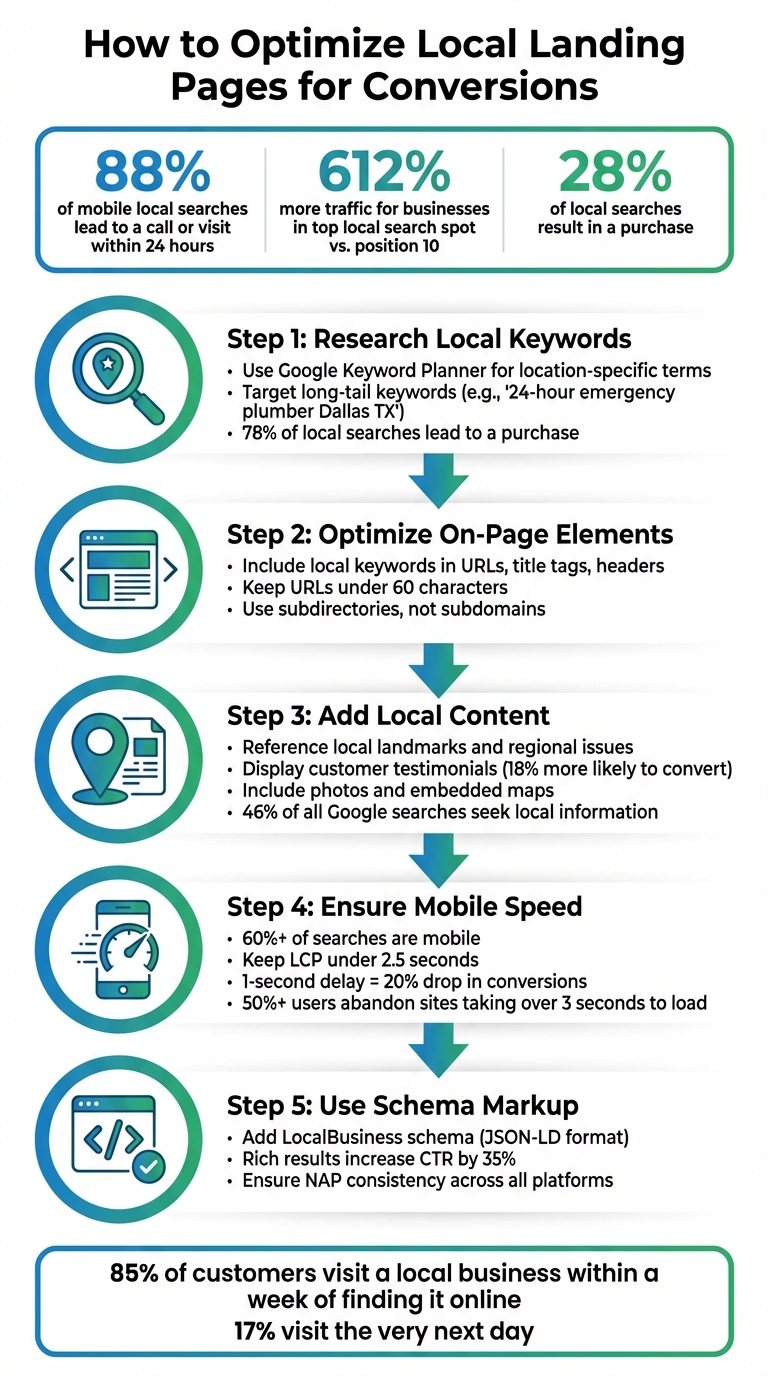
- 88% of mobile local searches lead to a call or visit within 24 hours.
- Businesses in the top local search spot get 612% more traffic than those in position 10.
- 28% of local searches result in a purchase.
To create effective local pages, focus on these steps:
- Research Local Keywords: Use tools like Google Keyword Planner to find location-specific terms (e.g., "emergency plumber Dallas TX").
- Optimize On-Page Elements: Include local keywords in URLs, title tags, headers, and content.
- Add Local Content: Reference landmarks, include testimonials, and display maps/photos.
- Ensure Mobile Speed: Over 60% of searches are mobile. A fast-loading, mobile-friendly page is essential.
- Use Schema Markup: Add structured data like LocalBusiness schema to help search engines understand your page.
These strategies not only improve rankings but also turn online searches into customer actions.
5-Step Process to Optimize Local Landing Pages for Conversions
Local SEO Landing Page Strategy for 2025 (SEOSpace Local)
sbb-itb-cef5bf6
How to Research Local Keywords
To identify local keywords, align your customers' search habits with your services and location. Begin with core service terms like "plumber" or "dentist", then add geographic identifiers such as your city, neighborhood, or ZIP code. For instance, "emergency plumber" becomes "emergency plumber in Dallas, TX" or "emergency plumber 75201." This simple formula - service + modifier + location - creates a strong base for local keyword research. From here, you can uncover more detailed, action-oriented phrases that boost conversions.
Some searches skip location specifics, relying instead on phrases like "near me." Queries such as "plumber near me" or "emergency plumber" still carry local intent, as Google determines location based on IP addresses or GPS data. These searches dominate mobile traffic, often signaling an immediate need. To confirm whether a keyword has local intent, search it yourself. If Google shows a Map Pack or local business listings, it’s a keyword worth targeting.
Target Location-Specific Long-Tail Keywords
Long-tail keywords are extended, highly specific phrases that reflect exactly what someone is looking for. Instead of aiming for a broad term like "plumber", try more precise options such as "24-hour emergency plumber Dallas TX" or "water heater repair Oak Lawn." While these terms may have lower search volumes, they’re often tied to immediate, high-conversion actions. In fact, 78% of local searches lead to a purchase. The more specific the search term, the better its ability to match user intent and drive results - ideal for optimizing local landing pages.
Additionally, consider regional language differences. For example, depending on the area, people may refer to a sandwich as a "sub", "hoagie", or "grinder". To capture these nuances, review customer interactions like call logs, emails, and online reviews. Google's "People Also Ask" feature is another goldmine for long-tail ideas, surfacing questions like "how much does roof repair cost in Phoenix" or "best Italian restaurant near downtown Austin". Once you’ve gathered potential long-tail keywords, use research tools to refine and expand your list.
Use Keyword Research Tools
Keyword research tools are essential for validating local search terms. Google Keyword Planner is a great starting point - just remember to adjust the location settings to your city or ZIP code. Without this step, you might end up with misleading national data. Tools like Ahrefs and Semrush can further help by identifying gaps in your competitors’ strategies and uncovering high-intent keyword variations through features like "Matching Terms" reports.
| Tool | Best Use for Local Research |
|---|---|
| Google Keyword Planner | Checking local search volume and implicit keywords with city/ZIP code filters |
| Ahrefs | Analyzing competitor keywords and content gaps with "Matching Terms" reports |
| Semrush | Discovering high-intent keywords using the Keyword Magic Tool |
| Answer the Public | Finding conversational phrases and long-tail questions for voice search |
"Local keyword research is the process of finding keywords that people search for when looking for local products and services."
– Joshua Hardwick, Head of Content at Ahrefs
Don’t forget to check Cost-Per-Click (CPC) data in Keyword Planner. High CPC values for local terms often signal strong commercial intent and a higher likelihood of conversions. Once you’ve built your keyword list, assign each term to a specific landing page. For example, if "oil boiler installation" and "gas boiler installation" trigger distinct search results, they should lead to separate pages.
Optimize On-Page Elements for Local Search
Once you've selected your local keywords, the next step is integrating them into your website's structure so search engines can clearly understand your local intent. On-page optimization is where strategy meets execution. Every aspect of your page - URLs, title tags, headers, and content - should work together to communicate what service you provide and where you provide it. This isn't about cramming keywords everywhere; it's about creating a logical, user-friendly hierarchy that benefits both search engines and visitors. Here's how to fine-tune your on-page elements to emphasize your local focus.
Structure URLs for Local Targeting
URLs are one of the first things search engines crawl, making them a key element in local SEO. Keep your URLs clean, descriptive, and focused on location. Instead of using subdomains, stick with subdirectories to ensure your local pages benefit from your main domain's authority. For example:
- Better:
example.com/locations/chicago/ - Avoid:
chicago.example.com
Search engines often treat subdomains as separate entities, which can dilute your SEO efforts. Aim for URLs under 60 characters, and include both the location and primary service. For instance:
example.com/denver-plumbing-services/ or example.com/roofing-doylestown/.
Use hyphens to separate words, avoid unnecessary stop words like "the" or "and", and steer clear of adding dates or years to keep your content evergreen.
| URL Element | Best Practice | Example |
|---|---|---|
| Protocol | Use HTTPS for security benefits | https://example.com |
| Structure | Use subdirectories, not subdomains | /locations/chicago |
| Word Separator | Use hyphens, not underscores | /roofing-doylestown |
| Length | Keep under 60 characters | /denver-plumbing-services |
| Case | Use lowercase only | /san-diego-dentist |
"A well-crafted URL can act as a powerful signal, communicating directly to search engines what a page is about and giving users a clear, trustworthy path to follow."
– SERPs.com
Once your URLs are in order, focus on optimizing title tags and meta descriptions to reinforce your local intent.
Write Location-Specific Title Tags and Meta Descriptions
Title tags are crucial for signaling both your service and your location to search engines. Start with your primary keyword and local identifier. For example:
"Emergency Plumber in Dallas, TX | 24/7 Service"
Each local landing page should have a unique title tag to avoid internal competition. Pair this with concise meta descriptions that include a call-to-action and highlight key service details. While meta descriptions don't directly influence rankings, they can significantly impact click-through rates by enticing users to click on your link.
Add Local Keywords to Headers and Content
Your H1 tag should clearly state your primary service and target location, such as:
"Phoenix Plumbers – 24/7 Services"
Stick to one H1 per page and include the target keyword and location within the first 100 words of your content. Use H2 and H3 tags for related terms and variations. For instance, if your H1 is "Roofing Services in Austin", your H2 tags might include:
- "Residential Roof Repair in Austin"
- "Commercial Roofing Solutions"
To establish local expertise, weave in references to neighborhoods, landmarks, or regional concerns. Aim for 800 to 1,500 words of unique, helpful content, and steer clear of doorway pages - those that duplicate content with only the city name swapped out.
"If your local SEO landing pages are thin on content, missing local signals, or slapped together without a strategy, they won't rank on Google or bring in leads."
– RedKnight
These adjustments will not only help your page rank better in local searches but also make it more compelling to potential customers.
Create Content That Connects with Local Users
Once your on-page elements are optimized, it’s time to focus on creating content that resonates with your local audience. Generic pages won’t cut it - people want to see proof that you’re part of their community. In fact, 46% of all Google searches are specifically looking for local information. To meet these expectations, include local references, customer testimonials, and visual evidence of your presence. Show users you’re not just another faceless business; you’re part of their neighborhood.
Reference Local Landmarks and Regional Issues
Incorporating local landmarks or addressing regional concerns can make your content feel more genuine. Instead of sticking to generic service descriptions, mention things only a local business would know. For example, a Phoenix-based company might reference Camelback Mountain, while a New Orleans business could discuss the challenges of aging cast iron pipes. For SEO, use region-specific long-tail keywords like "emergency plumber near Millennium Park" to target searchers with immediate needs.
Addressing local issues is another way to stand out. A landscaping company in Seattle might focus on rain-tolerant plants and drainage solutions, while one in Phoenix would highlight drought-resistant xeriscaping and efficient irrigation. This approach not only improves your credibility but also positions you as an expert who truly understands the community.
"A local business landing page explains what you do specifically for customers in that location."
– Arc4
Display Customer Reviews and Testimonials
Customer testimonials can be incredibly persuasive, especially when they include local details. For example, a review from "Elizabeth T., Lincoln Park, Chicago" or "Mike R., Downtown Austin" feels more relatable and trustworthy to potential clients. This local connection matters - searchers are 18% more likely to convert when they see reviews from nearby customers.
Place these testimonials strategically near call-to-action buttons or contact forms to reassure hesitant visitors. Avoid duplicating testimonials across multiple location pages, as Google may flag this as thin content. Instead, keep reviews fresh and specific to each location.
"When someone lands on a page with your local address and glowing reviews from nearby customers, trust builds fast."
– Neil Patel, Co-Founder, NP Digital
Include Photos and Maps
Visuals can make a big difference in building trust. Real photos of your team, local office, or completed projects show that you’re genuinely part of the community. For instance, a picture of your team working in a familiar neighborhood or standing in front of a local landmark creates authenticity. This matters because 85% of customers visit a local business within a week of finding them online.
Including a Google Map on your page further reinforces your local presence. Optimize images with location-based file names like austin-roofing-team.jpg and include the city and state in the alt text for better visibility.
| Visual Element | Purpose | Implementation Tip |
|---|---|---|
| Team Photos | Builds a personal connection | Feature staff at recognizable local spots |
| Embedded Map | Confirms physical presence, aids navigation | Use Google Business Profile embed feature |
| Project Photos | Highlights local expertise and quality | Show completed work in nearby neighborhoods |
| Landmark Images | Reinforces ties to the community | Use geo-specific alt text for SEO |
Improve Mobile Experience and Page Speed
Optimizing for mobile devices is a must for succeeding in local search. With Google’s mobile-first indexing, your mobile site is what determines your ranking. And here’s the kicker: over 60% of Google searches happen on mobile, and 88% of local searches on mobile lead to quick actions, like a call or a visit. Think about it - when someone searches “emergency plumber near me” or “coffee shop open now,” they’re ready to make a move.
Page speed is just as crucial. A delay of even one second can sink your conversion rates by 20%. Plus, more than half of users will bail on a site that takes over three seconds to load. A slow site not only irritates visitors but also hurts your Google ranking.
"Mobile optimization is nonnegotiable for local SEO. Most local searches happen on mobile and convert fast."
– Neil Patel, Co-Founder, NP Digital
Making your mobile experience faster and smoother is a direct path to better conversions on local landing pages.
Reduce Page Load Times
Start by assessing your site’s performance with Google PageSpeed Insights, a free tool that provides actionable tips based on three Core Web Vitals:
- Largest Contentful Paint (LCP): Should be under 2.5 seconds.
- Cumulative Layout Shift (CLS): Keep it below 0.1.
- Interaction to Next Paint (INP): Aim for under 200 milliseconds.
One of the easiest fixes? Optimizing images. Switch from JPEG or PNG to modern formats like WebP or AVIF, which shrink file sizes without losing quality. Compress images before uploading, and use descriptive filenames (e.g., "denver-hvac-repair-truck.webp") to improve SEO. Tools like Autoptimize or WP Rocket can also help by minimizing JavaScript and CSS, reducing the load on browsers.
If your website is hosted on a shared server, consider upgrading to a VPS or dedicated server with SSD storage. This can significantly improve your Time to First Byte (TTFB). Adding a Content Delivery Network (CDN) can further speed things up by serving your pages from locations closer to your users.
| Core Web Vital | Good (Fast) | Needs Improvement | Poor (Slow) |
|---|---|---|---|
| Largest Contentful Paint (LCP) | ≤ 2.5 sec | 2.5–4.0 sec | > 4.0 sec |
| Cumulative Layout Shift (CLS) | ≤ 0.1 | 0.1–0.25 | > 0.25 |
| Interaction to Next Paint (INP) | ≤ 200 ms | 200–500 ms | > 500 ms |
Improving load times and responsiveness not only enhances user experience but also boosts conversion rates.
Design for Mobile Users First
Your landing page should cater to mobile users from the start. Make sure buttons are large enough to avoid accidental taps, and place key details - like your business name, address, phone number, and call-to-action - front and center, above the fold.
Add click-to-call buttons prominently. For example, when someone searches for “24-hour tow truck in Dallas” at midnight, they’re looking to call, not fill out a form. Speaking of forms, keep them short and ask only for the essentials. Use responsive designs that adapt to various screen sizes without forcing users to scroll horizontally or zoom in.
Once your mobile design is solid, test specific elements to fine-tune performance.
Test Different Page Elements
Use A/B testing to see which page elements drive better results. Here’s an example: In 2025, Advanced Local revamped a landing page for a dental clinic in Ogden, Utah. They replaced a vague headline and generic “Contact Us” button with a targeted headline (“Same-Day Emergency Dental Care in Ogden”), Google star ratings, and a mobile-friendly call button. The results? Conversion rates jumped from 8% to 13%, leads increased by 65%, and the cost per lead dropped by 42% in just 90 days.
Heatmap tools can also help by showing where mobile users focus their attention and where they lose interest. Test one element at a time - like button colors or form layouts - to pinpoint what works. Even small tweaks, such as simplifying a form or changing a button color, can lead to noticeable improvements in conversions.
Use Schema Markup and Technical SEO
Once you've optimized your content and ensured mobile performance is on point, it's time to focus on technical SEO. This aspect plays a vital role in boosting the visibility and trustworthiness of your local landing pages. Think of it as the structural framework that ensures your site is easy for both users and search engines to navigate.
Technical SEO, particularly through tools like schema markup and XML sitemaps, helps search engines crawl, understand, and rank your pages effectively. By 2026, schema markup has become more than an optional add-on - it’s now considered a "structural trust layer" that communicates essential details about your business to Google, Maps, and AI systems.
"Local business schema markup is no longer optional in 2026. It is a structural trust layer that helps Google, Maps, and AI systems understand exactly who you are, where you operate, what you offer, and why your business is legitimate."
– LocalMighty
This method delivers tangible results. Structured data significantly increases your chances of appearing in AI-generated summaries and voice search results. Rich results, like star ratings and business hours, can boost click-through rates by as much as 35%. Since 68% of clicks go to the top five organic Google results, getting these details right can make a noticeable difference in your local SEO performance.
Add LocalBusiness Schema
Schema markup is essentially a piece of code that helps search engines interpret your business information clearly. Google recommends the JSON-LD format because it’s clean, easy to manage, and doesn’t interfere with your website’s HTML structure.
When implementing schema, choose the most specific subtype for your business. For example, instead of using the generic LocalBusiness tag, opt for types like Dentist, HVACBusiness, or Restaurant. This level of detail helps search engines classify your business more accurately.
| Business Type | Recommended Schema Subtype |
|---|---|
| Dental Clinic | Dentist |
| Law Firm | LegalService or Attorney |
| HVAC Company | HVACBusiness |
| Gym | SportsActivityLocation |
| Cafe | Restaurant |
Include the following key schema properties:
- name: Your official business name (must match your Google Business Profile exactly)
- address: Your complete physical address in
PostalAddressformat - telephone: Your primary contact number, including the country code
- geo: Latitude and longitude coordinates
- openingHours: Your operating hours
- image: A high-quality photo of your storefront or logo
- url: A link to the specific location landing page
- sameAs: Links to authoritative profiles like LinkedIn or Facebook
Maintaining NAP consistency (Name, Address, Phone) is critical. For instance, if your schema lists "123 Main St." but your Google Business Profile says "123 Main Street", it could confuse search engines and weaken your trust signals.
In early 2026, a dental clinic in Los Angeles implemented a complete LocalBusiness schema and saw its Google Maps ranking climb by four positions in just eight weeks. Similarly, a Chicago law firm triggered a Knowledge Panel for branded searches for the first time after adding structured data.
To ensure accuracy, validate your schema using tools like Google’s Rich Results Test or Schema Markup Validator. If you’re using WordPress plugins like Yoast Local SEO or Rank Math, double-check their output to avoid duplicate or conflicting schema blocks.
Once your schema is in place, you’ll also need to address duplicate content issues to maintain strong local SEO.
Prevent Duplicate Content Problems
If you manage multiple local landing pages, avoid duplicating content with minor changes like swapping out city names. Google penalizes thin or repetitive content, which can harm your overall rankings.
Each location page should feature unique, localized content. Include details about nearby landmarks, streets, or community partnerships. For example, REI’s Sacramento landing page doesn’t just list the store’s address - it highlights solar power initiatives and local staff involvement, helping it rank for queries like "camping gear Sacramento".
Personalize each page with:
- Staff bios specific to that location
- Unique photos of the branch
- Customer reviews tied to that specific outlet
"Google Search works hard to understand the content of a page. However, you can provide explicit clues about the meaning of a page to Google by including structured data."
– Google (via Whitespark)
Instead of generic statements like "We serve Austin with pride", try something more specific: "Our South Congress location has been serving Austin families since 2018, just two blocks from the iconic 'I Love You So Much' mural." This level of detail shows Google that your content is tailored to the local audience, not just a copy-paste template.
Submit XML Sitemaps
While schema markup helps search engines understand your content, XML sitemaps ensure that all your pages are discovered and indexed. An XML sitemap is a file listing all your website’s pages, guiding search engines to them efficiently. Without one, some local landing pages might remain "orphan pages" - existing but undiscovered by crawlers.
Submit your sitemap through Google Search Console to streamline the indexing process. This is particularly important for businesses with multiple locations. If you add new locations or update existing pages, resubmit your sitemap to prompt Google to re-crawl them.
Use the Enhancements report in Google Search Console to monitor schema performance and catch any errors. Fixing flagged issues promptly is essential, as unresolved errors can prevent your pages from appearing in rich results.
For multi-location businesses, create a separate landing page for each branch, each with its own LocalBusiness schema. Avoid duplicating the same schema across all pages. Assign each page a unique permanent URL identifier using the @id property (e.g., yourwebsite.com/locations/dallas#business) to establish it as a distinct entity in Google’s Knowledge Graph.
Conclusion
The advantages of well-optimized local landing pages are undeniable. These pages are all about creating personalized, locally relevant experiences that build trust and encourage immediate action.
The numbers speak for themselves: 88% of mobile local business searches lead to a call or visit within 24 hours, 28% of location-based searches result in a purchase, and businesses ranking at the top of local search results see a 612% increase in search traffic and a 397% rise in user actions compared to those in the 10th spot. These kinds of results can significantly boost revenue.
"The businesses that will win in the next decade of search are not necessarily the ones with the biggest budgets, but the ones with the most precise targeting. Geo-targeted landing pages are the scalpel in a world of SEO sledgehammers."
– Digital Kulture
To achieve this, focus on strategies that transform local search intent into measurable growth. Ensure NAP consistency (Name, Address, Phone number) across all platforms. Create unique content for each location, referencing local landmarks or issues. Use LocalBusiness schema markup effectively. Optimize for mobile users who often need quick, actionable information. Every detail - from local keyword integration to mobile responsiveness - plays a role in driving results.
The payoff is clear: 85% of customers visit a local business within a week of discovering it online, and 17% make their visit the very next day. A well-optimized local landing page doesn’t just attract searchers - it turns them into loyal customers.
FAQs
How many location pages should I create?
When deciding how many location pages to create, there’s no one-size-fits-all answer - it all hinges on your business's structure and geographic scope. If your business operates in multiple cities, neighborhoods, or regions, consider creating separate pages for each location to boost your local SEO efforts. On the other hand, if you run a single-location business, one well-optimized page might be all you need.
The key is to match the number of location pages to your actual geographic presence, ensuring each page is thoughtfully optimized to improve local search visibility.
What should make each local landing page unique?
To make your local landing pages stand out, they need to feel specific to their location. Incorporate unique content, targeted keywords, and local signals that resonate with the area you're targeting.
Include details like:
- Business information: Address, phone number, and hours tailored to the location.
- Services: Highlight offerings specific to that area.
- Localized images: Photos that reflect the community or the local branch.
- Contact details: Ensure easy access to location-specific contact information.
This level of personalization not only helps search engines see the page as relevant for local searches but also boosts the chances of turning visitors into customers.
How do I track conversions from local landing pages?
To measure conversions from your local landing pages, leverage analytics tools to keep tabs on user actions and tie them back to specific pages. Set up conversion goals or events to track key actions such as form submissions, phone calls, or completed purchases. You can also use tools like call tracking and UTM parameters to pinpoint the source of conversions, offering a clearer picture of how well your local landing pages are performing.