Ultimate Guide to NAP Consistency for Local SEO
April 2, 2026NAP consistency - ensuring your Name, Address, and Phone number are uniform across all platforms - is critical for local SEO success. It improves your search rankings, builds trust with customers, and prevents revenue loss caused by incorrect business details. Inconsistent NAP data can confuse search engines, reduce visibility, and frustrate potential customers. Here's what you need to know:
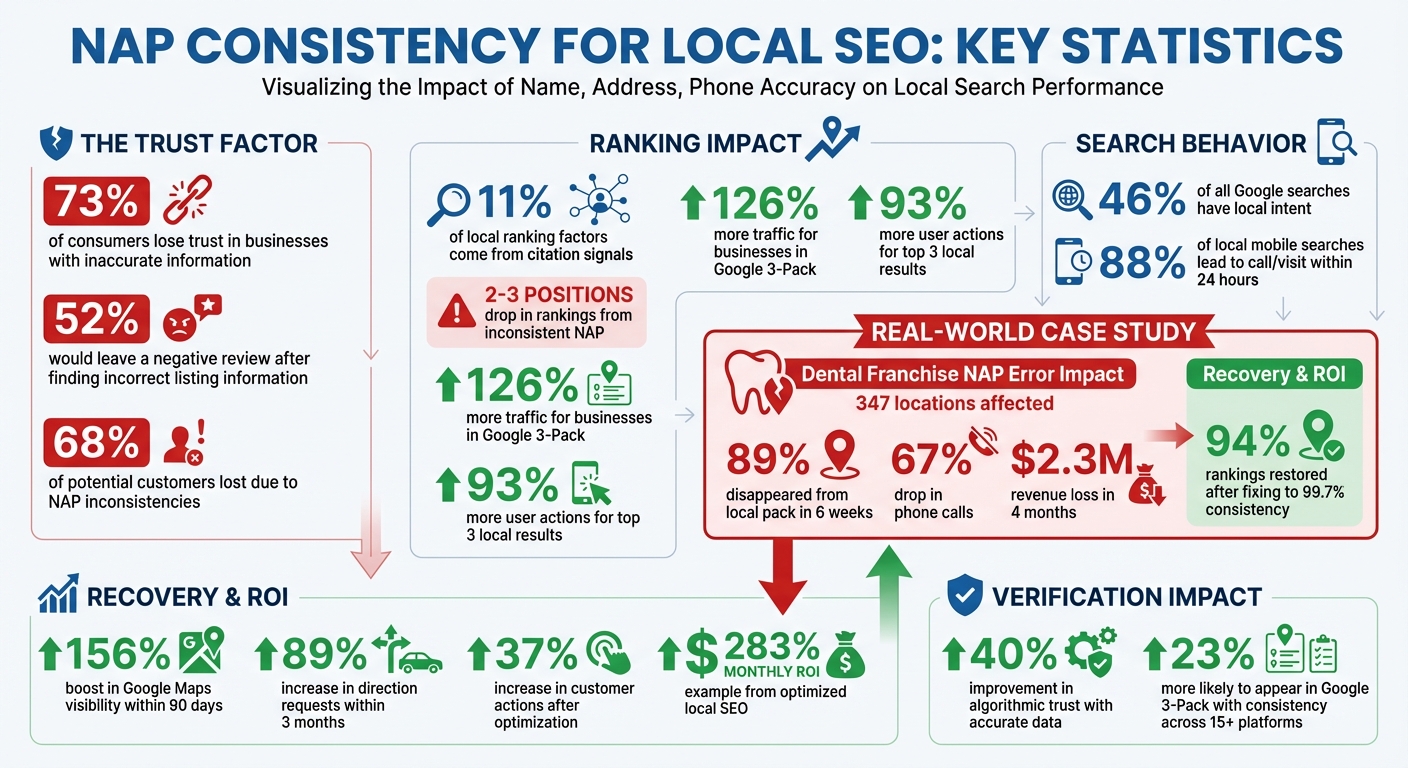
- Why It Matters: 73% of consumers lose trust in businesses with inaccurate info. Inconsistent NAP can drop your rankings by 2–3 spots and cost up to 68% of potential customers.
- How Search Engines Verify: Google cross-checks your NAP across directories. Consistent info boosts trust and improves local rankings.
- Risks of Inconsistency: Lower rankings, lost customers, and revenue. For example, a dental franchise lost $2.3M due to NAP errors.
- Steps to Fix:
- Create a master NAP record with your official business details.
- Audit all listings on key platforms like Google, Yelp, and Bing.
- Correct inconsistencies manually or with tools like Moz Local or BrightLocal.
- Maintaining Accuracy: Regularly audit your listings and update your master record when changes occur.
Taking these steps ensures your business stays visible, credible, and easy to find online.
NAP Consistency Impact on Local SEO: Key Statistics and ROI
What is NAP and How Does It Affect Local SEO?
NAP Basics and Why It Matters
NAP stands for Name, Address, and Phone number. When your website URL is included, it becomes NAP+W. These key details are displayed across platforms like your website, Google Business Profile, Yelp, Facebook, and various industry directories.
Search engines view consistent NAP information as a sign of trust. If your business name, address, and phone number are listed the same way across authoritative platforms, it confirms your legitimacy. This consistency ensures that every mention points to the same verified business.
The effect on local search rankings is notable. Citation signals - such as NAP consistency - contribute to about 11% of local ranking factors. Google uses directory listings to determine "prominence", which plays a major role in its local search algorithm.
"NAP consistency... forms a cornerstone of local SEO success. This seemingly simple technical detail profoundly impacts local search visibility, Google Business Profile performance, and customer trust."
– Inshalytics
Beyond rankings, accurate NAP data improves customer experience. Imagine a customer finds your phone number on Yelp, calls it, and reaches you without issue. Or they see your address on Google Maps, follow it, and arrive at the right location. These seamless interactions build trust. On the flip side, incorrect details frustrate customers - 52% of consumers say they would leave a negative review after encountering wrong or misleading information on a local business listing.
Next, we’ll dive into how search engines verify this crucial data across different platforms.
How Search Engines Verify NAP Data
Search engines cross-check your business information across various platforms - like your website, Google Business Profile, Yelp, and other directories - to ensure accuracy. For example, if Google consistently finds "Joe's Pizza, 123 Main Street, 555-1234" across multiple sources, it strengthens its confidence in your business data.
Every consistent mention reinforces search engines' trust in your listing. However, inconsistencies - like slight variations in your business name - can confuse search engines and weaken your ranking authority.
Accurate and consistent data can improve algorithmic trust by up to 40%. While modern search engines recognize variations like "St" and "Street", they prioritize overall accuracy. As Jo Cameron from Moz explains:
"Accuracy is more critically important than consistency these days. Google (and humans) understand, for the most part, that 'St' and 'Street' are the same... Accuracy is the key."
This verification process isn’t limited to traditional search engines. Voice assistants like Alexa and Google Assistant also rely on structured NAP data. If your information is inconsistent, these assistants may respond with uncertainty. Considering that 46% of all Google searches have local intent and 88% of local mobile searches lead to a call or visit within 24 hours, keeping your NAP data consistent can directly influence your revenue.
This thorough verification process highlights why maintaining accurate NAP information is essential for building customer trust. The next sections will outline actionable steps to audit and correct your NAP data for better local SEO results.
sbb-itb-cef5bf6
What is NAP Consistency? (And Why It Matters)
What Happens When Your NAP Data is Inconsistent
Inconsistent NAP (Name, Address, Phone Number) data can seriously hurt your online visibility and bottom line. When your business information doesn't match across platforms, search engines struggle to identify which details are correct. This confusion can lead to lower rankings, fewer customers, and lost revenue.
Lower Local Search Rankings
Consistent NAP data helps search engines trust your business information. But when inconsistencies crop up, search engines might treat each listing as a separate entity, which can tank your local rankings.
Here’s a real-world example: In March 2023, a national dental franchise with 347 locations updated its address format on Google Business Profiles from "Suite" to "Ste." Unfortunately, they didn’t update this change across more than 40 other directories. Within six weeks, 89% of their locations disappeared from Google's local pack. The fallout? A 67% drop in phone calls and a staggering $2.3 million revenue loss over just four months. Once they implemented a centralized NAP management system and achieved 99.7% consistency, 94% of their rankings were restored.
Fixing widespread inaccuracies isn’t quick, either. It can take anywhere from 30 to 120 days to correct NAP inconsistencies across directories. And while rankings suffer, customer trust takes a hit too.
Lost Customer Trust and Credibility
Beyond search engine penalties, inconsistent NAP data can confuse and frustrate potential customers. If someone finds conflicting phone numbers or addresses, they might struggle to contact you - or worse, show up at the wrong location.
"Businesses with inconsistent NAP information risk losing up to 68% of potential customers due to confusion and reduced search visibility."
– Speak Increase Marketing
This kind of confusion can make your business seem unreliable. Customers might wonder if they’ve found the right company, if you’re still in operation, or if the listing is even legitimate. Industries like healthcare, legal, and financial services face even stricter scrutiny. Google’s E-E-A-T (Experience, Expertise, Authoritativeness, Trustworthiness) standards weigh NAP consistency heavily in these fields.
Take the dental franchise example again: Not only did they face ranking penalties, but they also saw a 67% drop in phone calls and a 71% decline in new patient appointments. That’s a clear sign of eroded trust and lost opportunities. Each incorrect phone number, mismatched address, or inconsistent business name creates an obstacle between potential customers finding you online and becoming actual clients.
The next sections will walk you through how to identify and fix these issues to regain trust and improve visibility.
How to Audit Your NAP Data
Conducting a thorough audit of your NAP (Name, Address, Phone Number) data is key to improving local search rankings and ensuring customers can trust your business information. This process helps you identify where your business details are listed online and where they might be incorrect.
Finding All Your NAP Listings
Start by creating a master NAP record in a spreadsheet. This record should include your business name (as listed on legal documents), a USPS-verified address, and your primary phone number. Treat this as your ultimate reference point throughout the audit.
Next, use Google search operators to locate your listings. For example, search for "[Your Business Name]" + "[Your City]" to find existing entries. To uncover forgotten listings, search for your phone number in quotes, like "(555) 123-4567". Don’t forget to search for outdated details, such as old phone numbers or addresses, which can reveal "ghost" listings still lingering online.
Focus your efforts first on high-impact platforms where customers commonly search for businesses. These include Google Business Profile, Apple Maps, Bing Places, Yelp, Facebook, and your website. After covering these, move on to industry-specific directories. For instance:
- Healthcare businesses should check platforms like Vitals and Healthgrades.
- Restaurants should review profiles on TripAdvisor and OpenTable.
Finally, check data aggregators - these are major sources that distribute your business information to smaller directories. The "Big Four" aggregators - Acxiom, Factual, Infogroup, and Localeze - play a significant role. Errors here can spread across multiple sites, so addressing them early can save you a lot of time.
Once you've documented your listings, you're ready to identify any inconsistencies.
Spotting Inconsistencies
For each listing, record the platform, URL, displayed NAP details, and whether they match your master record. This will guide your corrections.
Look out for common issues like:
- Name variations: For example, adding or dropping "LLC."
- Address formatting differences: "Street" vs. "St."
- Phone number discrepancies: Especially outdated numbers.
- Old details: Previous locations or contact information.
While small formatting differences (like "Suite" vs. "Ste") might not severely impact rankings, accuracy is critical. Major errors, such as an incorrect phone number or address, can seriously harm your business. In fact, 52% of consumers say they’d leave a negative review after encountering false information on business listings. Also, ensure your website displays your NAP in crawlable HTML for search engines.
| Mismatch Type | Impact | Recommended Fix |
|---|---|---|
| Old Phone Number | Missed calls and duplicate listings | Choose one primary number and update high-priority listings first. |
| Moved Address | Incorrect directions and mapping | Correct core platforms, then work through less prominent directories. |
| Name Variations | Listings fail to merge | Use your official legal or brand name consistently across all platforms. |
| Suite/Unit Issues | Delivery or navigation confusion | Stick to one format (e.g., "Suite 4B" or "Ste 4B") and apply it everywhere. |
Setting Up Your Master NAP Record
After auditing your business listings and spotting inconsistencies, the next step is creating a master NAP record - a definitive source for your business's name, address, and phone number. This record serves as your go-to reference for ensuring all your online listings match, from your website to every directory.
Having a master record eliminates formatting errors and typos, making future updates far easier. For example, a national dental franchise experienced major ranking drops due to inconsistent updates across platforms.
This consistency isn't just about appearances; it helps search engines confirm your business's legitimacy. When Google sees the same information across multiple sites, it builds trust in your business. This trust feeds into your "prominence", a key factor in Google's local search algorithm. On the flip side, mismatched listings can confuse search engines, making it seem like you're running multiple businesses, which can hurt your visibility.
Choosing Your NAP Format
Your Google Business Profile (GBP) should set the standard for your NAP format. Whatever format you use there should be mirrored everywhere else.
- Business Name: Stick to your exact legal name. Avoid adding keywords, locations, or promotional phrases like "Best Burgers in Austin" unless they're officially part of your registered name.
- Address: Verify your address through USPS.com to ensure it's officially recognized. Decide on abbreviations for terms like "Street" vs. "St." or "Suite" vs. "Ste." and use them consistently.
- Phone Number: Opt for a local number as your primary contact. Local numbers send stronger trust signals than toll-free ones. Choose one format, such as (555) 123-4567, and avoid rotating tracking numbers, as they create multiple NAP variations that can confuse search engines.
| NAP Element | Standardization Decision | Example |
|---|---|---|
| Business Name | Exact legal name; no added keywords | Johnson Marketing Agency |
| Street Type | Consistent format (spell out or abbreviate) | 456 Oak Street or 456 Oak St |
| Suite/Unit | Pick one format | Suite 200 or Ste. 200 |
| State | Use USPS two-letter code | CO |
| Phone Number | Local number, consistent format | (555) 123-4567 |
Suite numbers can be tricky since platforms handle "address line 2" differently. When possible, omit the suite number unless it's vital for deliveries or navigation. Using a simplified address often works better across directories.
Document your master NAP in a spreadsheet to feed into all your systems - your website, CRM, GBP, and marketing materials. This stops conflicting signals from creeping in. As Jo Cameron from Moz explains:
"Accuracy is the key, and consistency is important, but use your common sense - it's okay if the formatting is a bit different as long as the information is correct".
Why Standardization Prevents Problems
A standardized master NAP simplifies updates. If you change your phone number or move locations, you can quickly update all your listings using this one reference point. This avoids "NAP drift", where repeated manual entries introduce errors over time.
Standardization also addresses issues with data aggregators. The "Big Four" aggregators - Acxiom, Factual, Infogroup, and Localeze - distribute your business info to hundreds of smaller directories. Errors in these systems can cascade, taking 30–120 days to correct. A master record ensures you're sending uniform, accurate information to these aggregators.
For businesses with multiple locations, a master database is crucial. It prevents franchisees or managers from creating unauthorized variations. Anytime Fitness, which manages over 4,000 locations, implemented a centralized NAP system to maintain consistency. This led to 97% compliance and a 34% improvement in local pack rankings across the U.S..
Consistency also builds trust with customers. When people find conflicting information, it creates a frustrating experience and damages your reputation. In fact, 52% of consumers say they'd leave a negative review after encountering false or incorrect details in local listings. A master record helps avoid these damaging inconsistencies.
Finally, display your standardized NAP on your website in HTML text format (not images) in key areas like the header, footer, and contact page. This makes it easy for search engines to crawl and verify your information. To go a step further, use schema markup with LocalBusiness structured data to give search engines a clear, machine-readable version of your NAP.
Next, we’ll cover how to roll out your standardized NAP across all platforms and fix any existing inconsistencies.
Correcting NAP Data Across Platforms
Once you’ve established your master NAP (Name, Address, Phone) record, the next step is ensuring consistency across all platforms. It’s a time-consuming process, but it’s worth it - 68% of consumers lose trust in a local business when they encounter incorrect directory information.
Start with the platforms that matter most, like Google Business Profile, Yelp, and Bing Places. These are the heavy hitters in local search traffic and significantly influence how search engines perceive your business. After tackling these, move on to industry-specific directories. To streamline the process, you might also consider using listing management tools to handle the smaller, less prominent sites.
Updating Google My Business, Yelp, and Bing Places
Here’s how to approach the major platforms:
- Google Business Profile (GBP): This is your top priority. Log in to your account, claim your listing if you haven’t already, and update your details directly. Use the "Edit profile" option in search results or Google Maps to modify your name, address, phone number, hours, and categories. If the listing isn’t under your control, click "Own this business?" to start the claiming process. Verification usually involves a postcard with a PIN, though some businesses qualify for phone or email verification. Since users can suggest edits, it’s wise to check your profile regularly to prevent unauthorized changes.
- Yelp: A key platform, especially for businesses in the U.S. On your business page, use the "Edit Business Info" option to update your address, hours, and services. Responding to reviews within 24–48 hours not only boosts customer engagement but also signals to search engines that your business is active.
- Bing Places and Apple Maps: Claim your listings through their respective portals. Apple Maps is particularly important since it’s the default app for millions of iOS users. Make it a habit to audit your listing at least quarterly to ensure accuracy.
- Facebook: For updates, go to "Settings & Privacy", then "Settings", and finally "Page details" to adjust your address, phone number, and business hours.
| Platform | Primary Function | Recommended Update Frequency |
|---|---|---|
| Google Business Profile | Key for visibility on Google Search/Maps | Weekly checks and updates |
| Yelp | Major review platform for consumers | Weekly checks for reviews/messages |
| Apple Maps | Default map service for iOS users | Quarterly audits |
| Social engagement and directory | Weekly updates | |
| Bing Places | Part of Microsoft's search ecosystem | Semi-annual audits |
If you find duplicate listings, choose one as the master and consolidate the others using options like "Suggest an edit" or "Report a problem." This helps channel ranking power into a single listing.
Fixing Directory Listings
Accuracy across local and industry-specific directories is essential. For instance, hospitality businesses can update their details through the Tripadvisor Management Center, while legal professionals might focus on Avvo. Restaurants often rely on platforms like OpenTable.
Search for your business using common abbreviations, misspellings, old business names (if you’ve rebranded), and combinations of your business name and location on search engines like Google, Bing, and DuckDuckGo.
When updating listings, keep these tips in mind:
- Avoid legal suffixes like "LLC" unless they are part of your branding.
- Include suite numbers only if they’re essential for deliveries or navigation.
- Use a local phone number as your primary contact and steer clear of rotating tracking numbers, which can create inconsistent NAP data.
Focus on accuracy above all else. Start by manually updating the top 20 most influential directories to ensure your core information is correct. Once that’s done, you can use automated tools to handle the rest.
After correcting key directories, listing management tools can help you maintain accuracy across smaller platforms.
Using Listing Management Tools
If your business is listed on dozens of directories, listing management tools can save you a ton of time. Tools like Semrush, BrightLocal, or Moz Local let you update multiple directories from a single dashboard.
These tools also sync your NAP data with major data aggregators like Data Axle and Acxiom, which distribute the updated information to smaller directories downstream. Keep in mind that syncing changes across all connected directories can take 2–3 weeks.
Start by updating your Google Business Profile and wait 24–48 hours before syncing with other platforms. This ensures that all updates align with your primary source. Even if you’re using automation, set up monthly checks to catch any inconsistencies caused by user-suggested edits or third-party scrapes.
"Monitoring your listings is so much more than just fixing typos. It's active reputation management."
Many of these tools also help detect and suppress duplicate listings. That’s important because businesses with inconsistent NAP data tend to rank 2–3 positions lower than those with consistent information. Regular monitoring ensures your business stays accurate and trustworthy.
Building and Managing Local Citations
What Are Local Citations?
Local citations are a key part of building your business's credibility online, especially when paired with a consistent NAP (Name, Address, Phone number) strategy. Essentially, a local citation is any mention of your business's name, address, phone number, and website (NAPW) across the web. These mentions come in two main forms:
- Structured citations: Found in formal directories like Yelp, Bing Places, or Google Business Profile.
- Unstructured citations: Appear more informally, such as in blog posts, news stories, or forum discussions.
Search engines rely on these citations to verify your business's legitimacy. When your NAPW details are consistent across reputable sites, it reinforces your data's accuracy and boosts your local search rankings. However, even small inconsistencies - like using "St." on one site and "Street" on another - can confuse search engines, weaken your ranking authority, and hurt your local visibility.
Why does this matter? Businesses that make it into the Google 3-Pack (the top three local search results) can see 126% more traffic and 93% more user actions than those ranked lower. A 2024 study found that businesses maintaining consistent NAP information across at least 15 platforms were 23% more likely to appear in the Google Maps 3-Pack. By understanding the importance of local citations, you can take steps to secure your spot in top search results.
How to Build Quality Citations
Start with the essentials: Tier 1 platforms like Google Business Profile, Apple Maps, Facebook, Bing Places, and Yelp. Once you've covered these, move on to more specific directories:
- Tier 2 platforms: These include industry-specific sites, such as Avvo for legal professionals or Healthgrades for healthcare providers.
- Tier 3 platforms: These focus on local directories, like Chamber of Commerce websites or community platforms in your area.
To expand your reach, take advantage of data aggregators like Data Axle and Neustar Localeze. These services distribute your NAP information to hundreds of smaller directories, saving you the hassle of manual submissions.
Next, review your existing citations. Use targeted Google searches to find outdated entries and update them. To maintain consistency, create a master spreadsheet with your official NAPW details and use it as your go-to reference for all submissions. After adding new citations, verify that they're indexed by search engines using the "site:" operator in Google (e.g., site:directory.com/your-listing). If a citation isn't indexed, it won't contribute to your SEO. Sharing these listings on social media can sometimes help trigger indexation.
"Citations are a cornerstone of local SEO. They build trust, verify your business, and are a significant signal to search engines about your local relevance." - Moz
Measuring Your NAP Consistency Results
Tracking Local SEO Performance
Once you've cleaned up your NAP (Name, Address, Phone number) data, it's time to measure how well it's working for your local search performance. One of the most important indicators is your Local 3-Pack ranking - those top three map results that show up for local searches. To monitor this, track your rankings for 20–30 target keywords weekly using tools like BrightLocal, Whitespark, or LocalFalcon. Many businesses notice improvements of 2–4 positions within 4–6 weeks of fixing NAP inconsistencies.
Your Google Business Profile (GBP) Insights dashboard is another great resource. It shows how often your business appears in map and search results. Pay close attention to Maps impressions, as this metric reveals how many people are seeing your business in local searches. Businesses that achieve full NAP consistency often experience a 156% boost in Google Maps visibility within 90 days. It's worth noting that the completeness of your Google Business Profile - which relies heavily on accurate NAP data - makes up about 32% of the local pack ranking factors.
To dig deeper, use Google Analytics to track referral traffic from citation sources and directory listings. Add UTM parameters to your website links in local listings, so you can identify traffic driven by consistent NAP data. This helps you figure out which directories are sending quality visitors to your site. From there, analyze how these improvements influence customer actions.
Monitoring Business Results
After tracking your local SEO performance, shift your focus to customer engagement. High-intent metrics are the ones that directly impact your revenue. Your GBP Insights provides three key metrics to watch: direction requests, click-to-call volume, and website visits. For example, direction requests often translate directly into foot traffic. Businesses that optimize their profiles typically see an 89% increase in direction requests within the first three months.
| Metric Category | Key KPI | Measurement Tool |
|---|---|---|
| Local SEO Performance | Local Pack Position (1-3) | BrightLocal, Whitespark, LocalFalcon |
| Local SEO Performance | Maps Impressions | Google Business Profile Insights |
| Business Results | Direction Requests | Google Business Profile Insights |
| Business Results | Click-to-Call Volume | GBP Insights / Call Tracking Software |
| Business Results | Website Conversions | Google Analytics (via UTM tags) |
Consider implementing call tracking numbers on your directory listings. This allows you to measure both the volume and quality of leads generated by consistent NAP data. For example, in 2025, a multi-location dental practice invested $6,000 monthly in local SEO efforts (including $3,000 for agency fees, $1,500 for internal staff time, and $1,500 for tools and content). They attributed $15,000 in direct conversions and $8,000 in assisted conversions to local search, achieving a 283% monthly ROI.
Another useful metric is your action-to-view ratio - the percentage of people who take action after viewing your profile. If this ratio starts to drop, it could indicate that your NAP data or profile needs updating. Businesses that optimize their GBP, including maintaining NAP consistency, often see a 37% increase in customer actions (such as calls, direction requests, and website visits) within 90 days. Keep in mind, 68% of consumers say they would stop using a local business if they found incorrect information online. This makes NAP consistency not just a ranking factor but also a critical part of safeguarding your conversion rates.
Keeping Your NAP Data Consistent Over Time
Creating a NAP Management System
Fixing your NAP (Name, Address, Phone Number) data once isn’t enough - you need a system to keep it accurate over time. Start by creating a master NAP record as your go-to reference. This record should match your Google Business Profile exactly and be stored in a central document that your team can access. Be consistent with formatting: use your business name without legal suffixes like “LLC,” include the full address (with suite numbers), and list your primary local phone number.
Make sure your website displays your NAP in crawlable HTML text on key pages. Regularly check that this information remains crawlable and supported by LocalBusiness schema markup for better visibility.
Keep a detailed citation inventory, like a spreadsheet, that lists all directories where your business is listed, along with URLs and login credentials. This makes updates easier when changes happen. If you need to update your NAP, follow this order:
- Update your website first.
- Update your Google Business Profile.
- Update major aggregators like Data Axle and Acxiom.
- Finally, update individual directories.
Always copy and paste directly from your master record to avoid typos or inconsistencies.
For efficiency, consider using listing management tools such as Moz Local (starting at $14/month), BrightLocal (starting at $29/month), or Yext. These tools can automate updates across multiple directories. However, for high-authority platforms like Yelp, Bing Places, and Apple Maps, it’s best to update them manually to ensure accuracy.
Once your system is in place, regular audits will help ensure your data stays accurate.
Scheduling Regular NAP Audits
NAP data can change or drift over time, and this can frustrate customers. In fact, 52% of consumers say they’d leave a negative review if they found incorrect information on a local business listing. Even with a solid NAP management system, regular audits are essential to catch and correct errors.
Here’s how to stay on top of it:
- Monthly: Check your top 10–20 citations to spot any unauthorized changes. Platforms like Google or Yelp sometimes allow users to suggest edits, which can alter your information without your knowledge.
- Quarterly: Use tools like BrightLocal, SEMrush, Whitespark, or Moz Local to perform a full citation scan. This helps you find inconsistencies across smaller directories and aggregators.
- Immediate: Update your master NAP record whenever there’s a major change, like a move, rebrand, or new phone number.
Rocket Clicks offers a great reminder:
"Check and update NAP information regularly, at least once every quarter. Frequent reviews help keep the information current and prevent any inaccuracies that might negatively impact search rankings".
Another helpful method is to use Google search operators to find outdated listings. For example, search for your old phone number or previous address in quotes. You can also set up Google Alerts for your business phone number and address. This way, you’ll get notified whenever your NAP appears online, allowing you to quickly address any discrepancies.
| Frequency | Task | Purpose |
|---|---|---|
| Monthly | Check Top 10–20 Citations | Identify unauthorized changes on high-traffic listings |
| Quarterly | Full Citation Scan | Detect NAP drift across smaller directories |
| Immediate | Update Master Record | Respond to moves, rebrands, or phone number changes |
Conclusion
Consistency in your Name, Address, and Phone Number (NAP) is a cornerstone of both local search rankings and customer trust. When these details are uniform across all platforms, search engines can confidently verify your business as legitimate, improving your chances of ranking higher in local results. On the flip side, even small inconsistencies can confuse algorithms and push your business out of the highly coveted Google Local Pack - where nearly half of local searchers make their clicks.
Inconsistent NAP information can have a tangible impact, with businesses potentially losing up to 68% of customers due to confusion and lower visibility. For some companies, this can translate to staggering financial losses, even reaching millions of dollars in missed opportunities.
"NAP consistency isn't just about pleasing search engines - it's about delivering a seamless user experience that converts online visibility into real-world customers." - Speak Increase Marketing
To safeguard your business, start by creating a master NAP record that serves as your single source of truth. Use this record to claim and verify your Google Business Profile, update key data aggregators, and ensure consistent citations on platforms like Yelp and other relevant directories. Regularly auditing this information - ideally on a quarterly basis - can help you catch discrepancies before they harm your rankings or confuse potential customers.
In a competitive landscape, NAP consistency gives you an edge. While others wrestle with mismatched listings, maintaining accurate data builds trust with search engines and customers alike, turning local searches into actual visits and calls.
FAQs
How strict does my NAP have to be?
Your NAP (Name, Address, Phone number) doesn’t have to match exactly down to every minor detail, but it should be highly consistent across all platforms. Maintaining consistency strengthens your local SEO and helps establish trust with both search engines and potential customers. Double-check that your business name, address, and phone number are correct and uniform wherever they appear.
What should I update first if my NAP is wrong?
To ensure your business information is accurate, start by updating your NAP (Name, Address, Phone Number) across all platforms where your business is listed. Pay close attention to directories, your website, social media profiles, and your Google Business Profile. Keeping these details consistent and correct is crucial for local SEO. It not only improves your visibility in search results but also helps establish trust with both search engines and potential customers.
How do I use call tracking without hurting NAP?
To implement call tracking while keeping your NAP (Name, Address, Phone Number) consistent, make sure your business details remain the same across all platforms. Use a dedicated call tracking number that appears consistently alongside your other NAP information. Additionally, check and update your details regularly to prevent any mismatches. This approach protects your local SEO efforts and builds trust with both search engines and customers.