
Ultimate Guide to Mobile Page Speed Optimization
April 19, 2026Your mobile site’s speed is directly tied to user experience, SEO rankings, and revenue. Here’s why it’s critical:
- 70% of website traffic now comes from mobile devices.
- 73% of users leave if a page takes more than 3 seconds to load.
- A 1-second delay can reduce conversions by 20%.
- Google’s mobile-first indexing means slow sites lose ranking visibility.
Key metrics like Largest Contentful Paint (LCP), Interaction to Next Paint (INP), and Cumulative Layout Shift (CLS) determine your site’s performance. Yet, 74% of small business websites fail Google’s Core Web Vitals.
Simple fixes - like compressing images, enabling caching, and reducing JavaScript - can significantly improve speed. For example, a restaurant owner in Richmond reduced load time from 15.2 seconds to 2.1 seconds, boosting weekly orders by 193%.
This guide covers actionable strategies to improve mobile speed, from quick wins to advanced techniques, ensuring your site stays competitive in 2026.
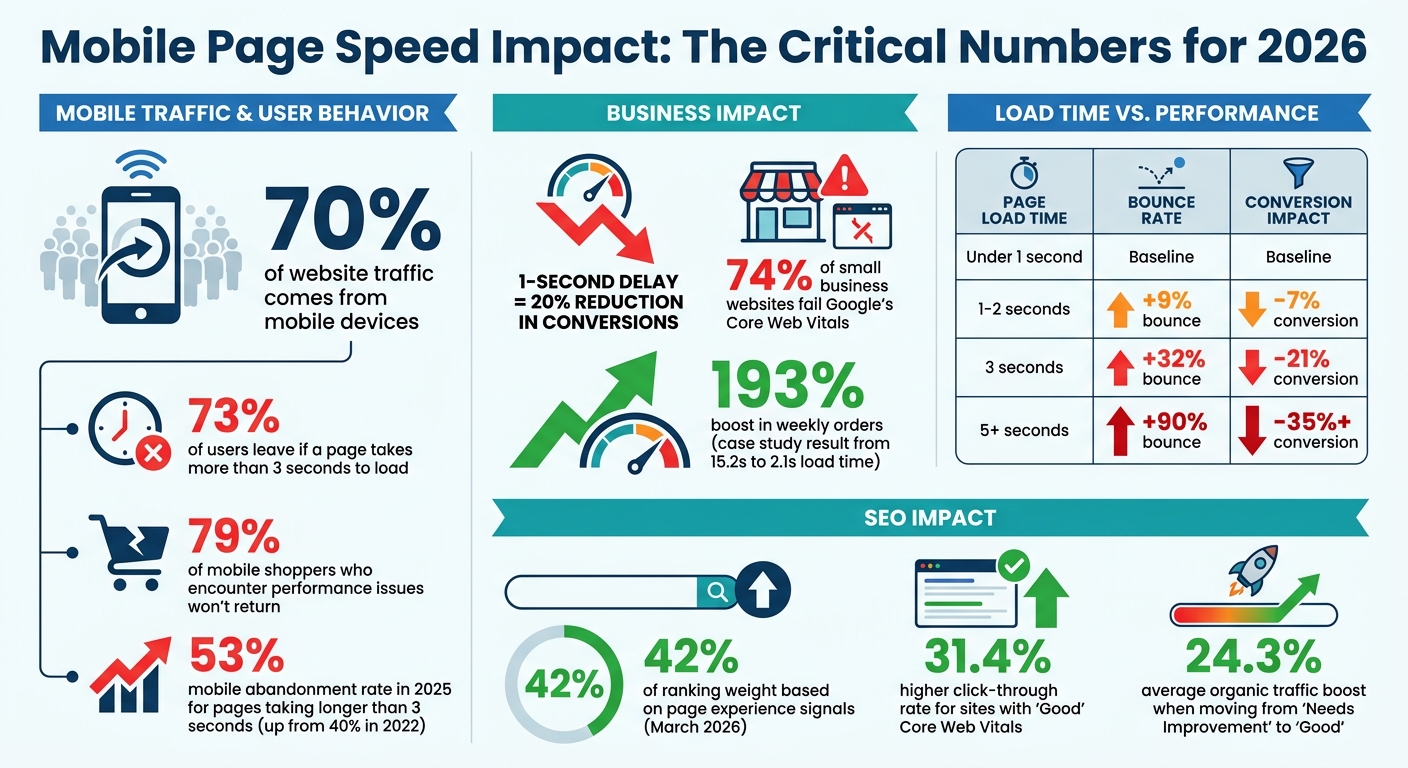
Mobile Page Speed Impact on User Behavior and Conversions 2026
Why Mobile Page Speed Matters in 2026
How User Expectations and Mobile Trends Have Changed
By 2024, 5G coverage expanded to 85% of urban areas, and this shift has drastically reshaped user expectations. Mobile abandonment rates climbed from 40% in 2022 to 53% in 2025 for pages taking longer than 3 seconds to load. In an era where people are constantly on the move or juggling multiple tasks, delays are no longer tolerated. A slow-loading site? That’s a ticket to losing potential customers.
Voice search has also become a major player, now making up over 30% of mobile searches in 2026. Interestingly, the average voice search result page loads in just 4.6 seconds - about half the speed of the broader web average. If your mobile site lags behind, you're essentially shutting the door on a growing audience segment. And here’s the kicker: 79% of mobile shoppers who encounter performance issues won’t return to your site. These trends make one thing clear - mobile speed isn't just a nice-to-have; it's a must-have for staying relevant.
How Mobile Speed Affects SEO and Search Rankings
Fast-forward to 2026, and Google’s indexing and ranking systems are now entirely mobile-first. Mobile speed is no longer a side consideration - it’s a critical part of SEO strategy. Following Google’s March 2026 core update, 42% of ranking weight now hinges on page experience signals. Sites that achieve "Good" Core Web Vitals scores enjoy a 31.4% higher click-through rate from organic search compared to those with "Poor" scores. Even moving from "Needs Improvement" to "Good" can boost organic traffic by an average of 24.3%.
Google evaluates performance using the 75th percentile of real user sessions, meaning even if the slowest 25% of your visitors have a subpar experience, your entire site might be flagged as underperforming. And if your Interaction to Next Paint (INP) values exceed 500ms, you could see a drop of 2 to 4 positions in search rankings. Simply put, slow speeds can cost you visibility - and a lot more.
Business Benefits of Faster Mobile Pages
The connection between page speed, bounce rates, and conversions is undeniable. A jump in load time from 1 second to 3 seconds increases the chance of a bounce by 32%, and at 5 seconds, that number skyrockets to 90%.
| Page Load Time | Bounce Rate Impact | Conversion Impact | SEO Risk |
|---|---|---|---|
| Under 1 second | Baseline | Baseline | None |
| 1-2 seconds | +9% bounce | –7% conversion | Low |
| 3 seconds | +32% bounce | –21% conversion | Medium |
| 5+ seconds | +90% bounce | –35%+ conversion | High |
Even small improvements make a difference. A 100ms improvement in Largest Contentful Paint (LCP) can boost conversions by 0.6% to 1.2%. For local businesses, speed is especially crucial: 76% of mobile users visit a related business within 24 hours of conducting a local search. In today’s competitive market, a faster mobile experience doesn’t just improve rankings - it can directly impact revenue, giving you an edge over slower competitors.
sbb-itb-cef5bf6
Mobile Page Speed Optimization: Deep Dive for Better Scores
Core Web Vitals and Mobile Speed Metrics
Google evaluates mobile performance using three Core Web Vitals, based on real-world data from Chrome users, that directly influence your search ranking. These metrics include LCP (Largest Contentful Paint), which measures the loading speed of main content; INP (Interaction to Next Paint), which tracks responsiveness to user interactions; and CLS (Cumulative Layout Shift), which gauges visual stability. Websites that meet these metrics experience 24% fewer bounces.
Google assesses your site based on the 75th percentile of all page loads. This means if the slowest 25% of your users have a subpar experience, your site could be flagged. Current pass rates (as of early 2026) show 57% for INP, 68% for LCP, and 78% for CLS, with INP being the most challenging metric - 43% of websites fail it.
Here’s how performance is categorized:
| Metric | Good (Pass) | Needs Improvement | Poor (Fail) |
|---|---|---|---|
| LCP (Largest Contentful Paint) | ≤ 2.5 seconds | 2.5 - 4.0 seconds | > 4.0 seconds |
| INP (Interaction to Next Paint) | ≤ 200 milliseconds | 200 - 500 milliseconds | > 500 milliseconds |
| CLS (Cumulative Layout Shift) | ≤ 0.1 | 0.1 - 0.25 | > 0.25 |
Let’s dive into each metric to understand its role in mobile speed.
Largest Contentful Paint (LCP)
LCP measures how long it takes the largest visible element on the screen to fully load. If your LCP exceeds 2.5 seconds, you're likely to face performance issues.
The main obstacle? Slow server response times. If your Time to First Byte (TTFB) exceeds 800ms, achieving a good LCP score becomes very difficult. Improving LCP often requires infrastructure upgrades like CDN edge caching and server-side rendering.
To improve LCP:
- Preload your largest image using
<link rel="preload">withfetchpriority="high"to start downloading before CSS parsing begins. - Convert images to WebP (reduces file size by 25-34%) or AVIF (cuts size by up to 50%).
- Use correctly sized images to cut file sizes by 50% or more without noticeable quality loss.
Interaction to Next Paint (INP)
INP replaced First Input Delay (FID) in March 2024 because FID focused only on the first interaction. INP, on the other hand, measures every interaction during a user’s visit, reporting the slowest one. This includes clicks, taps, and keypresses, tracking the time from input to a visual update.
With 43% of websites failing the 200ms threshold, INP is the toughest Core Web Vital to pass. The main culprit? JavaScript blocking the main thread. Third-party scripts like analytics, ads, and chat widgets are often to blame, as they interfere with user interactions.
To optimize INP:
- Break JavaScript tasks into chunks under 50ms using
scheduler.yield()orrequestIdleCallback. - Limit total DOM nodes to under 1,500 (ideally under 800) to avoid costly layout recalculations.
- Poor INP scores (over 500ms) can cost you 2 to 4 positions in search rankings.
Cumulative Layout Shift (CLS)
Finally, focus on CLS, which ensures visual stability by preventing content from shifting unexpectedly during loading. This is especially frustrating for mobile users, as it can lead to unintended clicks or taps.
To reduce CLS:
- Always define explicit
widthandheightattributes for images, videos, and ad containers to reserve space before they load. - Use CSS
aspect-ratiofor responsive containers and setmin-heightfor dynamic elements like ads. - For fonts, use
font-display: swapand adjust fallback font metrics withsize-adjustto eliminate layout shifts when custom fonts load.
With 78% of sites passing CLS, it’s the easiest Core Web Vital to improve. However, achieving a stable layout still requires careful attention to these details.
Tools for Testing Mobile Page Speed
Testing mobile page speed is essential for identifying performance issues and tracking progress. Two standout tools for this are Google PageSpeed Insights and Google Search Console, which provide complementary insights. PageSpeed Insights focuses on detailed diagnostics for specific URLs, while Search Console offers a broader view of site-wide performance trends.
Field data from the Chrome User Experience Report (CrUX) captures real-world user performance over the past 28 days. In contrast, lab data from Lighthouse provides instant feedback under controlled conditions. PageSpeed Insights updates field data daily, giving you the most current snapshot of user experiences. Both tools use the 75th percentile to assess performance, meaning if the slowest 25% of users encounter issues, your site could be flagged as underperforming.
A Lighthouse score of 90 or above is classified as "Good", while scores below 50 are deemed "Poor".
Google PageSpeed Insights
PageSpeed Insights is your go-to tool for analyzing individual URLs. It evaluates both field and lab data, delivering a performance score between 0 and 100 for mobile and desktop views.
The Opportunities section highlights prioritized fixes, like "Eliminate render-blocking resources" or "Properly size images", and provides estimated time savings to help you focus on impactful changes. The Diagnostics section offers additional technical insights, such as identifying an overly large DOM or inefficient cache policies, which may not directly affect your score but still influence user experience.
For low-traffic pages, the tool displays aggregate "Origin" data, reflecting overall site performance. If you're working on pages still in development or behind authentication, you can use Lighthouse directly in Chrome DevTools by navigating to the "Lighthouse" tab. This allows for immediate testing without requiring a public URL.
While PageSpeed Insights zeroes in on specific URLs, Search Console provides a more comprehensive view of your website's performance.
Google Search Console Core Web Vitals Report
Search Console takes a high-level approach, grouping similar URLs (like product pages or blog posts) that share common performance issues. This makes it easier to identify patterns and address problems at scale instead of handling pages individually.
The tool categorizes URLs into three groups: Poor, Needs Improvement, and Good. Start by fixing "Poor" URLs, as these have the greatest impact on user experience and search rankings. The "Why URLs aren't considered good" table pinpoints which metrics - such as LCP (Largest Contentful Paint), INP (Interaction to Next Paint), or CLS (Cumulative Layout Shift) - are failing and how many URLs are affected.
Once you've implemented fixes, click "Start Tracking" to initiate a 28-day validation period. During this time, Search Console monitors whether the issue persists. If any URL in the group fails again, the validation fails, signaling that the root problem wasn't fully resolved. This process requires patience, as you'll need to wait the full 28 days to confirm your optimizations are effective across real-world traffic.
With these tools, you can pinpoint and address mobile speed issues effectively. Next, let’s explore quick fixes to enhance mobile performance.
Quick Wins for Improving Mobile Page Speed
Once you've pinpointed performance issues using testing tools, it's time to roll up your sleeves and tackle some quick fixes. These straightforward adjustments address common speed hiccups and can boost your PageSpeed score by 15–30 points - no need for a complete site overhaul.
Optimize Images with WebP and Lazy Loading
Images are often the biggest culprits when it comes to slow-loading pages. They make up more than 50% of total page weight on most sites and cause Largest Contentful Paint (LCP) issues on 78% of pages. A quick fix? Switch from JPEG and PNG formats to modern ones like WebP and AVIF. WebP offers 25–35% smaller file sizes with over 97% browser support expected by 2026, while AVIF can compress files by more than 50% without sacrificing quality, with 90%+ browser support.
Here’s how to fine-tune your images:
- Compress images to 80–85% quality for the best balance of size and clarity.
- Keep hero images under 200 KB and other content images below 100 KB.
- Use the
<picture>element to prioritize AVIF, then WebP, with JPEG as a fallback.
For better performance, enable lazy loading by adding loading="lazy" to images that are below the fold. However, for your hero image, skip lazy loading. Instead, set fetchpriority="high", loading="eager", and include a preload link in the <head> section (e.g., <link rel="preload" as="image">) to speed up LCP.
Don’t forget to define explicit width and height attributes for your images to avoid layout shifts that can disrupt the user experience. Additionally, use srcset and sizes to ensure mobile users get the right-sized images, and strip out unnecessary EXIF metadata to shave off an extra 10–100 KB per file.
"In 2026, most performance bottlenecks are not JavaScript frameworks - they are oversized, poorly delivered, or incorrectly prioritized images." - AskSEOCoach
Minify CSS, JavaScript, and HTML
Minification is a simple but effective way to speed things up. It removes unnecessary spaces, line breaks, and comments from your code - elements that developers need but browsers don’t. The result? Smaller files that download faster, which helps reduce render-blocking resources and improves LCP.
Many websites serve CSS where only 20–40% of the code is actually used. Tools like WP Rocket or W3 Total Cache for WordPress can handle minification with ease, while custom setups can use PostCSS with the cssnano plugin. If you're using platforms like Elementor or Webflow, check their built-in optimization features under Settings > Features.
To maximize efficiency, pair minification with compression methods like Gzip or Brotli. Also, regularly review third-party scripts, such as those for analytics or marketing tags, and remove any you no longer need.
"Minification... makes the file smaller without changing its function." - Itamar Haim, SEO Team Lead, Elementor
After minifying, you can further cut down on delays by tackling HTTP requests and redirects.
Reduce HTTP Requests and Redirects
Every HTTP request introduces a delay, especially on slower mobile networks. Start by auditing your site for unused scripts. This includes outdated plugins, redundant analytics tools, excessive font imports, and non-essential social sharing widgets. For non-critical JavaScript, like analytics or chat widgets, use the defer or async attributes to load them after the main content. For heavier elements, like live chat widgets or video embeds, consider loading them only when users interact with them.
Redirects are another common drag on performance. They force browsers to make extra trips before loading content. Look for redirect chains (e.g., Page A → Page B → Page C) and eliminate them by linking directly to the final destination. This step is especially crucial on mobile, where every millisecond can impact the user experience.
Advanced Techniques for Long-Term Optimization
Once you've tackled the basics, it's time to dive into more technical strategies. These methods might take some extra effort to set up, but the payoff is worth it - they provide lasting improvements to your site's speed and performance.
Enable Browser Caching and Compression
Browser caching is a game-changer for repeat visitors. By storing static files locally, it can slash repeat page load times by up to 80%. To make this work, include the following header in your static assets:
Cache-Control: public, max-age=31536000, immutable
This tells browsers to keep these files for a year, ensuring faster load times.
Compression is another crucial step. It reduces the size of text-based files before they're sent over the network. Gzip can shrink files by 60–80%, but Brotli compression takes it a step further, outperforming Gzip by 15–20%. To confirm Brotli is active, look for the Content-Encoding: br header.
For assets that need regular updates, service workers are your best friend. They let you manage caching programmatically with strategies like "Stale-While-Revalidate", which serves cached files instantly while fetching fresh ones in the background. This approach has been shown to cut Largest Contentful Paint (LCP) by 40–60% on repeat visits.
"Service workers hand you programmatic control over exactly what gets cached, how it's served, and when it's refreshed - turning repeat visits into near-instant page loads." - WebPerfClinic
To keep cached files updated without manual intervention, use content hashing in filenames (e.g., style.a1b2c3.css). This ensures users always get the latest version when changes are made.
Pairing caching with a Content Delivery Network (CDN) can take your performance to the next level.
Implement a Content Delivery Network (CDN)
A CDN speeds up content delivery by hosting your files on multiple servers (Points of Presence or PoPs) worldwide. This reduces latency by serving files from the server closest to each visitor, cutting delays by 50–70% for users far from your main server.
When choosing a CDN, look for features like Anycast routing, which automatically directs traffic to the nearest healthy data center for seamless failover. Tiered caching is another must-have - it reduces the load on your origin server and helps achieve a cache hit ratio above 90% for static assets. Modern CDNs also support HTTP/3 (QUIC) and include automatic image optimization, which is essential for mobile performance in the coming years.
| Metric | Target (Good) | Impact of CDN |
|---|---|---|
| TTFB | < 200ms | Reduces by 60–80% |
| LCP | < 2.5s | Improves by speeding up asset delivery |
| Cache Hit Ratio | > 90% | Optimized with tiered caching |
While a CDN minimizes network delays, your server's response time also plays a critical role.
Optimize Server Response Times
If your Time to First Byte (TTFB) exceeds 600ms, it will undermine all your optimization efforts. The first step to improving this is upgrading your hosting. Managed hosting options like SiteGround ($15–$30/month), WP Engine ($30–$60/month), or Kinsta ($35–$100/month) can significantly reduce response times.
Additionally, enabling HTTP/2 or HTTP/3 allows multiple files to download simultaneously over a single connection - this is particularly helpful for mobile users with spotty networks. Compression tools like Brotli and Gzip can reduce transfer sizes by 70–90%. For dynamic content, edge caching with your CDN ensures HTML is served from servers closer to users, avoiding repeated trips to your origin server.
"If TTFB is slow, nothing else can compensate." - Vezert
To monitor progress, use tools like ByteCheck to pinpoint server-side delays. Real User Monitoring (RUM) with libraries like web-vitals.js can also provide insights into how your site performs for actual users on real devices.
Latest Techniques for Mobile Speed in 2026
Staying ahead of the curve in mobile speed optimization is crucial, especially with the performance standards shifting after Google's March 2026 core update. The new thresholds demand swift action to ensure your site meets the latest requirements. Below, we dive into three standout strategies - AMP, PWA, and advanced JavaScript delivery - that cater to these updated performance benchmarks.
Adopt Accelerated Mobile Pages (AMP)
By 2026, AMP remains a go-to framework for ensuring fast, reliable performance, especially for large-scale publishers managing thousands of templated pages. Its restricted JavaScript model and component-based architecture help maintain consistent speed and stability. Notably, AMP aligns well with the 2026 Core Web Vitals standards, particularly for metrics like Cumulative Layout Shift (CLS) and Interaction to Next Paint (INP).
AMP's structured system is ideal for massive content volumes, where its limitations ensure predictable performance. However, for sites with optimized HTML and robust infrastructure - like server-side rendering and edge caching - standard pages can often rival AMP in speed while providing more flexibility for testing and customization.
"AMP's constraints can force performance, but once standard templates are engineered correctly, they often deliver similar speed with significantly better growth tooling." – Launchmind Team
If your CMS isn't easily optimized or you manage large-scale content, AMP can be a practical choice. But for businesses that prioritize flexibility and personalization, standard pages might be the better route.
Progressive Web Apps (PWA) Implementation
PWAs are redefining mobile experiences by offering app-like speed and functionality. With service workers acting as programmable network proxies, PWAs can load 2–3 times faster than native apps on repeat visits. Key assets are cached locally, enabling near-instant loading.
The app shell architecture is a game-changer, instantly delivering the UI from cache while fetching dynamic content in the background. This approach has driven measurable success - Pinterest, for instance, saw a 60% jump in user engagement and a 44% increase in ad revenue after rolling out their PWA in early 2026.
PWAs also simplify deployment. Installation is four times faster than native apps, and updates roll out instantly without app store delays. For best results, use tools like Workbox 7 to implement smart caching strategies. For example:
- Apply a "Cache First" strategy for static assets that rarely change.
- Use "Stale-While-Revalidate" for frequently updated content to balance speed with freshness.
PWAs are a solid choice for businesses aiming to enhance user engagement and revenue through faster load times and seamless updates.
Advanced JavaScript Delivery with requestIdleCallback
Efficient JavaScript delivery is critical to hitting the strict 150 ms threshold for Interaction to Next Paint (INP). The requestIdleCallback API plays a key role by allowing low-priority tasks to run only when the browser's main thread is idle. This prevents long tasks from interfering with user interactions.
The API includes a timeRemaining() method, which checks how much idle time is available (up to 50 ms) before handing control back to the browser.
"Window.requestIdleCallback() makes it possible to become actively engaged in helping to ensure that the browser's event loop runs smoothly, by allowing the browser to tell your code how much time it can safely use without causing the system to lag." – MDN
Use requestIdleCallback for tasks like sending analytics data, pre-fetching content, or initializing non-essential UI elements. Always monitor deadline.timeRemaining() to ensure tasks stay within the idle window, and include a timeout option so tasks eventually execute even if the browser never becomes fully idle.
Monitoring and Continuous Improvement
Once you've implemented both quick wins and advanced strategies, it's critical to keep an eye on your progress. Improving mobile page speed isn't a one-time task - it requires ongoing attention. Google evaluates Core Web Vitals (CWV) using a 28-day rolling average of real-world data, which can lead to sudden ranking changes. To meet Google's standards, your page needs to hit the "Good" threshold for at least 75% of page views. This makes continuous monitoring essential to catch and address any issues before they impact your rankings or conversions.
Regular Performance Audits with Field Data
While quick fixes are important, regular performance audits offer a more comprehensive view of your site's mobile speed over time. Combining lab data and field data is the best approach. Lab tools help you debug issues in a controlled environment, while field tools capture how your site performs for real users.
"Field tools tell you what's happening and lab tools tell you how to improve it" - WooRank
Using the Performance Observer API, you can gather real-time Core Web Vitals data directly from your users. This provides detailed insights that public datasets like CrUX might not reveal. For example, users on mid-range Android devices in rural areas may experience slower loading times, which you can address with this granular data.
Set performance budgets to avoid regressions. For instance, you can limit total JavaScript size to 300 KB, total image size to 500 KB, and ensure LCP stays under 2.5 seconds. Integrate these checks into your CI/CD pipeline to block non-compliant code. Conduct quarterly audits to track CWV scores, identify robots.txt errors, and validate structured data for mobile templates. Testing on budget devices, like mid-range Android phones, is essential since mobile performance heavily depends on CPU capabilities.
| Audit Frequency | Scope of Work | Purpose |
|---|---|---|
| Quarterly | Technical crawl, Core Web Vitals check, broken link scan | Spot new issues |
| Biannually | UX analysis, content updates, competitive benchmarking | Measure user engagement and conversions |
| Annually | Full audit (SEO, Performance, UX, Content, Security) | Plan a prioritized roadmap for improvements |
| Post-Migration | Redirect verification, rendering check, performance baseline | Prevent ranking or speed losses |
Partner with SEO Werkz for Ongoing Optimization

While in-house audits are valuable, partnering with experts can take your site's performance to the next level. Professional agencies bring specialized knowledge and a fresh perspective that internal teams may not always have. SEO Werkz, for example, identifies the "critical 20%" of technical issues that often cause 80% of performance problems. Instead of relying on generic checklists, they focus on high-impact fixes tailored to your business and audience.
Agencies also help prevent technical debt by catching issues like broken redirects or performance declines that can arise after major site updates. They test under real-world conditions, such as throttled 4G connections and mid-range devices. With JavaScript-heavy pages requiring up to 2,500 milliseconds to process - about 17 times longer than static HTML - expert guidance ensures you're optimizing the elements that matter most.
SEO Werkz offers customized strategies that align performance improvements with your conversion goals and competitive benchmarks. Their ongoing monitoring and targeted approach help you maintain excellent mobile speed as your site evolves, keeping you prepared for future standards while delivering measurable results.
Conclusion
Mobile page speed optimization is the backbone of online success in 2026. With mobile devices driving over 65% of global internet traffic, and 53% of users leaving pages that take more than 3 seconds to load, speed isn't just important - it’s essential. Even a one-second delay can slash conversions by up to 20%, and 79% of mobile shoppers who face performance issues are unlikely to return.
To get started, focus on quick wins like converting images to WebP or AVIF formats, enabling lazy loading, and minifying your code. These straightforward changes can significantly improve your Core Web Vitals scores. Once these are in place, move on to advanced tactics such as browser caching, using a Content Delivery Network (CDN), and optimizing server response times. Together, these steps create a strong foundation for better performance and user satisfaction.
"Mobile SEO is not a subset of SEO - it is SEO." – ECOSIRE Research and Development Team
Google’s mobile-first indexing makes your mobile experience a direct factor in search rankings. Sites with strong Core Web Vitals often see 15–25% more organic traffic. Plus, with voice search now making up over 30% of mobile queries, optimizing for speed ensures you're ready for future trends.
Keep in mind, mobile optimization isn’t a one-and-done deal. Google evaluates performance using a 28-day rolling average, and ranking improvements typically take 4–8 weeks to show. Regular audits, performance budgets, and testing on mid-range devices help maintain top-notch speed as your site evolves. Whether you handle this in-house or work with experts like SEO Werkz, staying ahead requires consistent effort.
The benefits are undeniable. Faster mobile load times lead to improved rankings, higher conversions, and greater revenue. Start implementing these strategies now to stay ahead of the competition and thrive in 2026 and beyond.
FAQs
What should I fix first to improve mobile speed fast?
To improve mobile speed effectively, prioritize optimizing your Largest Contentful Paint (LCP). This means ensuring that critical elements, such as hero images, load within 2.5 seconds. You can achieve this by:
- Compressing and resizing images to reduce load times without sacrificing quality.
- Implementing server-side rendering to speed up how content is delivered to users.
- Using a Content Delivery Network (CDN) to distribute content from servers closer to your audience.
These adjustments not only create a smoother user experience but also help boost search rankings.
How can I identify which Core Web Vital is failing on my site?
Tools like Google PageSpeed Insights and Google Search Console are invaluable for evaluating your site's Core Web Vitals. They can highlight specific metrics, such as Largest Contentful Paint (LCP), Cumulative Layout Shift (CLS), or First Input Delay (FID)/Interaction to Next Paint (INP), that may not be meeting performance benchmarks. By pinpointing these underperforming areas, you can focus on targeted improvements to enhance your site's overall performance.
When should I use a CDN, AMP, or a PWA for speed?
Using a CDN (Content Delivery Network) can significantly cut down server response times and ensure faster content delivery across the globe, making it a great choice for websites with a broad audience. Implement AMP (Accelerated Mobile Pages) to provide lightning-fast load times on mobile devices - perfect for news sites or pages with lots of content. For improved user engagement, consider a PWA (Progressive Web App), which offers benefits like offline functionality and quicker load times for returning visitors. Each of these tools plays a specific role in optimizing mobile page speed and enhancing the overall user experience.