
Top Crawlability Issues and Fixes
April 16, 2026Crawlability determines how well search engines can access and understand your site. If your site isn't crawlable, even great content won't rank. Common problems include broken links, robots.txt errors, and poor URL structures. Fixing these issues ensures search engines index your pages efficiently, improving visibility and user experience.
Key issues and solutions:
- Broken Links: Use tools like Screaming Frog or Google Search Console to find and fix 404 errors with 301 redirects or by removing irrelevant links.
- Robots.txt Errors: Avoid blocking essential pages or resources. Test and update your robots.txt file using Google Search Console.
- Poor URL Structure: Simplify your site's hierarchy and use canonical tags to prevent duplicate content.
Other factors like server errors, duplicate content, and mobile crawlability also impact your site's performance. Regular audits and clean XML sitemaps can optimize crawl budgets and boost search rankings.
3 Tips for Crawling Errors
sbb-itb-cef5bf6
Common Crawlability Problems and Their Fixes
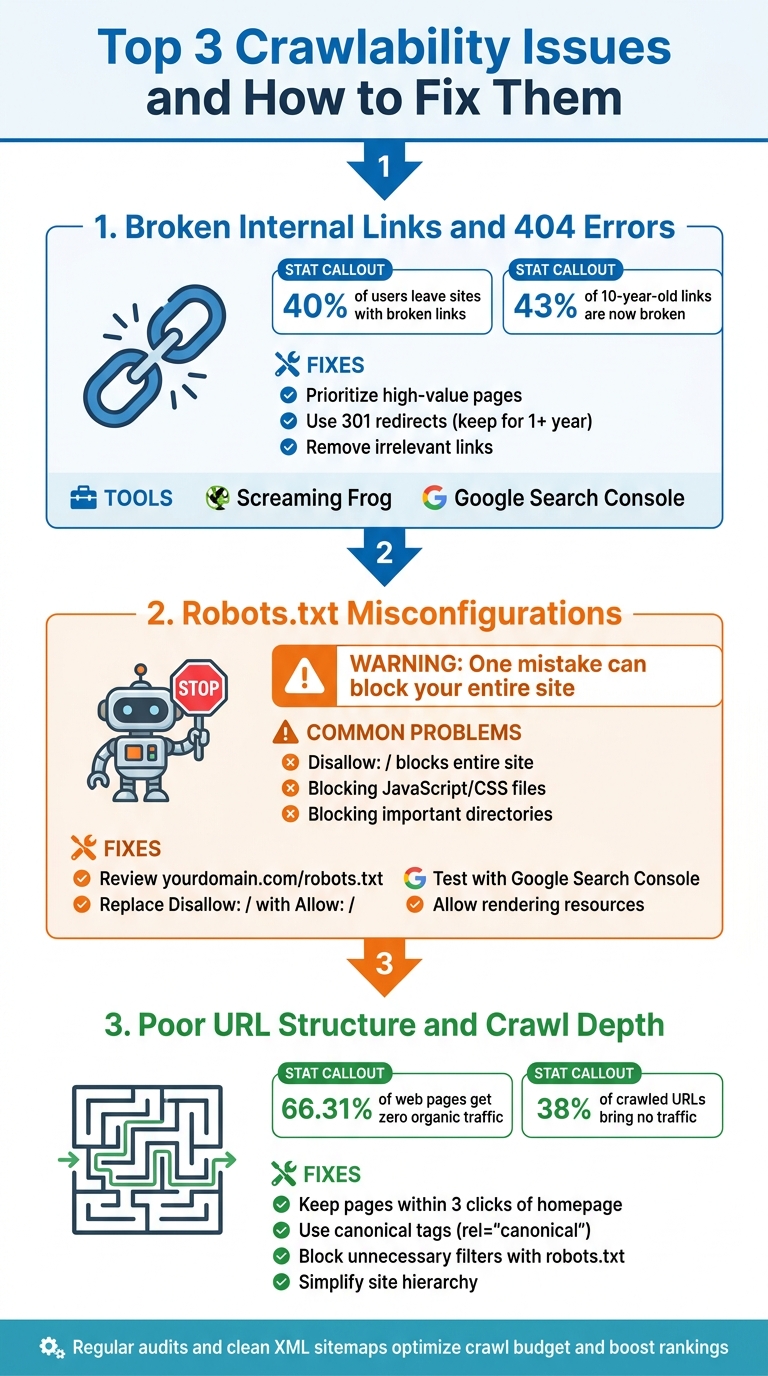
Top 3 Crawlability Issues and How to Fix Them
Here are three common issues that can block search engines from accessing your site, waste valuable crawl budget, and hide important content. Let’s break them down and explore how to resolve them.
Broken Internal Links and 404 Errors
Broken links are like dead ends for search engines - they waste crawl budget and disrupt link equity. Plus, they frustrate users. Studies show that about 40% of users leave a site after encountering broken links. Another study tracking over 2 million hyperlinks found that 43% of links from 10 years ago are now broken.
To identify these issues, tools like Screaming Frog (free for up to 500 URLs) are invaluable. Navigate to the "Response Codes" tab, filter for "Client Error (4xx)", and check the "Inlinks" tab to see which pages link to those broken URLs. Google Search Console also flags these errors in the "Pages" report under the "Indexing" section.
Here’s how to fix them:
- Prioritize high-value pages: Start with pages that have the most inbound links.
- Use 301 redirects: Redirect broken links to live pages to preserve link equity. Avoid 302 redirects, as they don’t pass equity as effectively. As Seth Trammell from GR0 explains:
Google recommends you keep 301 redirects in place for at least a year to ensure all equity passes from the old page to the new.
- Remove irrelevant links: If no replacement page exists, delete the link altogether.
Next up, let’s look at how robots.txt misconfigurations can hinder crawlability.
Robots.txt Misconfigurations
Your robots.txt file acts as the starting point for search engine crawlers. A single mistake - like Disallow: / - can block your entire site from being indexed. Another common issue? Blocking JavaScript and CSS files, which prevents search engines from rendering your site properly and seeing it as users do. Guy Sheetrit from Over The Top SEO warns:
Your robots.txt file is the first technical control point for AI crawler access. Get this wrong and your content might as well be invisible to AI search.
To avoid these problems:
- Review your robots.txt file: Visit
yourdomain.com/robots.txtand check for problematicDisallow:lines blocking important directories (e.g.,/blog/or/products/). - Test with Google Search Console: Use the robots.txt Tester to ensure no critical URLs are accidentally blocked.
Common fixes include:
- Replacing
Disallow: /withAllow: / - Adding directives like
Allow: /wp-content/themes/andAllow: /wp-content/plugins/to ensure rendering resources are accessible - Adding user-agent directives for AI crawlers like GPTBot to control access
Finally, let’s address how poor URL structures can impact crawlability.
Poor URL Structure and Crawl Depth
Complicated URL structures and overly deep site hierarchies can slow down crawlers and waste resources. URLs with excessive parameters (e.g., ?sort=price&color=blue) often create spider traps, leading bots to crawl endless variations.
An Ahrefs study of one million domains found that 66.31% of web pages receive zero organic traffic from Google, often due to technical issues like poor crawlability. For large sites with over 100,000 URLs, managing crawl budget becomes even more critical.
Here’s how to address this:
- Simplify your site structure: Ensure key pages are no more than three clicks away from the homepage.
- Use canonical tags: Add
rel="canonical"tags to direct search engines to the main version of a page, avoiding duplicate content issues. - Block unnecessary filters: For e-commerce sites, use robots.txt to block faceted navigation combinations (e.g.,
Disallow: /*?color=) that generate countless unnecessary URLs.
Technical Problems That Block Crawlers
Even after solving structural challenges, technical server issues can still prevent crawlers from accessing your site. These problems don't just waste your crawl budget - they can delay indexing and even cause pages to disappear from search results altogether, no matter how great your content is.
Server Errors and Response Time Issues
When your server starts throwing 5xx errors - like 500 (Internal Server Error), 502 (Bad Gateway), 503 (Service Unavailable), or 504 (Gateway Timeout) - it signals a problem on your end. These errors can arise from things like misconfigured plugins, unexpected traffic surges, ongoing maintenance, or slow database queries. And here's the kicker: if Googlebot encounters these errors repeatedly, it might crawl your site less often - or stop altogether.
"Search engines can remove your site from their index after they repeatedly get such a response."
Even short-lived server errors can reduce crawl frequency, leaving critical pages unindexed. To avoid this, keep a close eye on your server logs to identify and fix errors quickly. If you're expecting a traffic spike or performing maintenance, consider serving a 503 status with a "Retry-After" header so crawlers know when to come back. Tools like Google Search Console's Crawl Stats report can help you spot spikes in server errors and monitor your site's response times.
Duplicate Content and Canonical Tag Problems
Once server issues are under control, duplicate content can still wreak havoc on your crawl budget. It not only confuses users but also forces search engines to spend extra time figuring out which version of a page to index. Here's a surprising stat: sites with more than 15% non-canonical duplicates may face a 22% delay in indexing. And even when you use canonical tags, Google might ignore them 35% of the time if they conflict with your internal links. This splits your link equity among multiple URLs (like those with tracking parameters or session IDs), weakening your main page's ranking power.
Krish Srinivasan, Senior Search Architect at Search Engine Zine, explains it well:
"You cannot force a canonical tag if your entire site architecture points elsewhere."
To fix this, ensure your XML sitemaps, internal links, and breadcrumbs consistently point to self-referencing canonical URLs. If a duplicate URL doesn't add any value for users, use a 301 redirect to consolidate signals - this typically updates indexing within 48 to 72 hours. And whatever you do, don’t block canonicalized URLs in your robots.txt file. Crawlers need access to these pages to pass along link equity.
Once duplicate content is addressed, it's time to tackle mobile crawlability.
Mobile Crawlability and Mobile-First Indexing
With mobile-first indexing now the standard, Google primarily uses your mobile site - viewed through a smartphone agent - for indexing and ranking, even for desktop searches. If your mobile version has less content, missing structured data, or blocks essential resources like CSS and JavaScript, your rankings could take a hit.
Some common mobile crawl issues include blocked resources due to restrictive robots.txt rules, lazy-loading that requires user interaction to display content, and mismatched robots meta tags between desktop and mobile versions. Google won’t load content that requires actions like clicking or swiping to appear.
To identify and fix these issues, use Google Search Console's Mobile Usability Report and URL Inspection Tool. Make sure your mobile site mirrors your desktop site in terms of content, headings, and metadata. If you run a separate mobile site (like an m-dot version), ensure your desktop site includes a rel="alternate" tag pointing to the mobile version, and the mobile site uses a rel="canonical" tag referencing the desktop version. Don’t forget to align all structured data and update URLs within your mobile schema as needed.
XML Sitemaps and Crawl Budget Management
Once you've tackled mobile crawlability, the next step is optimizing your XML sitemaps and managing your crawl budget. These efforts ensure that search engines focus on the pages that matter most. Think of your XML sitemap as more than just a discovery tool - it’s a navigational guide for crawlers, pointing them toward your most important content. At SEO Werkz, the emphasis is on keeping sitemaps clean and well-organized to make the best use of your crawl budget.
Maintaining Clean XML Sitemaps
A good sitemap should include only URLs that are canonical, indexable, and return a 200 OK status. Avoid including 404s, redirects, or "noindex" pages, as these can confuse search engines and waste crawl resources.
Here’s a real-world example: In 2025, a media publisher with 42,000 articles found 6,200 "noindex" URLs and 3,100 redirects clogging their sitemap. After cleaning it up to include only canonical, 200-status URLs, the "Discovered - currently not indexed" status in Google Search Console dropped by 31% in just six weeks. This freed up crawl budget to index 4,800 high-priority articles that had previously been overlooked.
Keep your sitemaps under the hard limits of 50,000 URLs and 50MB uncompressed. For larger sites, use a sitemap index file to break things down by content type (e.g., /sitemap-products.xml or /sitemap-blog.xml). A practical tip: instead of maxing out at 50,000 URLs per sitemap, limit them to around 5,000 URLs. This makes parsing faster and simplifies error tracking.
Pay attention to the <lastmod> tag. As Kiril Ivanov, Managing Director at TwoSquares, warns:
A bad lastmod is worse than no lastmod.
Only update this tag when there are meaningful content changes. If you overuse it, search engines may start ignoring the signal altogether.
Once your sitemap is in top shape, the next focus should be on cleaning up your URL inventory to make the most of your crawl budget.
Improving Crawl Budget Efficiency
Even with a well-maintained sitemap, an unmanaged URL inventory can drain your crawl budget. Research shows that around 38% of URLs crawled by Googlebot on e-commerce sites bring in no organic traffic, which highlights wasted resources.
The usual suspects? Faceted navigation, session IDs, and tracking parameters, which can create endless low-value URL combinations. To fix this, analyze these parameterized URLs and identify those that generate no traffic. Use robots.txt to block only the nonessential variations, while keeping high-demand filters crawlable. Relying solely on canonical tags won’t cut it - Google still has to crawl the page to see the tag, meaning the budget is already spent.
Rohit Sharma, Founder of IndexCraft, puts it this way:
The crawl efficiency problem is almost never a server issue - it's a URL inventory problem.
In late 2025, Sharma audited a large e-commerce platform and found that 45% of Googlebot requests were wasted on session-parameterized URLs from analytics and affiliate systems. By blocking these in robots.txt and focusing on clean URLs, the platform saw a significant increase in crawl frequency for core product pages within six weeks.
Don’t overlook orphan pages - these are URLs in your sitemap that lack internal links. Ensuring that high-priority pages are no more than 3–4 clicks away from the homepage can help boost recrawl efficiency.
Finally, keep an eye on the "Discovered - currently not indexed" report in Google Search Console. This report helps you track how well your efforts are working and identify unused pages that need to be pruned. If the numbers in this report are high, it means Google found your URLs but didn’t allocate enough resources to crawl them. Addressing this can make a big difference.
Quick Fixes to Improve Crawlability
After working on your XML sitemaps and optimizing your crawl budget, there are a few quick adjustments you can make to improve how search engines access and index your site. These don't require a complete overhaul but can still make a noticeable difference. As Manick Bhan, Founder and CEO/CTO at Search Atlas, explains:
Fixing crawl errors is one of the most important tasks in technical SEO because it directly impacts ranking potential and site visibility.
Many of these fixes can be implemented in just hours or days, with results often visible within 2 to 14 days, depending on how frequently your site is crawled. Building on the foundational steps already discussed, these quick fixes can help restore and boost your site's crawl efficiency.
Fixing Broken Links and Cleaning Sitemaps
Broken links are a problem because they block crawlers, waste your crawl budget, and prevent indexing. Kelly-Anne Crean, Head of Operations at Koozai, highlights this issue:
In audits, I often see broken links on high‑traffic pages or key conversion paths. They frustrate users, waste crawl budget, and disrupt the flow of authority across a site.
To tackle this, start by reviewing the "Not found" report in Google Search Console under Indexing > Pages. This will help you identify unreachable URLs. Using tools like Google Search Console can streamline this process.
Here’s how you can address broken links:
- Redirect pages that have moved or have equivalent replacements using 301 redirects to preserve link equity.
- Recreate or restore high-value pages that were removed by mistake.
- Fix typos in URLs to resolve 404 errors.
- Remove broken links if no replacement exists.
When cleaning up your XML sitemaps, remove any URLs with non-200 status codes, robots.txt blocks, or "noindex" tags. Only include URLs that are indexable and canonical. Pay special attention to high-traffic pages or those critical to conversions.
Once your broken links are addressed, move on to configuration issues that might be blocking crawlers.
Resolving Robots.txt and Canonical Issues
The robots.txt file is one of the first things search engines check when crawling your site. Arman Advani, Director of SEO Strategy at Search Atlas, emphasizes its importance:
A page that bots cannot crawl will not be indexed. Without indexing, the page never appears in search results. This kills SEO performance.
Here are some quick steps to review and update your robots.txt file:
- Make sure yourdomain.com/robots.txt doesn’t include
Disallow: /, which would block your entire site. - Add
Allow:directives for JavaScript and CSS directories to ensure proper rendering. - Use Google Search Console’s robots.txt Tester to confirm that important URLs aren’t blocked.
- Add specific "Allow" rules for public subfolders that should be accessible.
For canonical tags:
- Ensure every indexable page includes a self-referencing canonical tag.
- Use absolute URLs with the full protocol and domain, rather than relative paths.
- Simplify redirect chains (e.g., A > B > C) into single redirects (A > C) to improve efficiency.
With these fixes in place, check that your site’s security settings aren’t creating crawlability issues.
Addressing Mixed Content Errors
Mixed content errors happen when HTTPS pages load resources over HTTP. These errors can create security risks, trigger browser warnings, and negatively affect rankings.
Here’s a quick checklist to resolve mixed content errors:
- Update your CMS settings to use HTTPS for all URLs.
- Perform a database search-and-replace to update all "http://" references to "https://".
- Check your theme files and CSS for hardcoded HTTP URLs and update them.
- Replace any third-party embed codes with HTTPS versions.
A real-world example shows how impactful these fixes can be. In a technical SEO project documented by Search Atlas in 2026, a rehab facility saw a 277% increase in organic traffic and over 1,400 keywords move into the Top 3 rankings. Using the OTTO SEO tool, they identified and resolved technical issues like broken links and navigation problems, completing the primary fixes in just one day.
Conclusion
Crawlability forms the backbone of any SEO strategy. If search engines can’t access your pages, they can’t index them - and without indexing, even the highest quality content won’t appear in search results. As Tyson Braun from seoClarity explains, "Systematic technical audits prevent hidden crawl barriers from undermining ranking potential at scale."
The challenges we’ve covered - like broken links, robots.txt errors, server issues, and duplicate content - are what Arman Advani refers to as "silent performance killers." These problems quietly block search engines and waste your crawl budget on irrelevant pages instead of prioritizing the content that drives results. This is especially critical now, as modern AI crawlers often operate with fewer resources than traditional search engines, making efficient crawlability even more vital for appearing in AI-generated answers.
Crawlability isn’t something you fix once and forget. Websites, especially larger ones, are constantly evolving, and new technical obstacles can arise with every update. Regular audits are essential to catch issues early. For sites that frequently update, automating weekly audits can help identify problems - like unexpected robots.txt blocks or redirect loops - before they hurt your rankings. Tools like Google Search Console’s Crawl Stats report can reveal spikes in server errors or sudden drops in crawl rate. Analyzing log files can also provide valuable insights into how bots interact with your site.
The bright side? Many crawlability fixes can lead to noticeable improvements relatively quickly, though results depend on how often your site is crawled. As Ezekiel Adewumi from Carril Agency puts it, "Fixing [technical issues] does not guarantee rankings, but failing to fix them guarantees you will not reach your potential." Staying proactive ensures your site remains accessible to search engines, safeguarding your organic visibility and keeping you competitive as search technologies continue to advance.
FAQs
How do I know if Google is wasting crawl budget on my site?
To spot crawl budget waste, start by digging into your server log files and keeping an eye on crawl activity. Look for telltale signs, such as search engines spending too much time on low-value pages - things like faceted URLs, orphan pages, broken links, or duplicate content. Other red flags include frequent 404 errors, excessive redirects, or crawling of pages marked with noindex or those blocked by disallow directives.
Tools like Google Search Console can be incredibly helpful here. They can highlight problematic URLs and provide insights into crawl-related inefficiencies, making it easier to address the issues.
When should I use a 301 redirect vs removing a broken internal link?
When a page has been permanently moved or replaced, a 301 redirect is your best bet. It helps retain SEO value by guiding both users and search engines to the new location without losing any link equity. On the other hand, if there’s no suitable replacement for a broken internal link, it’s better to remove it entirely. This avoids frustrating users with dead-end links and keeps your site functioning smoothly. Redirects keep your SEO intact, while removing broken links ensures a seamless browsing experience.
What should my XML sitemap include (and exclude) for best indexing?
Your XML sitemap should list all the key URLs you want search engines to find and index. Leave out any non-essential, duplicate, or restricted URLs (like those blocked by robots.txt or meta tags). This approach helps search engines prioritize your most important content, improving crawl efficiency and visibility.