Ultimate Guide to Email Segmentation for Personalization
April 24, 2026Email segmentation is about dividing your subscriber list into smaller groups to send targeted, relevant emails. This strategy can boost click rates by 100.95%, improve revenue by up to 760%, and generate 58% of email marketing income. It also helps maintain your sender reputation by ensuring your emails are valuable to recipients.
Here’s how segmentation works:
- Demographic Segmentation: Group subscribers by traits like age, location, or job role.
- Behavioral Segmentation: Target based on actions, such as purchase history or email engagement.
- Sales Funnel Segmentation: Customize messages for each stage of the customer journey.
To implement segmentation, audit your data, define core groups (e.g., loyal customers vs. new subscribers), and use automation to keep lists updated. Advanced personalization, like tailored subject lines or predictive analytics, can further improve results.
Key metrics to track include open rates, click-through rates, conversions, and revenue per email. Regularly refine your segments based on performance to ensure your campaigns remain effective.
In today’s crowded inboxes, segmentation is essential to stand out and drive meaningful engagement.
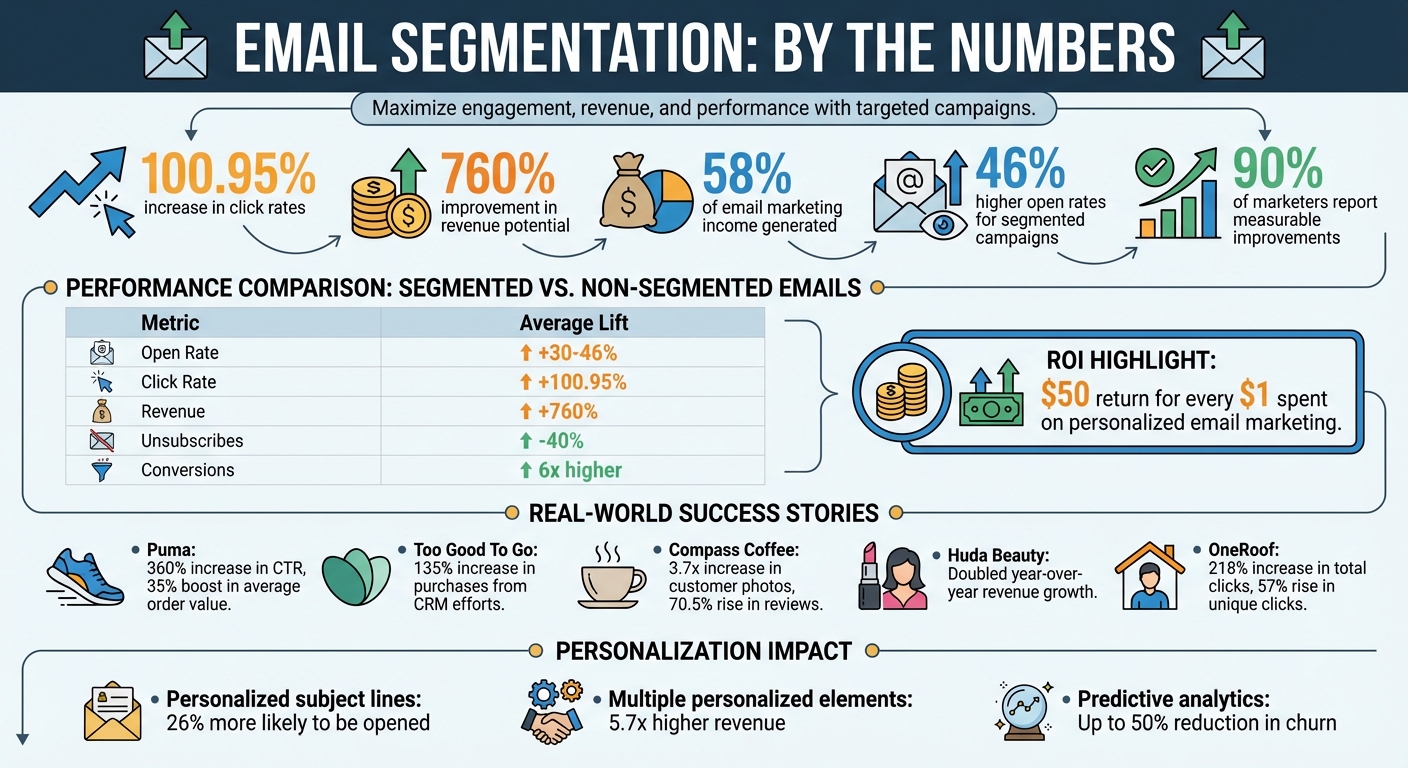
Email Segmentation Performance Statistics and ROI Impact
Email Marketing Segmentation: Full Guide for 2025
sbb-itb-cef5bf6
Main Types of Email Segmentation
To make your email campaigns more effective, breaking your email list into meaningful groups is essential. The three main approaches - demographic, behavioral, and sales funnel segmentation - each serve specific purposes and can deliver impressive results when used correctly. Let’s dive into each type.
Demographic Segmentation
Demographic segmentation organizes your subscribers based on characteristics like age, gender, location, income, job title, education, or family status. This method works best when these traits influence how someone interacts with your product or service.
For instance, B2C brands might send diaper discounts to parents or retirement planning tips to seniors. On the B2B side, companies could target engineers with technical guides or executives with ROI-focused case studies.
A great example of this is Puma, which used CRM data to create personalized jersey images featuring each customer’s name. This approach led to a 360% jump in click-through rates and a 35% boost in average order value.
Collecting demographic data is often straightforward - sign-up forms, surveys, and CRM tools are common sources. However, it’s crucial to focus only on traits that genuinely affect how your audience uses your product. For example, family status might be critical for a toy company but irrelevant for enterprise software.
But demographics only scratch the surface. To dig deeper, understanding behavior is key.
Behavioral Segmentation
Behavioral segmentation is all about actions - what your subscribers do, like their purchase history, browsing habits, email engagement, or abandoned carts. This approach relies on clear intent signals rather than assumptions.
Take Too Good To Go, a food-waste reduction app, as an example. They segmented users based on app activity and purchase behavior. By sending API-triggered notifications when nearby "Surprise Bags" became available, they increased purchases tied to CRM efforts by 135%.
"Braze has allowed me to try different things as a CRM manager... being able to configure personalized messages with Liquid, A/B test with color and creative variations, diversify campaigns, and review performance reports without having to ask the development team has made my job more efficient." – Eunpa Han, CRM Manager, Job Korea
A key advantage of behavioral segmentation is that it updates automatically. For example, repeated visits to your pricing page indicate high purchase intent, while prolonged email inactivity suggests disengagement. Huda Beauty used this strategy to target only subscribers active within the last 120 days, doubling their year-over-year revenue growth.
Beyond tracking behaviors, tailoring emails to where subscribers are in their journey can refine your approach even further.
Sales Funnel Segmentation
Sales funnel segmentation sorts subscribers by their stage in the journey - Awareness, Consideration, Conversion, Retention, or Advocacy. A new subscriber might benefit from educational content, while a loyal customer could respond better to exclusive perks or loyalty rewards.
Compass Coffee used lifecycle segmentation creatively. They separated reviewers based on whether they included photos in their reviews. Those who submitted photos received a 15% discount, while others got a thank-you note. This strategy resulted in a 3.7x increase in customer photos and a 70.5% rise in total reviews quarter-over-quarter.
Tailoring your message to a subscriber’s current stage is crucial. For example, sending a welcome series to a new subscriber makes sense, but it could be a missed opportunity for a long-time customer. Segmented campaigns, on average, boost conversion rates from 1.31% to 1.79%, and when paired with personalization, email marketing ROI can soar to $50 for every dollar spent.
How to Implement Email Segmentation
Setting up email segmentation involves reviewing your data, creating core audience segments, and leveraging automation to keep everything updated in real time.
Audit Your Subscriber Data
Start by exporting your subscriber list and analyzing key details like job titles, industries, locations, and purchase histories. This helps you identify gaps in your data and areas that need improvement. Organize your data into categories such as demographic, behavioral, transactional, technographic, and lifecycle stage.
Maintaining clean data is crucial. Eliminate duplicate entries, validate email addresses, and remove hard bounces to safeguard your sender reputation. You can also use email preference centers to allow subscribers to set their own preferences. This approach collects accurate, privacy-compliant zero-party data and can retain up to 25% of users who might otherwise unsubscribe.
Once your data is cleaned and well-organized, you can move forward with defining meaningful segments.
Define Core Segments
With your data in order, focus on creating segments that directly influence subscriber behavior. Begin with three to five broad segments tailored to how users engage with your product. Examples include:
- Engagement level: Active vs. inactive users (e.g., an "active" user might be someone who opened an email in the last 30 days).
- Lifecycle stage: New subscribers vs. loyal customers.
- Purchase behavior: Frequent buyers vs. one-time shoppers.
Establish clear criteria for each segment. For instance, a "high-value customer" could be defined as someone who has spent over $500 in the past year. Prioritize segments that offer the most strategic value, such as targeting high-lifetime-value customers for upselling or re-engaging those at risk of churning.
Given that nearly 48% of emails are opened on mobile devices, consider adding a technographic segment to ensure responsive design. Geographic segments are also valuable, allowing you to optimize send times and tailor offers based on regional preferences and time zones.
Use Automation Tools for Dynamic Segmentation
Once you’ve outlined your core segments, automation can simplify the process of keeping them updated. Unlike static segments, dynamic segments adjust automatically based on preset rules. For example, a "recent purchaser" segment can instantly include subscribers who made a purchase within a specific timeframe and remove them once that period expires.
Automation platforms, such as Customer Data Platforms (CDPs), consolidate user behavior across web, app, and offline channels, ensuring your email data reflects current user intent. APIs and webhooks can automate updates for fast-changing data, like recent site visits or link clicks.
You can also use automated lead scoring models to weigh engagement signals - like email opens, clicks, and purchases - and dynamically move subscribers between "cold", "warm", and "active" segments. Behavioral triggers are especially effective for segmentation. For instance, users who visit your pricing page without booking a demo can automatically enter a follow-up sequence. Similarly, a win-back campaign can be triggered after 90 days of inactivity, with inactive users eventually removed to maintain strong deliverability rates.
"Segmented email marketing campaigns can increase revenue by 760% compared to batch-and-blast approaches." – Alex Berman
Many email platforms offer pre-built segment templates, like "frequent link clickers" or "loyal fans", which you can customize to suit your needs. These templates are a great starting point, but refining them based on your goals will yield better results. Lastly, ensure your CRM and email service provider are synced bi-directionally so that changes - like a prospect becoming a customer - are reflected in real time.
Advanced Personalization Techniques
Once you've set up your segments and automation workflows, it's time to add a layer of personalization that makes each email feel like it was crafted just for the recipient. Segmented campaigns already achieve 46% higher open rates compared to generic emails. By building on these segmented lists, advanced personalization techniques can take your email performance to the next level. For instance, personalized subject lines are 26% more likely to be opened, and emails with multiple personalized elements can drive revenue that's 5.7 times higher than non-personalized campaigns. These strategies help refine your messaging and ensure your emails land at the right time.
Customizing Messaging and Subject Lines
Start with the subject line. Instead of generic phrases, include personal details like the recipient’s name, location, or recent activity. For example, “Sarah, check out new boots for Chicago winters” or “Complete your order from yesterday” can grab attention. Personalized subject lines have an average open rate of 20.66%, compared to 19.57% for non-personalized ones.
Take it a step further by switching your brand’s generic "From" name to a real person’s name, such as the founder or a dedicated account manager, to make the email feel more personal. You can also tailor visuals based on the subscriber's location, which has been shown to boost click-through rates by 29%. Even small changes, like replacing a generic "Shop Now" button with a more specific call-to-action like "Continue Your Order" for cart abandoners or "See Products You'll Love" for loyal customers, can make a big difference. Adding timely details, such as local weather or events, can help create an immediate connection.
"It costs almost nothing to include personalized elements but earns a lot more." – Thomas Radavicius, Author, Sender
Optimizing Send Times for Each Segment
Personalization doesn’t stop at content - it also applies to timing. Forget the old advice about sending emails on Tuesday mornings; people’s behavior varies too much for one-size-fits-all strategies. Instead, analyze past interactions like session times, email clicks, and human (not bot) opens to determine the best send window for each subscriber. Start by segmenting your list by time zone, ensuring emails arrive at logical local times, like mid-morning.
Industry benchmarks can provide a starting point. For example:
- B2B emails perform best on Tuesday through Thursday between 9 and 11 a.m.
- Retail and e-commerce campaigns often see higher engagement on Thursday and Friday from 10 a.m. to 2 p.m.
- Nonprofits tend to do well with mid-week afternoons or Saturday mornings.
- Event-related emails perform better on Thursday or Friday afternoons or Sunday evenings.
However, these are just guidelines. Regular A/B testing is essential to find the best timing for your audience.
For even better results, consider machine learning tools to pinpoint optimal send times. In 2025, OneRoof, a New Zealand property platform, used Braze Intelligent Timing to personalize email delivery windows. This shift led to a 218% increase in total clicks to property listings, a 57% rise in unique clicks, and a 23% boost in email click-to-open rates. Similarly, foodora tested the same tool during its customer onboarding in Austria, achieving a 9% increase in click-through rates, a 41% conversion rate, and a 26% drop in unsubscribe rates.
"A message's timing is just as important as its content." – Team Braze
Using Predictive Analytics
Predictive analytics uses historical data to anticipate customer needs. It can model probabilities for actions like repeat purchases or churn risk. For example, if a customer typically buys coffee beans every six weeks, predictive models can trigger a replenishment reminder just before they run out.
AI-powered tools can recommend the next best action, such as suggesting relevant products, upsells, or loyalty rewards tailored to each user. These tools can also forecast Customer Lifetime Value (CLV), helping you focus on high-value segments with specialized campaigns. Predictive lead scoring has been shown to increase sales-ready leads by 50% and boost average deal sizes by 10%. Additionally, AI-driven send-time optimization can improve email open rates by 5–10%.
Automation allows predictive models to update segments in real time, moving subscribers from "active" to "at-risk" as their behavior changes. For example, a sudden drop in website visits might trigger a retention email. By combining purchase history, browsing behavior, and social media engagement, you can create even more precise predictive models. Studies show that predictive analytics can reduce churn by up to 50%, making it an essential tool for retention strategies.
"Predictive segmentation identifies hidden patterns in your customer data to deliver exactly what they want - before they even realize it themselves." – SAP Engagement Cloud
Measuring and Improving Segmentation Performance
Tracking the right metrics and refining your audience segments can help you get the most out of your campaigns. By focusing on performance data, you can ensure that every email sent aligns with your business goals.
Key Metrics to Track
To get the most out of your segmentation strategy, keep an eye on these key metrics:
- Open Rates: Compare the open rates of each segmented list to your overall average. This helps you see if your subject lines are resonating with specific audiences.
- Click-Through Rate (CTR): Segmented campaigns often achieve 100.95% higher click rates compared to non-segmented ones. This indicates that your content is connecting with each group.
- Click-to-Open Rate (CTOR): This metric focuses on how well your content performs by measuring clicks among those who opened the email.
- Conversion Rate: Tracks the percentage of recipients who take the desired action, like making a purchase or signing up for an event. This shows how well your offer matches the segment's interests.
- Revenue Metrics: Keep an eye on revenue per email (RPE) or revenue per recipient (RPR) to measure the financial impact of each email on a particular segment.
- Unsubscribe and Complaint Rates: These metrics highlight when your content misses the mark.
- Deliverability and Inbox Placement: Ensure your emails land in inboxes and avoid spam filters.
Here’s a quick summary of the performance boosts segmentation can deliver:
| Metric | Segmented Lift (Avg) | Strategic Importance |
|---|---|---|
| Open Rate | +30–46% | Indicates subject line effectiveness |
| Click Rate | +100.95% | Reflects content and offer alignment |
| Revenue | +760% | Shows overall business impact |
| Unsubscribes | -40% | Highlights list health and retention |
| Conversions | 6x higher | Measures how well the funnel works |
Refining Segments Based on Data
Segmentation isn’t a one-and-done process - it requires constant adjustments based on performance data and subscriber behavior.
After every campaign, review the results to identify segments that aren’t performing as expected. Adjust the criteria for these groups, such as tweaking purchase frequency thresholds or merging smaller segments to improve statistical accuracy. If a segment continues to underperform, experiment by changing one variable at a time, like the offer or subject line, to pinpoint what works.
Dynamic segmentation can automatically update as subscriber behavior changes. For example, when a prospect becomes a customer, they should immediately stop receiving acquisition-focused emails. Conduct quarterly reviews to ensure your segments still align with both subscriber behavior and your business goals.
You can also use engagement tiers to manage your list more effectively. Divide subscribers into groups like "Champions" (active in the last 30 days), "Warm" (active in the last 90 days), "Cold" (active in the last 180 days), and "Inactive." For colder segments, reduce send frequency to protect deliverability. Additionally, re-engage or remove inactive subscribers after 90–180 days of inactivity to maintain a healthy list.
It’s worth noting that 90% of marketers say segmentation improves performance across all metrics they track. By regularly analyzing and adjusting your segments, you can keep your campaigns effective and aligned with your goals.
Conclusion
Email segmentation is a powerful tool that turns one-size-fits-all broadcasts into tailored, meaningful conversations. By segmenting your audience based on factors like demographics, behavior, and their stage in the sales funnel, you can craft campaigns that resonate on a personal level. It’s no wonder segmented emails account for 58% of revenue and achieve 46% higher open rates.
To succeed, start simple. Divide your list into broad categories, such as new subscribers and loyal customers, and refine your approach over time as you gather more data. Keep a close eye on key metrics like open rates, click-through rates, conversions, and revenue per email. These numbers will guide you in fine-tuning your strategy. After all, 90% of marketers report seeing measurable improvements in engagement and conversions with segmentation.
As your audience evolves, so should your strategy. Use dynamic automation to shift subscribers between segments as their behaviors change, and regularly audit your data to maintain accuracy. Advanced personalization - like tailored messaging and predictive analytics - can take your efforts even further, helping you deliver the right message at the perfect moment. This not only drives revenue but also strengthens customer relationships.
In today’s crowded inboxes, generic mass emails just don’t cut it. Adopting segmentation isn’t just a smart move - it’s a necessity for achieving meaningful business results.
FAQs
What’s the easiest way to start segmenting if my list is small?
The easiest way to begin dividing a small email list is by using straightforward criteria like engagement levels (such as open or click rates) or demographics. This method is simple to implement, needs only a small amount of data, and lets you send more focused, relevant emails immediately - ideal for smaller lists that don’t rely on extensive data collection.
How can I collect segmentation data without hurting sign-ups or trust?
When collecting segmentation data, it's important to respect users' privacy and make the process as seamless as possible. One way to do this is by asking for voluntary information - like preferences or demographics - during sign-up. Keep these forms short and straightforward to avoid overwhelming users. Focus on gathering only the most essential details upfront.
Over time, you can refine your segmentation by observing behavioral patterns and tracking engagement signals. This approach not only protects user privacy but also builds trust, ensuring you gain meaningful insights to deliver more personalized experiences.
How often should I update segments and remove inactive subscribers?
Regularly updating your email segments and removing inactive subscribers is a smart move. Aim to do this every 90–120 days. If you're sending emails daily, consider marking subscribers as inactive after 30–40 days of no engagement. For weekly senders, this window is typically 21–28 days, and for monthly senders, it stretches to 90–120 days. Keeping your list clean not only boosts engagement but also helps maintain strong deliverability, ensuring your email campaigns stay on track.