Core Web Vitals: Improving LCP For Better Rankings
February 21, 2026Google uses Core Web Vitals to measure user experience, and Largest Contentful Paint (LCP) is one of the most important metrics for SEO rankings. A fast LCP reassures users that your page is useful, while a slow LCP can hurt engagement and conversions. Here’s what you need to know:
- LCP measures how long it takes for the largest visible element (e.g., image, video, text) to load. A good LCP score is 2.5 seconds or less.
- Websites meeting Core Web Vitals benchmarks see lower bounce rates and higher rankings. For instance, improving LCP can boost conversions by up to 12% for every second saved.
- Common LCP bottlenecks include slow servers, unoptimized images, and delayed resource loading.
- Tools like Google Search Console, PageSpeed Insights, and Lighthouse can help diagnose LCP issues.
To improve LCP:
- Optimize images with modern formats (e.g., WebP, AVIF) and preload critical assets.
- Reduce server response time using caching and CDNs.
- Ensure text and fonts load quickly with techniques like
font-display: swap.
A deep dive into optimizing LCP
sbb-itb-cef5bf6
How to Measure LCP
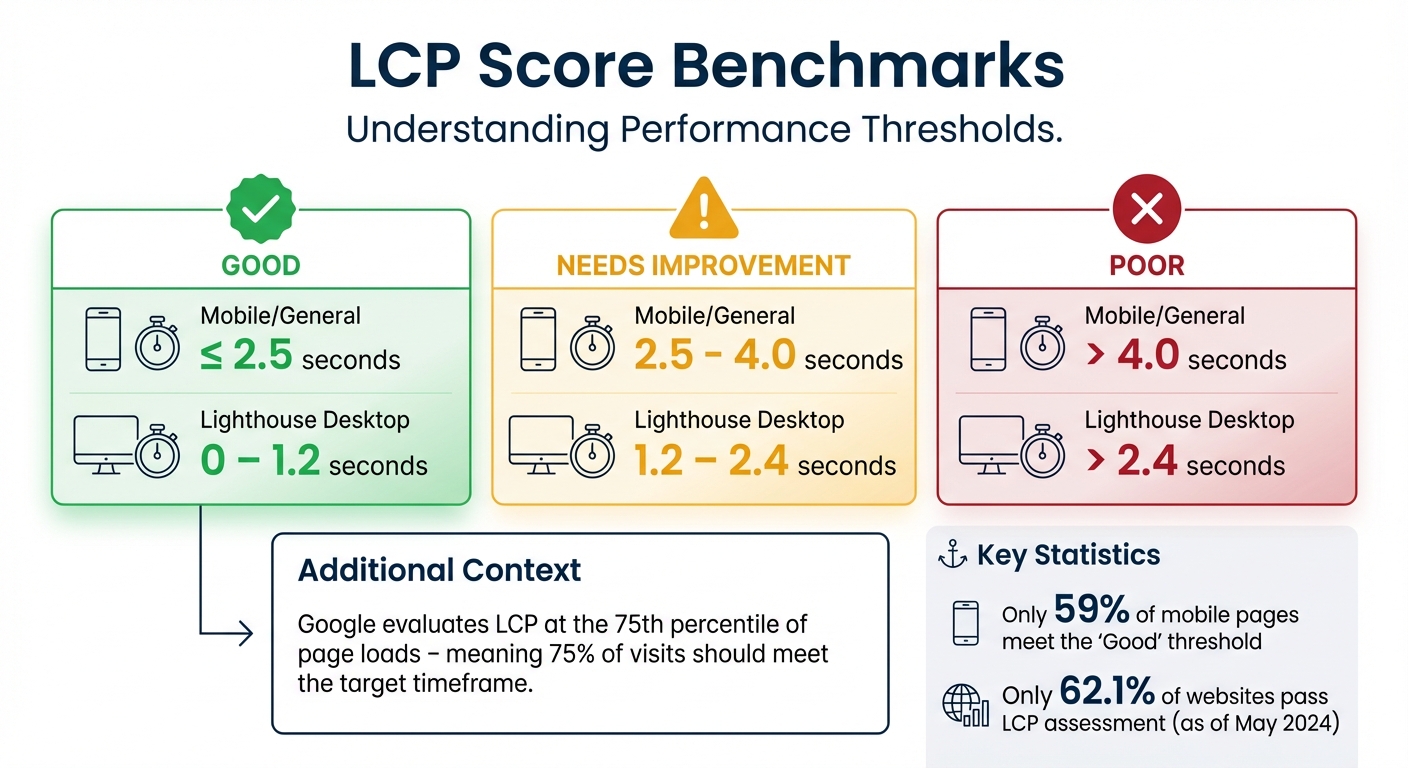
LCP Score Benchmarks: Good vs Needs Improvement vs Poor Performance
Understanding how to measure Largest Contentful Paint (LCP) is crucial for identifying and fixing performance issues. The process starts by determining which elements are delaying rendering. Let’s break down the key elements involved and the benchmarks that indicate optimal performance.
Elements That Contribute to LCP
LCP focuses on the largest visible element within the viewport - the part of the page users see without scrolling. This can include:
<img>tags<image>elements inside an<svg><video>elements (using either the poster image or the first frame)- Background images loaded via the CSS
url()function - Block-level elements containing text nodes
Certain elements are excluded, such as those with zero opacity, images used as full-screen backgrounds, and low-quality placeholder images. For images, the size is determined by the smaller of the intrinsic or displayed dimensions. For text, the minimal bounding rectangle is used.
LCP is measured dynamically. As larger elements render, the browser updates the LCP value until the user interacts with the page. The metric involves four phases: Time to First Byte (TTFB), Resource Load Delay, Resource Load Duration, and Element Render Delay. On slower sites, the median delay before downloading the LCP image is 1.3 seconds - almost four times longer than the actual download time.
LCP Score Benchmarks
Google evaluates LCP performance based on the 75th percentile of page loads, meaning 75% of visits should meet the target timeframe.
| Category | LCP Time (Mobile/General) | LCP Time (Lighthouse Desktop) |
|---|---|---|
| Good | ≤ 2.5 seconds | 0 – 1.2 seconds |
| Needs Improvement | 2.5 – 4.0 seconds | 1.2 – 2.4 seconds |
| Poor | > 4.0 seconds | > 2.4 seconds |
Lighthouse uses stricter benchmarks for desktop testing. Field data, which reflects real user experiences, is collected separately for mobile and desktop devices over a 28-day rolling average. Lab data, on the other hand, provides immediate feedback for debugging and development. For many underperforming sites, a slow Time to First Byte (TTFB) is a major issue. In fact, for 50% of sites with poor LCP, TTFB exceeds 2,270 milliseconds, making a good score nearly impossible without server-side improvements. As Arjen Karel from corewebvitals.io puts it, "A slow TTFB is a foundational problem that will always kill your LCP".
Tools to Diagnose LCP Problems
To effectively diagnose LCP issues, you’ll need a mix of tools to analyze real-world data and perform controlled testing.
Field Tools:
- Google Search Console's Core Web Vitals Report: Shows performance trends across similar URLs using real user data.
- PageSpeed Insights: Combines data from the Chrome User Experience Report (CrUX) for individual URLs and entire origins.
- web-vitals JavaScript Library: Lets you measure LCP directly within your analytics setup.
Lab Tools:
- Chrome DevTools Performance Panel: Provides live metrics that update as you interact with the page, helping you identify issues under specific conditions.
- Lighthouse: Offers a performance score and diagnostic audits, including an LCP filter to zero in on problem areas.
- WebPageTest: Pinpoints the LCP element and visualizes network activity through waterfalls.
Field data should take priority when assessing performance. As Philip Walton and Barry Pollard explain on web.dev, "If Lighthouse and CrUX disagree, then CrUX likely provides a more accurate picture of your user experience". While using Chrome DevTools, configure network and CPU throttling (e.g., "Fast 4G" or "20x slowdown") to replicate the conditions your visitors face.
How to Improve LCP
Once you’ve pinpointed what’s slowing down your Largest Contentful Paint (LCP), it’s time to address the issue. Improvements typically fall into three main areas: optimizing media, fixing text and background rendering issues, and speeding up your server. Focusing on all three ensures you tackle every phase of the LCP timeline.
Optimize Images and Videos
Images are the LCP element on 73% of mobile pages, making them a top priority for optimization. Start by ensuring your LCP image is immediately discoverable in the initial HTML - through an <img> tag or <link rel="preload">. Surprisingly, 35% of pages bury their LCP image in external CSS or JavaScript, delaying its download.
Here are some key tips for image optimization:
- Add
fetchpriority="high"to your LCP image. For example, Google Flights reduced their LCP by 700 milliseconds (from 2.6 seconds to 1.9 seconds) by prioritizing their LCP background image. - Avoid
loading="lazy"on above-the-fold content, as it delays the most visible part of your page. - Use modern image formats like WebP or AVIF for better compression. WebP has 95% browser support, while AVIF is supported by around 92%.
- Use
srcsetandsizesto serve device-appropriate image sizes, avoiding unnecessary downloads of large desktop-resolution files on mobile. - Replace heavy GIFs with MPEG4 or WebM formats for animations to reduce file sizes significantly.
Self-hosting your LCP assets is another critical step. As corewebvitals.io puts it:
"Not self-hosting your LCP element is like constantly borrowing sugar from your neighbor... Self-hosting is like keeping the sugar in your kitchen: fast, direct, and reliable".
By self-hosting, you eliminate extra DNS lookups and connection delays. Also, set explicit dimensions for images, use <link rel="preload">, and prioritize them with fetchpriority="high". Finally, avoid fade-in animations, as LCP isn’t recorded until the animation completes.
Improve Text Rendering and Background Images
When text elements are your LCP, fast font loading becomes essential. Here’s how to optimize text rendering:
- Use WOFF2 fonts, which compress 30% better than WOFF.
- Self-host and subset fonts to include only the characters you need.
- Apply
font-display: swaporoptionalto ensure text appears immediately, even if it’s with a fallback font for a brief moment. - Consider using
font-family: system-uifor body text to skip font downloads entirely.
For background images used as LCP elements, avoid relying on CSS background-image, as browsers can’t preload these resources. Instead:
- Include a
<link rel="preload">for background images in your HTML. - Replace background images with
<img>tags styled withobject-fit: coverfor better performance.
Another quick win is inlining critical CSS directly in the <head> of your document. This allows the browser to render above-the-fold content immediately, without waiting for external stylesheets. Additionally, use preconnect to establish early connections for third-party resources like Google Fonts.
Optimize Server and Resource Loading
Server performance and resource loading account for about 80% of LCP time, with each contributing roughly 40%. A slow Time to First Byte (TTFB) creates a bottleneck, delaying everything else. As web.dev explains:
"A high TTFB can make achieving a 2.5 second LCP challenging, or even impossible".
To improve server performance:
- Use server-side caching tools like Redis or Varnish.
- Leverage a Content Delivery Network (CDN) to serve content from locations closer to users.
- Minimize redirects and enable HTTP/3 for better handling of packet loss and reduced latency.
- Configure caching headers for static assets, such as
Cache-Control: public, max-age=31536000, immutable, to speed up resource delivery.
Resource Load Delay is another area to address. The median site with poor LCP wastes about 1.3 seconds waiting for downloads to start. Use <link rel="preload"> for critical LCP resources and set fetchpriority="high" to ensure they’re loaded promptly.
| LCP Subpart | Recommended % of Total LCP |
|---|---|
| Time to First Byte (TTFB) | ~40% |
| Resource Load Delay | <10% |
| Resource Load Duration | ~40% |
| Element Render Delay | <10% |
Lastly, explore the Speculation Rules API to optimize LCP for subsequent navigations. These server-side improvements are key to hitting LCP benchmarks that can enhance your search rankings.
How SEO Werkz Can Help Improve LCP

Fixing LCP (Largest Contentful Paint) issues isn’t a one-size-fits-all process. It requires strategies tailored to your website's unique setup and how users interact with it. SEO Werkz offers a personalized approach to tackle these challenges head-on.
SEO Werkz Advanced SEO Plan
The Advanced SEO Plan dives into the four core components of LCP: Time to First Byte (TTFB), Resource Load Delay, Resource Load Duration, and Element Render Delay. Using tools like Google Search Console, PageSpeed Insights, Chrome DevTools, and Lighthouse, SEO Werkz pinpoints the exact causes of LCP issues.
To reduce TTFB, they implement server-side caching and Content Delivery Network (CDN) solutions. They also use advanced techniques like 103 Early Hints to speed up resource delivery and the Speculation Rules API, which prefetches or prerenders pages based on user interactions - like hovering over a link.
Image optimization is a key part of the plan. SEO Werkz converts images to modern formats like WebP and AVIF, uses responsive image techniques with the srcset attribute, and applies fetchpriority="high" to prioritize critical images. They also ensure that the main LCP image is included directly in the initial HTML, rather than being delayed by external CSS or JavaScript.
Custom Campaigns for Core Web Vitals
SEO Werkz tailors its approach based on your website's platform. For headless CMS platforms, they focus on decoupled content delivery and streamlined API queries. For traditional CMS platforms, they identify and remove unused JavaScript and CSS to improve performance. E-commerce sites, such as those on Shopify, benefit from optimized redirects and server-side code adjustments to prevent issues like cart abandonment.
The team also uses Chrome User Experience Report (CrUX) data to analyze performance separately for mobile and desktop users, addressing device-specific challenges. Since images play a role in 90% of LCP issues, much of their work focuses on optimizing visual content.
Measurable Results and Clear Reporting
SEO Werkz doesn’t just make changes - they track the results. Using Google Search Console, they monitor the progress of pages moving from "Poor" to "Good" in LCP performance. Their reports clearly show how technical improvements lead to better search rankings, higher user engagement, and increased conversion rates.
The stakes are high. A one-second delay in page load time can cut conversion rates by 7%, and 53% of mobile users will leave a site if it takes more than three seconds to load. As of May 2024, only 62.1% of websites pass the LCP assessment, leaving room to outpace the competition by meeting the "Good" threshold - or even reaching the ambitious 0.5-second benchmark that top sites aim for by 2026.
These measurable improvements demonstrate how targeted LCP optimizations can boost rankings, user satisfaction, and overall site performance. With such focused strategies, SEO Werkz sets the stage for long-term SEO success.
Conclusion
Improving Largest Contentful Paint (LCP) isn't just a technical adjustment - it’s a direct path to better rankings and stronger user engagement. Since LCP is a confirmed Google ranking factor, its impact on performance is undeniable. Yet, only 59% of mobile pages meet the "Good" threshold for LCP, which is set at 2.5 seconds or less. This leaves a clear opportunity for those willing to optimize.
The results speak for themselves: Vodafone boosted sales by 8% after cutting LCP by 31%. Tokopedia saw session durations and organic traffic climb by 23% after reducing LCP from 3.78 to 1.72 seconds. Rakuten achieved a 61% surge in conversions by hitting a "Good" LCP score.
"LCP is the hardest Core Web Vital to pass. Only 59% of mobile pages achieve good LCP compared to 74% for INP and 72% for CLS."
- Harlan Wilton, Unlighthouse
The stakes are high: every 1-second delay in LCP can slash conversion rates by 12%. With 73% of mobile pages relying on images as their LCP element, focusing on image optimization, reducing Time to First Byte (TTFB), and ensuring the LCP resource is discoverable in the initial HTML are essential steps to stay competitive.
FAQs
What is the LCP element on my page?
The Largest Contentful Paint (LCP) element on your page is the biggest visible content element within the viewport. It could be an image, a video, or a block of text - depending on how your page is designed. Pinpointing and optimizing this element is key to speeding up load times and enhancing the overall user experience.
Why does my LCP differ between Lighthouse and Search Console?
The key difference lies in how the two tools measure LCP (Largest Contentful Paint). Lighthouse relies on lab-based testing, conducted in a controlled environment. This means it uses preset conditions, like specific network speeds and device settings, to simulate a user's experience.
On the other hand, Search Console reports field data, which comes from real-world user experiences. This data reflects actual conditions, including variations in network quality, device performance, and user behavior.
Because of these contrasting approaches, it's normal for their LCP metrics to differ. Lab tests offer consistency, while field data provides insights into how users truly experience your site. Both perspectives are valuable, but they serve different purposes.
What should I fix first: TTFB, images, or render-blocking resources?
Resource load delays are often the main culprit behind noticeable latency before downloads even start. These delays significantly affect Largest Contentful Paint (LCP), which measures how quickly the largest visible content on a page loads. Since LCP plays a critical role in overall performance, addressing these delays should be your top priority.