
E-Commerce PPC: Budgeting for Competitive Keywords
February 20, 2026E-commerce PPC is all about targeting shoppers who are ready to buy. But not all keywords are created equal - competitive keywords, which have high intent and attract heavy bidding, can either drive conversions or drain your budget. With Google Ads' average cost-per-click (CPC) rising 15% year-over-year, smart budgeting is essential.
Here’s what you need to know:
- Competitive keywords are high-intent search terms like "buy leather boots online" that signal purchase readiness but come with higher CPCs.
- These keywords often deserve 50–75% of your PPC budget since they drive the majority of conversions.
- Use tools like Google Keyword Planner, Semrush, and SpyFu to research keywords based on intent, volume, and competition.
- Prioritize transactional keywords over informational ones for better ROI.
- Allocate budgets wisely: 10–15% for branded campaigns, 85–90% for non-branded growth, and keep 10–15% for testing.
- Start small with a $1,500/month budget to test campaigns, then scale based on performance.
- Track metrics like CTR, CPC, CPA, and ROAS to optimize performance.
How To Setup Your Keyword Bidding | Keyword Bidding Like A Pro
sbb-itb-cef5bf6
How to Research Competitive Keywords
Smart budget allocation begins with solid research - pinpointing competitive keywords that offer the best return on investment (ROI). The key is to use the right tools and focus on intent. Successful keyword research isn’t about chasing high-volume terms; it’s about identifying keywords that show a shopper is ready to buy. With 88% of PPC specialists now incorporating AI tools like ChatGPT into their keyword research process, strategies are shifting toward intent-focused approaches rather than volume-first tactics.
Using Keyword Research Tools
Start your research with Google Keyword Planner, a free tool that pulls data straight from Google Ads. It provides search volume and cost estimates, and its "Start with a website" feature lets you analyze a competitor’s URL to uncover their targeted keywords. For deeper insights, Semrush's Keyword Magic Tool offers metrics like search intent, volume, and average CPC. If you want to see competitors’ ad spend history and the keywords they’re bidding on, SpyFu specializes in competitive intelligence.
For campaigns on the Microsoft Search Network (Bing), use the Microsoft Advertising Keyword Planner, which often reveals lower CPCs and unique keyword opportunities. Tools like Keywords Everywhere (starting at $2.25/month) display CPC and competition data directly on search results pages, making it easy to identify opportunities as you browse. Meanwhile, Ahrefs Keywords Explorer includes a "Paid Keywords" report that shows which ads competitors have run recently, offering a peek into their current strategies.
"New advertisers get so excited about visibility. They think more impressions = more clicks = more sales. So they use keyword research to add the highest-volume terms to their campaigns, which is exactly the wrong approach." - Amy Hebdon, Founder, Paid Search Magic
Prioritizing Keywords by Intent
Not every keyword is worth your budget. High-intent keywords - those with commercial or transactional intent - are essential for PPC success. For example, a search like "buy organic dog treats" (transactional) shows immediate purchase intent, while "best running shoes for marathons" (commercial) suggests someone is researching before buying. Both are valuable, but transactional keywords often lead to quicker conversions.
Tools like Semrush and Ahrefs allow you to filter keywords by intent. Long-tail keywords, such as "organic dog treats for puppies", are especially useful. They tend to have less competition and higher conversion rates compared to broader terms.
To determine which keywords are worth bidding on, calculate your maximum CPC using this formula:
(Product Price × Profit Margin × Conversion Rate). This ensures you focus only on profitable keywords.
With 42% of specialists citing limited keyword data for niche products as a major challenge, prioritizing intent helps you zero in on what truly matters. Avoid informational searches like "how to clean leather boots" unless your goal is awareness - they rarely drive immediate sales. Once you’ve identified your high-priority keywords, keep track of them systematically.
Creating a Keyword Tracking Sheet
Once you’ve selected your keywords, consolidate all your data into a single tracking sheet for ongoing management. Export keyword data from tools like Google Keyword Planner or Semrush into Excel or Google Sheets. Organize it with columns for Keyword, Monthly Search Volume, CPC (low and high ranges), Competition Level, and Search Intent. Include a column to note which competitors are bidding on each term and their estimated traffic costs.
To prioritize your keywords, use an Intent-Fit Framework to score them on a scale of 1–3 based on how well they align with your product and their commercial intent. This helps you decide which keywords deserve the biggest portion of your budget. Group related keywords into Single Theme Ad Groups (STAGs) - a method favored by 40% of PPC specialists for its ability to improve ad relevance and Quality Scores.
Don’t forget to include a column for negative keywords, which will help you exclude irrelevant terms. Regularly audit your search term reports to identify and add these exclusions. With 57% of PPC specialists conducting keyword research weekly, keeping your tracking sheet updated ensures your campaigns stay effective and data-driven.
Budget Allocation Strategies for Competitive Keywords
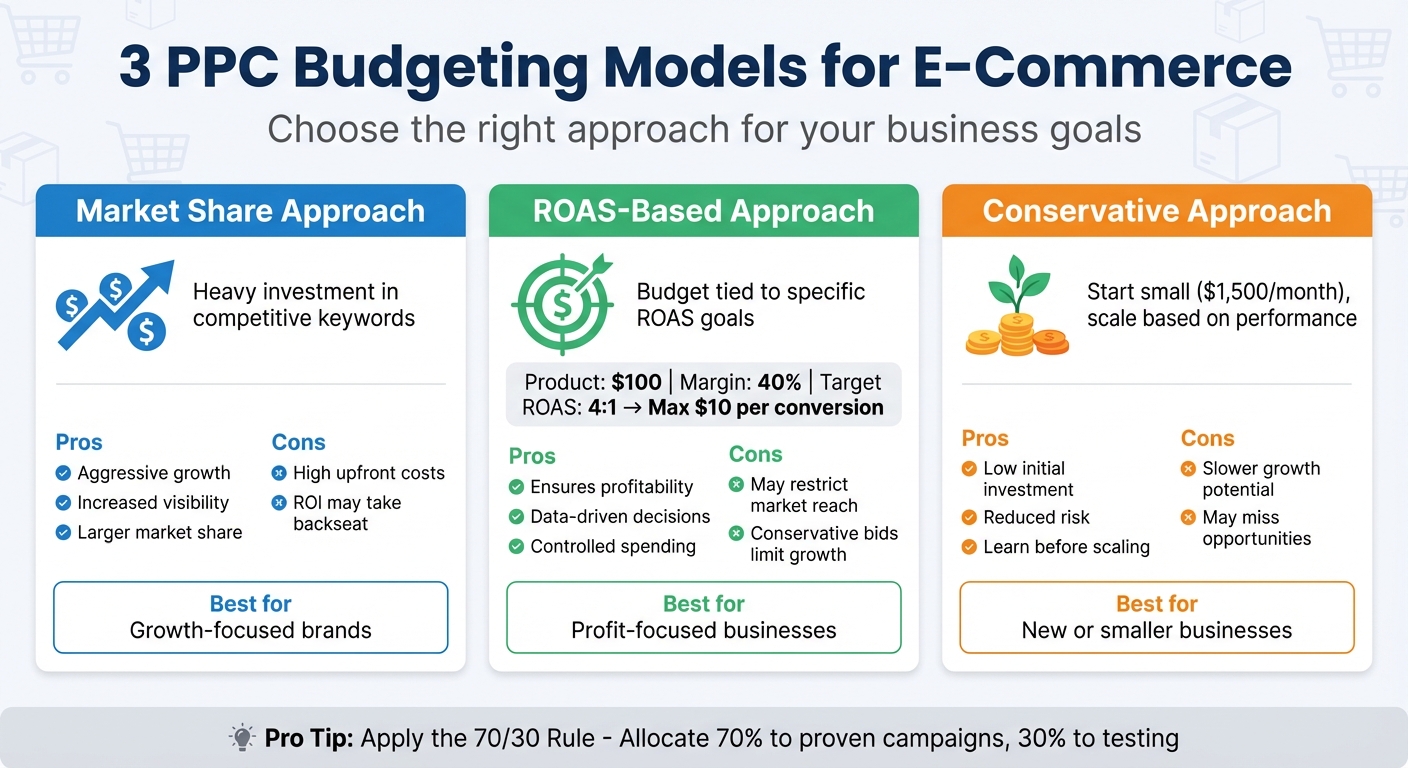
E-Commerce PPC Budget Allocation Models Comparison
As we move into 2026, PPC costs are expected to climb significantly - by as much as 15–30%. This is due to a mix of economic pressures and AI-driven changes that are reducing clickable impressions. With these rising costs, making sure your budget is aligned with clear business outcomes is more important than ever. Once you've pinpointed your competitive keywords, the next step is figuring out how much to spend and how to allocate those funds effectively. Your strategy should reflect your business goals, current revenue, and appetite for risk.
Estimating Budget Requirements
Budget planning starts with your goals. Let’s say your aim is to acquire 100 customers, and your conversion rate is 2.81%. You’d need roughly 3,559 clicks to achieve that. At an average CPC of $2.69, your estimated monthly spend would be around $9,573. This backward approach ensures your budget aligns with your objectives.
Don’t forget to account for hidden expenses. These might include management fees (typically 10–20% of your ad spend), subscriptions for PPC tools (ranging from $100–$400 per month), and creative development costs. A comprehensive PPC budget isn’t just about CPC - it’s about considering all these factors.
Once you’ve got a clear estimate, the next step is choosing a budgeting model that best suits your business.
3 Budgeting Models for E-Commerce PPC
Different businesses thrive on different approaches. Here are three common models:
- Market Share Approach: This strategy involves heavy investment in competitive keywords to grab a larger share of the market. It’s ideal for brands focused on growth and visibility, even if it means higher upfront costs. However, it can quickly become expensive, and ROI may take a backseat.
- ROAS-Based Approach: This method allocates budgets to hit a specific Return on Ad Spend (ROAS). For instance, if you need a 4:1 ROAS and your product sells for $100 with a 40% margin, you can afford to spend up to $10 per conversion. While this ensures profitability, it might limit your reach if your bids are too conservative.
- Conservative Approach: This low-risk strategy is perfect for smaller or newer businesses. It involves starting with a modest budget - around $1,500 per month, just enough to gather meaningful data - and scaling as ROI improves. The downside? Slower growth and the possibility of missing out on opportunities.
| Budgeting Model | Description | Pros | Cons |
|---|---|---|---|
| Market Share Approach | Heavy investment in competitive keywords | Aggressive growth | High upfront costs |
| ROAS-Based Approach | Budget tied to specific ROAS goals | Ensures profitability | May restrict market reach |
| Conservative Approach | Small initial budget to test and learn | Low initial investment | Slower growth potential |
A practical way to manage your budget is the 70/30 Rule: allocate 70% of your spending to proven, evergreen campaigns and the remaining 30% to testing new keywords and audiences. This approach balances consistency with the flexibility to explore new opportunities.
After selecting a model, the next step is fine-tuning your allocation between branded and non-branded keywords.
Allocating Budgets for Branded vs. Non-Branded Keywords
To get the most out of your competitive keyword campaigns, structure your budget into two main categories: branded and non-branded. A common split is dedicating 10–15% of your search budget to branded campaigns and 85–90% to non-branded campaigns. Branded terms are great for protecting your name from competitors and tend to convert at higher rates, but they mainly capture existing demand.
Non-branded keywords, on the other hand, drive growth by targeting users researching product categories rather than specific brands. For competitor keywords, keep budgets tight and capped, as they often come with higher costs and lower conversion rates. Additionally, reserve 10–15% of your total budget for testing emerging platforms like TikTok or Pinterest and experimenting with new creative formats.
"A common split is allocating 10-15% of your search budget to branded campaigns and 85-90% to non-branded campaigns that drive new customer acquisition." - Improvado
Regularly review your campaign performance and reallocate funds from underperforming keywords to those with better ROAS or higher click-share potential. Keep in mind that Google Ads can spend up to double your daily budget on high-traffic days, but it won’t exceed your monthly limit (daily budget × 30.4).
Monitoring and Optimizing Keyword Performance
Setting a budget is just the first step. To truly succeed, you need to track keyword performance daily. This phase ties your budget decisions to actual results, helping you avoid wasting money on underperforming keywords while uncovering opportunities to stretch your dollars further. These strategies build on earlier budgeting insights to ensure every dollar works hard for you.
Using Automated Bid Strategies
Automated bidding plays a central role in managing PPC campaigns effectively. Smart Bidding, for example, uses machine learning to analyze countless factors - like device type, location, time of day, and user intent - in real-time for every auction.
"Think of automated bidding (Smart bidding) as a prediction machine... It automatically sets the perfect bid for each auction to maximize your chances of getting a conversion at your desired cost." - PPC.io
For e-commerce businesses, Maximize Conversion Value is often a great starting point. This strategy prioritizes clicks that are more likely to bring in higher revenue rather than simply increasing the number of conversions. Once you've collected enough data - typically at least 50 conversions in the past month - you can switch to a Target ROAS strategy to focus on profitability.
One feature worth noting is shared budgets, which automatically reallocates funds to campaigns performing better. This prevents one campaign from exhausting its budget while others remain underutilized. Keep in mind that Google Ads can spend up to twice your daily budget on high-traffic days, balancing it out over a 30.4-day cycle. If you see a "Limited by budget" warning, it means you're missing out on profitable clicks - consider raising your budget or tweaking your ROAS target accordingly.
Regular Search Term Audits
Even with automation, weekly search term audits are a must. These audits reveal which queries are triggering your ads, helping you spot irrelevant searches, wasted spend, and hidden opportunities. Dedicating just 30 minutes a week to this task can make a huge difference - add negative keywords, and promote high-performing terms to Exact match.
Start by sorting your search term report by spend, conversions, and cost per conversion. Focus on these four categories:
- Non-converters: Keywords with high spend but no sales
- Irrelevant terms: Queries that don't align with your goals
- Inefficient terms: Keywords converting at too high a cost
- Opportunity terms: High-performing variants not yet added as keywords
For instance, if "waterproof hiking boots size 10" is driving sales, consider promoting it to Exact match and linking it directly to the product page.
Use N-Gram analysis to group queries by common phrases, uncovering patterns of wasted spend. This approach has helped marketers identify over $1.7 million in inefficient ad spend. Additionally, maintain a negative keyword list at the account level to filter out terms like "free", "used", "diy", "repair", "jobs", and "wholesale". Aim to include at least three negative keywords per ad group to stay on track.
Tracking Key Metrics
After optimizing bids and auditing search terms, tracking key metrics is the final piece of the puzzle. Campaign averages can hide underperforming keywords, so focus on metrics like Click-Through Rate (CTR), Cost Per Click (CPC), Conversion Rate (CVR), Cost Per Acquisition (CPA), and Return on Ad Spend (ROAS). For e-commerce, the average CPC is $2.59, and the average conversion rate is about 2.81%. Falling below these benchmarks signals it's time to reassess your strategy.
Quality Score is another crucial metric, rated from 1 to 10 based on expected CTR, ad relevance, and landing page experience. Higher scores usually mean lower CPCs and better ad placement. If your Quality Scores are consistently under 5, it's time to revisit your ad copy and landing pages. Watch out for keywords with high spend but low conversion rates - these may need to be paused or moved to lower-priority campaigns.
Finally, conduct a monthly audit to consolidate low-volume ad groups, adjust Target ROAS settings, and review shared negative lists for outdated terms. This ensures your campaigns stay aligned with seasonal trends and business priorities. Keep in mind, the average business earns $2 for every $1 spent on Google Ads - a 200% ROI. If you're not hitting this benchmark, your monitoring and optimization efforts may need fine-tuning.
Conclusion
Effective e-commerce PPC isn’t about spending the most - it’s about spending smart. By approaching it as a structured process rather than guesswork, you can maximize results. Start with intent-driven keyword research to identify high-value terms like "buy espresso machine" while filtering out lower-intent searches. Then, allocate your budget wisely: dedicate 70–80% to campaigns with a proven track record and 20–30% to testing new opportunities. This balance allows you to build on what works while exploring untapped potential.
"PPC is driven by math, strategy, and ongoing management; treat it as a system to maximize returns." - Manning Marketing
This systematic approach - rooted in data and strategy - reinforces the importance of consistent optimization. Even small improvements, such as doubling your Quality Score from 5 to 10, can dramatically cut your cost-per-click (CPC) in half. Regular audits and efforts to refine your Quality Score remain essential to sustaining performance.
Key Takeaways
- Prioritize high-intent keywords that drive direct sales over those that merely generate traffic.
- Apply the 70/30 rule: allocate 70–80% of your budget to proven campaigns and 20–30% to testing. Segment further into 50–75% for non-branded growth keywords, 10–25% for branded defense, and 15–20% for testing new ideas.
- Use metrics like target CPA and conversion rates to calculate your budget. For example: [Number of Sales × AOV × Margin] – Budget = Profit.
- Maintain a negative keyword list to avoid wasting money on terms like "free", "cheap", "DIY", and "repair."
- Monitor campaigns weekly by adding negative keywords, refining high-performing search terms to Exact match, and tracking metrics like CTR, CPC, CVR, CPA, and ROAS at the keyword level.
- On average, successful e-commerce businesses spend $9,000–$10,000 monthly on PPC, but even a smaller testing budget of $1,500 can yield valuable insights when managed effectively.
- Start with manual bidding to maintain control and gather data, then transition to Smart Bidding (like Target ROAS) after achieving 30–50 conversions in a 30-day period.
- Continuous optimization is key: businesses that fine-tune campaigns at the keyword level can achieve up to 30% higher conversion rates compared to those relying on broader metrics.
Success in e-commerce PPC lies in disciplined budgeting, detailed keyword management, and a commitment to ongoing refinement. By treating PPC as a system, you’ll position your business for consistent performance and growth.
FAQs
How do I set my max CPC for a keyword?
To set your maximum cost-per-click (CPC), decide on the highest amount you’re comfortable paying for a single click in your pay-per-click (PPC) campaign. Inside your advertising platform, you’ll adjust bids by assigning a specific amount to each keyword or ad group. This amount serves as a cap, helping you manage your expenses effectively. Base your bid on your campaign goals and performance metrics, then enter it into the platform’s bidding settings to take control of your ad spend.
When should I switch from manual bidding to Target ROAS?
When your campaign has gathered enough conversion data, it might be time to switch to Target ROAS. This strategy works best once you've achieved steady manual bids and consistent conversion trends. By using automated bidding, you can tap into data-driven insights to boost performance. This approach is particularly effective for shopping campaigns with a solid conversion volume, as it allows the algorithm to learn and adjust for better returns.
What should I do when a campaign is “Limited by budget”?
If your campaign is flagged as "Limited by budget", it might be time to reassess your approach. One option is to increase your budget, allowing for more impressions, clicks, and potential conversions. But if that’s not feasible, there are smart ways to make the most of what you have.
Start by refining your targeting - focus on reaching the audience segments most likely to convert. Consider pausing underperforming keywords to free up funds for better-performing ones. You can also adjust your ad schedule, concentrating your budget on times when your audience is most active. Testing different delivery methods, such as prioritizing ads during peak performance hours, can help stretch your current budget further while still driving results.