
Ultimate Guide to CRM and Marketing Tool Integration
February 19, 2026Integrating your CRM with marketing tools can transform how your business operates. By connecting these systems, you eliminate data silos, align sales and marketing teams, and gain real-time insights into customer behavior. The result? Shorter sales cycles, higher close rates, and improved campaign ROI. Here’s why it matters:
- Better Team Coordination: Sales and marketing work together seamlessly with shared data, reducing inefficiencies and miscommunication.
- Eliminating Data Silos: Unified systems ensure all customer interactions are accessible, avoiding duplicate efforts and wasted resources.
- Improved Personalization: Use CRM data to create targeted campaigns, meeting the expectations of 87% of customers who demand tailored experiences.
- Higher ROI: Businesses see an average return of $5.44 for every dollar spent on integration and automation tools.
This guide covers everything from why integration is essential to step-by-step implementation, ensuring your systems work together to drive measurable growth.
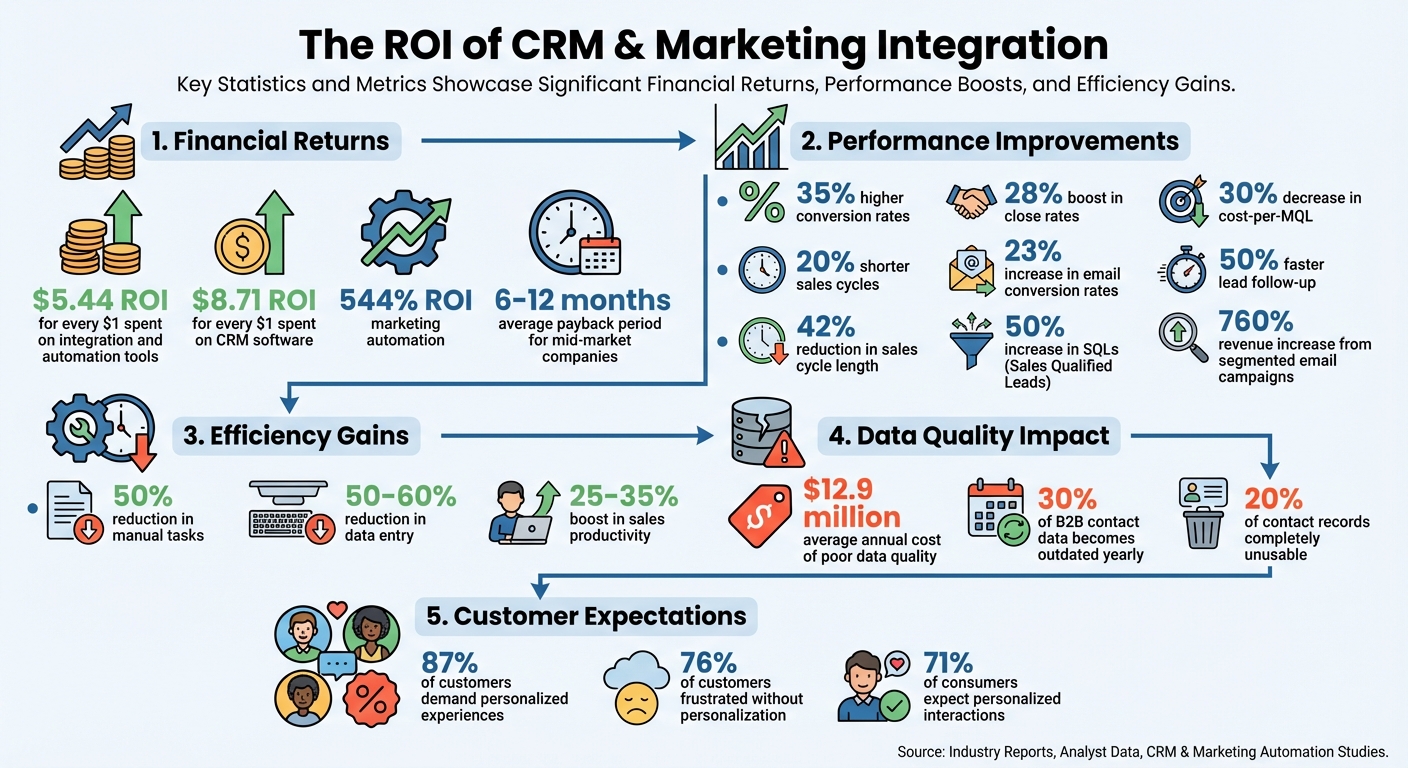
CRM and Marketing Integration ROI Statistics and Business Impact
How to Connect Your CRM to Meta Ads (Step-by-Step)
sbb-itb-cef5bf6
Why You Need to Integrate CRM with Marketing Tools
When systems don’t communicate, teams are left guessing. Marketing might send leads without context, while sales unknowingly contacts prospects who are already engaged. This lack of coordination makes it tough to identify which campaigns actually drive revenue. In fact, poor-quality data costs businesses an average of $12.9 million annually. Integration solves this by creating a unified customer database, where every interaction is accessible. Marketing can track closed deals, and sales can see which emails prospects opened. Let’s explore how integration bridges these gaps and boosts performance.
Aligning Sales and Marketing Teams
Sales and marketing often struggle to agree on what makes a lead "qualified." Marketing might think they’re passing along strong prospects, but sales could see them as unqualified. Integration forces both teams to define and document terms like Marketing Qualified Leads (MQL) and Sales Qualified Leads (SQL) before syncing data.
"When your tech stack is a collection of disconnected tools, your teams are forced to operate on assumptions instead of insights. The result is a reactive, inefficient revenue engine where opportunities are lost." - MarTech Do
Integrated systems provide detailed insights into prospects’ actions - like downloading whitepapers or attending webinars - enabling personalized follow-ups. Instead of cold pitches, sales reps can say, "I noticed you downloaded our guide on email automation. Let’s talk about how it fits your workflow." These insights not only help sales move deals forward but also allow marketing to refine content based on real feedback.
Integration also supports accountability through Service Level Agreements (SLAs). Marketing commits to delivering a specific number of qualified leads, while sales agrees to follow up within a set timeframe - often 24 hours. Both teams can monitor these commitments, reducing finger-pointing.
Eliminating Data Silos
Integration doesn’t just align teams; it also eliminates the inefficiency caused by fragmented data. Without it, customer information is scattered. Marketing might see email clicks but not know the person is already a customer, while sales could close a deal without realizing marketing is still sending promotional emails. This disconnect wastes resources and creates inconsistent experiences.
Take Glassdoor as an example. By integrating Marketo, Salesforce, and Bizible, they built a complete view of their customer journey. This allowed them to adopt account-based marketing and improve lead scoring, leading to a 50% increase in SQLs and a 30% decrease in cost-per-MQL.
Integration also streamlines workflows by automating data exchange, eliminating the need for manual CSV imports. This can cut manual tasks by up to 50% and reduce data entry by 50–60%. The time saved - potentially hundreds of hours each month - can be redirected toward more strategic efforts.
| Operational Area | Impact of Siloed Systems | Benefit of Integrated Systems |
|---|---|---|
| Lead Handoff | Sales gets leads with no context, leading to generic outreach | Sales accesses full interaction history for tailored follow-ups |
| Campaign ROI | Marketing struggles to link revenue to campaigns | Clear attribution from marketing spend to closed deals |
| Sales Forecasting | Pipeline predictions lack visibility into marketing data | Accurate forecasts based on the full customer journey |
| Team Alignment | Teams work in silos, often blaming one another | Shared data fosters collaboration and mutual goals |
Driving Business Growth
When systems are integrated, your tech stack becomes a growth driver instead of just an operational expense. Closed-loop reporting ties marketing spend directly to revenue, showing which campaigns bring in customers - not just clicks. This helps you invest in strategies that work while cutting those that don’t.
Personalization also improves significantly. With CRM data feeding into marketing tools, you can segment audiences based on purchase history, industry, or lifecycle stage. This matters because 87% of customers expect personalized experiences, and 76% get frustrated when they don’t receive them.
For example, Instructure, a learning management provider, integrated Marketo, Salesforce, Cvent, and ON24 using an iPaaS platform. This allowed them to capture webinar engagement data in Salesforce and send real-time sales alerts. The result? 50% faster lead follow-up and enriched lead records with over 100 data points.
The financial benefits are undeniable. Integrated systems can deliver 35% higher conversion rates and shorten sales cycles by 20%. On average, companies see an ROI of $8.71 for every dollar spent on CRM software. Marketing automation alone can yield a 544% ROI, and most mid-market companies recover their integration costs within 6–12 months.
Automated lead scoring combines behavioral and firmographic data to focus sales efforts on high-intent prospects. This precision is crucial since only 25% of buyers express interest early in the buying process. Integrated systems can boost sales productivity by 25–35% and reduce time-to-close by 20–30%.
Key Benefits of CRM-Marketing Tool Integration
Integrating your CRM with marketing tools isn't just about convenience; it transforms how you understand your customers, prioritize leads, and measure success. When these systems work together, they unlock capabilities that disconnected tools simply can't deliver.
Better Customer Segmentation
By merging CRM data with behavioral insights, integration creates comprehensive customer profiles. This unified view allows you to segment audiences based on real-time actions, not outdated assumptions. For instance, instead of sending a generic email to everyone in the "healthcare" category, you can focus on healthcare executives who visited your pricing page three times last week.
This level of segmentation drives results. Segmented email campaigns can increase revenue by up to 760%. Integration also enables dynamic content personalization, ensuring messages resonate with each recipient. For B2B companies, it supports Account-Based Marketing (ABM) by combining firmographic data with behavioral signals from multiple stakeholders in the same organization.
Mistakes like promoting products to customers who already purchased are avoided through automated filters. These filters can exclude customers in active sales negotiations or those who recently completed a purchase, saving your budget and reputation. With 71% of consumers expecting personalized interactions and 76% feeling frustrated without them, precision isn’t just helpful - it’s necessary.
"Integration converts marketing automation from a broadcasting tool into a precision instrument for delivering exactly the right message to exactly the right person at exactly the right moment." - Sytewide
Integration also supports advanced segmentation techniques like RFM (Recency, Frequency, Monetary) analysis and cohort analysis, allowing you to prioritize high-value customers dynamically. This shift from static to real-time segmentation ensures your campaigns stay relevant as customer behavior evolves.
Improved Lead Nurturing and Scoring
Integrated systems turn lead scoring into a science. By combining demographic data (like job title or company size) with behavioral data (such as email opens or website visits), you can create accurate scores that reflect real purchase intent. High-intent actions, like multiple demo page visits or frequent email interactions, increase a lead's score, signaling readiness for follow-up.
These systems can also automate next steps. For example, when a lead hits a specific score threshold, an email sequence can be triggered, or sales can get an instant notification to follow up. Nurtured leads generate 20% more sales opportunities and 50% more sales-ready leads while reducing costs by 33%.
Modern integrations leverage AI-powered predictive scoring, which analyzes historical data to rank leads by their likelihood to convert. Negative scoring is also supported, deducting points for actions like unsubscribing or prolonged inactivity. This ensures sales teams focus on active, high-potential prospects.
| Action | Typical Point Value |
|---|---|
| Requesting a Demo | +50 points |
| Visiting Pricing Page | +20 points |
| Downloading Whitepaper | +15 points |
| Clicking Email Link | +10 points |
| Opening an Email | +5 points |
| Unsubscribing | -20 points |
| Inactivity (60+ days) | -15 points |
| Bouncing Email | -10 points |
Integration also enables progressive profiling, where you gather prospect information gradually, avoiding long, overwhelming forms. Each interaction adds to the dataset, enriching both lead scores and nurturing efforts. Given that 80% of prospects not ready to buy today will purchase within 24 months, long-term nurturing is essential for maximizing revenue.
Complete Reporting and Real-Time Insights
Disconnected systems often leave a gap between marketing efforts and sales results. Integration bridges this gap with closed-loop reporting, linking marketing activities to actual sales outcomes. You’ll know which emails, ads, or content pieces directly influenced conversions.
This unified data allows for real-time decision-making. Instead of waiting for monthly reports, you can adjust underperforming campaigns on the fly. Multi-touch attribution further enhances insights by showing how different channels work together to drive sales.
The ROI is undeniable. Businesses report an average return of $5.44 for every dollar spent on integrated automation and CRM systems. For example, Salesforce streamlined its CPQ (configure, price, quote) process from four days to just four hours while ensuring 100% accuracy - a feat made possible through integration.
Real-time insights and predictive forecasting allow businesses to allocate resources more effectively and make faster decisions. With 89% of users integrating marketing automation with CRM tools to improve data management, this approach has become a standard for staying competitive. The result? Better resource allocation, faster decision-making, and a clear view of what’s driving success.
Step-by-Step Guide to CRM and Marketing Tool Integration
Integrating CRM and marketing automation systems requires more than just the right tech - it’s about having a solid plan that aligns your data, teams, and objectives. In fact, strategy plays a much bigger role than technology in making this process successful.
Evaluating Your Current Systems and Needs
Start by conducting a CRM audit. This involves reviewing your current system to uncover issues like poor data quality, low user adoption, or inefficient workflows. Look for areas where different teams - sales, marketing, and customer service - operate in silos, using separate systems that don’t communicate effectively. To address these gaps, create a cross-functional task force with members from Marketing Operations, Sales Operations, and IT. Together, map out your customer journey to identify where data needs to flow seamlessly between systems. For example, if someone downloads a whitepaper, does that action trigger a notification for your sales team? If not, that’s a gap your integration should fix.
Next, run a data audit to catch and resolve inconsistencies before they become bigger problems. This means spotting duplicate records, outdated contacts, or mismatched fields. Businesses that regularly audit their CRM see about 30% higher efficiency in converting leads to customers. Decide on your "Source of Truth" - the system that will serve as the master record for specific data. Typically, CRMs handle sales data like accounts, contacts, and deals, while marketing platforms manage engagement data like email clicks or website visits.
| Audit Component | What to Evaluate |
|---|---|
| Documentation | Review setup notes, security settings, and workflow documentation. |
| Data Quality | Check for duplicates, outdated information, and accuracy. |
| Integrations | Test how well the CRM connects with tools like email platforms or online stores. |
| User Adoption | See who’s actively using the system and which features are underutilized. |
| Reporting | Assess if current reports align with your business KPIs. |
Once you have a clear picture of your systems and workflows, you can choose the integration method that fits your needs.
Choosing the Right Integration Method
There are three main ways to connect your CRM and marketing tools, each with its own pros and cons. Native integrations are pre-built connections within the same ecosystem - like linking HubSpot CRM with HubSpot Marketing Hub. These are simple to use but may lock you into a specific vendor’s tools. Third-party connectors like Zapier or Make allow you to link tools from different ecosystems without needing to code, offering flexibility for mid-sized businesses. Lastly, custom APIs are tailor-made solutions that provide complete control over your integration but require significant development and maintenance resources.
Define what data should flow between systems, such as lead sources, campaign IDs, UTM tracking parameters, or product preferences. Also, decide on your sync direction and frequency. A unidirectional (one-way) sync protects your master data from accidental overwrites, while a bidirectional (two-way) sync ensures updates in one system are reflected in the other. For time-sensitive data like hot leads, real-time syncing is essential. For less critical updates, batch syncing (daily or weekly) can help manage costs associated with API calls. Use inclusion lists to filter which data gets synced - for instance, only transferring contacts with a lead score above 100 or those marked as "Marketing Qualified Leads".
Once you’ve chosen your integration method, it’s time to execute and test it thoroughly.
Executing and Testing the Integration
Begin by mapping and aligning fields between systems. For example, match FirstName in your CRM to FirstName in your marketing tool, and create custom fields for marketing-specific data like UTM parameters. Standardize field values before syncing to prevent duplicates - if one system uses "United States" and another uses "USA", you’ll run into inconsistencies.
Test the integration with a small batch of contacts first to catch any errors before syncing your entire database. Automate lead handoffs by setting triggers in your marketing tool - for instance, when a lead reaches a certain score, it should automatically update ownership in the CRM and notify a sales rep to follow up.
Conduct User Acceptance Testing (UAT) with your cross-functional team, ensuring that key scenarios - like submitting a form, unsubscribing from emails, or updating contact details - work as expected across both systems. For example, if someone opts out of emails in your marketing tool, their status should instantly update in the CRM to maintain compliance.
Finally, schedule training sessions tailored to each team. Show sales reps how the integration provides richer lead insights, and help marketers understand how it proves their impact on revenue. Offer "office hours" a few weeks after launch to address any lingering questions or technical hiccups. These steps ensure your integration eliminates data silos and boosts system efficiency.
Best Practices for Data Synchronization and Maintenance
Setting up an integration is just the beginning. Keeping your CRM and marketing tools synchronized requires ongoing effort. Without regular maintenance, data quality can deteriorate quickly - 30% of B2B contact data becomes outdated each year, often due to job changes or company restructuring. Poor data quality isn't just inconvenient; it’s expensive. It costs organizations an average of $12.9 million annually, with 90% of contact records incomplete and 20% completely unusable. Following these best practices can help keep your integration running smoothly while ensuring efficient data flow.
Ensuring Data Cleanliness
Start with a data audit. Use your CRM's built-in reports and profiling tools to identify incomplete fields, duplicate entries, and formatting issues. Duplicates are a big problem - integrations and web forms create them at an 80% rate, compared to just 19% when importing CSV files. Use both exact and fuzzy matching to merge or archive duplicates, which helps reduce clutter.
Consistency is key. Enforce standardized formatting for fields like company names, phone numbers (use international formats), and job titles. Set up picklists and controlled lists to ensure uniformity. Implement real-time validation rules to block invalid data - like incorrect email addresses or phone numbers - from entering your system. To avoid incomplete records, make critical fields like email and lead source mandatory on lead forms.
Maintain data health over time with automated hygiene processes. These can include regular deduplication, formatting checks, and risk scoring for email contacts. If your records have gaps, consider using data enrichment tools to add missing firmographic or technographic data, which can improve segmentation and personalization. Tools like Melissa Clean Suite (starting at $11,000 per year) or DemandTools ($10 per user per month) can handle much of this work for you.
Once your data is clean, it’s time to focus on how it moves between systems.
Defining Sync Directions and Field Mapping
Start by creating a Data Dictionary. Document API names, field types, and access levels (e.g., Read-Only or Read-Write) for every field you’re integrating. This ensures everyone on your team understands the data flow and avoids confusion.
Choose the right sync direction. A unidirectional (one-way) sync is ideal if you want to protect your CRM’s master data from being overwritten by marketing imports. On the other hand, a bidirectional (two-way) sync is better for keeping basic information like names and email addresses updated across systems. Many organizations opt for a hybrid sync: using real-time syncing for critical, time-sensitive data like lead scores, while relying on batch syncing for less urgent updates like address changes. This approach also helps manage API limits.
Use inclusion lists to filter which records sync to your CRM. For example, you might only transfer leads with a score of 100 or higher to keep your sales pipeline focused on qualified prospects. Configure web forms with hidden fields to capture UTM parameters (like source, medium, and campaign) and map them directly to CRM fields for better ROI tracking. Also, ensure that field types match across systems - for instance, a "Dropdown select" in one platform should map to a "Picklist" in another to avoid errors.
| Health KPI | What It Measures | Who Owns It |
|---|---|---|
| Freshness SLA | Percentage of records updated within the required timeframe | Data/Analytics |
| Sync Latency | End-to-end time delay for data syncing | Marketing Ops/IT |
| Failed Job MTTR | Average time to repair a failed sync task | Marketing Ops/IT |
| Sync Success Rate | Percentage of successful vs. failed record syncs | Marketing Ops/Analytics |
With these sync parameters in place, it’s crucial to monitor performance and address issues promptly.
Regular Audits and Performance Monitoring
Schedule comprehensive CRM audits twice a year, supplemented by lighter "mini-audits" every quarter to catch problems early. Use automated observability tools to monitor for schema drift, null values, data range errors, and duplicates in real-time. Automating alerts can help flag sync failures, SLA breaches, or suspicious records before they escalate into bigger issues.
Keep your integrations running smoothly by regularly updating API credentials and tokens to avoid unexpected downtime. Stay on top of release notes from both your CRM and marketing tools so you can adjust integrations when major updates roll out. Pay attention to sync latency - the time it takes for data to move between systems. This is especially important for real-time use cases like lead routing, which can directly impact lead response times and campaign ROI. Establish clear Mean Time To Repair (MTTR) targets for failed sync jobs to ensure quick resolutions.
Assign data stewards to oversee data quality and define escalation paths for resolving flagged issues. Maintain detailed documentation of your integration architecture, field mappings, and sync rules. This makes troubleshooting easier, especially when onboarding new team members or working with consultants. Periodically review how fields are being used by your teams to identify inconsistencies or deviations from your standards. As your data volume grows, verify that your integration processes can handle increased loads without timing out.
Measuring the Success of Your Integration
When you've dedicated time and resources to integrating your CRM with marketing tools, it’s crucial to measure whether it’s paying off. Tracking metrics like lead conversion, customer value, and marketing ROI can reveal whether the integration is driving results or just adding complexity to your tech stack. These key performance indicators (KPIs) will help you evaluate how well the integration is enhancing your sales and marketing efforts.
Tracking Lead Conversion Rates
Lead conversion rate shows how effectively prospects are turning into customers. With an integrated system, you can monitor this across all marketing channels - whether it’s email campaigns, social media ads, webinars, or downloadable content. This lets you pinpoint which channels are delivering the most qualified leads. Closed-loop reporting is especially useful here, as it links marketing efforts directly to closed deals, showing which campaigns are driving revenue rather than just engagement.
Another important metric to watch is pipeline velocity, which measures how quickly leads progress through your sales funnel. The formula is: (Deals × Average Deal Size × Win Rate) ÷ Sales Cycle Length. A good integration should help speed up this process. Additionally, keep an eye on your MQL-to-SQL conversion rate - the percentage of marketing-qualified leads that sales teams accept as sales-qualified. If this rate is low, it might signal that your lead scoring needs adjustment. Proper integration has been shown to boost conversion rates by 35% and shorten sales cycles by 20%, but these improvements require consistent monitoring of key handoff points.
Monitoring Customer Lifetime Value
Once leads convert, the next step is understanding their long-term value. Customer Lifetime Value (CLV) estimates the total revenue a customer will bring to your business over time. The formula is simple: (Average Purchase Value) × (Average Purchase Frequency) × (Average Customer Lifespan). Integration makes this calculation easier by consolidating data from purchase history, renewals, upsells, and even support interactions into a single view.
You’ll also want to track your CLV-to-CAC ratio, which compares customer lifetime value to the cost of acquiring that customer. A healthy ratio is generally 3:1 or higher, meaning each customer should generate at least three times what it cost to bring them on board. Integrated tools, like email and CRM systems, can increase CLV by 19% by helping you identify upsell opportunities and detect churn risks early. To get a fuller picture, monitor retention rates and repeat purchase rates alongside CLV - this will show whether your integration is helping you retain customers and encourage repeat business.
Assessing Campaign ROI
Marketing ROI is the ultimate test of whether your campaigns are delivering value. Use this formula to calculate it: ((Sales Growth - Marketing Cost) ÷ Marketing Cost) × 100. Integration plays a key role here by linking marketing expenses directly to closed deals. Without integration, you’re left with surface-level metrics like clicks and impressions, which don’t reveal revenue impact.
Another critical metric is Customer Acquisition Cost (CAC), calculated by dividing total sales and marketing costs by the number of new customers acquired. To understand which channels are most effective, track Return on Advertising Spend (ROAS) for each one. On average, every dollar spent on CRM implementation delivers a return of $8.71, and businesses see an ROI of $5.44 for every dollar spent on integration and automation tools. Integration also enables multi-touch attribution, which shows how various marketing interactions contribute to a sale. This level of insight is only possible when CRM and marketing data are seamlessly connected.
| KPI | What It Measures | How to Calculate |
|---|---|---|
| Lead Conversion Rate | Percentage of leads that become customers | (Number of deals closed ÷ Number of leads in pipeline) × 100 |
| Customer Lifetime Value (CLV) | Total revenue expected from a customer | (Avg. purchase value) × (Avg. purchase frequency) × (Avg. customer lifespan) |
| Customer Acquisition Cost (CAC) | Cost to acquire one new customer | (Total Sales Costs + Total Marketing Costs) ÷ Number of New Customers |
| Marketing ROI | Return on marketing investment | ((Sales Growth - Marketing Cost) ÷ Marketing Cost) × 100 |
Partnering with Experts for Integration Success
Bringing your CRM and marketing tools together isn’t just a technical task - it’s a strategic move. Integration projects often fail, with failure rates ranging from 20% to 70% due to issues like poor planning, inconsistent data, or low user adoption. That’s why working with an experienced agency is crucial. While technology plays a role, the real focus should be on strategy. Expert agencies provide the know-how to align your team, processes, and data before diving into implementation. This kind of guidance can turn potential risks into opportunities.
On average, businesses use over 900 apps, but only 28% of them are integrated. Handling this level of complexity requires specialized knowledge. By addressing challenges early with expert assistance, you can ensure your integration supports long-term growth. This strategic groundwork also opens the door for future system improvements.
Why Choose SEO Werkz for CRM-Marketing Integration
When it comes to integration experts, SEO Werkz stands out for its personalized approach. They offer a service called Automation Werkz, designed to streamline client responses and connect multiple channels. This ensures leads are captured and nurtured promptly, eliminating the inefficiencies of data gaps that can waste hundreds of hours each month. Beyond integration, SEO Werkz provides access to in-house specialists in SEO, PPC, content creation, and web design. This ensures your CRM integration aligns with your broader marketing strategy.
Their Premium CRM Package ($500/month) includes features like custom CRM development, automated workflows, sales funnels, and inbound lead tracking. This allows businesses to measure how much revenue is directly tied to specific marketing efforts - transforming marketing from a cost center into a revenue generator. Plus, SEO Werkz operates with a "No Contracts" policy and offers free consulting, giving businesses the flexibility to test their services without long-term commitments.
Benefits of Professional Support
Investing in professional support for CRM integration delivers measurable results. For every dollar spent on integration and automation technology, businesses see an average ROI of $5.44. Integrated systems can cut manual tasks by up to 50%, freeing up time for your team to focus on more impactful work. It’s not just about saving time - it’s about empowering your sales and marketing teams to prioritize high-value activities over tedious data entry.
Agencies like SEO Werkz also provide transparent reporting and regular updates throughout the integration process. This ensures you can track inbound leads effectively and calculate ROI with precision. They perform pre-integration data audits to clean up and standardize your data, avoiding the common "garbage in, garbage out" problem. Additionally, their services include structured training and user acceptance testing (UAT). When dealing with complex tools like APIs, webhooks, and middleware, having experts by your side can make all the difference between a smooth launch and costly setbacks.
| Package Tier | Monthly Price | Key Features |
|---|---|---|
| Standard Instant Response | $200 | Auto-responses (SMS/Email), GMB messaging, social media automation, web chat widget, missed call text back |
| Professional Nurture | $300 | All Standard features plus Google/Microsoft calendar integration, active email marketing (holidays/milestones) |
| Premium CRM | $500 | All Professional features plus customized CRM, full automation workflows, sales funnels, inbound lead attribution |
Conclusion
Bringing your CRM and marketing tools together does more than streamline operations - it lays the groundwork for a reliable growth strategy by turning scattered data into actionable insights. With integrated systems, you create a centralized hub where every customer interaction is tracked, from the first marketing touchpoint to the final sale. This alignment not only ends the blame game between sales and marketing but also delivers the personalized experiences that 87% of customers now demand.
The stats back it up. Companies report an average ROI of $5.44 for every dollar spent on integration tools. These systems help cut sales cycles by 42% and boost close rates by 28%, compared to businesses using disconnected tools. Email conversion rates also see a 23% increase, while manual data entry drops by 50% to 60%. These aren't just operational improvements - they're game-changers that can directly enhance profitability.
"Integration is not a 'nice-to-have.' It is essential for any B2B company aiming to transition from reactive tactics to a proactive, predictable growth model." - MarTech Do
However, success with integration doesn't happen overnight. It starts with a solid strategy - setting clear goals, cleaning up your data, and ensuring your teams are aligned before plugging systems together. Begin with basic integrations to achieve quick wins, and then gradually build out more complex workflows. Regular audits and ongoing monitoring are key to keeping your systems aligned with your evolving business needs.
For companies without in-house IT resources, working with experts like SEO Werkz can make enterprise-grade automation achievable. With professional guidance, you can turn integration challenges into opportunities that drive growth and efficiency.
FAQs
Which CRM fields should be the source of truth?
The CRM fields acting as the source of truth are essential for storing key customer data that needs to stay accurate and consistent across all systems. These typically include contact details (such as name, email, phone number, and address), customer IDs, account numbers, and important metrics like purchase history or customer preferences. Focusing on these fields helps maintain data accuracy, avoids duplication, and ensures smooth integration with marketing tools, sales workflows, and overall decision-making processes.
Should my CRM and marketing tools sync one-way or two-way?
When deciding between one-way sync and two-way sync, it all comes down to your business priorities and how consistent you need your data to be.
- One-way sync pushes data in a single direction. This is a good choice for straightforward tasks, like sending marketing leads to your CRM without needing updates from sales activities.
- Two-way sync, on the other hand, keeps both systems updated in real-time. This option works best when you need smooth workflows and up-to-date insights across platforms.
The right option depends on the complexity of your processes and how much interaction you need between your systems.
What KPIs show the integration is successful?
Key signs that your integration is working well include better customer insights, more effective campaign results, smoother operations, real-time syncing of data, and a clear return on investment (ROI). For instance, some businesses have seen a 20% decrease in sales cycle length and a noticeable boost in revenue attribution. These numbers highlight how well your CRM and marketing tools are collaborating to deliver tangible outcomes.