Ultimate Guide To Video CTR Optimization
March 28, 2026Video click-through rate (CTR) is the percentage of viewers who click on your video after seeing its thumbnail or title. A strong CTR can significantly boost video visibility, especially in the first 48 hours when platforms like YouTube decide how much to promote your content. Here's what you need to know:
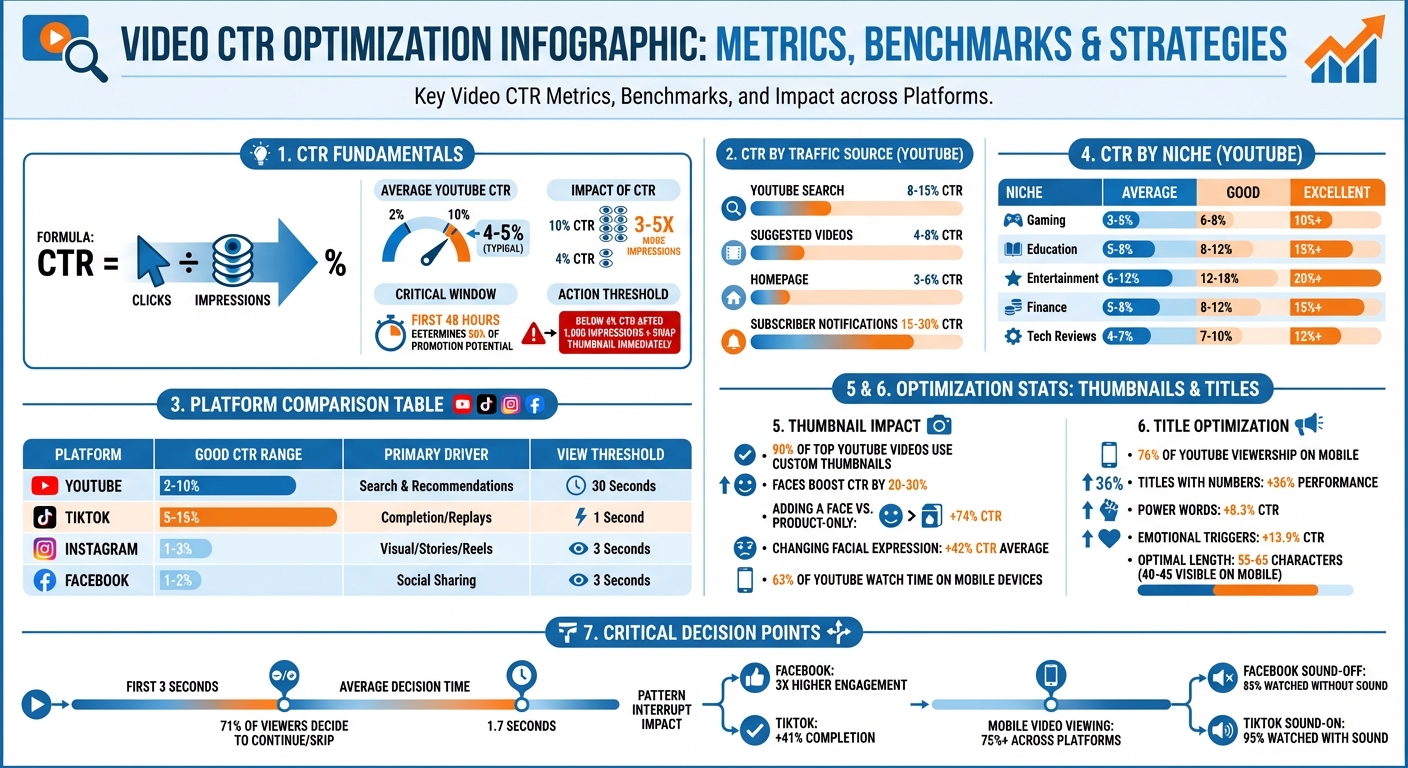
- CTR Basics: CTR = (Clicks ÷ Impressions) × 100. Average YouTube CTR ranges from 2% to 10%, with 4–5% being typical.
- Why It Matters: Higher CTR means better reach, lower ad costs, and more engagement. A 10% CTR can lead to 3–5x more impressions than a 4% CTR.
- Key Elements: Thumbnails, titles, and calls-to-action (CTAs) are critical for driving clicks.
- Strategies:
- Use bold, high-contrast thumbnails with minimal text and emotional faces.
- Write curiosity-driven titles with keywords in the first 3–5 words.
- Test and tweak thumbnails/titles early, especially within the first 1,000 impressions.
- Platform-Specific Tips:
- YouTube: Optimize for search and suggested videos; use A/B testing tools.
- Social Media: Grab attention in the first 2–3 seconds; focus on mobile-friendly formats.
Video CTR Optimization: Key Metrics, Benchmarks & Platform Comparison
Test YouTube Titles & Thumbnails to Increase CTR – Full Tutorial
sbb-itb-cef5bf6
Core Elements of Video CTR Optimization
Your thumbnail, title, and call-to-action (CTA) are the trifecta of video success. Each element has to work seamlessly together. If one falters, your click-through rate (CTR) could take a hit. But when they’re in sync, the results can be game-changing. Let’s dive into the specifics.
Thumbnail Design Best Practices
A thumbnail has less than a second to grab someone’s attention. That’s why 90% of top-performing YouTube videos use custom thumbnails instead of letting YouTube auto-generate one.
Start with bold, high-contrast colors. Choose 2–3 complementary colors like blue and orange, and make sure your main subject stands out by being at least 30% brighter or darker than the background. Human faces showing emotions - like surprise, humor, or curiosity - are particularly effective, boosting CTR by 20–30%.
Keep text to a minimum. Limit overlays to 1–4 impactful words in bold, sans-serif fonts like Montserrat or Impact. With 63% of YouTube watch time happening on mobile devices, run a shrink test: scale your thumbnail down to 160×90 pixels. If it’s not clear at that size, simplify it.
"Most creators think thumbnails are about design. In reality, thumbnails are about decisions." – Dewan Ysul Zulkarnain
Real-world tests back this up. ClickyApps found that a thumbnail featuring one character’s shocked face achieved a 4.2% CTR, while a cluttered version with four characters only managed 1.8%. Similarly, a software tutorial thumbnail with a frustrated face and the word "FINALLY" outperformed a plain interface shot by 2.1% over 48 hours.
Avoid placing key elements in the bottom-right corner, where YouTube timestamps appear. To make your subject pop, add a 4–8 pixel stroke, outer glow, or background blur (Gaussian blur at 4–8 pixels works well). WIRED’s approach is a great example: they use consistent solid-color backgrounds for their series, like green for "Autocomplete Interview" and blue for "Tech Support".
| Color Pair | Foreground / Background | Contrast Ratio | Recommended Font |
|---|---|---|---|
| White on Navy | #FFFFFF on #0A1E3D | ~7:1 | Source Sans Pro 700 |
| Neon Yellow on Black | #FFFF00 on #000000 | ~12:1 | Adobe Sans |
| Paddy Green on Charcoal | #A7D27A on #2B2B2B | ~8:1 | Inter or Source Sans Pro 700 |
| Blue on White | #1E4D99 on #FFFFFF | ~8:1 | Source Sans Pro 600 |
Writing Titles That Get Clicks
Your title has to do two things: improve discoverability and drive clicks. With 76% of YouTube viewership happening on mobile, you’ve got about 40–45 characters before the title gets cut off. Make sure your primary keyword appears within the first 3–5 words.
The secret sauce? The curiosity gap. Instead of giving away everything in the title, tease the viewer. For example, instead of "How to Fix Your Acne", try "Why Your Acne Cream Isn’t Working." This makes people want to click to find out more.
"YouTube title optimization is the single highest-leverage skill you can develop as a creator." – Daniel Whitmore, YouTube Growth Strategist, YTShark
Numbers also work wonders. Titles with specific digits outperform vague ones by 36% on average. Adding power words like "ultimate" or "proven" can increase CTR by 8.3%, while emotional triggers like "secret" or "free" can boost it by up to 13.9%.
Your title and thumbnail should complement each other. Think of them as a team: the thumbnail sparks curiosity, and the title answers just enough to make people click. This approach, called the "curiosity unit", can push CTR from 4% to 10%, potentially tripling your impressions.
For extra context, use brackets at the end (e.g., "[Case Study]" or "[Step-by-Step Guide]") and include the current year to make it feel relevant. Keep your title between 55–65 characters for optimal visibility across all devices.
| Title Formula | Description | Example |
|---|---|---|
| The Number Formula | Uses specific digits to set clear expectations | "7 YouTube Title Mistakes Killing Your Views" |
| How-To + Outcome | Combines a tutorial with a promised result | "How to Rank YouTube Videos in 2026 (Step by Step)" |
| Contrast / Mistake | Highlights failure versus success | "Why Your YouTube Titles Get No Clicks (Fix This)" |
| Curiosity-Gap | Teases without giving away the solution | "I Changed One Word in My Title and Views Exploded" |
Once your title grabs attention, the CTA keeps viewers engaged.
Call-to-Action (CTA) Placement
Your thumbnail and title are your first CTAs, but don’t stop there. Use your video description to encourage actions like subscribing, liking, or clicking a link to your website.
Short-form content can also act as a gateway. Repurpose highlights from your long-form videos into Shorts, TikToks, or Reels. These mini trailers can drive viewers to your main channel or website. The trick is to leave just enough mystery in the short clip to make people want more.
Timing is crucial. Keep a close eye on your CTR during the first 48 hours after publishing. If it’s below 4% after 1,000 impressions, consider tweaking your thumbnail or title right away. Early performance often dictates how well your video does overall.
CTR expectations vary depending on traffic sources. Videos found via YouTube Search often see CTRs between 8–15% because viewers are actively looking for answers. Suggested videos typically range from 4–8%, while homepage traffic hovers around 3–6%. Notifications sent to subscribers can drive CTRs as high as 15–30%.
"I spent two years making better content. My views didn’t change. Then I spent two weeks optimizing thumbnails and titles. My channel exploded." – Ali Abdaal
These strategies lay the groundwork for tailoring your CTR tactics to different platforms.
Platform-Specific CTR Strategies
Each platform comes with its own audience behavior, meaning your CTR strategies need to adapt. For instance, YouTube users actively search for content, while social media users are more likely to stumble upon videos while casually scrolling their feeds. With this in mind, let’s explore how to tailor strategies for YouTube and social media platforms.
YouTube CTR Optimization
Think of YouTube as a search engine first and a social platform second. To succeed here, your thumbnails and titles must work together seamlessly to attract clicks - whether from search results or suggested videos.
- For search traffic: Use keyword-rich titles, prioritizing your main keyword within the first 3–5 words.
- For suggested and homepage traffic: Create thumbnails with bold contrasts and emotionally engaging visuals to grab attention.
Early performance is critical. If your video’s CTR falls below 4% after 1,000 impressions in the first 48 hours, swap out the thumbnail. Why does this matter? A video with a 10% CTR can get 3–5 times more impressions than one stuck at 4%.
"CTR is YouTube's #1 signal for video promotion - higher CTR means exponentially more impressions." – InstantViews Team
You can also leverage YouTube’s built-in features to improve performance:
- End screens: These appear in the last 20 seconds of your video and can drive a 5–15% continuation viewing rate. Plan your script to recommend another video verbally during this time.
- Cards: These clickable pop-ups guide viewers to related content and typically achieve a 2%+ CTR.
- Chapters with timestamps: Breaking your video into chapters creates multiple clickable entry points in search results, boosting visibility.
Don’t forget to test and refine. YouTube Studio’s "Test & Compare" tool lets you A/B test up to three thumbnails. And since most YouTube views happen on mobile, make sure your thumbnails are optimized for smaller screens.
While YouTube leans heavily on search-driven tactics, social media platforms rely on interruption marketing to grab attention.
Social Media Video CTR Tips
On platforms like Facebook and Instagram, your goal is to stop users mid-scroll. Videos auto-play in feeds, so the first 2–3 seconds are make-or-break.
- Hook viewers immediately: Use bold, high-contrast text overlays in the opening frames to deliver your value proposition - even with the sound off. Pose a question or make a bold statement to grab attention fast.
- Optimize for mobile: Use a vertical 9:16 format, as over 75% of video views happen on mobile devices.
Different platforms call for slightly different approaches:
- Instagram Stories and Reels: Use interactive stickers to encourage engagement.
- TikTok: Focus on trending audio and hashtags. Unlike YouTube, TikTok’s algorithm prioritizes completion rates and replays over initial clicks.
Here’s a quick comparison of CTR benchmarks across platforms:
| Platform | Good CTR Range | Primary Discovery Driver | View Count Threshold |
|---|---|---|---|
| YouTube | 2–10% | Search & Recommendation Algorithm | 30 seconds |
| TikTok | 5–15% | Fast engagement (completion/replays) | 1 second |
| 1–3% | Visual nature & Stories/Reels | 3 seconds | |
| 1–2% | Social sharing & Feed targeting | 3 seconds |
"In 2025, SEOs will need to think beyond Google and embrace optimization for multiple search engines, as AI platforms like TikTok, Instagram, and YouTube increasingly become discovery hubs." – SEOZilla
To fine-tune your strategy, use each platform’s native analytics tools:
- YouTube Studio for YouTube
- Meta Business Suite for Facebook and Instagram
- TikTok Creator Studio for TikTok
For a broader view, tools like Sociality.io and Socialinsider help unify data across platforms, giving you a clearer picture of what’s working and where to adjust.
Testing and Measuring Performance
Once you've implemented optimization techniques, the next step is to test and measure their effectiveness. This process ensures your efforts are on the right track and allows you to refine strategies based on data rather than guesswork. Testing lets you see what works, while measurement provides the insights needed to fine-tune your approach.
A/B Testing for Thumbnails and Titles
A/B testing is a method where you compare different versions of thumbnails or titles to determine which one performs better. YouTube's "Test & Compare" tool simplifies this process by allowing you to upload up to three thumbnail variations for a single video. Over a period of 7–14 days, the tool automatically rotates these thumbnails and identifies a winner based on metrics like watch time share. This removes the guesswork and accounts for external factors such as time of day or trending topics.
When testing, focus on changing only one element at a time. For example, altering both a facial expression and a text hook simultaneously makes it hard to tell which change had the biggest impact. Start with major elements like facial expressions, text hooks, or color schemes before moving on to smaller tweaks such as font style.
Top creators like MrBeast often test 5 to 10 thumbnail variations per video. In fact, a study in 2026 revealed that simply changing a facial expression could improve click-through rates (CTR) by 42% on average. Adding a face to a thumbnail, compared to using product-only images, boosted CTR by as much as 74%.
Timing is critical. YouTube evaluates 80% of a video's promotion potential within the first 48 hours. If your CTR is below 4% after the first 1,000 impressions, consider swapping the thumbnail immediately. Even a small improvement - like a 2% increase in CTR - can lead to 50% more views, as the algorithm responds positively to this signal.
"I spend more time on thumbnails than editing the actual video. If no one clicks, it doesn't matter how good the content is." – Paddy Galloway, YouTube Consultant
To ensure reliable results, each variant should receive at least 1,000–2,000 impressions before drawing conclusions.
Once you've identified the best-performing thumbnail or title, dive into analytics for deeper insights.
Using Analytics Tools for Insights
YouTube Studio offers real-time metrics in its Reach and Engagement tabs, including impressions, CTR, and Average View Duration (AVD). A high CTR paired with a low AVD could signal clickbait - where the thumbnail's promise doesn't align with the content - prompting YouTube to reduce its promotion.
For more advanced insights, third-party tools like TubeBuddy ($9–$49/month) and VidIQ ($7.50–$39/month) provide features like automated A/B testing and CTR trend analysis. AI tools such as InstantViews Video Analyzer can even estimate your CTR before publishing.
In 2025, creator Nick DiGiovanni (31.1 million subscribers) used CTR Studio to optimize his "Hidden Restaurants" video. By swapping out the original thumbnail, his CTR jumped from 4.27% to 6.21% - a 45% increase. Similarly, Squat University (2.1 million subscribers) saw a 76% increase in YouTube recommendations and a 17% boost in search traffic after implementing automated A/B testing.
Segmenting analytics by traffic source can also provide valuable insights. For instance, Search traffic typically yields an 8–15% CTR, while Browse (Homepage) traffic averages 3–6% due to lower viewer intent.
With these tools, you can set benchmarks and measure progress effectively.
Setting Benchmarks and Tracking Progress
CTR benchmarks vary depending on the type of content and traffic source. For example, a 4% CTR in Browse Features is considered solid, but the same rate in Search traffic might indicate room for improvement. Use these benchmarks to evaluate performance and adjust strategies as needed.
| Niche | Average CTR | Good CTR | Excellent CTR |
|---|---|---|---|
| Gaming | 3–5% | 6–8% | 10%+ |
| Education | 5–8% | 8–12% | 15%+ |
| Entertainment | 6–12% | 12–18% | 20%+ |
| Finance | 5–8% | 8–12% | 15%+ |
| Tech Reviews | 4–7% | 7–10% | 12%+ |
The size of your channel also influences benchmarks. Smaller channels with under 1,000 subscribers often see higher CTRs (6–10%) due to their more targeted audience. Larger channels with over 100,000 subscribers typically average 3–5% as they cater to a broader, less-engaged audience.
To track progress, focus on high-impression, low-CTR videos. These represent opportunities for improvement. Review your last 20 videos to establish a baseline, then experiment with new thumbnails and titles on older, high-traffic videos to breathe new life into them.
"The difference between good and great on YouTube is testing. Most creators upload and pray. Professionals upload and measure." – Derral Eves, YouTube Expert
Advanced Techniques for Maximizing Video CTR
Once you've nailed the basics of testing and measurement, it's time to dive deeper. These advanced strategies focus on understanding viewer psychology, audience behavior, and leveraging real-time data to take your video CTR to the next level.
Pattern Interruption in Video Content
Pattern interrupts are all about breaking the monotony to grab attention. In 2026, the first 3 seconds of a video are critical - 71% of viewers decide whether to keep watching or scroll in this short window, with the average decision made in just 1.7 seconds. Platforms like TikTok are especially unforgiving; if viewers skip early, the algorithm may deprioritize your content.
Creators often swear by the "Holy Grail" method: combining visual, verbal, and audio hooks within the first 1.5 seconds. This approach has been shown to deliver up to 3× higher engagement on Facebook and boost TikTok completion rates by 41%.
"People say that Gen Z has a short attention span on social media. They don't. They have a short consideration span. Gen Z will watch a five-minute video if it's good, but they'll skip right past it if the first three seconds don't give them a reason to stay." – Cameron Gidari, VP of Social Media, Major League Baseball
A practical way to apply this is with the 3-2-1 Method: identify three potential scroll triggers, use two interruption techniques, and convey one clear message. For instance, add a bold visual disruption between 0.8 and 1.2 seconds - right when a viewer decides whether to scroll. Since 85% of Facebook videos are watched without sound, while 95% of TikTok videos are watched with sound, use bold text overlays and dynamic audio cues to reinforce your message.
These tactics not only grab attention but also set the stage for personalized messaging, which ties into audience segmentation strategies.
Audience Segmentation Strategies
Not every viewer reacts the same way to your content. Going beyond basic demographics, psychographic persona mapping can help you uncover deeper insights, such as viewer pain points, professional backgrounds, and how they engage with content. For instance, a channel focused on building credibility might use polished, professional visuals, while an entertainment channel would benefit from high-energy, dramatic imagery.
Creating a one-page audience persona document can be a game changer. Include details like age range, job background, and psychological triggers to guide your creative approach. You can also conduct a competitive gap analysis by reviewing the top 10 channels in your niche. This helps identify opportunities to stand out through unique visual elements and emotional appeals.
Keep in mind that YouTube first tests your video with a small group of 100–500 viewers, so achieving a strong CTR in this initial phase is crucial for broader promotion. Automation tools can help fine-tune these strategies in real time.
Real-Time Optimization Tools
Modern tools make it easier than ever to test and optimize your video elements while they're live. Platforms like CTR Studio and CTRLoop use statistical models to rotate thumbnail variations, automatically locking in the best-performing option without requiring manual input. These tools are fully compliant with YouTube's API, ensuring accuracy and account safety.
The impact of these tools is impressive. For example, Squat University (2.1 million subscribers) saw a 76% boost in YouTube recommendations and a 17% increase in search traffic, while Brett Maupin (242,000 subscribers) experienced a 128% jump in views and over $360 in additional monthly revenue.
Predictive AI tools like TubeBuddy and CheckMyThumbnail take it a step further by offering heatmaps and predictive scores before you even publish. These features can simulate how viewers might respond to specific elements, helping you position text or faces in high-attention zones. They can also analyze your existing videos to pinpoint "underperformers" - those with high impressions but low CTR - and estimate the potential views or revenue you're missing out on due to poor packaging. Even a small 2% increase in CTR on a video with 1 million impressions can result in 20,000 additional views.
| Tool | Starting Price | Key Feature |
|---|---|---|
| CTR Studio | Free analysis | Automatic A/B testing with brand style learning |
| CTRLoop | $12/month | Bayesian confidence scoring; supports up to 12 variants |
| TubeBuddy | $9/month | AI heatmaps and Click Magnet tool |
| CheckMyThumbnail | $19/month | CTR prediction snapshots before publishing |
When using these tools, focus on testing one variable at a time - like facial expressions or background colors - so you can clearly identify what impacts CTR. Also, preview thumbnails at small sizes (around 168×94 pixels) to ensure they’re easy to read on mobile devices, where most views happen.
Conclusion and Next Steps
Key Takeaways
Video click-through rate (CTR) is one of the most important factors platforms like YouTube consider when deciding how much to promote your content. A higher CTR significantly boosts your video's visibility, so optimizing every detail of your video packaging is crucial. Think of your thumbnail and title as a single "curiosity unit" - the thumbnail grabs attention, while the title provides context without repeating the same message.
Since most viewers are on mobile devices, optimizing for smaller screens is non-negotiable. Your thumbnail should pass the "squint test" - if the emotion or topic isn't immediately clear when viewed at a small size, simplify it. Thumbnails with expressive faces tend to outperform abstract designs, and placing keywords at the beginning of your titles ensures they aren't cut off on mobile.
Start by analyzing your current content. Use Google Search Console to find videos with high impressions but low CTR - these are your quickest opportunities for improvement. Predictive analysis tools and A/B testing can help fine-tune your approach, especially since YouTube tends to make promotion decisions within the first 48 hours after a video is uploaded.
These strategies set the foundation for effectively improving your video CTR.
How SEO Werkz Can Help
SEO Werkz, a Utah-based digital marketing agency with over 12 years of experience, focuses on delivering results that go beyond rankings. They understand that optimizing video CTR isn't just about increasing clicks - it's about driving meaningful ROI for your business. Their services include PPC, social media marketing, keyword research, and reputation management, all of which contribute to better video performance across platforms.
Whether you need to improve your thumbnails, refine your titles, or plan cross-platform distribution, SEO Werkz offers clear reporting and consistent communication to keep you informed about your campaign's progress. For agencies looking to expand their services, they also provide white-label SEO reseller options. You can kick things off by requesting a free SEO report or setting up a consultation to explore your specific video goals.
With the right insights and expert guidance, you can take your video marketing strategy to the next level.
Start Optimizing Your Video CTR Today
Take action now: review your videos, apply the squint test to your thumbnails, and tweak your titles. If you're working on new content, use predictive tools to test different options before uploading - this is especially important during the critical first 48 hours.
For businesses aiming to scale their video marketing, working with experienced professionals can make a big difference. SEO Werkz's expertise in SEO, PPC, and content strategy ensures your video efforts align with your broader business goals. The gap between a 4% CTR and a 10% CTR could mean thousands of extra views and a noticeable boost in revenue - don’t miss this opportunity to maximize your results.
FAQs
What’s the difference between video CTR and audience retention?
Video CTR (Click-Through Rate) and audience retention each highlight different aspects of how your video performs. CTR reveals the percentage of people who click on your video after seeing the thumbnail and title, giving insight into how appealing your video looks at first glance. On the other hand, audience retention tracks how long viewers stick around after clicking, offering a sense of how engaging the content itself is. These two metrics work hand in hand - CTR helps attract viewers, while retention keeps them engaged, both playing a key role in your video's overall success and visibility.
How can I tell if my thumbnail is lowering CTR on mobile?
To figure out if your thumbnail might be dragging down your click-through rate (CTR) on mobile, you need to test it specifically on smaller screens. A good thumbnail should be clear, high-contrast, and easy to read, even on a phone. Since thumbnails are often the main reason people click, any text or details that are too small or unclear could negatively impact your CTR.
Make a habit of running A/B tests within the first 48 hours after uploading your video. This will help you compare how different thumbnails perform and make adjustments that cater to mobile viewers.
When should I change a title or thumbnail after publishing?
If your video’s title or thumbnail isn’t performing well or feels outdated, it might be time for a change. A smart move is to run A/B tests within the first 48 hours after publishing. This can help you figure out which options grab more attention.
Keep an eye on your performance metrics regularly. Even for videos that performed well initially, their title or thumbnail might lose relevance over time. Giving them a refresh can reignite visibility and engagement, keeping your content in the spotlight.