Ultimate Guide to Local Voice Search SEO
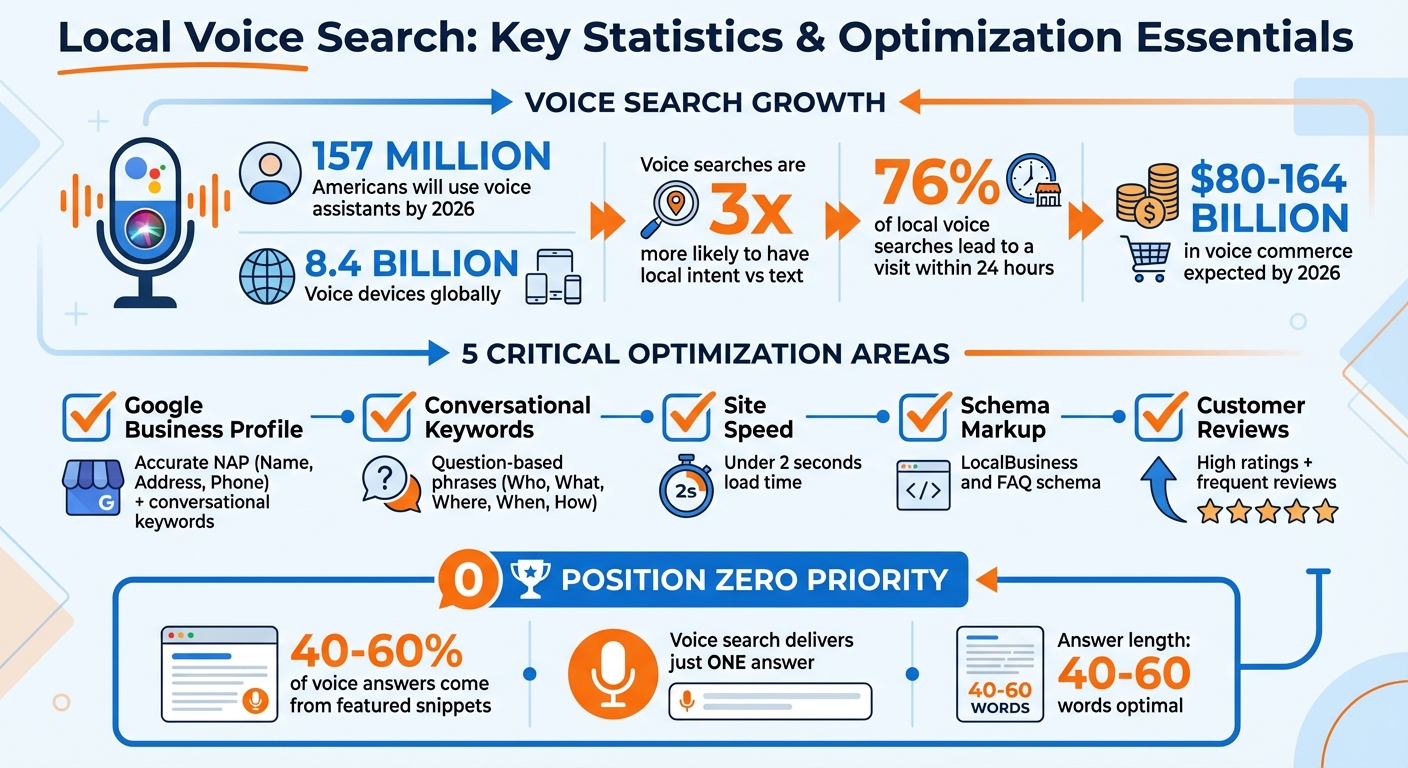
March 2, 2026Voice search is transforming how people find local businesses. By 2026, 157 million Americans will use voice assistants, with 8.4 billion devices globally. Most voice queries are conversational, like, “Where’s the best pizza near me?” These searches are 3x more likely to have local intent compared to text queries, and 76% of local voice searches lead to a visit within 24 hours.
To stand out, businesses must optimize for voice search by focusing on:
- Google Business Profile (GBP): Ensure accurate, consistent details (name, address, phone) and use conversational keywords.
- Conversational Keywords: Target natural, question-based phrases like "Who’s the best plumber nearby?"
- Site Speed: Voice results prioritize fast-loading pages (under 2 seconds).
- Schema Markup: Use LocalBusiness and FAQ schema to help voice assistants understand your site.
- Customer Reviews: High ratings and frequent reviews increase your chances of being featured in voice search answers.
Voice search delivers just one answer, so ranking in Position Zero is critical. Optimizing for natural language, providing concise answers (40–60 words), and improving mobile performance are essential steps. With voice commerce expected to generate $80–164 billion globally by 2026, now’s the time to focus on this growing trend.
Local Voice Search Statistics and Optimization Checklist 2026
Local SEO Just Changed - Here's What Voice Search Means for You
Optimizing Your Google Business Profile for Voice Search
Your Google Business Profile (GBP) plays a crucial role in capturing voice search queries like, "Who's the closest emergency electrician open now?" With over half of local searches now happening through voice commands, voice assistants such as Google Assistant, Siri, and Alexa rely heavily on your GBP details to suggest businesses. Once your profile is set up, aligning it with natural language queries and reviews is the next step.
Claiming and Completing Your Profile
Voice search has reshaped how people find local businesses, making it essential to fine-tune your GBP. Start by logging in with your business email and entering your business name, category, and location type. Complete the verification process to ensure your profile appears in search results. If you run a service-based business, define your service area by city or postal code, covering up to a two-hour radius.
Consistency is key - ensure your NAP (Name, Address, Phone) matches across your GBP, website, and directories. Even minor inconsistencies, like using "St." instead of "Street", can confuse voice assistants and hurt your rankings. Keep your operating hours and holiday closures updated, as voice assistants often filter results based on real-time availability.
Choose the most specific primary category for your business. For example, instead of "Electrician", opt for "Emergency Electrician" to better match voice search intent. Add relevant secondary categories to cover all your services. Features like messaging can help capture voice-to-text inquiries, and attributes like "Women-Led" or "LGBTQ+ Friendly" can help your profile stand out for niche queries.
Adding Keywords for Voice Queries
Voice searches tend to be conversational. Instead of typing "plumber Dubai", users might ask, "Who's the best plumber near me?". Craft your business description in a natural, conversational tone, incorporating hyper-local keywords like neighborhood names or landmarks. For instance, instead of "Best SEO Agency NY", try, "We are a top-rated SEO agency in New York helping local businesses grow".
| Search Type | Keyword Example | Intent |
|---|---|---|
| Typed | "24hr electrician Toronto" | Informational/Research |
| Voice | "Who's the closest emergency electrician open now?" | Immediate Action/Proximity |
| Typed | "best pizza NYC" | Comparison |
| Voice | "Where can I find the best deep-dish pizza near me that delivers?" | Specific Requirement |
Focus on question-based content that answers "Who, What, Where, When, and How" about your business. Use the Q&A section of your profile to post common questions like, "Do you offer gluten-free options?" with concise answers (ideally under 40 words). This content is often indexed and used by Google Assistant to provide spoken answers.
In the Services section, describe offerings in conversational terms. For example, "24-hour emergency pipe repair" is more effective than just "plumbing." Once your profile is optimized for keywords, customer reviews can help boost credibility.
Using Customer Reviews
Voice assistants often recommend businesses with high ratings and a strong review count. Positive reviews and consistent engagement signal credibility, increasing the chances of your business being featured in voice search results.
"The higher your review count and average score, the more likely you are to be recommended in a voice search." - Local View
A great example comes from 2025, when marketing agency Advanced Local helped a dentist in Ogden, Utah, improve their voice search visibility. By implementing an email follow-up system to gather reviews and adding voice-optimized FAQs, the practice saw five local queries trigger voice answers within six weeks. This led to a 29% increase in click-through rates and a 38% rise in phone calls from new patients.
Encourage customers to leave reviews right after their service experience, while it's fresh in their minds. Use direct links or QR codes on receipts or in-store to guide them to your review page. When responding to reviews, use natural language and include service-related keywords, such as, "We're glad we could help with your emergency plumbing repair". Whether the review is positive or negative, responding shows Google that your business is engaged and active.
Using Conversational Keywords
Voice search has changed how people phrase their queries. Instead of typing something like "pizza Brooklyn", users now ask, "Where can I get pizza in Brooklyn right now?" This trend highlights how voice searches rely on longer, more conversational language compared to the short, direct phrases often used in typed searches.
How People Speak vs. Type
The difference between typed and voice queries isn’t just about length - it’s about how natural the language feels. Typed searches tend to be brief and keyword-focused, while voice searches mimic everyday speech. For example, someone typing might search for "emergency plumber open now", but when speaking, they’re more likely to ask, "Who’s the closest emergency plumber open right now?"
| Typed Query | Voice Search Query |
|---|---|
| "keyword research tools" | "What are the best keyword research tools for small businesses?" |
| "SEO strategy guide" | "How do I create an SEO strategy for my e-commerce website?" |
| "weather Pennsylvania" | "Alexa, what’s the weather like in Pennsylvania today?" |
Recognizing these natural language patterns is a key part of optimizing for local SEO. It helps pave the way for more precise on-site strategies, which we’ll explore in later sections.
Creating Long-Tail and Question-Based Keywords
A good starting point is focusing on the "6 Ws and H" - Who, What, Where, When, Why, How, and Which. These question words dominate voice searches. Instead of targeting broad terms like "roofing services", aim for conversational alternatives such as "Where can I find affordable roofing services near me?" or "How much does roof repair cost in [your city]?"
Reworking high-performing keywords into questions is another effective tactic. For instance, if "SEO strategy guide" is already driving traffic, expand on it with content like, "How do I create an SEO strategy for my e-commerce website?". This works because 65% of voice searches are conversational, and voice assistants often pull answers directly from featured snippets - up to 78% of the time.
To uncover these conversational phrases, look at how your customers naturally talk about their problems. Dive into support chat logs, explore forums like Reddit or Quora, or even ask your customers directly about how they describe their needs. These insights can reveal long-tail keyword opportunities that competitors might overlook.
"Focusing on conversational keywords and answering specific user questions led to a 30% boost in search visibility." - Brooker Webber, Head of Marketing at Ninja Patches
Keyword Research Tools
Several tools can help you identify conversational keywords:
- AnswerThePublic: This tool visualizes question-based queries, showing how people phrase "Who", "What", and "Why" questions around your topic.
- SEMrush: Use its question-based filters to analyze SERP features and group keywords.
- Ahrefs: Great for spotting content gaps and finding question-based opportunities with search volume data.
- LowFruits: Specializes in uncovering low-competition, long-tail conversational phrases.
Don’t forget free resources! Google’s "People Also Ask" boxes are filled with real user questions related to your topic. Additionally, filter your Google Search Console data for queries longer than six words or those containing question words. This can help you see which conversational keywords are already driving traffic to your site and identify areas where your content could improve.
sbb-itb-cef5bf6
Optimizing Your Website for Voice Search
After identifying the right conversational keywords, the next step is making sure your website delivers quick and clear answers to voice assistants. Factors like speed, mobile performance, and technical optimization play a huge role in whether your site gets picked for voice responses or not.
Improving Site Speed and Mobile Performance
Voice assistants prioritize pages that load quickly to deliver instant answers. To improve your chances of being featured in voice search, aim for a total page load time of under 2 seconds. Focus on Core Web Vitals metrics, such as:
- Largest Contentful Paint (LCP): Under 2.5 seconds
- First Input Delay (FID): Under 100 milliseconds
- Cumulative Layout Shift (CLS): Under 0.1
These metrics ensure your site is optimized to be the go-to source for voice-based local queries. Techniques like compressing images (using formats like WebP), optimizing CSS and JavaScript, enabling browser caching, and using a CDN can all help improve speed.
A study found that faster page loads not only increase the likelihood of being chosen for local voice search answers but also lead to higher click-through rates.
"Page speed under 2 seconds is a prerequisite for voice search ranking." – Digital Applied
Mobile performance is just as important. Around 58% of consumers use voice search to find local business information, and most of these searches happen on mobile devices. To capture this audience, ensure your site uses responsive design, has touch-friendly buttons, and prominently displays key information - like your business name, address, and phone number - above the fold. Fast-loading mobile sites are especially effective for local searchers, with 76% of local voice searches leading to a business visit within 24 hours.
Once your site is fast and mobile-friendly, it’s time to focus on structured data to highlight your local business details.
Adding LocalBusiness Schema Markup
Structured data, such as LocalBusiness schema, gives search engines clear information about your business, including its location, services, and hours of operation. Voice assistants often rely on this data to answer user queries. In fact, about 40.7% to 41% of voice search results come from featured snippets influenced by structured data.
To implement schema, use the JSON-LD format, as recommended by Google. Add LocalBusiness schema to your homepage and contact page, and consider applying FAQPage schema to service-specific pages to capture question-based searches. Include essential details like:
- Business name
- Physical address
- Phone number
- Operating hours
- Price range
- Geographic coordinates
Once added, validate your schema using tools like Google’s Rich Results Test or the Schema Markup Validator to catch any errors. Also, ensure consistency between your schema details and your listings on platforms like Google Business Profile, Apple Maps, and Yelp.
"Schema markup is code you add to your website to help search engines understand your content. For voice SEO, it's crucial." – Improvado
After setting up structured data, focus on content formats that align with voice assistants' preferences.
Creating FAQ Pages
FAQ pages are a natural fit for voice search because they follow the question-and-answer format that voice assistants favor. In fact, content structured as Q&A is twice as likely to be selected as a voice search answer compared to traditional paragraphs. To optimize your FAQ pages:
- Use clear header tags (H2 or H3) for each question so search engines can easily identify them.
- Provide concise answers - stick to 30 to 60 words per question. This helps voice assistants deliver the exact information users need.
- Write in simple, conversational language at about an 8th-grade reading level. Address the reader directly using "you" for a natural tone.
Avoid starting answers with "I" or "We", and skip company-specific jargon. Instead, focus on objective, straightforward responses. Including local context, like nearby landmarks or neighborhood names, can also help capture “near me” searches, which are three times more common in voice search than in text-based queries.
To further optimize these pages, apply FAQPage schema markup to highlight the question-and-answer format for search engines.
Measuring Local Voice Search Performance
Tracking the performance of your voice search optimization involves monitoring indirect signals and key metrics. Let’s dive into the specific metrics and tools that can help you evaluate how well your efforts are working.
Key Metrics to Track
Voice assistants often pull answers from featured snippets, so keeping an eye on your ranking in Position Zero is essential. Studies show that 40% to 60% of voice search answers come from this spot.
Another area to analyze is the performance of conversational and long-tail keywords. Tools like Google Search Console allow you to filter for queries longer than six words, especially those starting with question words like "who", "what", "when", "where", "why", or "how." These are prime indicators of voice search traffic. Your Google Business Profile (GBP) Insights is another valuable resource, offering data on local actions like phone calls, direction requests, and profile views. Fun fact: 76% of local voice searches lead to a business visit within 24 hours.
Pay attention to "dark traffic" as well. Since many voice searches show up as "Direct" traffic in analytics, monitoring visits to voice-optimized FAQ or local landing pages can help you estimate this hidden organic traffic. Also, analyze mobile-specific engagement metrics like bounce rates and session durations, as most voice searches are conducted on mobile devices.
| Metric Category | Specific Metric to Track | Recommended Tool |
|---|---|---|
| Visibility | Featured Snippet (Position 0) Wins | SEMrush, Ahrefs, GetStat |
| Local Intent | Clicks to Call / Direction Requests | Google Business Profile Insights |
| Traffic | Organic Traffic to FAQ/Local Pages | Google Analytics 4 |
| Keywords | Long-tail Question Queries (>6 words) | Google Search Console |
| Technical | Page Load Speed (<2 seconds) | PageSpeed Insights, GTmetrix |
Using Analytics Tools
Analytics tools are essential for connecting your optimization efforts to measurable outcomes. While Google Analytics 4 doesn’t label sessions as "voice search", you can infer performance through patterns like conversational queries, mobile usage, and local intent. For example, filtering keyword reports in Google Search Console for terms like "near me" or "open now" can help you identify voice search traffic. Geo-specific views in GA4 can further isolate traffic from areas where your business operates.
Google Business Profile Insights tracks actions that often result from voice searches, such as "Click to Call", "Request Directions", and "Website Visits." With nearly half of voice assistant users searching for local businesses daily, these metrics provide a clear picture of voice-driven behavior. Tools like SEMrush can help you cross-reference featured snippet performance with conversions to identify which queries are driving results.
"For some queries, Google is partially relying on Knowledge Graph information for the answers, and in some cases will show a well-optimized Google Action." – Katherine Watier-Ong, Consultant, WO Strategies
Regularly auditing your site with PageSpeed Insights can ensure your mobile performance remains competitive. You can also use UTM parameters to track conversions from voice-specific content or local listings.
Adjusting Your Strategy Based on Data
The data you gather from voice and mobile performance can reveal areas for improvement in your local SEO strategy. For instance, identify high-impression but low-click-through queries - these long-tail phrases could be reformatted into featured snippets to boost visibility. To better align with voice assistant retrieval, add concise, 40 to 60-word answers directly below question-based headings.
If you notice high bounce rates on voice-optimized pages, it might indicate that your content isn’t engaging enough. Address this by improving technical elements like image compression or minifying CSS, which can enhance mobile performance. For keywords ranking in the top three but lacking a featured snippet, try reformatting your content into bulleted lists or short, clear paragraphs.
Segmenting your data by device and location can help you identify where voice-driven traffic is strongest. Use this information to create local landing pages or update metadata with regional modifiers. Finally, validate your schema markup by tracking clicks and impressions for pages using FAQ, HowTo, or LocalBusiness markup. Compare engagement and rankings before and after updates to ensure your visibility is improving.
Conclusion
Voice search is changing the way customers discover local businesses. With over 8.4 billion voice assistants in use globally and 76% of local voice searches leading to a business visit within 24 hours, the time to adapt is now. These numbers highlight just how important it is to adjust your strategy to stay ahead.
Since voice assistants often deliver only one or two top results, the strategies discussed in this guide - like optimizing your Google Business Profile, using conversational keywords, adding structured data, and tracking performance metrics - are key to reaching customers when they’re ready to take action. By focusing on these methods, including boosting site speed and creating concise answers, you can attract voice-driven traffic and secure those coveted top spots.
Consistency in your NAP (Name, Address, Phone number) details, a site speed under 2 seconds, and clear answers of 40–60 words are the building blocks for success in voice search optimization. These small but crucial steps ensure your business is ready to capture traffic that converts.
With 157.1 million voice search users expected in the U.S. by 2026, businesses that prioritize conversational queries will gain a clear edge. The question isn’t whether to optimize for voice search - it’s how soon you can start.