SEO Navigation Tips for Large Websites
April 28, 2026When managing a large website with thousands of pages, effective navigation is critical for both search engines and users. Poor navigation can lead to orphan pages, wasted crawl budgets, and hidden high-value content. Here’s how to optimize your site navigation for better SEO and user experience:
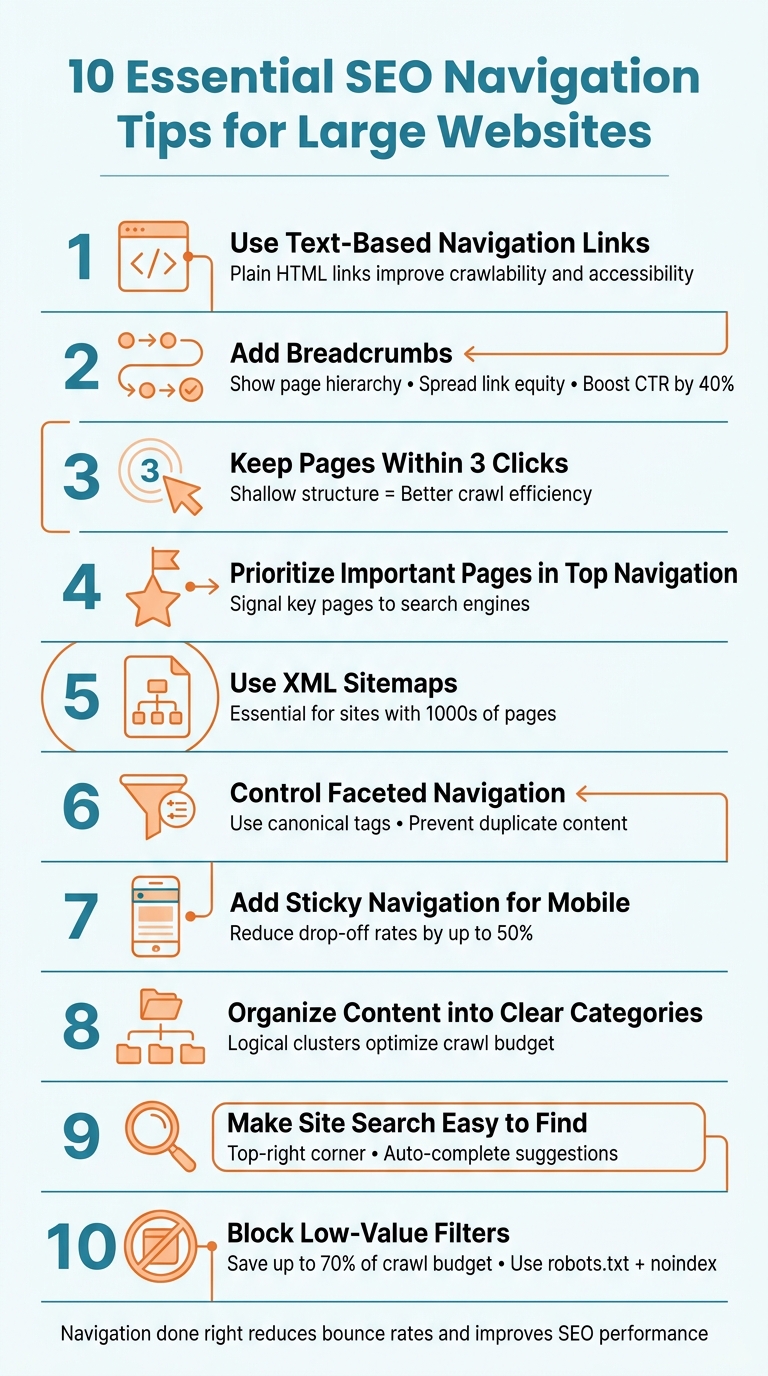
- Use text-based navigation links: Plain HTML links are easier for search engines to crawl and improve accessibility for users.
- Add breadcrumbs: These help users and search engines understand your site’s hierarchy while spreading link equity effectively.
- Keep all pages within three clicks: A shallow structure ensures search engines can crawl your site efficiently and improves user navigation.
- Prioritize important pages in the top navigation: This signals to search engines which pages are key and improves crawl efficiency.
- Use XML sitemaps: These guide search engines to all your important pages, especially on large sites.
- Control faceted navigation: Use canonical tags and block low-value filters to prevent duplicate content and save crawl budget.
- Add sticky navigation for mobile: Keep key links accessible as users scroll, improving usability on mobile devices.
- Organize content into clear categories: Logical clusters make it easier for users and crawlers to navigate your site.
- Make site search easy to find: A visible and functional search bar helps users locate content quickly.
10 Essential SEO Navigation Tips for Large Websites
SEO at Scale: Optimizing Large, Multi-Category Websites Webinar
sbb-itb-cef5bf6
1. Use Text-Based Navigation Links
Text-based navigation links are critical for building a crawlable and accessible website structure. By using plain HTML instead of images or heavy JavaScript, search engine crawlers can easily identify and follow every link on your site. This is important because search engine bots typically process a text-only version of your page. If your navigation relies on images or complex scripts, those essential internal links might be invisible to Google.
Improves Crawlability for Search Engines
For effective SEO, search engines need to understand your site's structure, and that starts with clear, accessible links. Using structured HTML, such as unordered lists, helps crawlers map out your site, even if styling scripts or CSS fail. Richard Baxter, Founder of Builtvisible, puts it simply:
"Search engine friendly navigation requires only properly structured HTML combined with CSS for all the fancy bits".
The anchor text in your navigation also plays a big role. Descriptive, keyword-rich labels are far more effective than generic terms like "Products" or "Solutions." As Caleb from Portent explains:
"Using descriptive anchor text in your global navigation means that every page on your website has keyword-rich links pointing to those pages".
For example, "Model Train Parts" is much clearer and more useful than just "Products" because it conveys exactly what users and search engines can expect.
Text-based links don’t just improve crawlability - they also enhance usability and accessibility.
Enhances User Experience and Accessibility
Text-based navigation ensures accessibility for everyone, including users relying on screen readers. Screen readers can easily parse text links, which is especially useful when images or JavaScript fail to load. This is also crucial for mobile users, as hover-based dropdown menus often don’t work well on touchscreens.
To check how your site performs, view its text-only version in Google’s cache. If your main links are missing, they’re likely invisible to search engines too. The solution is simple: use standard HTML for structure and CSS for styling, steering clear of Flash or overly complicated JavaScript that could disrupt the user experience.
These adjustments not only make your site more user-friendly but also simplify navigation on larger, more complex websites.
Simplifies Navigation for Large, Complex Websites
For websites with hundreds or even thousands of pages, text-based navigation ensures link authority is preserved, unlike overloaded flyout menus. By incorporating descriptive text links in your main navigation, you make it clear which pages are most important to both users and search engines.
To avoid overwhelming users, keep your top-level navigation limited to 5–7 links. If your site has more than 10 core categories, consider using mega menus. These can display multiple navigation levels while still relying on text-based links. The ultimate goal is to maintain a shallow hierarchy, where all content is accessible within three levels.
2. Add Breadcrumbs to Show Page Hierarchy
Breadcrumbs help users and search engines understand a page's position within your site. These typically appear near the top of a page, just below the main navigation, showing a path like "Home > Electronics > Laptops > Gaming Laptops." For large websites, breadcrumbs act as both a navigation aid and an SEO tool.
Improves Crawlability for Search Engines
Breadcrumbs create internal links that connect deeper pages to parent categories and the homepage, ensuring link equity spreads effectively across your site. This network of contextual links helps search engines crawl and understand your site better.
The benefits can be dramatic. For example, a website that lost its breadcrumb schema saw its organic click-through rate (CTR) drop from 6.6% to 4.1% - a nearly 40% decrease. After restoring breadcrumbs, the CTR climbed back to 7% in just three weeks.
To maximize SEO benefits, implement BreadcrumbList structured data to clearly outline your site's hierarchy. Kirill Sajaev, Founder of AUQ, notes:
"The primary users of these breadcrumbs are Google spiders, which is useful because we can also add schema markup to these crumbs. So, even if our URL structure isn't ideal, we can always specify exactly how Google should think about our content."
This structured approach complements other navigation strategies and strengthens your site's SEO foundation.
Enhances User Experience and Accessibility
Beyond SEO, breadcrumbs improve navigation for users on both desktop and mobile. They reduce complexity by offering quick, one-click access to higher-level categories - ideal for users who land on deeper pages through search results. Breadcrumbs also enhance accessibility for screen readers, making your site easier to navigate for all users.
For mobile, use CSS overflow to enable horizontal swiping for breadcrumbs on smaller screens. This is particularly important because, as of January 2025, Google no longer displays breadcrumbs in mobile search results.
Simplifies Navigation for Large, Complex Websites
On complex websites, hierarchical breadcrumbs work best. They consistently communicate your site's structure to search engines, unlike history-based or attribute-based trails. Position breadcrumbs above the H1 header and below the main navigation for maximum visibility. Use absolute URLs (e.g., https://example.com/category) in breadcrumb schema to avoid crawling issues. Ensure the current page appears as plain text rather than a clickable link to avoid confusion. For better performance, generate breadcrumbs server-side so search engine crawlers can access them immediately.
When combined with text-based navigation, breadcrumbs simplify site architecture and contribute to stronger SEO results.
3. Keep All Pages Within Three Clicks
Search engines allocate a limited "crawl budget" to every website. If your pages are buried more than three clicks away from the homepage, Google's crawlers might struggle to reach them efficiently. This can be especially challenging for large websites with thousands of pages.
Improves Crawlability for Search Engines
Crawl depth refers to how many clicks it takes to access a page from your homepage. Since Google starts crawling from the root URL, pages requiring multiple clicks are less likely to be discovered. Pages within three clicks are crawled more frequently and are often considered more important, while those deeper in the structure tend to be deprioritized.
Kody Wirth and Sophie Atkinson from Search Engine Land explain:
"Generally, the fewer clicks it takes to reach a page, the more important that page is perceived to be by both people and search engines".
A flat site structure also ensures that link equity flows more efficiently from the homepage to subpages, increasing their potential to rank higher.
To achieve this shallow structure, prioritize placing key pages - like pillar content, product categories, or landing pages - within your top navigation or directly on the homepage. Use tools like category hubs and index pages to make deeper content accessible within three clicks. This approach not only enhances crawl efficiency but also improves the overall navigation experience for users and search engines alike.
Enhances User Experience and Accessibility
The three-click rule isn't just about SEO; it also makes browsing easier for visitors. When users can quickly find what they're looking for, they’re less likely to leave your site out of frustration or confusion. Felix Rose-Collins, Co-founder of Ranktracker, emphasizes:
"Every page should be reachable within 3–4 clicks from the homepage. If a page is 8 clicks deep with no internal links, it won't rank consistently".
For larger websites, consider adding mega menus to organize subpages into clear categories, enabling users to jump straight to deeper content without navigating through multiple layers. Pair these with a prominent search bar so visitors can bypass navigation entirely when searching for specific information.
4. Place Important Pages in Top Navigation
Top navigation plays a key role in signaling to search engines which pages are the most important. By linking high-priority pages directly from the header, you ensure that crawlers can find and index them quickly - even on massive websites with millions of pages. This approach not only improves crawl efficiency but also helps search engines understand your site’s structure.
Improves Crawlability for Search Engines
Search engines operate with limited crawl budgets, which means prioritizing key pages in your top navigation is essential. Including product guides, category pages, and landing pages for high-value terms in this area ensures that link equity flows to the pages that matter most. By maintaining a shallow hierarchy, you create a flat structure that minimizes click depth, making all content easily accessible.
Bruce Clay, Founder and President of Bruce Clay Inc., highlights the importance of clear linking structures:
"Links between the landing pages and their own subpages clarify the relationships for search engine spiders crawling the website".
An Ahrefs study revealed that only about 4% of billions of webpages receive meaningful organic traffic. This underscores why it’s so important to feature your top-performing pages prominently in your navigation.
Enhances User Experience and Accessibility
Clear top navigation isn’t just about SEO - it’s also vital for creating a better user experience. When users can quickly navigate your site, they’re less likely to leave, which helps reduce bounce rates. For optimal clarity, keep top navigation menus limited to five to nine items.
Using descriptive labels instead of generic terms can make a big difference. For instance, replacing "Services" with "Digital Marketing Services" sets clear expectations while improving keyword relevance. As Bruce & Eddy point out:
"Consistency builds trust and reduces cognitive load. When a user sees the same navigation menu on the 'About Us' page as they do on the 'Services' page, they develop a mental map of your site".
For mobile users, make sure navigation buttons are easy to tap. A size of around 44x44 pixels works well to prevent accidental clicks.
5. Use XML Sitemaps to Improve Crawling
Improves Crawlability for Search Engines
XML sitemaps play a key role in helping search engines efficiently navigate and index websites, especially those with extensive structures. While internal linking is important, sitemaps act as a direct guide for search engine bots, ensuring they can find and index pages without solely relying on links. This is particularly valuable for large websites where important content might be hidden several clicks away.
Guy Sheetrit, author of Over the Top SEO, highlights their importance:
"For large-scale websites with thousands or millions of pages, XML sitemaps aren't just helpful - they're essential infrastructure".
By focusing on high-value, canonical URLs, XML sitemaps ensure that crawlers use their resources effectively, avoiding duplicate or parameter-heavy pages. Additionally, the <lastmod> tag signals when content has been updated, encouraging timely recrawls. For enterprise-level sites with over 50,000 URLs - the limit for a single sitemap file - sitemap index files allow you to organize URLs into manageable sections, such as by product category or content type.
While their primary function is to assist crawlers, XML sitemaps also contribute to site accessibility in meaningful ways.
Enhances Navigation for Complex Sites
Though designed for search engines, XML sitemaps also support users with assistive technologies. They align with Web Content Accessibility Guidelines (WCAG) 2.4.5 by offering an alternative way to locate pages. Nichola Stott from Search Engine Land explains:
"Assistive technologies 'read' page content to vision impaired users, which can be a frustrating experience on sites that contain lots of images and items between navigable elements... sitemaps serve WCAG section 2.4.5".
With features like XSLT rendering, XML sitemaps improve readability and provide a clear navigation path for users relying on assistive tools. This dual functionality makes them an invaluable asset for both search engines and users.
6. Control Faceted Navigation with Canonical Tags
Improves Crawlability for Search Engines
Managing faceted navigation effectively is key to keeping your site crawlable, especially for large websites. Faceted navigation can quickly spiral out of control, creating a massive number of URLs. For instance, a category with 10 colors, 5 sizes, and 5 brands can generate a staggering 250 URLs. Without proper controls, this can lead to millions of pages being indexed unnecessarily.
This is where canonical tags come in. They help search engines determine which version of a URL should be treated as the primary one, consolidating ranking signals from duplicate or similar pages. For example, URLs like ?color=red&size=10 and ?size=10&color=red might display the same content but are technically different. Canonical tags ensure search engines understand these are duplicates and focus their attention on the main version. This not only makes crawling more efficient but also provides users with cleaner, more relevant pages.
Serhii Dovzhenko, Technical SEO Architect at North SEO, highlights the importance of this approach:
"The rel='canonical' tag is your safety net. It tells Google, 'Even though you are looking at this filtered URL, please attribute all ranking signals to the base category.'"
To optimize this strategy, direct non-essential filters - like price, size, or sorting - back to the base category URL. For specific filtered views, such as "Nike Running Shoes", a self-referencing canonical tag can ensure search engines treat that view as a unique landing page worth indexing.
Enhances User Experience and Accessibility
Canonical tags not only improve crawl efficiency but also enhance the user experience. Shoppers expect robust filtering options - by brand, color, size, or price - to find exactly what they need without wading through endless product lists. By using canonical tags to consolidate non-essential filter combinations, you ensure search engines focus on high-value landing pages while keeping filtering options intact for users. This prevents your index from being cluttered with low-value pages and ensures only the best, most relevant pages appear in search results.
That said, it's essential to remember that canonical tags act as suggestions rather than strict rules. As Matt Hollingshead, Technical SEO Consultant at Oncrawl, explains:
"rel='canonical' is a suggestion, not a rule. Google may choose a different version if it thinks another page is more relevant."
7. Add Sticky Navigation for Mobile Devices
Boosts User Experience and Accessibility
Sticky navigation, or fixed scrolling bars, stays in place at the top or bottom of the screen as users scroll. This eliminates the hassle of scrolling back to the top on lengthy pages, making it easier for users to navigate through complex site structures. For content-heavy websites, this feature ensures users can quickly access important links without losing their place.
Studies show that well-designed navigation can reduce user drop-off rates by as much as 50%. Additionally, keeping primary calls-to-action visible through sticky headers can increase click-through rates on mobile devices. Jenn Marie, Freelance Copywriter and Marketing Strategist at Slickplan, emphasizes:
"Navigation must be clear. Navigation must be consistent. Navigation must be simple."
For mobile devices, placing sticky navigation in thumb-friendly areas - like a bottom tab bar - makes essential links easier to access. Following Apple's accessibility guidelines, ensure touch target sizes are at least 44×44 points for optimal usability.
Simplifies Navigation on Large, Content-Rich Websites
Sticky navigation is particularly helpful for large websites by providing constant access to key links and search tools, no matter how far users scroll. This feature is invaluable for long-scroll pages, blogs, or portals with extensive content, where users might otherwise feel lost.
To avoid obstructing content on smaller screens, keep the sticky bar compact and limited to the most essential links - ideally between 5 and 7 top-level options. Use hardware-accelerated CSS for smoother transitions instead of relying heavily on JavaScript, and always test your design on actual smartphones to identify and fix any mobile-specific usability issues.
8. Organize Content into Clear Categories
Improves Crawlability for Search Engines
Having a clear, organized category structure is like giving search engine bots a detailed map of your site. By grouping related content into logical clusters, you make it easier for crawlers to navigate and identify your most important pages. This approach helps you make the most of your crawl budget - the number of pages search engines will crawl within a specific timeframe - ensuring more of your content gets processed before bots move on to other sites.
Search engines often view pages buried more than three clicks away from the homepage as less significant, which can hurt their rankings. To counter this, keep your internal page depth minimal. Daria Chetvertak, SEO and Content Marketing Expert at SE Ranking, emphasizes this point:
"The logical organization of site structure and internal linking not only simplifies the crawling process but also optimizes the crawling budget".
Organizing content into silos also sends a strong signal to search engines about your site's expertise. When you create clear parent-child relationships between categories and subcategories, it helps algorithms identify your key pages and supporting content. This reduces the risk of different pages competing for the same keywords and reinforces your site’s authority in specific topics. The result? A structure that benefits not just search engines but also sets the groundwork for a smoother user experience.
Simplifies Navigation for Large, Complex Websites
Clear categorization doesn’t just help search engines - it’s a lifesaver for users navigating large, content-heavy websites. For sites with thousands of pages, a well-thought-out hierarchy is essential. Breaking navigation into smaller, manageable sections prevents users from feeling overwhelmed, while a solid taxonomy ensures your site can grow without needing a complete redesign.
To create an effective hierarchy, tools like Mindmup or XMind can help map out your site structure. Keep URLs under 75 characters to ensure they’re easy to read and display well across all devices. Instead of focusing solely on keyword volume, organize your content by topic clusters or user intent. Consistent labeling across navigation menus also provides users with a reliable way to find their way around your site.
9. Make Site Search Easy to Find
A Key Tool for Better User Experience
Think of a search bar as the digital equivalent of a GPS. It helps users quickly find exactly what they’re looking for, especially on large websites where content can be buried under layers of navigation. When traditional menus fall short, a search feature steps in to save the day, keeping visitors engaged and reducing bounce rates. Plus, analyzing search queries can provide insights into what your audience is looking for and highlight content gaps you might need to address.
Essential for Navigating Complex Websites
For websites with a lot of content, a well-designed search feature simplifies navigation. Users expect to find the search bar in familiar spots - usually in the top-right corner or the center of the header. Meeting these expectations makes it easier for visitors to get started.
Want to make it even better? Add features like auto-complete and predictive suggestions. These tools not only guide users but also help minimize mistakes in their searches.
When it comes to search results, design them for quick and easy scanning. Offer filtering and sorting options, such as by price, date, or relevance, to make the experience more intuitive. This is especially important on mobile devices, where a clear and user-friendly search function can make all the difference.
10. Block Low-Value Filters with Noindex and Robots.txt
Using canonical tags is just one piece of the puzzle - blocking low-value filters is another effective way to save your crawl budget.
Improves Crawlability for Search Engines
On large websites, up to 70% of the crawl budget can be wasted on low-value pages. Faceted navigation filters, like "sort by price" or "size 10", are helpful for users but can create a flood of URLs that search engines struggle to manage. For instance, a single category page with 10 colors, 5 sizes, and 5 brands could generate 250 unique URLs. Multiply that by 1,000 categories, and you’re looking at 250,000 low-value pages.
"Faceted navigation is the silent killer of enterprise eCommerce SEO." – Serhii Dovzhenko, Technical SEO Architect, North SEO
To tackle this, you can use Robots.txt to block these filter combinations, stopping search engine bots from crawling them. This frees up crawl resources for more valuable pages, like fresh product listings or blog content. For parameters that offer no SEO benefit (e.g., ?price=, ?sort=, or ?sessionid=), disallowing them in Robots.txt prevents bots from wasting time on millions of redundant URLs.
On the other hand, the noindex, follow directive ensures that pages with thin or duplicate content stay out of search results while still allowing bots to follow links. This approach helps maintain internal link equity and directs about 60–70% of your crawl budget toward more strategic pages. By combining Robots.txt and noindex directives, you ensure that search engines focus on pages that truly matter.
Here’s a quick comparison of these methods and how they affect low-value filters:
| Method | Primary Benefit | Impact on Crawl Budget | Impact on Indexation |
|---|---|---|---|
| Robots.txt | Prevents crawl traps | High (Stops crawling) | Partial (May still index via links) |
| Noindex Tag | Prevents index bloat | Low (Requires initial crawl) | High (Removes from index) |
| Canonical Tag | Consolidates signals | Low (Google still crawls) | High (Groups duplicates) |
One common pitfall to avoid: don’t block a URL in Robots.txt if it already has a Noindex tag. If search engines can’t crawl the page, they won’t see the Noindex directive, leaving the URL potentially indexed. Regularly check your Crawl Stats in Google Search Console to ensure faceted URLs aren’t draining your crawl budget. This strategy is part of the broader effort to create SEO-friendly navigation for large websites.
Conclusion
Navigation is more than just a feature on your website - it’s a critical tool that impacts how users and search engines interact with your content. A well-thought-out navigation system ensures users can find important content within three clicks while guiding search engines toward your most valuable pages. The strategies discussed here - like using text-based links, breadcrumbs, faceted navigation, and optimizing for mobile - work together to create a smoother journey for everyone.
Key elements such as internal linking, organized categories, and mobile-responsive design all play a role in building an effective navigation structure. When done poorly, navigation can frustrate users, increase bounce rates, and signal to search engines that your site lacks value. On the flip side, strong navigation can reduce drop-offs by up to 50% and significantly improve user engagement.
"A good navigation menu is never an accident - it's designed." - SEOJet
To implement these strategies, start by auditing your navigation. Tools like Google Search Console or Screaming Frog can help you locate broken links, crawl traps, or menus that rely too heavily on JavaScript, which can block search engine access. Dive into Google Analytics to analyze metrics like Behavior Flow and Exit Pages to identify where users might be getting stuck. Keep your site structure shallow and straightforward - no page should be buried more than three levels deep from the homepage.
Finally, collaboration is key. SEO experts, developers, and UX designers should work together to balance crawl efficiency with user-friendly design. With mobile traffic now making up over 60% of visits, prioritizing responsive, mobile-first navigation is no longer optional - it’s essential.
FAQs
How can I find pages that are too many clicks from the homepage?
To find pages that are buried too many clicks away from your homepage, start by analyzing your site's internal linking structure. Pay close attention to how authority and crawl signals travel through your site.
You can use SEO tools to create a map of your internal links, which will help you identify pages that require several clicks to access. By optimizing these deep pages, you can improve their crawlability, making them easier for both users and search engine crawlers to reach.
Which faceted filters should I index vs block for SEO?
Index filters that help create important and distinctive pages, such as key product or category pages. On the other hand, block filters that produce duplicate or low-value URLs - like overly specific or irrelevant facets - to prevent crawl issues and unnecessary indexation. To manage which facet URLs get indexed and ensure a clean, SEO-friendly structure, rely on tools like canonical tags, robots.txt, or meta robots tags.
Should I use robots.txt, noindex, or canonical for filter URLs?
When dealing with filter URLs, it's best to use canonical tags to indicate the preferred version of a page - usually the main URL without any query parameters. Avoid relying on noindex for this purpose, as it can unintentionally block valuable content from being indexed. Similarly, steering clear of disallowing filter URLs in the robots.txt file is a smart move. Doing so can prevent search engines from accessing crucial canonical tags or other directives. Canonical tags remain the most effective way to manage filter URLs.