SEO for Hyperlocal Content: Key Strategies
July 16, 2026If you want more calls, bookings, and walk-ins from nearby searches, I’d focus on four things: micro-location keywords, location-specific pages, matching local business signals, and conversion tracking by area.
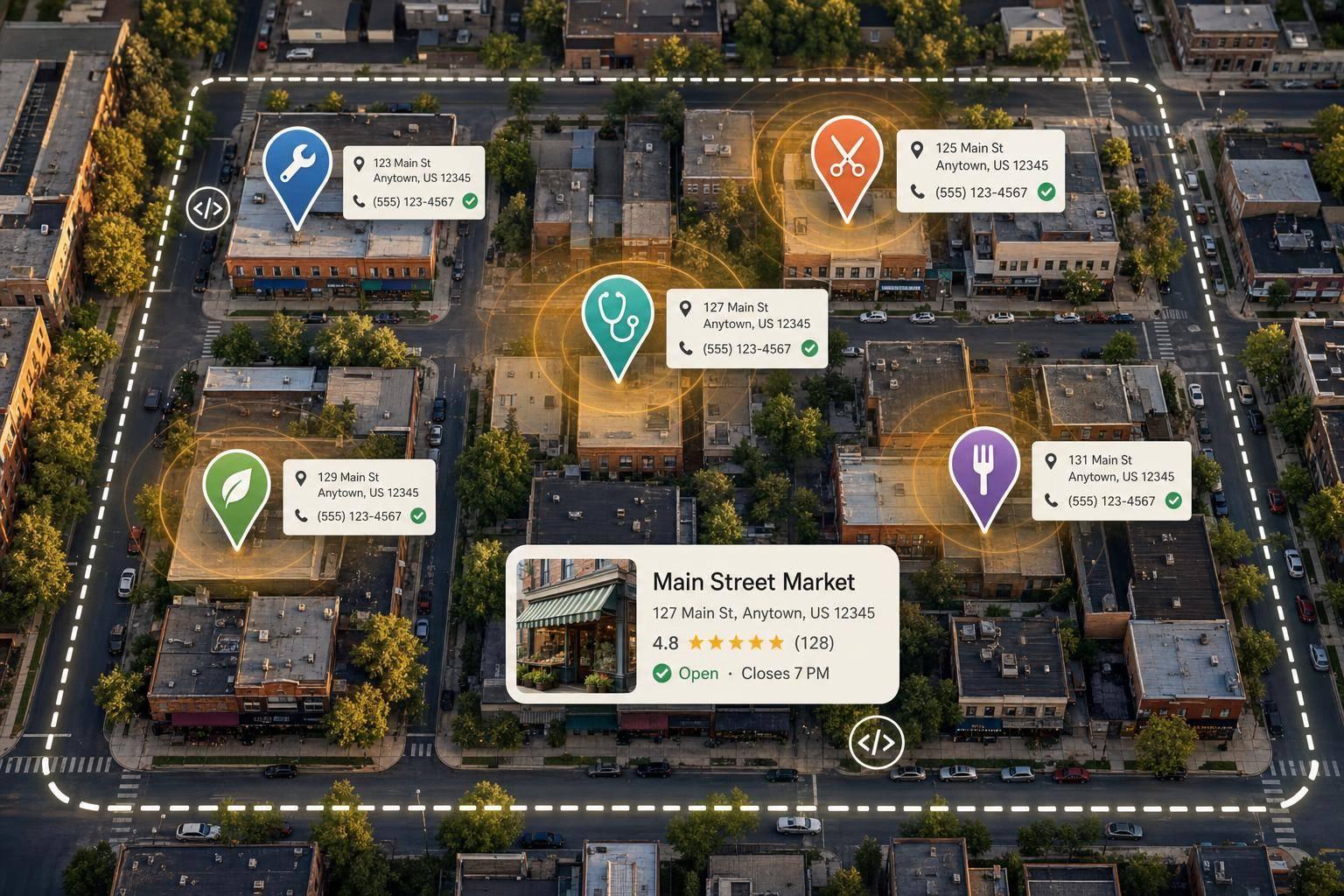
Hyperlocal SEO is about showing up for searches tied to a neighborhood, ZIP code, street, or landmark instead of just a city. That matters because nearby searches often come from people ready to act. In one stat from the article, 88% of people who do a local search on a smartphone visit or call a business within 24 hours.
Here’s the whole playbook in simple terms:
- I’d build a service + location keyword map
- I’d sort terms by urgent, routine, and “near me” intent
- I’d make one strong page per high-value area
- I’d add local proof like photos, reviews, and area details
- I’d keep NAP, Google Business Profile, and schema aligned
- I’d track calls, directions, forms, and bookings by location
A few points stand out fast:
- Hyperlocal SEO is narrower than local SEO. City pages target broad searches. Neighborhood and ZIP pages target close-by intent.
- Page quality matters. Swapping only the location name can lead to thin pages.
- Consistency matters. Your business name, address, phone, hours, and service areas should match across your site and listings.
- Mobile matters a lot. Nearby searchers want to call or get directions in one or two taps.
- Results should be measured by area. Traffic alone is not enough.
My takeaway: if a page matches how people search, shows clear local proof, and makes it easy to call or visit, it has a better shot at turning searchers into customers.
Below, I’d break down how to research keywords, build pages, support them with local signals, and improve them over time.
Boost Foot Traffic with Hyperlocal SEO in 2025!
sbb-itb-cef5bf6
Hyperlocal Keyword Research and Intent Mapping
Turn your services into a service-location keyword map before you build pages.
Build a Service and Location Keyword Matrix
A keyword matrix lines up each service you offer with every neighborhood, ZIP code, or landmark you want to rank for. The basic format is simple: [Service] + [Location].
For a plumbing company, that might look like "emergency plumber Fort Worth 76102," "water heater repair Sundance Square," or "drain cleaning Fort Worth 76104."
| Service Category | Target Location | Hyperlocal Keyword Example |
|---|---|---|
| Emergency Plumbing | Fort Worth 76102 | Emergency plumber Fort Worth 76102 |
| Water Heater Repair | Sundance Square | Water heater repair Sundance Square |
| Drain Cleaning | Fort Worth 76104 | Drain cleaning Fort Worth 76104 |
| Pipe Inspection | Near Stockyards | Pipe inspection near Stockyards Fort Worth |
| Sewer Repair | Tarrant County | Sewer repair Tarrant County |
This kind of matrix makes gaps easier to spot. You can see where you need new pages, where you already have coverage, and which terms deserve attention first.
Once the matrix is ready, sort each keyword by urgency.
Match Keywords to Urgent, Routine, and 'Near Me' Intent
Not every local search means the same thing.
Some searches are urgent. These usually include words like "emergency," "open now," or "same day." Others are more routine and use terms like "best," "top-rated," or "affordable." Then there are "near me" searches, which often point to immediate proximity and fast action.
The search trend is hard to ignore: "near me tonight" and "near me today" searches grew by more than 900% over a two-year period. As Paul Staten, CEO of SEO Werkz, noted:
"In the past three years, the usage for keywords 'where to buy' and 'near me' have grown by over 200%, and that's only on mobile devices."
Validate Demand With Search Data and Customer Language
Use actual search data and the words customers use to check demand before you make a page.
Start with Google Search Console. It shows which location-based queries already bring in traffic. Then look at your Google Business Profile (GBP) reviews and Q&A for repeated phrases such as "same day," "closest to me," or neighborhood names people mention on their own. Sales-call notes can help too, especially when you want the exact wording people use when they need help.
Validate demand with Search Console, GBP language, and sales-call phrasing before creating the page.
How to Structure Hyperlocal Pages, Content, and Metadata
Hyperlocal SEO Page Models: Which One Is Right for Your Business?
Use your keyword matrix to build one page for each high-value service-location query.
Create Neighborhood, ZIP Code, and Landmark-Focused Pages
Each page should line up with one main service-location intent from your keyword matrix. Don’t crank out the same template over and over with only the location swapped. That’s where pages start to feel thin. Each one needs its own local angle.
That means adding details people in that area would actually recognize and care about, like:
- Local photos
- Testimonials from nearby customers
- Neighborhood- or ZIP-specific details
A simple structure works well here: use the H1 for service + location, H2s for benefits and proof, and H3s for neighborhood details. That makes the page easier to scan and helps with indexing.
"Businesses in competitive niches often find it tough to stand out at the city or county level, and service area pages can act as mini landing pages that speak directly to each locality." - SEO Werkz
Once the page has its own local proof, back it up with location-specific metadata.
Write Title Tags, Meta Descriptions, URLs, and Image Alt Text for Local Relevance
Use the same location term across the title, URL, alt text, and schema. That consistency helps search engines connect the dots.
| Page Element | Hyperlocal Optimization Strategy |
|---|---|
| Title Tags | Include the main service + neighborhood/ZIP code in a natural way (for example, "Emergency Plumbing in [Neighborhood Name]") |
| Meta Descriptions | Sum up local services and add a local call to action (for example, "Schedule same-day service in [City/Neighborhood Name]") |
| H1/H2 Headings | Secondary headings should repeat the location only when it helps clarify the topic |
| URL Slugs | Keep slugs clean and easy to read (for example, /services/plumbing-[neighborhood-name]/) |
| Image Alt Text | Describe the image and work in local landmarks or area names where they fit |
| Structured Data | Use LocalBusiness schema that matches the page’s business name, address, and service area |
Internal links matter too. Link from broad service pages to your hyperlocal landing pages with anchor text that names the location. That passes authority and helps search engines read your site’s geographic coverage.
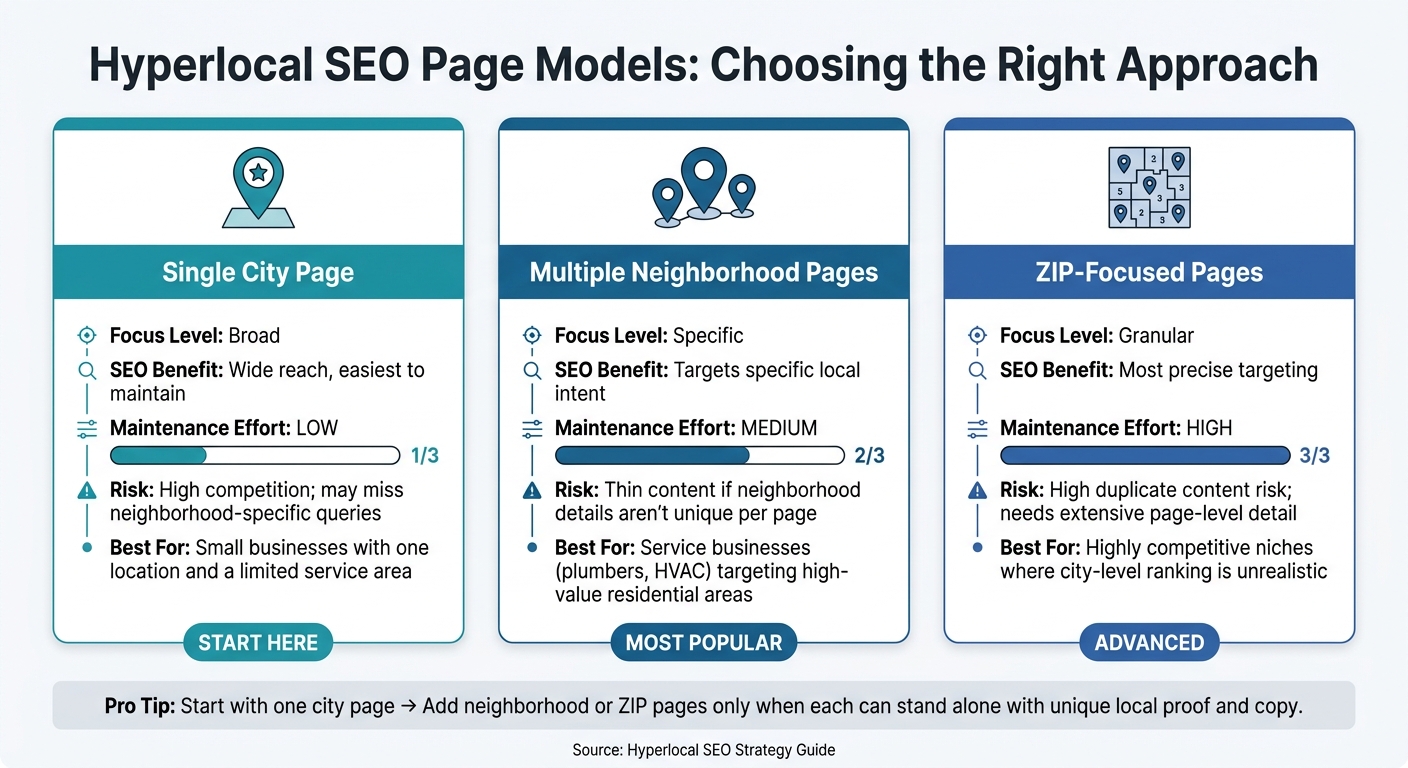
Choose the Right Hyperlocal Page Model
Pick the page model that fits the number of locations in your keyword map.
| Page Model | Focus Level | SEO Benefit | Maintenance Effort | Risks | Best Use Case |
|---|---|---|---|---|---|
| Single City Page | Broad | Broad reach; easiest to maintain | Low | High competition; may not rank for neighborhood-specific queries | Small businesses with one physical location and a limited service area |
| Multiple Neighborhood Pages | Specific | Targets specific local intent | Medium | Risk of thin content if neighborhood details aren’t different from page to page | Service businesses like plumbers or HVAC companies going after high-value residential areas |
| ZIP-Focused Pages | Granular | Most specific, hardest to scale | High | High risk of duplicate content; needs a lot of page-level detail | Highly competitive niches where ranking at the city level is not realistic |
A good way to handle this is to start with one city page. Then add neighborhood or ZIP pages only when each new page can stand on its own with local proof, area details, and copy that isn’t just reworded.
These pages tend to work best when your business details, GBP, and schema all line up with the same location signals.
Local SEO Signals That Support Hyperlocal Content
Once the page is live, the next step is trust. Search engines look for local signals that line up with the page itself. When those signals match, hyperlocal pages tend to perform better. That usually comes down to four things: steady business data, a tuned-up Google Business Profile (GBP), schema markup, and a fast mobile experience.
Keep NAP, Contact Details, and Service Areas Consistent
NAP - your business Name, Address, and Phone number - should match everywhere it shows up: your website, GBP, and every third-party directory. If your NAP is formatted differently across listings, local visibility can slip.
Use one USPS-style address format and one phone format - (XXX) XXX-XXXX - across every listing. Businesses with consistent NAP data are 40% more likely to appear in the local pack. That’s a big gap for something that sounds small. A simple auditing process helps you spot mismatches early and fix them before they spread.
If you run a service-area business, spell out your coverage by city, neighborhood, or ZIP code in GBP and in your on-page copy. Saying you serve “the area” is too vague. Specific service areas give search engines clearer location cues and help you show up for more nearby searches.
Align Google Business Profile and Structured Data With Hyperlocal Pages
After NAP is cleaned up, your GBP and schema should reflect the same local signals.
GBP is one of the strongest local ranking signals, and your primary business category carries the most weight. Profiles with services, hours, photos, and weekly updates tend to do better.
On the schema side, use JSON-LD LocalBusiness markup with areaServed, geo, and openingHoursSpecification. And don’t stop at the generic LocalBusiness type if a better fit exists. A subtype like Plumber or Dentist gives search engines a clearer read on what you do and where you do it.
Prioritize Mobile UX for Nearby Searchers
Nearby searchers don’t hang around. Mobile pages need to help people act fast. 88% of consumers who run a local search on a smartphone visit or call a business within 24 hours.
That means the page should make the next step obvious:
- Add a clear click-to-call button
- Include an easy-to-find Get Directions link
- Keep load times fast
- Embed a map
- Make calls or directions reachable in one or two taps
This matters even more for voice and mobile local searches, since many voice queries have local intent. Every extra tap, delay, or confusing step makes it easier for a searcher to bail before they call, get directions, or visit.
Measure Results and Improve Hyperlocal SEO Over Time
Once your hyperlocal pages are live and tuned up, the job changes. Now it's about measurement.
Rankings can give you an early read, sure. But they don't show whether someone called, booked an appointment, or showed up at your location. The numbers that matter most are calls, direction requests, form submissions, booked appointments, and revenue or lead volume by area. So instead of looking only at total site traffic, measure each page by the location it serves.
Track Rankings, Traffic, and Conversions by Location
Track results in Google Business Profile Performance, Google Analytics 4 (GA4), and Google Search Console.
- Google Business Profile Performance shows calls, direction requests, and clicks.
- GA4 lets you track click-to-call events, form completions, and appointment bookings tied to specific location pages.
- Google Search Console helps you filter by local queries, like neighborhood names or ZIP code terms such as "plumber in Bucktown", so you can see which micro-locations are getting impressions and clicks.
Segment by neighborhoods and ZIP codes. A city-level page and a ZIP code page might look close when you view them at a high level, but the story can change fast when you split the data out. That side-by-side view helps you spot where ROI is strongest and where leads are slipping away.
Expand Winning Pages and Fix Weak Ones
Use the data to improve pages that bring in traffic but fall short on conversions.
When a hyperlocal page already pulls in qualified traffic and converts well, lean into it. Update photos, offers, and service-area copy based on what drives action. Then refresh the title tag and meta description so they speak more clearly to micro-location terms.
Pages with strong impressions but weak conversions usually need better local proof or a clearer CTA. If a page ranks but doesn't convert, check a few common issues:
- The page may target the wrong intent
- The call to action may be buried
- The local details may be too thin
Thin pages usually need more local detail. Add local proof, tighten the CTA, and merge duplicate pages when needed. If two pages compete for almost the same searches, combine them into one stronger page, redirect the weaker URL, and update internal links to point to the main version.
Conclusion: Core Hyperlocal SEO Steps
The full process comes down to four repeating steps: choose the right micro-locations, map keywords to local intent, build useful location-specific pages, and measure conversions by area. Hyperlocal SEO works when each page matches a real location, reflects real search intent, and keeps getting better through conversion data.
FAQs
How is hyperlocal SEO different from local SEO?
Local SEO helps your business show up in specific geographic areas. It usually relies on Google Business Profiles, consistent NAP data (name, address, and phone number), and location-based keywords.
Hyperlocal SEO takes that a step further. Instead of aiming at a whole city or region, it focuses on much smaller areas, like neighborhoods, nearby landmarks, or a short radius around your business. The goal is simple: reach people who are close by and ready to act.
When should I create neighborhood or ZIP code pages?
Create neighborhood or ZIP code pages when you want to target specific service areas and bring in local search traffic.
Start with a list of the areas you serve. Then rank them by population or customer volume so you know where to begin.
From there, build a separate page for each area. Each one should feel specific to that place, not like the same page copied over and over. Add community-focused details like:
- Local testimonials
- Project examples from that area
- Service details that match local needs
The goal is simple: make every page useful for people in that neighborhood or ZIP code.
How do I measure hyperlocal SEO results?
Track Google Business Profile insights like calls, direction requests, and website visits. You should also watch organic search traffic and keyword rankings in your target area to see if your local visibility is getting better.
It also helps to review your click-through rate from search results and your website’s conversion rate. Those numbers show whether your content matches local intent and helps drive business growth.
If you want clean reporting and accurate tracking, SEO Werkz can help monitor these metrics and break down what they mean.