
Pagination SEO: Best Practices for Indexing
April 29, 2026When your site has too much content for one page, pagination helps divide it into smaller, manageable chunks. But without proper SEO practices, paginated pages can confuse search engines, leading to missed indexing opportunities. Here's what you need to know:
- Google no longer uses
rel="next"andrel="prev"for pagination. Instead, it relies on links and URL structures to understand sequences. - Indexing paginated pages is crucial to avoid orphan pages and ensure all content is discoverable.
- Avoid common mistakes, like using
noindextags on paginated pages or relying on JavaScript-only navigation buttons. - Optimize crawl budget by managing URL variations and ensuring paginated links are crawlable.
Two main strategies for pagination SEO:
- Index all paginated pages: Best for large catalogs. Use self-referencing canonical tags and distinct titles for each page.
- Index a "View All" page: Suitable for smaller categories. Consolidate ranking signals into one URL but watch for slow loading times.
Proper pagination ensures search engines can find and index your content efficiently. Focus on clear URL structures, crawlable links, and avoiding indexing errors to improve visibility and rankings.
😬 Every Smart SEO Uses This Pagination Strategy in 2025 🚀
sbb-itb-cef5bf6
Common Pagination Mistakes That Hurt Indexing
Pagination setups can cause serious issues if not handled properly. Here are three common mistakes that can negatively impact your site's visibility in search results.
Using Noindex Tags Incorrectly
Adding a noindex tag to paginated pages is a big misstep. It can lead to orphan content and missed indexing opportunities. For instance, if you apply noindex to Page 2, Page 3, and beyond, search engines might eventually stop crawling those pages altogether:
"When you add a noindex tag to paginated pages, search engines eventually stop crawling them... If important products, articles, or posts exist on deeper paginated pages, they may never be discovered or ranked".
Initially, Google may respect noindex, follow directives, following links on the page while excluding it from the index. But over time, Google could treat these pages as noindex, nofollow, essentially cutting them off from discovery. For example, if a product is only listed on Page 10 of your catalog, and that page is marked with noindex, the product might never get indexed. Instead, use self-referencing canonical tags for each paginated page, and include "Page X" in the title tags to make them distinct.
Broken or Inconsistent Pagination Links
Even with proper indexing, broken or poorly implemented pagination links can disrupt crawler navigation. If your pagination depends on JavaScript buttons, <span> tags, or "Load More" functionality without proper <a href> links, search engine bots won’t be able to follow the sequence. Bots rely on standard HTML anchor links to navigate. Similarly, using fragment identifiers (e.g., #page=2) can cause issues since Google often ignores everything after the hash symbol, breaking the pagination flow.
Another issue is inconsistent internal linking. Relying solely on "Next" and "Previous" links for a catalog with hundreds of pages forces crawlers to take unnecessary steps to reach deeper content. This increases crawl depth and makes it harder for bots to discover key pages. To fix this, ensure your pagination uses crawlable HTML links and consider adding skip links to key points like the first, middle, and last pages in long sequences.
Failing to Optimize for Crawl Budget
Crawl budget is another critical factor. Search engines allocate a limited crawl budget - the number of pages they’ll fetch from your site within a certain timeframe. If your site generates excessive URL variations from filters or sorting options, it can waste this budget on low-value pages.
Misconfigured pagination can lead to crawlers spending time on shallow URLs while missing deeper, more important content.
To prevent this, use self-referencing canonical tags on paginated pages, ensure all pagination links are crawlable, and avoid blocking paginated URLs in your robots.txt file. Additionally, for pages beyond your actual content limit (e.g., Page 50 when only 40 pages exist), make sure they return a proper 404 status code instead of serving an empty page with a 200 OK response.
Effective Pagination Strategies for SEO Indexing
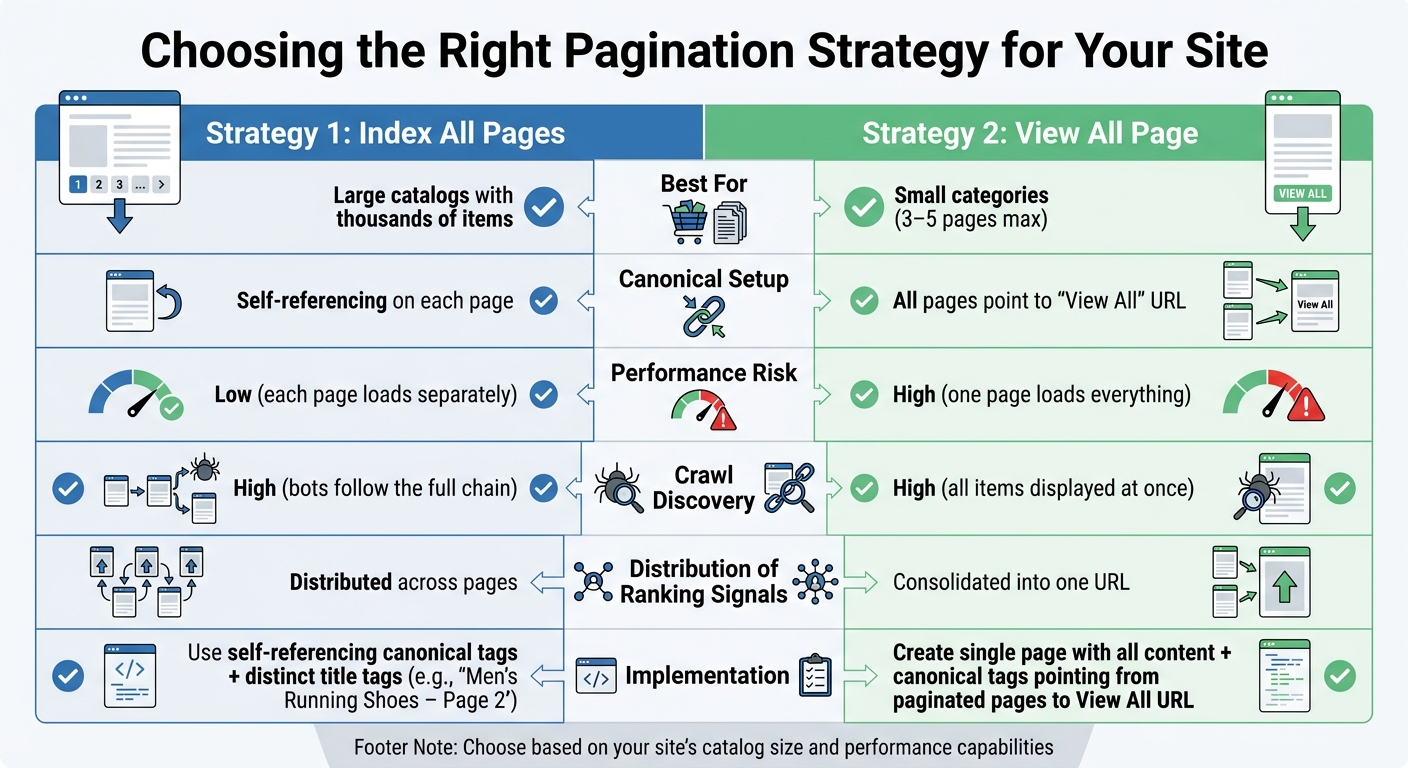
Pagination SEO Strategies Comparison: Index All Pages vs View All Page
After addressing common pagination pitfalls, the next step is to choose a strategy that fits your site’s needs. The ideal approach depends on factors like the size of your content catalog and how your pages perform. Let’s explore two approaches that can help improve pagination indexing.
Strategy 1: Index All Paginated Pages
This method works well for large websites, such as ecommerce stores, news archives, or directories. The idea is to let search engines index every paginated page.
To implement this:
- Each paginated page should have a self-referencing canonical tag. For example,
?page=2should canonicalize to itself rather than pointing back to Page 1. - Adjust title tags to reflect pagination. For instance, instead of repeating "Men's Running Shoes" on every page, use titles like "Men's Running Shoes – Page 2" to avoid duplicate content issues.
- Ensure all paginated pages are accessible via standard HTML anchor links.
By indexing all pages, search engines can discover content buried deeper in your catalog. For instance, if a product is only listed on Page 5 and that page isn’t indexed, the product may never show up in search results.
Additionally, it’s vital to use crawlable <a href> tags for navigation buttons like "Next" and "Previous." Avoid relying on JavaScript-only navigation or fragment identifiers like #page=2, as these can make it harder for search engines to crawl your content.
Strategy 2: Index Only the View All Page
This approach is better suited for smaller categories, typically those spanning three to five pages. Instead of indexing individual paginated pages, you create a single "View All" page that displays the entire content set. Then, use canonical tags to point all paginated pages to this "View All" page.
For example, if a category has 40 products spread across four pages, you’d create a "View All" page showing all 40 products. Paginated pages would include canonical tags directing search engines to the "View All" URL, while the "View All" page uses a self-referencing canonical tag.
This method consolidates ranking signals into one URL, which can boost its authority. Plus, many users prefer accessing all content on a single page. However, this strategy comes with a key challenge: page speed. A "View All" page can load slowly if it contains a lot of content, potentially hurting both user experience and rankings. Use tools like PageSpeed Insights to ensure the page is optimized for quick loading.
Quick Comparison of Strategies
Here’s a side-by-side look to help you decide:
| Factor | Index All Pages | View All Only |
|---|---|---|
| Best For | Large catalogs with thousands of items | Small categories (3–5 pages max) |
| Canonical Setup | Self-referencing on each page | All pages point to "View All" URL |
| Performance Risk | Low (each page loads separately) | High (one page loads everything) |
| Crawl Discovery | High (bots follow the full chain) | High (all items displayed at once) |
| Distribution of Ranking Signals | Distributed across pages | Consolidated into one URL |
This breakdown can help you determine which strategy fits your site’s structure and performance goals. Keep in mind, though, that mixing these strategies - such as using "View All" canonicals alongside rel="next/prev" attributes - can confuse search engines and lead to inconsistent results.
With your pagination strategy in place, the next step is to fine-tune your URL structure to further optimize performance.
Best Practices for URL Structures in Pagination
When it comes to pagination and indexing, getting your URL structure right is key to ensuring search engines can properly crawl and index your content. Each page in a paginated sequence should have its own unique URL. This helps search engines discover all your content and distribute link equity effectively, ensuring that even items on deeper pages don’t get overlooked in search results.
Choosing Between Query Parameters and Path-Based URLs
Pagination URLs can be structured using either query parameters or path-based directories. Here’s how they differ:
- Query parameters: These look like
example.com/shop?page=2. Google generally favors this approach because it works well with tools like Google Search Console and makes crawl management simpler. Marketing consultant Jes Scholz explains:
"If you have a choice, run pagination via a parameter rather than a static URL... Googlebot seems to guess URL patterns based on dynamic URLs. Thus, increasing the likelihood of swift discovery."
- Path-based URLs: These have a cleaner look, such as
example.com/shop/page/2/, and integrate naturally into keyword-rich subfolder structures. However, they often require server-side rewrites and can be more challenging to manage with parameter-handling tools.
One thing to avoid? Using fragment identifiers like example.com/shop#page2. Search engines ignore everything after the #, which means they won’t index those pages properly.
No matter which method you choose, consistency is critical. Stick to one format across your entire site.
Creating Unique and Descriptive URLs
Your pagination URLs should be logical and easy to follow. For example, opt for predictable numbering like page=2 or page=3, rather than random strings or skipped sequences. The first page should always use the base URL (e.g., example.com/category/) without any additional parameters. If variants like ?page=1 or /page-1/ exist, use canonical tags to point them back to the base URL.
To make paginated pages stand out to search engines, update on-page elements like title tags, meta descriptions, and H1 tags. Append phrases like "Page 2" or "Page 3" starting from the second page. This ensures each page is unique while staying relevant to the main category topic.
Lastly, handle out-of-range page requests carefully. For example, if someone tries to access page 20 of a 5-page series, your server should return a 404 HTTP status code. This prevents bots from wasting resources on nonexistent pages. If you’re using multiple parameters (e.g., filters and pagination), keep the parameter order consistent to avoid creating duplicate URLs for the same content.
Additional Tips for Optimizing Paginated Content
Avoid Blocking Pagination Links with Robots.txt
Blocking pagination links in your robots.txt file might seem like a way to save crawl budget, but it can backfire. When search engines can't access deeper content - like product listings, blog posts, or forum threads buried beyond the first few pages - you risk creating orphan pages that never get indexed.
This approach also disrupts the flow of link equity and hides canonical tags, making it harder for search engines to determine which URLs are authoritative. Think of pagination as a network that distributes authority from a main category page to individual items. Blocking that network cuts off this flow entirely.
John Mueller has emphasized that pagination is treated like any other page. Instead of blocking these pages in robots.txt, use a noindex, follow meta tag. This allows search engines to crawl the links while keeping the pages out of the index. By keeping pagination links accessible, you ensure your indexing strategy remains intact.
Managing Filters and Sorting Options
In addition to keeping pagination links crawlable, it's essential to handle URL variations caused by filters and sorting options effectively.
Filters and sorting options can generate countless URL variations. Pair them with pagination, and you could overwhelm your crawl budget, causing bots to waste time on duplicate or near-duplicate pages instead of discovering fresh, important content.
Canonical tags are the key here. Ensure filtered or sorted paginated URLs point back to the clean, canonical version. For instance, a URL like /category?page=2&sort=price should canonicalize to /category/page/2/. Also, make sure filtered URLs are not blocked in robots.txt, as this would prevent canonical tags from functioning correctly. And remember, never combine noindex with rel=canonical on the same page. As SEO expert Daria Chetvertak warns:
"Never mix noindex tag and rel=canonical, as they are contradictory pieces of information for Google... noindex is a stronger signal for Google".
To avoid crawl budget issues on large sites, limit the number of filter combinations available. This ensures that search engines focus on indexing your most important pages. Properly managing URL variations is a crucial step in optimizing crawl efficiency and maintaining a robust indexing strategy.
Conclusion
Let’s wrap up the strategies we’ve covered and focus on actionable steps to improve your site’s SEO performance.
Recap of Best Practices
Pagination plays a crucial role in SEO by ensuring that all content, even the deeper pages, gets discovered and indexed. Google treats each paginated page as a standalone entity, meaning every page in the series competes for its own ranking. To optimize this, use self-referencing canonical tags on every page in the series and standard <a href> anchor tags for pagination links so search engines can easily crawl them.
Avoid the temptation to use noindex tags on paginated pages. While it might seem like a way to save crawl budget, it can backfire by isolating valuable content from search engines. Instead, keep paginated URLs out of your XML sitemaps and add "Page X" to title tags and meta descriptions for pages beyond the first to prevent duplicate content issues.
Next Steps for Businesses
Here’s how to put these strategies into action:
- Audit your pagination setup: Use tools like Google Search Console or Semrush Site Audit to identify and fix broken links, missing canonical tags, or incorrect
noindexusage. - Review URL structures: Ensure your URLs and canonical tags are correctly implemented to guide search engines to the right pages.
- Check server logs: Confirm that crawlers can access deeper pages and aren’t getting stuck in crawl traps. Non-existent paginated pages, like a request for page 10 in a 5-page series, should return proper 404 status codes.
- Optimize infinite scroll or "Load More" setups: If you’re using these features for user experience, ensure they’re supported by an underlying paginated structure with unique, crawlable URLs.
FAQs
Should I index every paginated page or use a View All page?
When dealing with paginated pages, it's usually better not to index every single one. Instead, consider creating a 'View All' page where users can find everything in one place. Alternatively, you can implement canonical tags or apply noindexing strategies. These approaches help avoid duplicate content problems and make it easier for search engines to crawl your site efficiently.
What’s the best canonical tag setup for paginated URLs?
To optimize your paginated URLs, it's best to use a rel="canonical" tag on each page that points back to itself. Avoid setting the first page as the canonical for all others. Doing so can cause duplicate content problems and interfere with proper indexing. By letting each page stand on its own, search engines can index them accurately while preserving their relevance.
How can I make pagination crawlable if I use infinite scroll or Load More?
To ensure search engines can properly crawl content when using infinite scroll or "Load More" features, it's crucial to give each content segment a unique, crawlable URL (e.g., /category?page=2). This allows search engines to index every part of your content effectively.
Here are a few tips to make this work:
- Use server-side rendering or dynamically update URLs using techniques like
pushStatewhen new content loads. - Add rel="canonical" tags to prevent duplicate content issues. These tags point search engines to the preferred version of a page.
- Provide accessible links or buttons that allow search engines to index all content independently. This ensures no content is left undiscovered.
By following these steps, you make your content more search-engine-friendly, even with modern scrolling features.