How Canonical Tags Solve Duplicate Content
April 2, 2026Duplicate content can hurt your website's search engine rankings - and canonical tags are a simple, effective way to fix it.
Canonical tags (rel="canonical") tell search engines which version of a page is the primary one. This consolidates link equity, improves crawl efficiency, and prevents keyword cannibalization. However, search engines treat these tags as suggestions, not commands, so proper implementation is critical.
Here’s what you need to know:
- Why it matters: Duplicate content dilutes link equity, wastes crawl budget, and can reduce organic traffic by up to 40%.
- How it works: Canonical tags consolidate ranking signals and guide search engines to the preferred URL.
- Best practices: Use self-referencing canonical tags, align internal links and sitemaps, and avoid conflicting signals.
- Tools to help: Use Google Search Console, Semrush, or Screaming Frog to identify and fix duplicate content issues.
Canonical tags are especially useful for handling URL parameters, filtering options, and syndicated content. When implemented correctly, they can boost rankings by 10–30% and improve crawl efficiency for e-commerce sites by 18%.
Let’s dive into how to use them effectively.
How Canonical Tags Fix Duplicate Content
How Canonical Tags Work
Canonical tags help search engines handle duplicate content in three main steps: identifying duplicate URLs, evaluating various signals (including canonical tags), and selecting one URL to index and rank. All ranking signals are then consolidated into that chosen version.
The tag itself is a straightforward HTML snippet placed in the <head> section of a webpage: <link rel="canonical" href="https://example.com/preferred-page" />. This snippet tells search engines which URL should take priority. However, it’s important to note that canonical tags act as signals, not commands.
"Canonical tags operate as signals not commands." - Martin Splitt, Developer Advocate, Google
Google considers around 40 different signals when deciding which version of a duplicate page to treat as canonical. If other signals - such as internal linking structures or sitemap entries - contradict the declared canonical tag, Google may override it. In fact, Google disregards user-declared canonical tags 35% of the time when internal site signals don’t align. To ensure the tag works effectively, it’s crucial that all elements of your site, including internal links, XML sitemaps, and navigation menus, consistently point to the same canonical URL.
This alignment is key to making the most of canonical tags, which offer several benefits.
Benefits of Canonical Tags
Canonical tags address duplicate content issues by consolidating link equity and improving crawl efficiency. One of the biggest advantages is link equity consolidation. When multiple duplicate URLs exist, backlinks and PageRank can become fragmented across those versions. Canonical tags redirect all that ranking power to one preferred URL. Without this consolidation, keyword competitiveness can drop by 40% due to the dilution of link equity.
They also help optimize your crawl budget. Search engines often waste resources crawling redundant pages caused by URL parameters, session IDs, or tracking codes. By using canonical tags, you guide search engines to focus on your most important content. Websites that implement these tags correctly often experience a 10% to 30% improvement in rankings for the affected pages. E-commerce sites, in particular, can see an 18% increase in crawl efficiency within 30 days when canonical tags are used properly for faceted navigation.
Another critical benefit is protection against content syndication issues. Publishers who syndicate content without cross-domain canonical tags risk losing up to 40% of their potential organic traffic to third-party sites in the first week. By using canonical tags that point back to your original content, you retain authority and ranking power even when your content appears on other domains.
sbb-itb-cef5bf6
How to Implement Canonical Tags
Finding Duplicate Content
Start by identifying duplicate content on your site. Tools like Ahrefs, Semrush, or Moz Pro can scan your website and flag pages with identical or nearly identical content. For instance, Semrush's Site Audit tool highlights pages as duplicates if they share at least 85% of the same wording and structure.
If you're looking for a free option, Google Search Console can help. Its "Pages" report often labels URLs as "Duplicate, Google chose different canonical than user", signaling potential conflicts. You can also use the URL Inspection tool to see which version of a page Google considers canonical.
Common causes of duplicate content include technical variations such as HTTP vs. HTTPS, www vs. non-www, and trailing slashes. URL parameters, like tracking codes (?utm_source=), session IDs, or filtering options (?sort=price), can also create duplicate URLs serving the same content. Additionally, pages with identical title tags and meta descriptions are strong indicators of duplication. Surprisingly, it's estimated that nearly 29% of the web consists of duplicate content.
Once you've identified duplicates, you can move on to implementing canonical tags.
Adding Canonical Tags
After pinpointing duplicate pages, add a canonical tag to the <head> section of each duplicate page's HTML code. Use absolute URLs that include the full protocol and domain, like this:
<link rel="canonical" href="https://example.com/preferred-page/" />
Make sure the canonical tag is included only in the <head> section. Additionally, every unique page should have a self-referencing canonical tag to avoid issues like scraper-induced duplicates or problems caused by tracking parameters.
Remember to use only one canonical tag per page. Multiple tags can confuse search engines. For non-HTML files, such as PDFs or Word documents, you can apply canonicalization using the rel="canonical" HTTP header in the server response.
Proper implementation works best when paired with consistent site-wide practices.
Maintaining Consistency Across Your Site
Your XML sitemap should list only canonical URLs - never duplicate or parameterized versions. If there's a conflict between the sitemap and a page's canonical tag, Google relies on its own algorithm about 84% of the time.
When it comes to internal links, ensure they always point to the canonical version of a page. This applies to navigation menus, footers, breadcrumbs, and in-page links. If internal links contradict canonical tags, search engines may ignore those tags about 35% of the time.
Avoid blocking non-canonical URLs in your robots.txt file. Blocking these pages prevents Googlebot from crawling them and discovering their canonical tags, which can impact link equity. Lastly, make sure canonical tags only point to live pages (status code 200). Linking to a 404 error, a dead page, or a redirect can confuse search engines and undermine your efforts.
How and When to Use the Canonical Tag
Canonical Tags vs. Other Duplicate Content Solutions
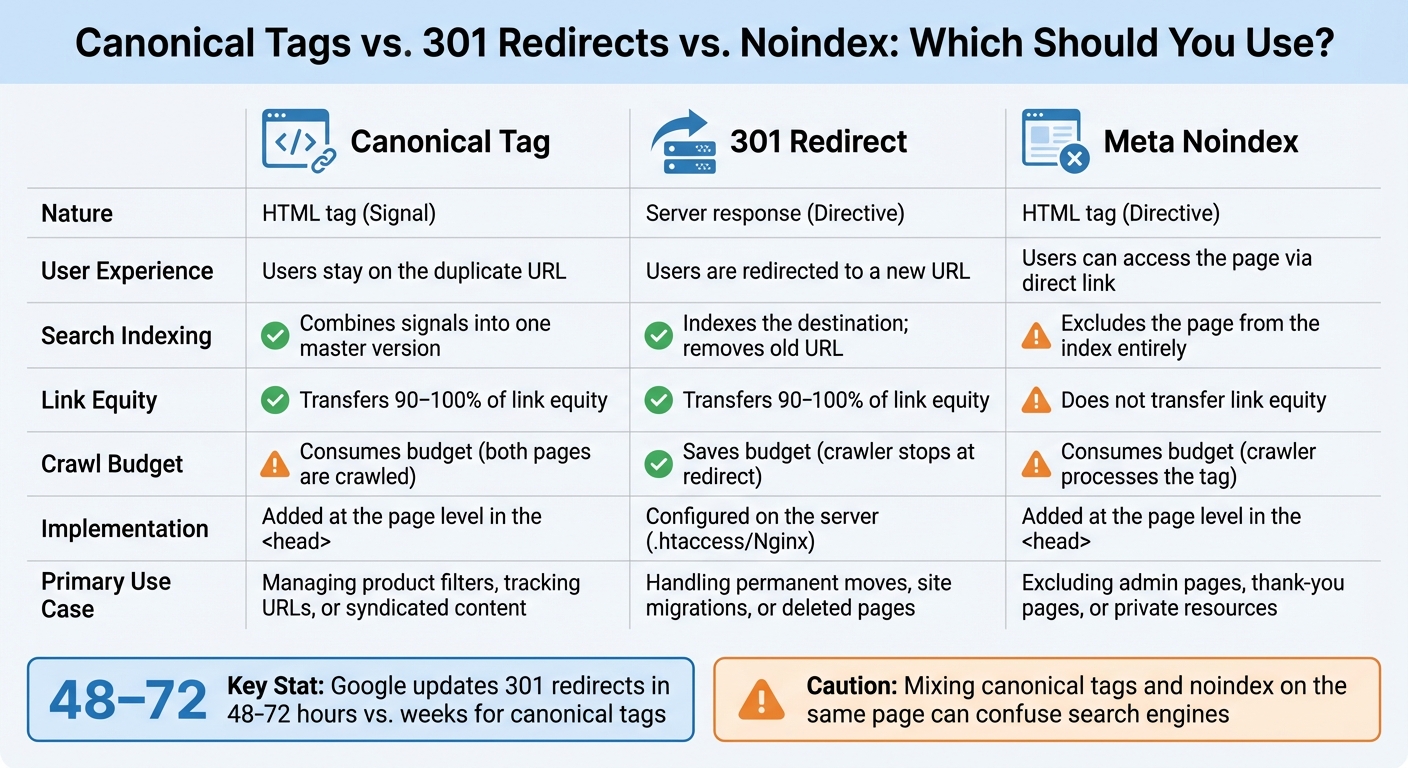
Canonical Tags vs 301 Redirects vs Noindex: Complete Comparison Guide
Comparison: Canonical Tags vs. 301 Redirects vs. Noindex
Now that we've covered how canonical tags work, let's see how they stack up against other tools for managing duplicate content. Depending on the situation, you might need to use 301 redirects or meta noindex tags instead.
301 redirects are permanent server-side instructions that send users and search engines from one URL to another. When someone visits the old URL, they’re automatically directed to the new one. This approach is best for cases like merging outdated content into a comprehensive guide, switching domains, or permanently removing pages. One key advantage? Google typically updates its index for a 301 redirect within 48–72 hours. By contrast, canonical tags can take weeks to fully suppress duplicate URLs in search results.
Meta noindex tags work differently - they tell search engines not to index a page at all, but users can still access it if they have the link or navigate to it. This is ideal for pages that don’t contribute to SEO, like admin panels or thank-you pages. However, unlike canonical tags and 301 redirects, noindex tags don’t transfer link equity to other pages.
Here’s a quick breakdown of how these methods compare:
| Feature | Canonical Tag | 301 Redirect | Meta Noindex |
|---|---|---|---|
| Nature | HTML tag (Signal) | Server response (Directive) | HTML tag (Directive) |
| User Experience | Users stay on the duplicate URL | Users are redirected to a new URL | Users can access the page via direct link |
| Search Indexing | Combines signals into one master version | Indexes the destination; removes old URL | Excludes the page from the index entirely |
| Link Equity | Transfers 90–100% of link equity | Transfers 90–100% of link equity | Does not transfer link equity |
| Crawl Budget | Consumes budget (both pages are crawled) | Saves budget (crawler stops at redirect) | Consumes budget (crawler processes the tag) |
| Implementation | Added at the page level in the <head> |
Configured on the server (.htaccess/Nginx) | Added at the page level in the <head> |
| Primary Use Case | Managing product filters, tracking URLs, or syndicated content | Handling permanent moves, site migrations, or deleted pages | Excluding admin pages, thank-you pages, or private resources |
Each method has its strengths and ideal scenarios. For example, if passing link equity is your priority, a canonical tag works well. On the other hand, if you want a page entirely removed from search results without transferring any equity, a noindex tag is the way to go. Just be cautious - mixing signals like canonical tags and noindex on the same page can confuse search engines, causing them to ignore the canonical tag altogether.
Best Practices for Canonical Tags
Common Canonical Tag Mistakes
Misconfigured canonical tags can lead to losing as much as 40%–60% of your organic traffic. One frequent error is neglecting self-referencing canonical tags. Every page should declare itself as canonical, even if duplicates seem unlikely. This helps guard against issues like scraping and parameter-based duplication - an oversight seen on 62% of e-commerce product pages.
Always use absolute URLs (e.g., https://example.com/page/) instead of relative ones (e.g., /page/). Google’s John Mueller has highlighted that trailing slash inconsistencies often cause problems. Another major issue is pointing canonical tags to URLs that are either blocked by robots.txt or return a 404 error. If search engines can’t crawl the target page, they’ll ignore the tag entirely. Also, steer clear of canonical chains - each tag should directly reference the final, intended version.
Conflicting signals are another pitfall. If your sitemap, internal links, and canonical tags point to different versions of a page, Google may disregard your preferred choice. In fact, it overrides user-declared canonical tags 35% of the time when internal linking contradicts them. For paginated content, don’t canonicalize all pages (e.g., Page 2, Page 3) back to Page 1. That approach prevents search engines from indexing unique content on subsequent pages. Instead, apply self-referencing canonical tags to each individual page in the sequence.
These errors can undermine the benefits of properly implemented canonical tags, making it clear why careful attention to these details is crucial for effective SEO. Regular testing and monitoring can help ensure these practices remain intact.
Monitoring and Testing
Once you’ve implemented canonical tags, regular monitoring is key to maintaining their effectiveness. This proactive approach helps catch issues before they impact your site’s rankings. Start by using Google Search Console’s "Pages" report. Look for statuses like "Duplicate, Google chose different canonical than user", which indicate that Google is overriding your tags due to conflicting signals elsewhere on your site. For deeper analysis, the URL Inspection Tool allows you to compare your "User-declared canonical" with Google's "Google-selected canonical" for critical pages.
For larger audits, tools like Screaming Frog, Sitebulb, or Moz Pro Site Crawl are invaluable for spotting missing tags, duplicate tags, or tags pointing to redirects or 404 errors. Browser extensions like MozBar can also help you manually verify canonical tags by checking the page source for rel="canonical" in the <head> section. After major updates, such as site redesigns or URL structure changes, run a full canonical audit. Sites where over 15% of pages are non-canonical duplicates can experience a 22% delay in indexing new content.
How SEO Werkz Can Help with Canonical Tags

When it comes to managing canonical tags effectively, expertise plays a huge role. Fixing duplicate content issues isn’t just about adding a bit of code here and there. Google treats canonical tags as suggestions rather than strict rules. In fact, up to 35% of the time, Google may disregard user-declared tags if they conflict with other internal signals like your site's linking structure or sitemaps. This is where SEO Werkz steps in. By running advanced audits, they ensure your site’s canonical tags are not just theoretically correct but also technically sound. Using tools like Google Search Console, Screaming Frog, and Semrush, their team identifies pages that are at least 85% similar, along with missing or conflicting canonical tags. They also dig into "Page Indexing" reports in Google Search Console to spot issues like "Duplicate, Google chose a different canonical than the user" or "Duplicate without user-selected canonical".
But SEO Werkz doesn’t stop at identifying problems - they also handle the technical fixes. This includes adding self-referencing canonical tags with absolute URLs (complete with the full https:// domain) and ensuring all internal signals, like sitemaps and links, consistently point to the correct canonical URL. For e-commerce sites, where faceted navigation can generate thousands of filtered URLs, they implement automated canonicalization methods to avoid overwhelming Google’s crawlers.
SEO Werkz Advanced SEO and Full-Service Plans
Once the technical groundwork is laid, SEO Werkz offers tailored service plans to help businesses stay on top of their SEO game. Their Advanced SEO Plan includes in-depth technical audits, link building, advanced keyword research, and reputation management. These services are designed to tackle complex duplicate content challenges that growing businesses often face.
For a more integrated approach, the Full-Service Plan combines SEO with PPC, social media marketing, web design, and content creation. This ensures every piece of your digital strategy works in harmony.
Both plans emphasize ongoing monitoring, using tools like the URL Inspection tool to confirm that Google’s chosen canonical aligns with what you’ve declared. They also conduct quarterly audits to catch any new issues that might arise from CMS updates or fresh content. This proactive approach helps businesses maintain strong link equity and ensures Google’s crawlers work efficiently across the entire site.
Conclusion
Canonical tags play a crucial role in tackling duplicate content issues. They consolidate ranking signals, optimize your site's crawl budget, and prevent keyword cannibalization - all without needing redirects or blocking pages.
Looking ahead to 2026, the stakes are even higher. With AI-driven search engines like ChatGPT and Perplexity depending on canonical signals to determine the "true" version of a page, proper implementation becomes essential. This ensures your content is correctly indexed, summarized, and attributed. Google reportedly evaluates around 40 different signals when deciding which page version to treat as canonical. If any of these signals conflict with the canonical tag you've set, Google may override your choice.
The risks of getting this wrong are significant. Misconfigured canonical tags can result in losing 40% to 60% of your organic traffic. To avoid this, it's vital to align your canonical tags with your internal links and sitemaps. Guy Sheetrit, CEO of Over The Top SEO, highlights the importance of accuracy:
"When you get canonical tags wrong, you're essentially telling Google to ignore your best content".
Given these challenges, partnering with experts like SEO Werkz can make all the difference. Their Advanced SEO and Full-Service Plans include quarterly audits, automated canonicalization for complex setups, and ongoing monitoring to catch issues early. Whether you're managing product variants, tracking parameters, or syndicated content, professional guidance ensures your site stays competitive in both traditional search and AI-driven discovery.
FAQs
When should I use a canonical tag instead of a 301 redirect?
A canonical tag is a tool you can use to let search engines know which version of a page you prefer, without needing to redirect users or alter the URL. It's especially helpful for handling duplicate content across different URLs while ensuring that SEO value is consolidated into the preferred page.
Why does Google ignore my canonical tag sometimes?
Google might bypass your canonical tag if it detects mixed signals or believes another URL is more useful for users. This can occur due to issues like conflicting tags, incorrect implementation, or anything that creates confusion. To increase the chances of Google honoring your canonical tag, focus on maintaining consistent signals and setting up the tag correctly.
How do I canonicalize filtered or parameter URLs on e-commerce pages?
When dealing with filtered or parameterized URLs on e-commerce sites, canonical tags are your go-to tool. These tags should point search engines to the preferred version of a page - usually the base product page without any filters or parameters. This approach helps consolidate ranking signals and prevents duplicate content issues.
In addition to canonical tags, you might want to block unnecessary URL parameters in your robots.txt file. This ensures that search engines focus on indexing the most authoritative version of your pages, keeping your site cleaner and more optimized for search.