
Ultimate Guide to Soft 404 Errors in SEO
March 19, 2026Soft 404 errors occur when a webpage appears valid to search engines (returns a "200 OK" status) but lacks meaningful content, such as empty pages, placeholders, or irrelevant information. These errors can harm your site's SEO by wasting crawl budgets, diluting link equity, and cluttering indexes.
Key Takeaways:
- What Causes Soft 404 Errors: Thin content, incorrect HTTP status codes, or dynamic pages with no results.
- How to Detect Them: Use tools like Google Search Console to flag "Soft 404" pages and manually verify them.
- How to Fix Them: Return proper status codes (404/410), enrich content, or set up relevant redirects.
- Prevention Tips: Regular content audits, CMS/plugin maintenance, and monitoring tools like Google Search Console.
Properly managing soft 404 errors ensures better search engine performance and user experience.
How to Fix Soft 404 Errors to Improve Site Health
sbb-itb-cef5bf6
What Is a Soft 404 Error?
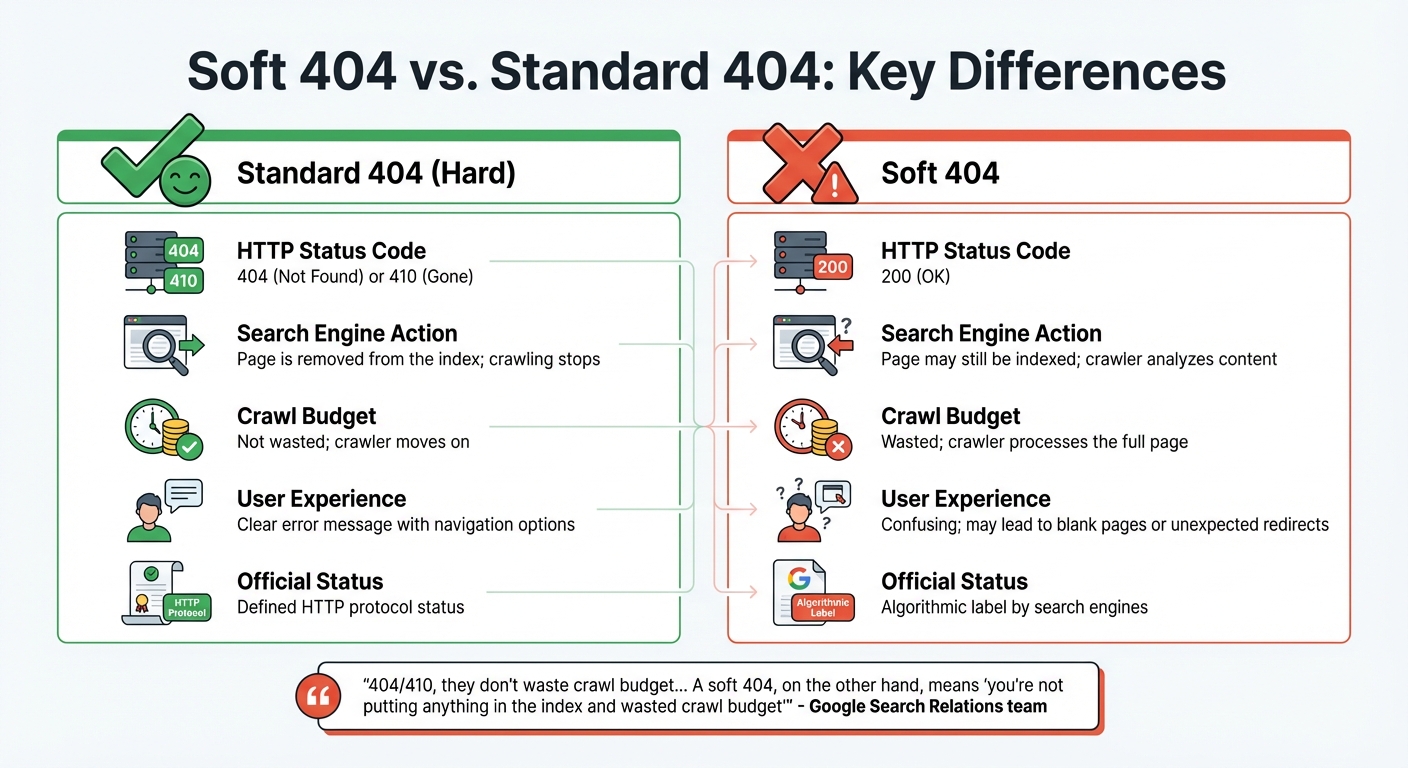
Soft 404 vs Standard 404 Error Comparison Chart
A soft 404 error happens when a page returns a "200 OK" status code, signaling that it loaded successfully, even though the page itself is missing, empty, or offers little to no value. Essentially, the server claims the page exists, but its content is irrelevant or unhelpful for search results.
Google uses machine learning to identify these errors. It reviews pages by rendering them and looking for phrases like "page not found" or "no results" in the HTML. Interestingly, this detection can vary based on the device - a URL might be flagged as a soft 404 on mobile but not on desktop.
A study from 2004, titled "Towards an Understanding of the Web's Decay," revealed that over 15% of dead links on the web were due to soft 404 errors. This disconnect between the server's response and the page's actual content creates confusion for both users and search engines, potentially leading to low-value pages being indexed.
Soft 404 vs. Standard 404: Key Differences
A standard (hard) 404 error occurs when a server correctly returns a "404 Not Found" or "410 Gone" status code, clearly indicating that the requested resource is unavailable. This is the proper way to handle missing pages, as it provides clarity and avoids wasting crawl resources.
The main difference lies in how search engines handle these responses. With a proper 404 or 410 status, the crawler notes the error and moves on without further effort. As explained by the Google Search Relations team:
"404/410, they don't waste crawl budget... A soft 404, on the other hand, means 'you're not putting anything in the index and wasted crawl budget'".
This distinction highlights the importance of proper error handling for both search engine efficiency and user experience.
| Feature | Standard 404 (Hard) | Soft 404 |
|---|---|---|
| HTTP Status Code | 404 (Not Found) or 410 (Gone) | 200 (OK) |
| Search Engine Action | Page is removed from the index; crawling stops | Page may still be indexed; crawler analyzes content |
| Crawl Budget | Not wasted; crawler moves on | Wasted; crawler processes the full page |
| User Experience | Clear error message with navigation options | Confusing; may lead to blank pages or unexpected redirects |
| Official Status | Defined HTTP protocol status | Algorithmic label by search engines |
Standard 404 errors are straightforward and often guide users with helpful navigation. In contrast, soft 404s can confuse users, leading them to blank pages or unexpected redirects. This confusion can result in frustration and higher bounce rates. Proper error handling is essential to maintain an efficient crawl process and provide a better user experience.
What Causes Soft 404 Errors
Soft 404 errors occur when search engines misinterpret a page's purpose due to technical issues or content shortcomings. These errors arise when there's a mismatch between the server's response and the actual value the page provides. Addressing the root causes of these errors is crucial for maintaining a well-functioning website and ensuring search engines correctly interpret your content.
The primary causes can be grouped into three main categories: thin content, incorrect HTTP status codes, and dynamic pages with no results. Each of these issues can mislead search engines, leading to wasted crawl budget and potential harm to your site's search performance. Let's break down how each factor contributes to soft 404 errors.
"A Soft 404 is a wolf in sheep's clothing. It looks like a real page to search engines, but it offers no value to users. It tells Google 'I'm here!' while simultaneously telling the user 'I'm empty.'" - Marcus D., SEO Specialist at The Ocean Marketing
Thin or Low-Value Content
One of the most common triggers for soft 404 errors is pages with minimal or placeholder content. When a page lacks substance, Google's algorithms often flag it as ineffective, even if the server delivers the correct 200 OK status.
Examples of thin content include:
- "Coming Soon" or "Under Construction" pages
- Empty blog templates with only headers and footers
- Pages containing just one or two sentences
- E-commerce category pages with no products, displaying messages like "No products found"
For e-commerce sites especially, maintaining empty category pages can lead to frequent soft 404 issues. To avoid this, SEO experts suggest ensuring every page has at least 250 words of original, meaningful content.
Incorrect HTTP Status Codes
Misconfigured servers often return a 200 OK status for pages that no longer exist, creating a classic soft 404 scenario. This happens when content management systems (CMS) like WordPress or Shopify are set to treat every request as successful, regardless of whether the requested page exists.
Search engines expect missing pages to return a 404 (Not Found) or 410 (Gone) status. When they encounter a 200 OK instead, they analyze the page as if it's valid, wasting crawl resources on URLs that shouldn't be indexed. Redirecting deleted URLs to unrelated pages - like the homepage - compounds the issue, as search engines interpret this as failing to provide the requested content.
This problem not only disrupts efficient crawling but also lays the groundwork for errors in dynamic pages, which we'll explore next.
Dynamic Pages Showing No Results
Dynamic pages, such as internal search results or product filter pages, often produce soft 404 errors when they display "0 results" while still returning a 200 OK status. This is particularly common in e-commerce sites with faceted navigation, where users can apply multiple filters to refine their search.
For example, searching for "red shoes in size 15" might yield no matches, leaving a valid-looking page with no content. Search engines see this as a soft 404, which can lead to index bloat - when your site's index becomes cluttered with low-value URLs, spreading crawl resources too thin.
Other causes include script errors or database issues that prevent key content from loading, even if standard elements like headers and footers appear. On JavaScript-heavy sites or Single Page Applications (SPAs), client-side routing problems or script failures can leave users with blank pages that still return a 200 OK status.
How to Find Soft 404 Errors
Soft 404 errors can waste your crawl budget and weaken link equity, so it's important to catch them using both automated tools and manual checks. Google Search Console (GSC) is a reliable starting point - it flags potential soft 404s and provides a list of affected pages. However, automated tools aren't foolproof, so manual reviews are essential to confirm issues and uncover any missed by GSC.
When diagnosing soft 404s, compare what Googlebot sees with your server's response. A page might appear fine to you, but if Googlebot encounters a blank page or a "No results found" message while receiving a 200 OK status, it qualifies as a soft 404. Start with automated detection in Google Search Console, then verify flagged pages manually.
Using Google Search Console
Google Search Console offers a straightforward way to identify soft 404 errors. Here's how to use it:
- Go to Indexing > Pages and scroll down to the "Why pages aren't indexed" table.
- Look for the row marked "Soft 404" and click it to view all flagged URLs.
- Export the list by clicking the Export button. You can download it as a CSV or Google Sheets file. This export includes useful data like "First seen", "Last crawled", and "Linked from", which can help you trace broken links or outdated sitemap entries.
For deeper analysis, use the URL Inspection Tool:
- Paste a flagged URL into the search bar at the top of GSC.
- Check the "Page indexing" verdict and click "Test Live URL" to see the current state of the page.
- Select "View Tested Page" to view a screenshot of what Googlebot sees.
Here’s a quick breakdown of GSC features and how they help with soft 404 detection:
| GSC Feature | Purpose for Soft 404 Detection | Key Metric to Watch |
|---|---|---|
| Pages Report | High-level identification | "Soft 404" count under "Why pages aren't indexed" |
| URL Inspection | Individual page diagnosis | HTTP response vs. rendered content |
| Test Live URL | Real-time verification | Current indexing eligibility |
| Export Data | Pattern recognition | "Linked from" and "Last crawled" dates |
| Validate Fix | Recovery tracking | Status of validation cycle (Passed/Failed) |
After fixing soft 404 errors, use the "Validate Fix" button to alert Google. This prompts Google to recrawl the updated URLs and refresh their indexing status. If you're working with Single Page Applications, check the URL Inspection tool for failed XHR requests. If critical data files return a 404 while the page shell returns a 200, Google will classify it as a soft 404.
Manual URL Review
While tools like GSC are invaluable, manual reviews provide the final confirmation. Open flagged URLs in a browser and look for signs like "Page Not Found", "No results found", or placeholder content such as "Coming Soon".
To verify the HTTP status code:
- Open your browser's Developer Tools (press
Ctrl+Shift+Ion Windows/Linux orCommand+Option+Ion macOS). - Go to the Network tab and reload the page.
- Find the main document in the list and check the Status column. If it shows
200but the page content is missing or displays an error, you've identified a soft 404.
You can also analyze user behavior. Pages with unusually high bounce rates or very low "Time on Page" metrics often indicate empty or irrelevant content. Cross-reference these pages with GSC's soft 404 list to spot patterns. For bulk status code checks, use external tools like httpstatus.io to verify multiple URLs without opening each one individually.
How to Fix Soft 404 Errors
Soft 404 errors can be resolved by ensuring pages return the correct status codes, improving thin content, or setting up proper redirects. The right approach depends on whether the page should exist, whether it provides value, and where users should be directed.
Return Correct 404 Status Codes
If your server mistakenly returns a 200 OK status for a missing or empty page, you need to configure it to return a 404 (Not Found) or 410 (Gone) status instead. Custom error pages that display friendly messages but still return a 200 OK status should also be avoided.
For Apache servers, this involves modifying your .htaccess file to ensure missing files trigger a 404 response. For IIS servers, you can adjust the web.config settings. WordPress users should check their theme and plugin settings, as tools like AIOSEO Redirection Manager might serve deleted or expired content with a 200 OK status. Single Page Applications (SPAs) can also cause soft 404s when failed API requests result in the page shell loading with a 200 status. Using server-side rendering (SSR) or pre-rendering can help search engines receive the correct status code.
If content has been permanently removed, use a 410 (Gone) status to signal search engines to drop the URL from their index faster. After making these updates, verify the changes using the URL Inspection Tool in Google Search Console.
| Status Code | Meaning | Search Engine Perception | Recommended Use |
|---|---|---|---|
| 200 OK | Success | Page exists and should be indexed | Live, valuable content |
| 404 Not Found | Missing | Page is gone; stop indexing it | Deleted pages or broken links |
| 410 Gone | Permanent Removal | Page is gone forever; remove from index | Content that will never return |
| Soft 404 | Mismatch | Page appears missing but server responds "OK" | Error state that needs fixing |
Improve or Remove Thin Content
Soft 404 errors often occur when pages return a 200 OK status but lack meaningful content. You can either enrich these pages with valuable, original content or remove them entirely and return a 404 or 410 status.
For e-commerce sites, improving product pages by adding detailed specifications, customer reviews, usage tips, or FAQs can make a big difference. As John Mueller, Senior Search Analyst at Google, explains:
"It's not just about the words on the page – layout, design, and visuals matter too."
- John Mueller
If a page is no longer needed, it should return a 404 Not Found or 410 Gone status. Pages that serve users but have low SEO value, like internal search results or thank-you pages, should be set to noindex. Google typically removes a 404 page from its index within a month.
A technical SEO audit of the Shopify store ISLE Surf & SUP revealed that if one of its 48 JavaScript files failed to load, the product list would disappear, displaying "0 items found" and triggering a soft 404. The solution was to implement hydration or server-side rendering to ensure content visibility, even if individual scripts failed.
Set Up Proper Redirects
When a page has moved or has a relevant alternative, use a 301 (Permanent) redirect to maintain SEO value and link equity. Redirects should lead to contextually relevant content, as redirecting to an unrelated page or the homepage may still be flagged as a soft 404.
Map old URLs to the most appropriate new pages or category archives instead of generic destinations. Avoid redirect chains or loops, and update internal links to point directly to the new location. For pages that have no suitable replacement, use a 410 (Gone) status instead of a redirect.
You can test your redirects using the URL Inspection Tool in Google Search Console or your browser's Network tab to confirm they return a 301 status and point to the correct destination. The "Validate Fix" function in Search Console can prompt Google to recrawl and update the page status.
Between 2023 and 2024, 4 Day Week, a job platform, addressed technical crawl issues and refined its SEO strategy under Julian Canlas at Embarque. This effort helped the platform achieve 21,000 monthly search clicks within three months.
Once these fixes are in place, it's essential to take steps to prevent soft 404 errors from occurring in the future.
How to Prevent Soft 404 Errors
Taking a proactive stance is key to saving your crawl budget, safeguarding rankings, and keeping your site in top shape for both users and search engines. Alongside methods for detecting and fixing soft 404s, these strategies help you maintain long-term SEO health.
Regular Content Audits
Frequent audits help you spot thin or low-value pages before Google flags them. For larger sites with frequent updates, aim to audit content in batches every 1–3 months. Smaller sites can get by with audits once or twice a year. Pay close attention to pages like blog posts older than six months or product pages with fewer than 1,000 organic sessions per month.
Follow a simple four-step framework to manage content: update, consolidate, redirect, or remove. Between 2024 and 2026, audits revealed this typical breakdown: 40–45% updates, 15–20% consolidations, 10–15% redirects, and only 5–10% removals.
Before deleting any page, check its backlinks. Pages with strong links should either be refreshed or redirected to preserve their link equity. Sites that remove 20–30% of their lowest-quality pages often see improved rankings for their remaining content. This happens because link authority consolidates and keyword cannibalization is reduced.
A cautionary tale: Between late 2024 and mid-2025, HubSpot saw a 70–80% drop in organic blog traffic after Google's March 2024 Core Update. The update penalized the site for hosting off-topic content - like "famous quotes" and "resignation letter examples" - which diluted its topical depth and triggered a site-wide suppression from Google's Helpful Content System.
By conducting regular audits, you ensure that earlier fixes remain effective and your site stays aligned with search engine expectations.
Ongoing Monitoring with Google Search Console
Google Search Console is your go-to tool for spotting soft 404 errors. It flags pages that return a 200 OK status but display signs of thin content or "not found" messages. Check the Pages report at least monthly - or weekly for larger sites - to catch soft 404s before they affect your rankings.
Export the list of flagged URLs as a CSV to identify patterns. For example, you might notice that certain subfolders, dynamic parameters, or CMS plugins are creating empty pages. Addressing these root causes prevents the issue from recurring. Regular monitoring also ensures that the fixes you’ve implemented continue to work over time.
CMS and Plugin Maintenance
Many CMS platforms and plugins return a 200 OK status even when a page is missing or deleted. Properly configuring your CMS can prevent these errors and improve your site’s overall performance.
Leverage SEO plugins with redirection managers to handle changes effectively. Use 301 redirects for moved content and 410 codes for permanently removed pages. E-commerce sites, in particular, should watch out for faceted navigation plugins that generate countless dynamic URLs for empty product combinations, such as out-of-stock items with specific color or size filters. These are often flagged as soft 404s by Google. To manage these, use canonical tags on parameter-based URLs or block crawlers from indexing empty filter combinations via robots.txt.
Also, ensure your robots.txt file isn’t blocking critical CSS or JavaScript files. If Google can’t render a page properly, it may assume the page is empty - even if users see it correctly. For Single-Page Applications, implement server-side rendering to make sure Googlebot can access key content without requiring user interaction.
Conclusion
Soft 404 errors can confuse search engines and frustrate users, leading to wasted crawl budgets and poor user experiences. As Marcus D. from The Ocean Marketing explains:
"A soft 404 is a wolf in sheep's clothing. It looks like a real page to search engines, but it offers no value to users".
These errors can weaken your site's credibility, increase bounce rates, and negatively affect rankings and conversions.
To address soft 404 errors, ensure your site returns proper 404 or 410 status codes for non-existent pages. Use 301 redirects wisely by pointing users to the most relevant pages instead of redirecting everything to the homepage. Additionally, enhance or remove thin content that doesn't align with user intent. Tools like Google Search Console and Screaming Frog can help you identify problematic URLs and ensure JavaScript-dependent pages are properly rendered for crawlers.
Once fixes are in place, ongoing prevention is key to maintaining SEO performance. Conduct regular audits - monthly if possible - and pay special attention to dynamic pages. For e-commerce sites, monitor pages created by empty filters or out-of-stock items to ensure they return appropriate status codes.
Keep in mind, SEO progress often takes 4–8 weeks to show results. Consistent monitoring helps retain link equity and ensures both users and search engines stay focused on your high-quality content.
For long-term success and to avoid future soft 404 issues, consider seeking professional help to refine your technical SEO. If you're looking for tailored support, SEO Werkz can help optimize your website for better performance.
FAQs
How do soft 404s affect rankings and crawl budget?
Soft 404 errors can negatively impact both your search rankings and crawl budget. These errors happen when a page sends a "200 OK" status code but doesn’t actually provide useful or relevant content. This misleads search engines, wasting valuable crawl resources on pages that offer little value. As a result, indexing of important pages gets delayed, and it may give the impression of poor site management, which can hurt your rankings.
On top of that, soft 404s also frustrate users by directing them to pages that fail to meet their needs, leading to a poor user experience. Addressing these errors not only improves crawl efficiency but also boosts overall SEO performance.
When should I use 404 vs 410 vs 301 for a soft 404?
When deciding on the right HTTP status codes for your pages, here’s a quick breakdown:
- Use 404 when a page is temporarily or unpredictably missing. This tells search engines the page isn’t currently available but might return in the future.
- Opt for 410 if the content is permanently removed. This helps search engines deindex the page faster, signaling that it's gone for good.
- Choose 301 when a page has permanently moved to a new URL. This preserves SEO value and ensures users are seamlessly redirected to the new location.
Lastly, for soft 404s (when a page displays as missing but doesn’t return a proper 404 code), make sure the status code accurately reflects the page's state. This improves both SEO and user experience.
Why does Google flag a page as a soft 404 on mobile but not desktop?
Google might label a page as a soft 404 on mobile but not on desktop because it evaluates these errors differently depending on the device type. This discrepancy occurs due to variations in how the page loads or responds on mobile devices compared to desktops, leading to different outcomes during Google's assessment.