Best Practices for Post-Migration Data Validation
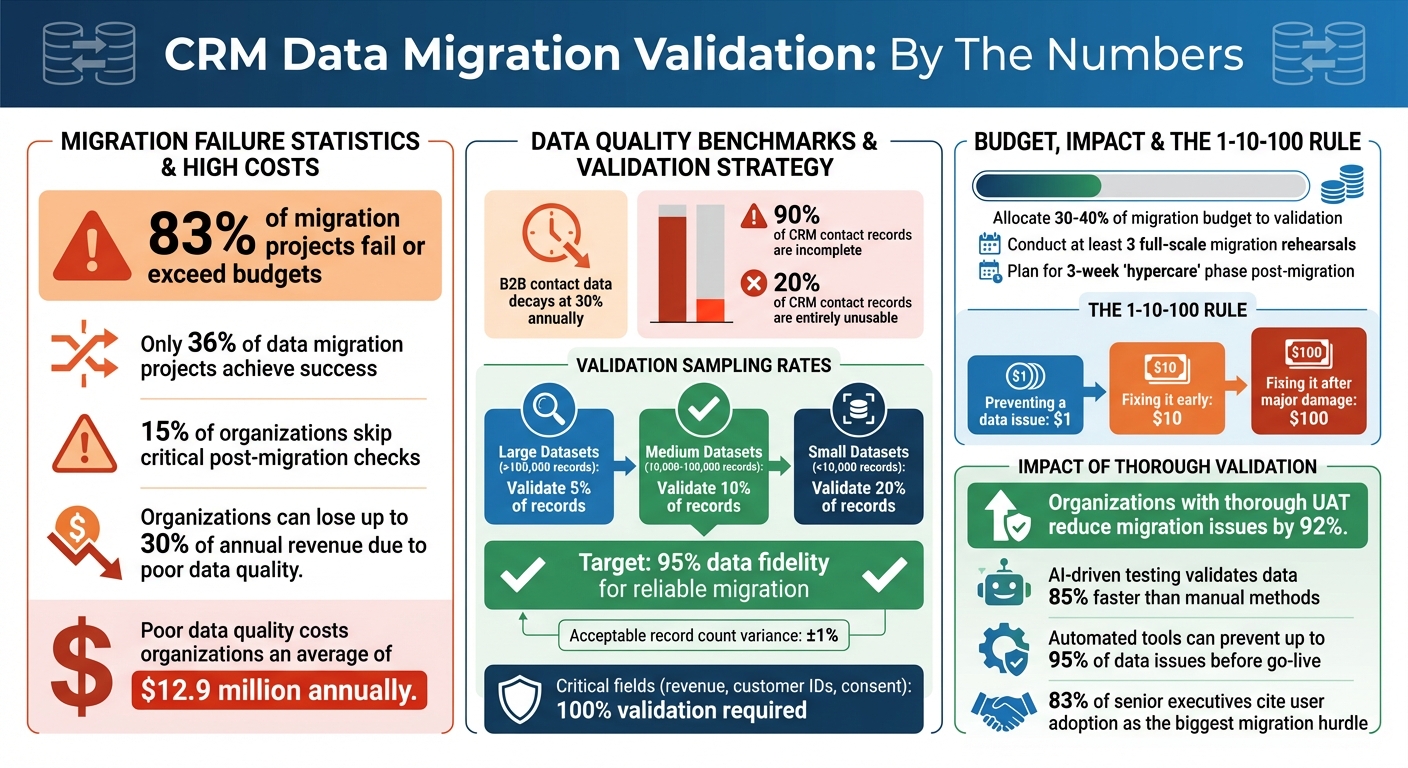
March 21, 2026Migrating CRM data without thorough validation can cost you. Studies show 83% of migration projects fail or exceed budgets, and 15% of organizations skip critical post-migration checks. This leads to issues like corrupted data, broken relationships, or duplicate records - problems that can disrupt operations and erode user trust.
To avoid this, focus on these key steps:
- Reconcile Record Counts: Ensure the total number of records matches between old and new systems.
- Check Field-Level Accuracy: Validate critical fields like revenue, customer IDs, and timestamps for precision.
- Verify Data Relationships: Confirm links between contacts, accounts, and opportunities remain intact.
- Test Business Logic: Run workflows and automations to ensure everything functions correctly.
- Monitor and Audit Regularly: Use automated tools for ongoing checks and periodic audits to maintain data quality.
Skipping validation can lead to expensive fixes and operational challenges. Investing 30–40% of your migration budget in validation ensures smoother transitions and long-term data integrity.
CRM Data Migration Validation Statistics and Best Practices
What Is A Strong CRM Data Migration Strategy?
sbb-itb-cef5bf6
Step-by-Step Validation Best Practices
A structured validation process is crucial to ensure your migrated CRM data is accurate and dependable. Let's break down the essential steps.
Record Count Reconciliation
Start by comparing the total number of records in your source and target CRM systems. Before migration begins, export record counts by object - such as contacts, companies, and deals - from your source CRM. This will be your baseline for comparison.
During migration, use automated tools to check record counts at key milestones: 25%, 50%, and 75% progress. This helps catch errors early. Once the migration is complete, compare the total records in your target CRM dashboard with your baseline. A difference of ±1% is typically acceptable.
If you find mismatches, investigate immediately. Common issues include unintended filters, duplicate merging, or silent batch failures. Fixing these problems after migration can be ten times more expensive than addressing them during validation. Also, involve sales and marketing managers in verifying record counts - they often spot nuances that automated checks might miss.
Field-Level Accuracy Checks
Once record totals align, shift focus to individual field accuracy. Record counts show how much data transferred, but field-level checks reveal how well it transferred. These checks can uncover subtle issues like time zone shifts, lost decimal points, or corrupted special characters.
Create a Field Mapping Matrix to document source and target field names, data types, transformation rules, and default values. This serves as your go-to reference. Be sure to include edge cases like maximum field lengths, unusual characters, and null values in your test dataset.
For large datasets (over 100,000 records), validate at least 5% of records. For medium datasets (10,000–100,000 records), aim for 10%. Smaller datasets (under 10,000 records) may need a 20% check.
Pay close attention to critical fields such as revenue, customer IDs, and consent indicators, which may require 100% validation. Also, confirm that transformation rules - like converting emails to lowercase or names to title case - were applied correctly. Ensure target field lengths are sufficient to avoid truncation during the transfer.
As Tom Redman from Harvard Business Review points out:
"The cost of bad data is an insidious tax on your business. You're paying for quality problems you don't even know you have."
Data Relationship Integrity Verification
CRM data is interconnected, so it's vital to check that relationships between records remain intact. For example, ensure foreign keys in the target system still reference valid parent records.
Use cross-table queries to confirm that related data is properly associated. For instance, verify that historical invoices are linked to the correct customer profiles or that child accounts are still tied to their global parent accounts. Test hierarchical (parent-child) and many-to-many relationships to ensure everything is in order.
The most effective way to validate these relationships is through business process testing. Run real-world scenarios on the migrated data: create an order for a migrated customer, generate a report for a sales rep's opportunities, or check that emails are attached to the right lead record. These tests often uncover relationship issues that technical checks might miss.
Plan for at least three migration rehearsals. Use the first to identify mapping gaps, the second as a full dress rehearsal with business validation, and the third to confirm that the process is repeatable. This approach ensures a smoother final migration.
Data Quality and Consistency Checks
Once you've confirmed that records have been transferred, it's time to make sure the data quality supports your business processes.
Format and Standardization Validation
Inconsistent data formats can disrupt integrations and confuse users. For example, phone numbers should align with the E.164 international standard (e.g., +15551234567) to ensure compatibility with calling systems. Dates should follow the U.S. format (MM/DD/YYYY) to avoid reporting errors, and currency fields should use ISO codes like USD, EUR, or GBP instead of outdated symbols.
Pay special attention to picklist mapping. If your old system included 47 industry types but your new CRM only supports 15 standardized options, make sure every legacy value is mapped to the correct new category. Spot-checking is crucial for fields that have transitioned from free-text inputs to dropdown menus, as automated tools may miss subtle errors in categorization.
As William Flaiz, a Digital Transformation Executive, aptly states:
"Your new CRM is going to be exactly as good as the data you put in it."
Also, confirm that character encoding has preserved special characters, ensuring no data is lost or corrupted.
Once formats are standardized, verify that business rules and workflows still operate as expected.
Business Logic and Transformation Confirmation
Technical checks ensure data has been moved, but business logic testing ensures it works as intended. Test workflows like order creation, commission reporting, and automated emails to confirm that calculated fields, triggers, and SLA timers function correctly. Key metrics such as pipeline revenue and open case volumes should also match between the old and new systems.
Timestamp fields, such as "Created Date" and "Last Activity Date", are particularly critical. These fields drive trend reports and customer lifecycle analytics, so they must be transferred accurately. Avoid resetting original creation dates, as this can compromise historical reporting.
Before the final production cutover, test your data in a sandbox environment. Import a small sample - typically 5% to 10% of real records - to see how triggers, integrations, and automations behave. This step can uncover issues like workflows misfiring or integration webhooks failing because of format mismatches.
Data quality matters - a lot. Poor data quality can cost organizations an average of $12.9 million annually. Investing in these checks now can save you from expensive fixes down the line.
After migration, ensure long-term integrity with regular audits and monitoring.
Advanced Validation and Testing Methods
After implementing record and field-level checks, advanced validation techniques take your CRM system to the next level by ensuring both functional performance and security compliance. These methods go beyond basic data quality checks, ensuring your CRM meets the demands of real-world business operations.
User Acceptance Testing (UAT) Procedures
User Acceptance Testing (UAT) evaluates your migrated data in real-world business scenarios, involving the actual users who will rely on the system. Instead of merely confirming that fields are filled correctly, UAT ensures users can perform critical tasks - like completing a sales cycle or resolving a customer case. Start by identifying the 5–8 most important business processes, such as a "lead-to-cash" journey or "service-to-resolution" workflow, and create test scripts that mirror daily operations. Conduct these tests in a sandbox environment that reflects the production system, complete with realistic data, proper security roles, and active integrations.
UAT uncovers practical issues that may disrupt workflows. For instance, 83% of senior executives say their biggest hurdle is getting teams to adopt the new system. A key warning: if users encounter issues like duplicate records or poorly formatted data during UAT, their trust in the system may erode permanently. As Cloud Consulting Inc explains:
A CRM can pass functional tests but still fails to meet business needs. UAT catches this.
Organizations that follow thorough UAT procedures can reduce migration-related issues by 92%. While UAT focuses on real-world usability, automation can handle the heavy lifting of large-scale data validation.
Automated Tool-Based Validation
For large-scale data migrations involving millions of records, manual validation simply isn’t practical. Automated tools are essential for managing repetitive tasks like record count reconciliation, checksum comparisons, and schema validation. These tools not only reduce human error but also speed up the process significantly. Advanced platforms enable real-time ETL monitoring to catch errors mid-migration, while AI-powered solutions identify subtle anomalies that traditional methods might overlook.
AI-driven testing can validate data up to 85% faster than manual methods. For example, tools like those from DataLark can prevent up to 95% of data issues before the system goes live. Allocate 30–40% of your migration budget to validation efforts to ensure a smooth transition. Use checksums and cryptographic hash values to detect bit-level data corruption, automate schema validation, and run dry tests in a sandbox to identify mapping or transformation issues before the final cutover.
Performance and Security Compliance Review
Accurate data is only part of the equation. If your CRM system can’t handle production-level performance or meet security standards, the migration isn’t truly complete. Establish pre-migration benchmarks for response times, throughput, and resource usage to detect any performance regressions in the new system. Conduct load and stress tests simulating peak usage scenarios - like "Black Friday" traffic levels - to confirm the system can handle real-world demands.
Security validation is equally critical. Ensure sensitive data remains encrypted during extraction, transfer, and storage, particularly in regulated industries. Map user roles, security groups, and permissions to prevent unauthorized access. To maintain compliance with privacy regulations, consider using data masking or synthetic data in test environments while still creating realistic scenarios.
Document each step of the validation process. Maintain detailed audit trails of test results, defect resolutions, and validation steps to meet regulatory requirements like GDPR or SOX. Define clear rollback criteria - such as data loss exceeding 0.01% or major performance issues - before proceeding with the migration. As DEV Community emphasizes:
Robust automated testing isn't just a nice-to-have for successful migrations - it's absolutely non-negotiable.
Maintaining Data Integrity Over Time
Starting with clean, validated data is important, but keeping it accurate over time is just as crucial. Data quality can degrade quickly with everyday use. For example, B2B contact data decays at nearly 30% annually due to changes like job transitions or company restructuring. Without regular upkeep, duplicate records can skyrocket - reaching rates as high as 10–30% in just a few months.
The key to preserving data quality lies in proactive monitoring instead of waiting to fix problems after they arise. As Validity puts it:
Data monitoring isn't the same as data cleaning. Cleaning is reactive - it's manual, periodic, and usually done after mistakes have already caused trouble. Data quality monitoring, on the other hand, is proactive and often automated.
This difference is critical. The 1-10-100 rule highlights that preventing a data issue costs $1, addressing it early costs $10, but fixing it after it causes significant damage costs $100.
Regular Monitoring and Delta Import Checks
Set up automated systems to monitor your data with clear standards and alert mechanisms. For instance, you might require 95% of your contact records to include valid email addresses, triggering real-time alerts if this threshold is breached. For phased migrations or ongoing integrations, validate every delta import batch to ensure data from source systems transfers accurately and without corruption.
Use data observability tools to detect hidden issues like data freshness, schema changes, or unexpected volume shifts. These tools often rely on machine learning to catch anomalies that traditional rule-based methods might overlook. For real-time replication, monitor data arrival times to identify delays that could lead to outdated records.
Additionally, create dedicated reporting channels - like Slack or email - for users to flag daily data issues. Assign clear responsibilities to different teams: for example, Sales Ops might manage pipeline fields, while Marketing Ops oversees contact attributes. During the first 30–90 days after a migration, deploy a specialized data triage team to address issues quickly during this critical adjustment period.
Once real-time monitoring is in place, complement it with periodic audits.
Periodic Data Audits and Cleanup
Incorporate tiered audits into your data maintenance routine to catch problems early and ensure long-term alignment with business goals. For example:
| Audit Frequency | Focus Area | Key Activities |
|---|---|---|
| Monthly | Duplicates & Entry | Run deduplication scripts; review new record creation patterns. |
| Quarterly | Field Usage | Identify unused fields; verify picklist alignment; check for "free-text" abuse. |
| Semi-Annual | Workflows & Access | Clean up automated workflows; review user permissions and IP access levels. |
| Annual | Strategy & Archive | Review data retention policies; archive inactive records or "dead" data. |
To prevent invalid data at the entry point, enforce mandatory fields and real-time validation for emails or phone numbers. Advanced fuzzy matching algorithms can automatically merge duplicates like "Jon Smith" and "Jonathan Smith". Define a clear survivorship model to determine which record takes precedence during merges - often the most recently updated or the one with the most complete data history.
Neglecting data quality can have serious financial consequences. Businesses can lose up to 30% of their annual revenue due to poor data, with 90% of CRM contact records incomplete and 20% entirely unusable. Regular audits not only combat this decay but also ensure compliance with regulations like GDPR and CCPA, where poor data hygiene can result in hefty fines. As IntegrateIQ emphasizes:
A CRM migration isn't complete when the data is moved. It's complete when your teams confidently use the new system, keep data clean, and maintain workflows that align with your business goals.
Conclusion
Ensuring data validation after a CRM migration is not just a step in the process - it’s a safeguard for your organization’s future. With only 36% of data migration projects achieving success, and around 15% of organizations bypassing post-migration validation, skipping this critical phase can lead to persistent inaccuracies and operational challenges.
As outlined earlier, migration should be seen as a process of continuous refinement, not a one-time task. The Umbrex CRM Playbook captures this mindset perfectly:
The cutover should feel boring because the interesting problems were resolved weeks earlier.
To achieve this, conduct at least three full-scale tests, establish readiness checkpoints, and allocate a significant portion of your migration budget - 30–40% - specifically for validation. This preparation ensures issues are addressed long before they can disrupt operations.
Post-migration, prioritize reconciling essential metrics like pipeline totals and renewal dates, verifying that record relationships and business logic are functioning as intended. Engage end-users in the testing process to uncover real-world issues. Industry benchmarks recommend aiming for at least 95% data fidelity to ensure a reliable migration. Remember, even if the record counts match perfectly, broken relationships or faulty logic can render the migration ineffective.
Validation doesn’t stop at go-live. Introduce a "hypercare" phase lasting at least three weeks, during which automated monitoring tracks performance against predefined thresholds. Schedule regular audits - monthly for duplicate records, quarterly for field reviews, and annually for strategic evaluations. The 1-10-100 rule highlights the importance of early intervention: addressing a data issue proactively costs $1, fixing it later costs $10, and resolving it after significant damage costs $100.
As William Flaiz, Digital Transformation Executive, wisely noted:
Your new CRM is going to be exactly as good as the data you put into it.
FAQs
What should I validate first after a CRM data migration?
After completing a CRM data migration, the first step is to check the accuracy and completeness of the data. Verify that all records were transferred without issues, are properly mapped to their corresponding fields, and remain uncorrupted. Double-check for missing or duplicate information to ensure the data stays reliable and consistent.
How can I identify and fix broken relationships between records?
To fix broken relationships after a CRM migration, the process starts well before the migration itself. Begin by auditing and cleaning your data. This means removing duplicate entries, correcting inconsistencies, and standardizing formats. These steps help ensure that connections between records - like contacts and accounts - stay intact.
During the migration, carefully map fields to align with the new system. Running test migrations can help catch and fix issues before finalizing the process. Once the migration is complete, take the time to validate linked records to confirm everything transferred correctly. To maintain data integrity over time, consider scheduling regular audits or using automated tools to monitor and fix issues as they arise.
What’s the best way to monitor data quality after go-live?
To keep tabs on data quality after go-live, set up a system to track critical metrics such as completeness, accuracy, duplication, and timeliness. Incorporate real-time checks during the migration process and follow up with post-migration tests to confirm data integrity. Make it a habit to routinely check for problems like missing fields or duplicate records. Automated validation tools can be a great ally here, offering ongoing monitoring to help maintain strong data quality standards.